Pages

Friday, May 27, 2016

CodeWeavers CrossOver 15.1.0 on Ubuntu Linux 16.04

A Quick overview of getting CodeWeavers CrossOver 15.1.0 installed on Ubuntu Linux 16.04

Ubuntu's latest release, Xenial Xerus, has been out since April 21.

The latest long term stable release has been working for our testing purposes since the day it dropped but we had to get CrossOver 15.1.0 installed first. In this release, the Ubuntu Software Center is gone. It has been replaced by GNOME Software.

While this will be a positive change for the distribution, it seems Ubuntu Software has a few hiccups. While the Ubuntu Desktop Team works to resolve these problems, we would like to make sure our customers can install CrossOver.


Please download the trial version of CrossOver before starting these steps. Or, if you already have an account, please login and download CrossOver.

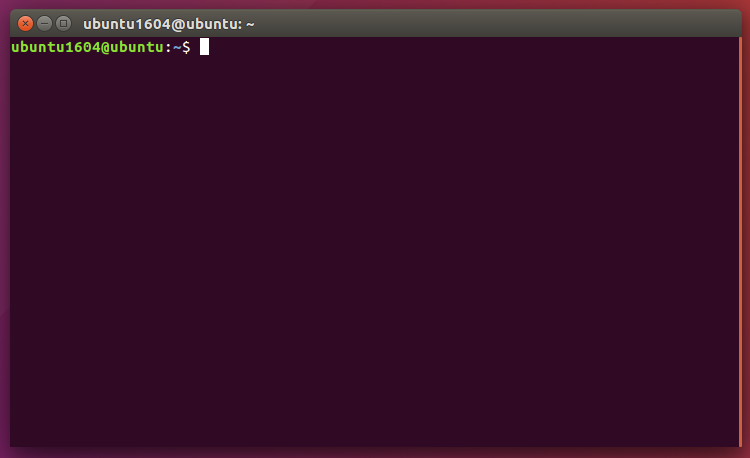
The easiest way to get CrossOver installed with Ubuntu 16.04 is a little terminal dancing. If you're new to Linux or Ubuntu, that is as easy as holding down the CTRL, ALT, and T keys at once to call a terminal window.

Terminal Window Ubuntu 16.04

First, bring your system up to date:

sudo apt-get update; sudo apt-get upgrade

Next, we like to use GDebi Package Installer to install CrossOver. Get it by typing in terminal:

sudo apt-get install gdebi

Ubuntu 16.04 is now ready to install CrossOver. In terminal, give the command:

sudo gdebi ~/Downloads/crossover_15.1.0-1.deb

Now, run CrossOver for the first time:

/opt/cxoffice/bin/crossover

On first run, CrossOver will check to see if every library it needed was installed. If not, it will again attempt to install the libraries it needs. To do this, it will open a new terminal window and prompt for administrative credentials. Please provide these credentials so CrossOver can complete the set-up process.

Run Microsoft Windows Applications and Games on Mac, Linux or ChromeOS save up to 20% off  CodeWeavers CrossOver+ today.

The WineHQ Wine development release 1.9.10 is now available for Linux and Mac

The Wine development release 1.9.10 is now available.
What's new in this release:
  • High resolution ("Retina") rendering option on Mac OS X.
  • More compatible directory enumeration.
  • A number of C++ runtime fixes.
  • Video output improvements.
  • Various bug fixes.
The source is available now. Binary packages are in the process of being built, and will appear soon at their respective download locations.


 Bugs fixed in 1.9.10 (total 25):

   9532  Month calendar control uses 0=sunday for firstDayOfWeek
  13843  tooltips not working properly - message problems
  14638  Discription file of task configuration \'C:\plc.xml\' not found
  18166  dlls/ntdll/directory.c: implicit declaration of function 'getdirentries'
  20383  SetMenuInfo() with MIM_BACKGROUND not implemented
  24017  Multiple applications need 'reg.exe' 'query' operation implementation
  24916  Soulbringer: crash in D3D Hardware mode
  26268  Multiple applications need ntdll.ZwSetLdtEntries stub (kwiksupport.me, Ragnarok Online patcher)
  32056  iexplore images.google.com doesn't work
  33961  RPC: server crashes during procedure call that returns variable size array as out parameter
  34122  Multiple applications expects files returned by FindFirstFile/FindNextFile to be in alphabetical order (Civilization V with 2 expansion packs, TAGAP)
  36838  TOCA Touring Car Championship: installer copies one file from CD and then shows an error
  37090  Multiple applications crash with built-in amstream (Shogun: Total War, Medieval: Total War)
  37926  NordicBet Poker-client fails to install
  38625  Pac-Man Championship Edition DX+: incomplete text rendering
  38811  Java JRE 8 installer 'jre-8uXX-windows-i586.exe' crashes on startup (GetThreadPreferredUILanguages is a stub)
  39509  OneDrive for Business installer crashes in Win8 mode (user32.dll 'SetCoalescableTimer' stub missing)
  39940  Stars! tooltips have wrong background color
  40027  Caesar IV Demo crashes at launch
  40342  playSNOW.exe needs implementation of KERNEL32.dll.InterlockedPushListSList
  40355  HeidiSQL not starting since version 1.9.5
  40517  Office 2007 shows error message "Unexpected error during export" when trying to export document as PDF file
  40532  Microsoft Word Viewer 11.8 does not show text on file properties dialog until the text is selected
  40550  AfterEffects CS6 crashes at launch
  40562  AkelPad: [ToolBar plugin] tooltips for toolbar buttons have some extra text

Run Microsoft Windows Applications and Games on Mac, Linux or ChromeOS save up to 20% off  CodeWeavers CrossOver+ today.

Sunday, May 1, 2016

The WineHQ Wine development release 1.9.9 is now available for Linux and Mac

The Wine development release 1.9.9 is now available.
What's new in this release:
  • More work towards the WineD3D command stream.
  • Service proxies in WebServices.
  • Query support in the builtin reg.exe utility.
  • Improved support for long URLs in WinInet.
  • Various bug fixes.
The source is available now. Binary packages are in the process of being built, and will appear soon at their respective download locations.


 Bugs fixed in 1.9.9 (total 38):

  16971  Windows Movie Maker 2.x needs ole32.dll.StgOpenPropStg
  17257  TeX2Word will not install
  23768  winhelp: Some images not shown in certain 16-bit Help files
  25790  WM_SETTEXT handler for the user32 buttons generates WM_CTLCOLOR* inconsistent with Windows user32
  26955  Prince of Persia SoT: control key bindings don't change properly
  27035  3DMark Vantage needs unimplemented function d3dx10_43.dll.D3DX10UnsetAllDeviceObjects
  28825  Mystic Diary - Haunted Island: Multiple sprite-related bugs in hidden object scenes
  30570  3D Custom Shoujo prints invalid GL operations related to device_clear_render_targets
  32451  Multiple GOG.com installer bundles show a broken/unresponsive dialog window during installation (installer process running out of wndproc slots)
  32979  Metal Gear Solid Crash
  33130  QuarkXPress v9.5 crashes after starting up
  34598  The cursor doesn't highlight chessboard fields precisely in Chessmaster 10
  35793  BOTTLENECK program crashes when loading datasets
  36031  GeForce 9700M incorrectly detected as 9400
  37087  Gothic 2 english demo fails with 'Conflict: a hook process was found. Please deactivate all Antivirus and Anti-Trojan programs and debuggers.'
  38102  Process Hacker 2.x needs winsta.dll.WinStationEnumerateW
  38544  Unable to send messages in Skype 7.4.85.102
  38865  HiSuite Huwaei Android Smart Device Manager v2.3.55.x crashes on startup
  39437  Visual Studio 2015-compiled C++ programs do not run (unimplemented function api-ms-win-crt-runtime-l1-1-0.dll._initialize_onexit_table)
  39543  Multiple games and applications crash on unimplemented function KERNEL32.dll.FreeUserPhysicalPages (Microsoft Office 2007 diagnosis service, Eden Eternal)
  39608  King Arthur II demo crashes with unimplemented function d3d10_1.dll.D3D10CreateEffectPoolFromMemory with native d3dx10_43 and d3dcompiler_43
  39622  TeamViewer 11 window does not show "Remote Control" and "Meeting" buttons/tabs.
  39759  Add support for detect  Nvidia TITAN Black in wine3d/device list
  39834  Just Cause 2 needs d3dx10_43.dll.D3DX10CreateDevice
  40112  kernel32:time regression
  40244  PostThreadMessage with WM_NOTIFY message should succeed
  40317  PDF Eraser does not open with wine-mono
  40348  Nvidia 800 series cards not detected correctly
  40408  Photoshop CC 2015 now crashes when adjusting levels
  40456  NFS MW + NFS Carbon: Car is flying above/under the track (D3DXVec3Transform needs arguments aliasing)
  40466  Midnight Commander needs KERNEL32.dll.GetConsoleFontInfo
  40473  wine fails to compile with >=glibc-2.23
  40474  Popup menus no longer close when clicking on a different window
  40487  3dmark Vantage Benchmark: unimplemented functions hal.dll.READ and WRITE PORT
  40493  Prison Tycoon 4 crashes on start up needing msvcp71.dll.??$?5DU?$char_traits@D@std@@@std@@YAAAV?$basic_istream@DU?
$char_traits@D@std@@@0@AAV10@AAC@Z
  40518  Guild Wars shows only garbled screen when anti-aliasing enabled
  40525  schannel:main does not recognize package version 0x400000
  40551  star craft 2 does not start

Run Microsoft Windows Applications and Games on Mac, Linux or ChromeOS save up to 20% off  CodeWeavers CrossOver+ today.

MacGourmet Deluxe 4.2.6 has been released

MacGourmet Deluxe is a recipe-management application that allows users to create, edit, and scale new recipes, or import recipes from their favorite websites, then share them via email, Facebook, and Twitter.
Features
  • Chef's view for distraction-free cooking
  • Add images to your recipes and to the steps, as well as to your Beer, Wine, and Cheese notes
  • Use the Ingredient search or let MacGourmet suggest a recipe for you
  • Free cloud account for storing and syncing on Mariner Cloud
http://marinersoftware.com/products/?ap_id=twickline

 What's New

Version 4.2.6:
  • Removed a 3rd party library that was causing a crash on startup
  • Fixed the NYTimes web importer to remove html codes from the ingredients
  • Updated the MyRecipes web importer to support their new web page format
  • Updated the Food.com web importer to support their latest format (change in ingredients and directions)

Requirements


  • Intel, 64-bit processor
  • OS X 10.7 or later
You can use any of these 4 coupons in the Mariners online store and save between 5% and 25% off the retail price of new purchases or one of the 5 pack bundles.

Run Microsoft Windows Applications and Games on Mac, Linux or ChromeOS save up to 20% off  CodeWeavers CrossOver+ today.

Saturday, April 16, 2016

The WineHQ Wine development release 1.9.8 is now available for Linux and Mac

The WineHQ Wine development release 1.9.8 is now available Linux and Mac OSX.

What's new in this release:
  • More work towards the WineD3D command stream.
  • Bug fix update of the Mono engine.
  • More WebServices reader support.
  • Still more Shader Model 5 support.
  • Support for gradients in metafiles.
  • Improved table formatting in WinHelp.
  • Various bug fixes.
The source is available now. Binary packages are in the process of being built, and will appear soon at their respective download locations.


 Bugs fixed in 1.9.8 (total 26):

   9030  army men hangs on black screen
  17918  AvsP Preview window fails to load
  22762  Multiple DirectX10 games need Texture2D DXGI_FORMAT_R24G8_TYPELESS format support for stencil operations (Battlefield Bad Company 2, Warhammer 40k: Kill Team)
  24421  MJ's Help Diagnostics crashes on startup (app provided MonitorEnumProc callback relies on ECX = lprcMonitor)
  31662  Office 2010 font embedding when exporting to PDF
  32007  AMD Demo - Whiteout crashes with null-ish pointer read after dxgi_output_GetDisplayModeList
  34070  Simutronics 'StormFront.exe' runs out of wndproc slots (ActiveSkin control)
  34851  Multiple applications need kernel32 GetFinalPathNameByHandleA/W (64-bit Autodesk Fusion 360, Microsoft OneDrive)
  35054  Dragon Age 2 system diagnostics tool fails to recognize GeForce GT 425M
  37460  Sid Meier's Civilization: Beyond Earth (Steam) crashes on startup
  39444  Fifa 2005 Demo version - black and flashing screen
  39573  GImageX v2.1.1 (gui for ImageX tool from Windows Assessment and Deployment Kit) crashes on unimplemented function wimgapi.dll.WIMCreateFile
  39605  GImageX v2.1.1 crashes with unimplemented function wimgapi.dll.WIMGetMountedImages
  39657  Tencent QQ 7.6  crashes on unimplemented function ntoskrnl.exe.PsRemoveLoadImageNotifyRoutine
  39730  FillRect() confuses 16bit brush handles with color constants
  39796  SCP Containment Breach page fault
  39863  Microsoft .NET Runtime Optimization Service 2.x terminates prematurely due to failure to hook up registry notifier ('RegNotifyChangeKeyValue' must treat NTSTATUS 'STATUS_PENDING' as success)
  39911  dxd9 PresentationInterval not propagated on device Reset
  40260  wine-mono 4.6 crash when starting .net app - SIGSEGV (APB Reloaded)
  40282  mIRC 7.43 options dialog does not accept focus / user input
  40286  Geforce 980 maxwell card is not properly detected
  40389  cmd.exe (native): Unimplemented function KERNEL32.dll.GetConsoleAliasExesLengthW
  40396  Windows SDK DirectWrite sample crashes on uninitialized parameter
  40397  Warhammer: Mark of Chaos - Battle March Demo needs unimplemented function sfc.dll.SRSetRestorePoint
  40406  Doom 4 requires bcrypt RNG provider
  40414  VirtualDub 1.10.4 crashes when attempting to play video with Directx9/11 backend

Run Microsoft Windows Applications and Games on Mac, Linux or ChromeOS save up to 20% off  CodeWeavers CrossOver+ today.

Friday, April 15, 2016

Run 64bit Wine 1.9.7 on your Mac OSX system with Wineskin WS9Wine

You can now run 64bit WineHQ Wine 2.21 on your Mac OSX system with Wineskin WS9Wine keep in mind this is kinda sorta beta but fun none the less...

Update 01/06/2018

I updated the link to the latest Wine Staging 2.21 OSX 64 bit release...

I just repackaged for Wineskin, the 64bit engines taken from here...


I made a test installing 7-zip x86 and 7-zip x64 and it install them automatically in their appropriate folders as happens in windows x64 O.S.:

Well, seeing the launch screen of FO4 is definitely some progress. :-)


Putty for Mac
Putty for Mac
$15.00

https://winereviews.onfastspring.com/putty-for-mac


Thursday, April 14, 2016

The WineHQ Wine maintenance release 1.8.2 is now available for Linux and Mac OSX

The #WineHQ #Wine maintenance release 1.8.2 is now available for #Linux and #Mac #OSX.

What's new in this release:
  • Various bug fixes.
  • Small translation updates.
The source is available now. Binary packages are in the process of being built, and will appear soon at their respective download locations.


Bugs fixed in 1.8.2 (total 32):

  12652  Tom Clancy's Rainbow Six: Vegas 2 fails to launch (number of quality levels for D3DMULTISAMPLE_NONMASKABLE multiple-sample type must not exceed 8)
  13683  Ultima IX: Mouse pointer missing when reading books, under inventory
  14617  Multiple Visual Basic 5/6 applications using ActiveX components depend on Standard OLE Types Typelib which is missing from 'olepro32.dll'
  15473  Adobe After Effects 4 crashes on startup
  25086  Multiple games and applications need kernel32.GetLogicalProcessorInformationEx implementation (CPU-Z 1.72, Splinter Cell: Blacklist, Adobe CC 2015, Kontakt 5)
  30687  Powerpoint 2003/2007: embedded video play/pause on click no longer works
  32827  Legrand XlPro 3 (MFC app) crashes on startup (failure to load registry-free COM servers via app hook, 'OleCreate' must ignore HRESULT of 'IOleObject::GetMiscStatus')
  33787  IE8 crashes on new tab
  33988  Star Wars: The Force Unleashed II - Crashes with a page fault
  34174  MinGW installer 0.5-beta-20120426-1 fails to process log files (sharing violation on temp file used for piped output)
  34318  Multiple games and applications need ntdll.dll.EtwRegisterTraceGuidsW (Process Hacker 2.x, Far Cry 4)
  35187  Jade Empire Special Edition configuration tool always resetting video settings
  36013  bleem! 1.4 (PlayStation emulator) fails on startup, complaining with 'Not enough memory to load program!'
  37115  Calling ReadFile from WINBASEAPI (WinBase.h) with zero read length causes hang
  37288  Not implemented feature System.Drawing.Pen.ResetTransform()
  37536  Native MSVCP120.dll override requires implementation of msvcr120.dll._W_Gettnames (Desura client)
  37556  CompareStringW should abort on the first nonmatching character to avoid invalid memory access.
  38314  Mouse Wheel doesn't work for Jagged Alliance 2 version 1.13 (it uses MOUSEHOOKSTRUCTEX)
  39591  Crimzon Clover: Page fault on launch
  39838  Wreckfest Server: Crashes at startup, unimplemented function KERNEL32.dll.GetConsoleScreenBufferInfoEx & SetConsoleScreenBufferInfoEx
  39866  XIIZeal (steam) immediately exits on start
  39875  Starcraft can't see Direct Cable Connection games hosted on another computer
  39878  Diablo II does not start on 64bit system with more than 2GB VRAM cards
  39908  SuperTux 0.3.5a crashes on startup, needs msvcr120.dll.strtof
  40021  IDEA v1.7 fails to start
  40053  Romance of the Three Kingdoms 13 (三國志13) fails to start
  40083  Heroes of the Storm Freezes/Crashes after its recent updates
  40129  MSI Reading and Writing Behaves differently than Windows
  40147  Assertion 'm->state == STATE_PASSIVE' failed at pulse/mainloop.c:827 on starting Skype 7.18.0.112
  40201  EccoPro only works on Wine 1.6.2
  40204  Steam client fails to start with UmePlus font installed, when running in dwrite mode
  40222  IMalloc(Spy)::Free nullptr

Run Microsoft Windows Applications and Games on Mac, Linux or ChromeOS save up to 20% off  CodeWeavers CrossOver+ today.

Monday, April 11, 2016

Experimental 64 bit Wine OS X packages ready for testing

Hi all,

Recently there were multiple requests to provide experimental OS X 64 bit packages. I decided to give it a try and updated our build system and cross compiling tool-chain during the last days. Luckily the whole idea turned out to be less difficult than I thought, and I can now present you the first 64-bit Wine packages for testing. It would be great to have some testers to find out if I made a mistake during the packaging and to evaluate how good the OS X 64 bit support already works, despite the GS segment / TEB problem.


You can find the Wine-Staging 2.21 development build. I didn't use the WineHQ url because those packages are really in a very early stage, so I would like to have some more testers first before we push it to the users. The pkg installer will now provide you with an option to enable 64 bit support.

Regards,
Michael Müller


Putty for Mac
Putty for Mac
$15.00

https://winereviews.onfastspring.com/putty-for-mac


Sunday, April 10, 2016

Uneeq Company Launches Awesome Mac Bundle 3

Uneeq Company Launches Awesome Mac Bundle 3

Minneapolis, MN - April 10, 2016 - Uneeq Company, Inc.today launched an incredible bundle of award-winning, diverse Mac software. 8 apps, with a combined retail value of $223.00, only for $23.95.

Included in the Awesome Mac Bundle 3 are:
- RapidWeaver
- MenuBar Stats
- MenuBar Rearranger
- StoryMill
- Mac Backup Guru
- Concealer
- PhotoMill
- DupHunter

https://uneeqco.com/categories/bundles/?ap_id=twickline

The Uneeq Mac Bundle is immediately available...

About Uneeq Company Founded in 2015 as a online marketplace of unique computer hardware, software and tech gadgets. Uneeq is focused EXCLUSIVELY on technology - a place where visitors know that all they will see are carefully selected products that are a combination of quality and uniqueness.The company's goal is to help software developers and hardware/tech gadget manufacturers reach a broader audience and at the same time help users find the best or most uneeq software and hardware/tech gadgets on the planet. Uneeq is a pioneer in bringing unique products to the marketplace and in located in Minneapolis, MN and Denver, CO USA. The company is privately held. For more information about Uneeq, see www.uneeqco.com, or follow us on Twitter @uneeqcompany or Facebook at https://www.facebook.com/uneeqcompany/

# # #

Contact:

Tom Wickline, Uneeq Company

Sunday, April 3, 2016

The WineHQ Wine development release 1.9.7 is now available for Linux and Mac

The WineHQ Wine development release 1.9.7 is now available Linux and Mac OSX.

What's new in this release:
  • More work towards the WineD3D command stream.
  • More support for Shader Model 5 shaders.
  • C++ exception handling on x86-64.
  • Support for Windows-style static import libraries.
  • Performance fixes in the XML writer.
  • Various bug fixes.
The source is available now. Binary packages are in the process of being built, and will appear soon at their respective download locations.


 Bugs fixed in 1.9.7 (total 42):

  10063  wineconsole run fail on korean locale.
  10156  oleidl.h has OLECONTF_ONLYUSER misspelled
  12400  Display problems in Indiana Jones and The Emperor's Tomb with vertex shader enabled
  15537  Game "PURE" shows black screen
  19081  Force closing winhlp32 without a file loaded pops up an error dialog (appinstall)
  19171  Powerpoint viewer 2003 & 2007 show weird characters (appinstall)
  19538  Microsoft Publisher 2007 and 2010 crash when opening documents/templates (TSF manager 'ITextStoreACPSink' must support QI with 'IID_ITextStoreACPServices')
  19585  Water is red in Settlers: Heritage of Kings demo
  20695  Cannot scroll documents being compared in winmerge
  26767  U-he Tyrell, Uhbik and ACE vst plugins: GUI Knob bug (image files files not being sorted correctly)
  26942  CSPRO 4 editing : context menu on grid header not working properly
  26978  tokenadmin.exe crash : Unimplemented function winscard.dll.SCardListReadersA
  28172  Civilization II crashes on startup
  29319  Internet Explorer 8 fails to start an InPrivate Browsing session
  29979  ElsterFormular crashes when trying to print already sent income tax return
  30488  IE8 shows corrupted previews on the quick tabs screen
  31393  Nvidia force antialiasing no longer works
  32347  Alien8 and Head Over Heels crash when window is moved partly off-screen
  35092  Multiple 64-bit applications need __CxxFrameHandler implementation (Ableton Live 9.1, Adobe Cloud apps)
  35711  Winelib: compile error in wincon.h if NOGDI is defined before #include
  36136  oleaut32/tests/vartest.c test shows a couple leaks with valgrind
  36297  valgrind shows uninitialized memory in msxml3/tests/domdoc.c
  36383  valgrind shows several uninitialized values in ddraw_CreateSurface() in ddraw/tests/dsurface.c
  36748  valgrind shows two possible leaks in d3drm/tests/d3drm.c
  38347  Canon PIXMA MP495 driver setup needs setupapi.dll.SetupDiSetDeviceInstallParamsW
  38670  advapi32/registry tests shows several uninitialized values
  38971  Allied Telesis Smart Switch Management Utility v1.0.0.7 crashes on unimplemented function mgmtapi.dll.SnmpMgrTrapListen
  39215  Nvidia GeForce GTX960M detected as GTX470
  39435  The 64 bit mshtml:xmlhttprequest fails on Windows 8/10
  39667  dinput: MotoGP 3 demo launcher crashes on leaving key configuration dialog.
  39681  Unimplemented function crypt32.dll.CryptMsgVerifyCountersignatureEncoded
  39786  GoodSync crashes, needs oleaut32.OleLoadPictureFile
  40048  Camtasia Studio 8 : crashes on unimplemented function dwmapi.dll.DwmSetPresentParameters
  40081  CLM Explorer needs fontsub.dll.CreateFontPackage
  40113  mshtml:xmlhttprequest regression
  40135  msvcirt.c:1386:5: warning: comparison of unsigned expression < 0 is always false
  40182  Elder Scrolls Online: Login connection issues
  40297  Multiple app crashes in macdrv_EnumDisplayMonitors
  40304  EveHQ2 crashes with builtin gdiplus
  40306  Overexposed/wrong gamma? on The Legend of Heroes Trails in the Sky SC
  40319  VerbAce Dictionary does not install correctly
  40331  The Legend of Heroes Trails in the Sky SC crashes on start with runtime error R6025


Run Microsoft Windows Applications and Games on Mac, Linux or ChromeOS save up to 20% off  CodeWeavers CrossOver+ today.

Saturday, April 2, 2016

Q4Wine 1.3.0 has been released for Linux and OSX

Q4Wine is a Qt GUI for Wine. It will help you manage wine prefixes and installed applications. It currently supported on Linux, FreeBSD and OSX platforms.

Q4Wine was initially written by Alexey S. Malakhov aka John Brezerk. General idea comes from WineTools scripts which were initially written by Frank Hendriksen.


 General features are:
  • Can export Qt color theme into wine colors settings;
  • Can easy work with different wine versions at same time;
  • Easy creating, deleting and managing prefixes (WINEPREFIX);
  • Easy controlling for wine process;
  • Autostart icons support;
  • Easy cd-image use;
  • You can extract icons from PE files (.exe .dll);
  • Easy backup and restore for managed prefixes;
  • Winetriks support;
  • And more: Explore it!;
Version changes since v1.3
Added:
  • Taiwan translation (thx 2 Jeff Huang);
  • Use icons from the system icon theme where possible BUG-22;
  • Replace default raster icons with SVG analogs BUG-21;
  • Extend App icons zoom sizes up to 512px BUG-21;
  • Allow to choose .svg and .svgz images for icons BUG-21;
  • Add an app option to switch default/ambiance-light/ambiance-dark icon BUG-21;
  • Use ISO country codes for translation files (required for: pootle, gentoo ebuild);
  • Use native language name for language selection;
Fixed:
  • WineLibs paths are no longer strictly required BUG-68;
  • Process explorer is broken BUG-70;

Run Microsoft Windows Applications and Games on Mac, Linux or ChromeOS save up to 20% off  CodeWeavers CrossOver+ today.

Sourceforge Community Choice Project of the Month Wine

For our April “Community Choice” Project of the Month, the community elected Wine, an Open Source implementation of the Windows API on top of X and Unix. Marcus Meissner, longtime developer of Wine, shared his thoughts about the project’s history, purpose, and direction.

SourceForge (SF): Tell me about the Wine project please.
Marcus Meissner (MM): The Wine project was launched with the goal to run Windows applications on the Linux operating system and also to provide a porting environment for Windows applications to Linux.

As it was launched around 1993 these were mostly Windows 3.1 applications.

SF: What made you start this?
MM: We started this project because a commercial vendor (WABI) alternative has shown it feasible to do and we wanted to provide an opensource implementation.

SF: Has the original vision been achieved?
MM: Yes, its original vision has been achieved after 15 years of development we had declared a Wine 1.0 release in 2008.
It took very long as Windows itself is a moving target.
Various commercial products embed Wine or are actually Wine in a commercial offering. Nearly every Linux user [has] heard of Wine.

Full interview
 

Codeweavers CrossOver 15.1.0 for Linux and Mac OSX has been released

I am delighted to announce that CodeWeavers has just released CrossOver 15.1.0 for both Mac OSX and Linux.  CrossOver 15.1.0 has important bug fixes for both Mac and Linux users.

Mac customers with active support entitlements will be upgraded to CrossOver 15.1.0 the next time they launch CrossOver Mac.  Linux users can download the latest version from https://www.codeweavers.com/.


Change Log For CrossOver Mac and Linux :

 15.1.0 CrossOver - March 31, 2016
  • Mac OS X:
    • Improved some confusing behavior in CrossOver's Software Installer.
    • Fixed a bug where CrossOver's Software Installer would hang while looking for compatible bottles.
    • Improved our resilience to custom Python installations. We now refrain from loading custom Python module installed in system directories, which prevents crashes when incompatible modules are present.
    • Improved security for Sparkle updates.
  • General Improvements
    • Fixed a problem initializing some fonts with dwrite, which could cause Steam to fail.
    • Fixed a bug in setting CrossOver's anti-virus scanner from a configuration file.
  • Application Support:
    • Fixed a bug which caused Heroes of the Storm to freeze.
    • Fixed a bug which prevented login to World of Warcraft.
    • Fixed some graphical problems in Alekhine's Gun on Intel graphics hardware.
    • Fixed a bug which caused Microsoft Excel to hang when accepting non-English input via an Input Method Editor.

Run Microsoft Windows Applications and Games on Mac, Linux or ChromeOS save up to 20% off  CodeWeavers CrossOver+ today.

Saturday, March 26, 2016

Vineyard Wine Configuration Application for Linux has been released

Wine version handling, better 64-bit support and bug-fixes!

Vineyard for Ubuntu and Linux has seen some development during the past few weeks and has received bug-fixes and new features! Some of the more advanced functionality – that was previously only supported by editing the wrapper.cfg file – is now easily accessible!


Here’s a list of some the most visible changes:
  • Creating a prefix has been overhauled:
    • You can now choose between creating a 64-bit or 32-bit prefix.
    • A specific version of Wine can be selected to be used for the prefix.
    • Installed versions of Wine are auto-detected (looks through $PATH, /opt and PlayOnLinux folders).
    • Progress indication works (finally).
  • 64-bit support is now auto-detected from the Wine version.
  • The main tab now shows which Wine binaries/version and arch (64/32-bit) is used.
  • The “Run executable” tool works again for .exe files in modern distros.
  • Added newer versions of MS Visual C++ to install list.
  • Launching a terminal in a prefix now works correctly again.
  • The menu icon has been changed to the modern gtk menu icon.
And since a picture is worth a thousand words:

The new prefix creation dialogue

New builds in the PPA

I’ve overhauled the packaging of Vineyard, and we now have builds back up for all LTS (long term support) Ubuntu releases going back to 12.04 (Precise) as well as for 15.10 (Wily) and 16.04 (Xenial). 16.04 deprecated the python-support package in favor of dh-python (in line with Debian), so Vineyard can now be built using both.

The name of the vineyard-testing PPA has also been changed to “PPA for Vineyard” as it really is the current stable PPA; the link is the same, so there’s no need to change your APT configuration.

Run Microsoft Windows Applications and Games on Mac, Linux or ChromeOS save up to 20% off  CodeWeavers CrossOver+ today.

Tuesday, March 22, 2016

Wine Staging 1.9.6 has been released with Vulkan support

We are happy to announce the release of Wine Staging 1.9.6. This version adds support for Vulkan and fixes for various other bugs.

This release adds a first version of a Vulkan wrapper to make the Vulkan API accessible to applications running in Wine. The work was started by Erich E. Hoover and later finished by other Wine Staging maintainers. The code translates the Windows specific surface extensions to the corresponding X11 / XCB extensions and passes the remaining functions on the host Vulkan library. Although this seems to be an easy task on first sight, there are various pitfalls that make this wrapper more complicated than you might think. While the Vulkan API is almost binary compatible in 64 bit (except the differences in the calling convention), properly translating Vulkan calls on 32 bit turned out to be a bit difficult.

The biggest problem on 32-bit is caused by alignment differences when using 64 bit integers in structures. On Windows a 64 bit integer is aligned on a 8 byte memory address, while compilers on most other systems only align them on a 4 byte boundary. Passing such a structure without conversion to the host library would cause problems and eventually lead to a crash. As the Vulkan API contains more than 120 structures, we had to spent a lot of time to implement structure and array conversions, which make the 32-bit version slightly slower than the 64-bit version. The final implementation adds about 10.000 lines of code to the Wine Staging code base.

Although this is the first beta version, we are happy to say that this version already passes all (~80300) Khronos Vulkan conformance tests (32 + 64 bit) when using a compliant driver on the host system. We also tested the windows version of the game "The Talos Principle" and various samples from the LunarG SDK and so far, we aren't aware of any bugs. If you still encounter any issues, feel free to open a bug report. Here is a screenshot showing The Talos Principle running in Wine Staging using the Vulkan option:
 
Before talking about the smaller additions, there is another important announcement regarding this release. We are aware that a big group of people uses Wine Staging because of the CSMT (command-stream multi-threading) patch-set, and we are glad to see that there is again (slow, but steady) progress to include this feature in the development version of Wine. The whole process also has a downside though. Various design goals have been changed during the up-streaming process and we are currently not aware of any fully functional patch-set, which provides all CSMT features. So far the multi-threading part, which contains the actual performance improvement, is not upstream yet and the remaining patches are getting more and more incompatible. Working around all those problem (which we did in the last releases) is not possible in the long term, and we therefore decided to disable CSMT support in this release. If you depend on this feature, you should not update to Wine Staging 1.9.6. The feature might be available in future versions again, so don't forget to check the release notes.

As mentioned at the beginning, we also added several smaller fixes. There are several patches to improve the compatibility with Python 3.5 as well as patches to improve Wines gdiplus.dll implementation. Here is the usual list of all changes, without those which already have been accepted upstream:
  • Do not update iosb.Status after FSCTL_PIPE_LISTEN call (Python 3.5)
  • Implement GdipCreateMetafileFromStream (Captvty v3, Wine Bug #40325)
  • Implement support for WICPixelFormat32bppGrayFloat (SlovoEB 2.1, Wine Bug #36517)
  • Fake success in dwmapi.DwmSetWindowAttribute function (Epic Games Launcher)
  • Implement support for Vulkan (Wine Bug #40164)
  • Fix pointer to custom dialog control data (Wine Bug #40303)
  • Populate CA certificate store in registry (Python 3.5)
  • Fix handling of GetOverlappedResult when status remains STATUS_PENDING (Python 3.5)
  • Implement semi-stub for ws2_32 DisconnectEx (Python 3.5)
  • Implement wuauserv dummy service (Python 3.5 installer)
  • Fix handling of INTERNET_INVALID_PORT_NUMBER in HttpOpenRequestW (Wine Bug #40169)
  • Implement windowscodecs.WICCreateBitmapFromSection(Ex) (Paprika Recipe Manager, Wine Bug #40273)
  • Implement a better stub for IPicture::SaveAsFile (JawsEditor, Wine Bug #8532)
  • Implement query operation in reg.exe (Wine Bug #24017)

Run Microsoft Windows Applications and Games on Mac, Linux or ChromeOS save up to 20% off  CodeWeavers CrossOver+ today.

Monday, March 21, 2016

CodeWeavers CrossOver can now run Steam on Android Remix

James Ramey the President of CodeWeavers has posted a short video showing CrossOver running Steam on Android Remix at this years GDC 2016 ( Game Developers Conference ) that was recently held in San Francisco USA.

James also posted on his Facebook account, "Our company, CodeWeavers, with the help of Jide Technology was able to demonstrate Steam running on Android. Gamers will be able to play their PC based games on Android devices. It's cutting edge if nothing else."

Back on October 9th 2015 I posted about CrossOver and Wine coming to Android maybe with this news a preview release is soon approaching.


About CodeWeavers
Founded in 1996 as a general software consultancy, CodeWeavers focuses on the development of Wine – the core technology found in all of its CrossOver products. The company’s goal is to bring expanded market opportunities for Windows software developers by making it easier, faster and more painless to port Windows software to Linux. CodeWeavers is recognized as a leader in open-source Windows porting technology, and maintains development offices in Minnesota, the United Kingdom and elsewhere around the world. The company is privately held.

Run Microsoft Windows Applications and Games on Mac, Linux or ChromeOS save up to 20% off  CodeWeavers CrossOver+ today.

Sunday, March 20, 2016

Προγράµµατα Windows στο Linux

Με το Crossover, θα έχετε τη δυνατότητα να εγκαταστήσετε λογισµικό που έχει σχεδιαστεί για Windows, στο Linux.

Οι λόγοι για τους οποίους ενδεχοµένως κάποιοι χρήστες θέλετε να τρέχετε προγράµµατα των Windows στο Linux είναι πολλοί και οι περισσότεροι σχετίζονται µε το γεγονός ότι µπορεί να έχετε ήδη αγοράσει τα προγράµµατα αυτά και θέλετε να τα χρησιµοποιείτε τακτικά. Δεν αποκλείεται να έχετε κάποιο εξειδικευµένο κοµµάτι λογισµικού που θέλετε να τρέχετε στη δουλειά σας, το οποίο λειτουργεί µόνο σε Windows. Επίσης, το gaming µε το Linux δεν είναι το πιο εύκολο πράγµα, εποµένως καλό θα ήταν να έχετε υπόψη σας έναν αξιόπιστο τρόπο που σας επιτρέπει να εγκαταστήσετε λογισµικό που έχει γραφτεί για Windows και να το τρέξετε κανονικά στη διανοµή Linux που έχετε στο σύστηµά σας.

https://www.codeweavers.com/store/?dealcode=weaveme

Το πρόγραµµα Crossover είναι ένας από τους καλύτερους τρόπους που έχετε στη διάθεσή σας για να τρέχετε Windows προγράµµατα στο Linux. Διατίθεται επί πληρωµή, ωστόσο µπορείτε να το δοκιµάσετε για µία περίοδο 15 ηµερών προτού προβείτε στην αγορά του. Έχει φτάσει στην έκδοση 15 και θα το βρείτε εδώ.

CrossOver Linux 15.0.1 download

Για να χρησιµοποιήσετε την εφαρµογή, πηγαίνετε στο πεδίο downloads του site κι επιλέξτε να κατεβάσετε τη δοκιµαστική έκδοση. Θα ερωτηθείτε για τη διανοµή του Linux που χρησιµοποιείτε και στη συνέχεια θα κατέβει το αρχείο εγκατάστασης. Στη δική µας περίπτωση, είχαµε ένα σύστηµα µε Ubuntu 14.04. Κατεβαίνει το αρχείο εγκατάστασης και µετά το εκτελείτε από το Software Center της Ubuntu, προκειµένου να εγκατασταθεί το Crossover.

Αντίο, Windows...
Το Crossover µπορείτε να το τρέξετε όπως όλα τα άλλα προγράµµατα στο Linux. Ανοίγοντάς το, θα δείτε την αρχική του οθόνη, η οποία θα σας ζητήσει να πατήσετε το Install Windows programs για να βάλετε στο σύστηµά σας τα προγράµµατα των Windows που χρειάζεστε. Πατώντας το σχετικό πλήκτρο, θα εµφανιστεί µία λίστα µε όλα τα προγράµµατα και τα games που υποστηρίζονται από το Crossover Software Installer. Θα συνειδητοποιήσετε ότι οι επιλογές είναι πολλές κι ενδιαφέρουσες. Μόλις επιλέξετε το λογισµικό που θέλετε, θα κληθείτε να διαλέξετε ανάµεσα σε Installer File ή Installer Folder προκειµένου να ορίσετε πού θα εγκατασταθεί το πρόγραµµα. Μόλις είστε έτοιµοι, πατήστε το Install και θα ξεκινήσει η διαδικασία εγκατάστασης. Σε πολλές περιπτώσεις, θα παρατηρήσετε ότι µαζί µε την εγκατάσταση µίας εφαρµογής, θα γίνει και η εγκατάσταση των ανάλογων απαραίτητων γραµµατοσειρών για τα Windows, ώστε όλα να φαίνονται σωστά και στο Linux. Μόλις ολοκληρωθεί η εγκατάσταση, στην οθόνη σας θα εµφανιστεί ένα µήνυµα ενηµέρωσης. Πατήστε το πλήκτρο Κλείσιµο.

Από το κεντρικό µενού του Crossover, µπορείτε να επιλέξετε Manage Bottles από το µενού Tools, προκειµένου να θέσετε τη διαδροµή από την οποία θα ανοίγει ένα πρόγραµµα των Windows στο Linux σύστηµά σας. Τα εγκατεστηµένα προγράµµατα εµφανίζονται στα αριστερά και στα δεξιά οι εντολές και η ρύθµιση του interface σύµφωνα µε το οποίο θα τρέχει το Windows λογισµικό στον Linux υπολογιστή σας. Όλα τα προγράµµατα Windows που έχετε εγκαταστήσει, µπορούν να τρέξουν από το κεντρικό µενού του Crossover.

Σε κάθε περίπτωση, είναι σηµαντικό να έχετε πλήρη ενηµέρωση για όλα τα προγράµµατα που είναι διαθέσιµα προς εγκατάσταση στο Linux. Εδώ θα πρέπει να τονιστεί ότι δεν µπορείτε να τα τρέξετε όλα, αλλά όσα γίνονται διαθέσιµα σταδιακά. Για αυτόν τον λόγο, είναι καλό να έχετε στο Crossover τη λειτουργία του αυτόµατου update, προκειµένου να βλέπετε τι είναι διαθέσιµο κάθε φορά που θέλετε να προχωρήσετε στην εγκατάσταση κάποιου προγράµµατος στο Linux σύστηµά σας.

Χαρακτηριστικά Crossover Linux

Δυνατότητες Εγκατάσταση και εκτέλεση προγραµµάτων Windows στο Linux

Δυσκολία 6/10
Χρόνος 00:25:00
Προεκτάσεις Crossover Linux

Απαιτήσεις Λειτουργικό σύστηµα Linux Ubuntu/Mint/Fedora/Debian/RHEL, 2MB χώρος στον σκληρό, x.org µε XRender και GLX Support

ΝΑΙ Εάν έχετε κάποια µεµονωµένα προγράµµατα για Windows και τα χρειάζεστε και στο Linux.

ΟΧΙ Εάν έχετε φύγει εντελώς από τον κόσµο των Windows και δεν τα χρειάζεστε πλέον.

Run Microsoft Windows Applications and Games on Mac, Linux or ChromeOS save up to 20% off  CodeWeavers CrossOver+ today.

Saturday, March 19, 2016

Vulkan Support Is Being Worked On For Wine

Support for running Vulkan Windows programs and games under Wine is currently being developed.

There's been this bug report for the past month suggesting that Wine utilize Vulkan for its Direct3D/HLSL translations. However, that idea really is unlikely to work out as explained by Wine developer Gabríel Arthúr Pétursson. "Translating DirectX 9/10/11 or OpenGL to Vulkan commands is unlikely to bring any performance improvements over existing solutions. OpenGL and DirectX 9/10/11 drivers are already employing highly tuned heuristics and tricks to bring out the best possible performance given the limitations of these APIs."


However, Gabríel did mention in his bug comment this week that he is working on the wrapper support to allow Vulkan programs to run on Wine. "I'm currently working on implementing Vulkan support, to allow running Vulkan programs under Wine. Hopefully I should have patches available for you all to play with soon."

Full Article

Run Microsoft Windows Applications and Games on Mac, Linux or ChromeOS save up to 20% off  CodeWeavers CrossOver+ today.

Friday, March 18, 2016

The WineHQ Wine development release 1.9.6 is now available for Linux and Mac

The WineHQ Wine development release 1.9.6 is now available for Linux and Mac

What's new in this release:
  • Better video card detection when using Mesa.
  • Support for Shader Model 5 shaders.
  • C++ exception handling improvements.
  • Various bug fixes.
The source is available now. Binary packages are in the process of being built, and will appear soon at their respective download locations.

Bugs fixed in 1.9.6 (total 32):

  17540  Zondervan Pradis 6.0 hangs due to ole32.dll.CoGetCurrentLogicalThreadId stub
  21475  TI Interactive application fails when attempting to display the TI math palette
  22533  Half-Life: Logo video rendering is wrong (msrle32 does not handle frames with 0 biClrUsed)
  25086  Multiple games and applications need kernel32.GetLogicalProcessorInformationEx implementation (CPU-Z 1.72, Splinter Cell: Blacklist, Adobe CC 2015, Kontakt 5)
  28177  Adventure games from Kheops Studio hang after the logo screen (Safecracker, Destination: Treasure Island, Nostradamus: Lost Prophecy, Dracula 3, Return to Mysterious Island 2)
  29458  Explorer sometimes crashes on drag-and-drop in folders accessed from "/"
  32237  A slower speed of light: Summer 2012 version crashes after Intro
  32314  Pikachu Volleyball (English version) crashes on restart
  32827  Legrand XlPro 3 (MFC app) crashes on startup (failure to load registry-free COM servers via app hook, 'OleCreate' must ignore HRESULT of 'IOleObject::GetMiscStatus')
  33787  IE8 crashes on new tab
  34303  underlined 8 point Times New Roman text doesn't display as underlined
  35471  Telepone (MTSP FIM) needs msvcr100.dll._CreateFrameInfo
  37949  eLicenser Control Center needs msvcr80.dll.__CxxRegisterExceptionObject
  39239  ole32:compobj fails if privileges not high enough
  39278  Multiple DirectX 10 games crash on unimplemented function d3d10_1.dll.D3D10CreateDeviceAndSwapChain1 (Assassin's Creed)
  39461  Garmin Homeport 2.2.9 crashes on unimplemented function msvcr90.dll.__CxxRegisterExceptionObject
  39510  EZCastPro 1.4/1.5 crashes on unimplemented function USER32.dll.QueryDisplayConfig
  39577  Fallout 4 needs WINED3DFMT_R11G11B10_FLOAT render target
  39674  3Dmark03, 05, 06 not started "System Info Error"
  39797  The suffering does not start, needs wmasf.dll
  39878  Diablo II does not start on 64bit system with more than 2GB VRAM cards
  39918  Mail.Ru GameCenter installer does not work
  40115  ole32:compobj regression (privilege issue)
  40147  Assertion 'm->state == STATE_PASSIVE' failed at pulse/mainloop.c:827 on starting Skype 7.18.0.112
  40190  7z fails at enumerating network places
  40201  EccoPro only works on Wine 1.6.2
  40221  Adobe Illustrator CC 2015 needs user32.GetGestureConfig
  40222  IMalloc(Spy)::Free nullptr
  40246  Please document WINEBUILD in the winegcc manpage
  40253  Build regression: Can't remove fonts: is a directory (--with-wine64, shared wow64)
  40287  steamwebhelper crashes in Windows 7 mode
  40312  Please look for builtin *.fon fonts in fontdir

Run Microsoft Windows Applications and Games on Mac, Linux or ChromeOS save up to 20% off  CodeWeavers CrossOver+ today.

Mariner Software is having a 50% off spring sale

Mariner Software has a huge 50% off spring sale going on this and next week this is your chance save 50% off their great word editing, blogging, journal and recipe software.

Clear Insight Products has a really nice page setup about this sale and and Mariner Software. You should take the time and check the site out.

http://marinersoftware.com/products/?ap_id=twickline
Because I have been a fan of this software for so long Mariner sent me a promo code and have allowed me to pass it on to my Clear Insight Productions connections. 

This promotion is for a limited time though. At 11:59pm Central time on Sunday, March 27th 2016, the sale will come to an end. So visit the eStore and use PRN6 when you check out to receive your discount.​
“One of the best blog editors we’ve seen.”
MacWorld Magazine

"Really like this app a lot and always looking forward the next revision with its new features. I have been happily using MacJournal since the beginning. Sometimes I even get up to using it half of the days which is a lot for me."
Howard R. Lieberman
Chairman CEO
Silicon Valley Innovation Institute


"This is a thank you for a superb product. I am writing more than I have done for quite some time. It is journal writing and getting my thoughts down in words. I love that I can specify different types of journals and make sub journals. It is so easy and everything is in one place. This is so wonderful and everything is dated. I really appreciate the convenience and ease of using MacJournal. Later I may take a look at your stuff for writers. Thanks again."
Bicki Smith
MacJournal user

Monday, March 7, 2016

Mariner Software Paperless 2 review

Mariner Software’s Paperless 2 is a good replacement for typical software that comes bundled with most scanners. For just a little extra investment, you’ll get a wide range of additional features. You can create a database for every document imaginable with Paperless. From receipts and bills to your five-year-old’s drawings, Paperless stores and organizes them all.

https://winonmacs.com/

Paperless is compatible with most scanners but Mariner Software highly recommends the use of Fujitsu ScanSnap S1100, ScanSnap S1300 or ScanSnap S1500 scanners. Mariner Software is an authorized partner of Fujitsu and Paperless is designed to work seamlessly with Fujitsu ScanSnap line.

Paperless stands out for numerous of reasons and it makes organizing papers as easy as it could get. The software has a good usability. The large graphical icons at the top of the toolbar give you an access to all of the most significant functions. The main window of the software has three columns. There is a file browser on the left, document image in the middle at the top, list of documents below it and the details about the currently selected document on the right.

You can store almost any type of document such as pdf, web archives, emails, word, excel, RTF, JPEG and TIFF. Conveniently, you can scan documents directly to Paperless or import existing files from the hard drive. The scanned documents can be placed in files which you have to set out in advanced. Setting up the files for scanned documents is a fairly easy and quick.

Paperless has OCR (Optical character recognition) function which recognizes the text on the document and adds it to the Details Window. Your own notes and tags can also be added to the document. Paperless does not support reconstruction of the document after OCR. This function is available in more expensive Nuance’s Paperport software.

After scanning you can crop and rotate the documents in the scan dialogue. However, this can’t be done after the documents have been imported. It is possible to change the order of the existing pages as well as split and merge documents.

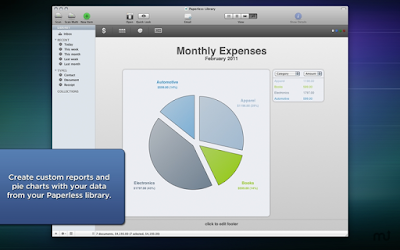
All documents can be viewed by the scanning date or by the collection. Paperless also has a calendar view. Of any collection you can create expense chart, table, pie or contact report.
A digital document is accepted by the IRS according to ruling Rev. Proc. 97-22. Therefore all your legal documents can be archived with Paperless.

Pros:
+Affordable price
+Works seamlessly with Fujitsu ScanSnap line
+Has all the necessary features for a typical user

Cons:
-OCR does not reconstruct documents

You can use any of these 4 coupons in the Mariners online store and save between 5% and 25% off the retail price of new purchases or one of the 5 pack bundles.

Run Microsoft Windows Applications and Games on Mac, Linux or ChromeOS save up to 20% off  CodeWeavers CrossOver+ today.

Sunday, March 6, 2016

Doom 2016 Alpha running on Linux with Wine

The WINE developers and community have typically been hard at work to fix issues, particularly with big AAA games. Usually with a bit of a wait before we see enough supported libraries for the title to function properly. Now it appears a Linux user has already managed to get the latest Doom Alpha running on WINE.


Doom currently has a closed alpha version available a Reddit user has it running on Linux, making it easier than expected. To the point there nothing really particular was done to get the game working, including excellent frame-rate on an Nvidia GTX 970. With the only things missing is the lack of Vsync. Not too shabby.
I obtained an Alpha copy of Doom with the intent of seeing how well it runs on WINE. I was a little concerned with performance and stability considering that it’s a 64-bit-only game (installed to the 32-bit folder, though), but this has proved to be a non issue. Since I’m too pleased with how well this worked, here are the major points:
  • Installed flawlessly using WINE Staging 1.9.1, but this should work with any version of WINE currently shipping with popular distros, seeing as DirectX crap-ware is not in the picture
  • Ran without any configuration (no DLL overrides, etc…)
  • Buttery smooth
  • Worked at Ultra settings with my GTX 970
  • Only issue was the lack of a VSYNC setting
So essentially, to use Doom 2016 on Linux with native performance, you will need to do the following:
  1. Set up a clean 64-Bit WINE prefix.
  2. Run the installer
  3. Install steam
  4. (Not always needed) fix DirectWrite issues with Steam (lol)
  5. Play Doom
  • i7-4790k
  • GTX970 4GB
  • 16GB DDR3-2400
  • 4.4.0-pf5turbokoopa #5 SMP PREEMPT Tue Feb 23 00:02:03 CST 2016 (linux-pf)
  • WINE 1.9.1
So as it stands, the new engine has been optimized rather nicely, seeing more advanced hardware requirements are expected for Linux. This if not a guarantee that the final version of the new Doom will just as easily, but it does give the community hope.

Doom will be released on May 13, 2016 for Windows PC, Xbox One, and PlayStation 4.

Run Microsoft Windows Applications and Games on Mac, Linux or ChromeOS save up to 20% off  CodeWeavers CrossOver+ today.

The WineHQ Wine development release 1.9.5 is now available for Linux and Mac

The Wine development release 1.9.5 is now available.

What's new in this release:
  • New version of the Mono engine, with 64-bit support.
  • Beginnings of the WineD3D command stream.
  • Support for effect states in Direct3DX.
  • Drag & drop improvements.
  • Various bug fixes.
The source is available now. Binary packages are in the process of being built, and will appear soon at their respective download locations.

Bugs fixed in 1.9.5 (total 24):

  15473  Adobe After Effects 4 crashes on startup
  17448  Impossible to insert an MPEG file in PowerPoint 2003
  22039  LEGO Island (Mindscape) fails to start (Direct3DRMViewport::SetAppData() and IDirect3DRMViewport::GetAppData() are stubs)
  29583  JScript is missing 'new XMLHttpRequest();' support
  30687  Powerpoint 2003/2007: embedded video play/pause on click no longer works
  34318  Multiple games and applications need ntdll.dll.EtwRegisterTraceGuidsW (Process Hacker 2.x, Far Cry 4)
  34870  Multiple games and applications crash on unimplemented function msvcr100.dll _crt_debugger_hook (ArchiCAD 16, Far Cry 4)
  35286  Borderlands (Steam) crashes on unimplemented function msvcr90.dll._crt_debugger_hook
  36996  Multiple games need msvcp110.dll.??0_Pad@std@@QAE@XZ implementation (World of Tanks 9.2, Planetary Annihilation, Train Fever)
  37115  Calling ReadFile from WINBASEAPI (WinBase.h) with zero read length causes hang
  37694  Multiple applications (Kontakt 5.4.x, Trainz: A New Era, Reaktor 6.0.1) need msvcp120.dll.??0_Pad@std@@QEAA@XZ
  38788  Malwarebytes Anti-Malware 2.1.x crashes on unimplemented function msvcp100.dll.?system_category@std@@YAABVerror_category@1@XZ
  38963  Multiple applications (Minko Engine v3 based custom application, Format Factory v3.7) crash on unimplemented function msvcp120.dll.??0_Pad@std@@QAE@XZ
  39242  oleaut32:typelib fails in the Korean locale
  39591  Crimzon Clover: Page fault on launch
  39636  Assassin's Creed Syndicate crashes due to lack of DisplayConfigGetDeviceInfo in user32.dll
  39690  MAXQDA 12.0.2 installer crashes on unimplemented function ADVAPI32.dll.RegCopyTreeA (Windows Vista+ API)
  39852  3DMark03: Mother Nature test: waterfall has no transparency if AllwaysOffScreen=disabled
  39908  SuperTux 0.3.5a crashes on startup, needs msvcr120.dll.strtof
  40083  Heroes of the Storm Freezes/Crashes after its recent updates
  40186  mscoree:mscoree test regression
  40191  ntdll:rtl test regression
  40194  drag and drop doesn't work because of typo in xdnd.c
  40204  Steam client fails to start with UmePlus font installed, when running in dwrite mode

Run Microsoft Windows Applications and Games on Mac, Linux or ChromeOS save up to 20% off  CodeWeavers CrossOver+ today.

Wednesday, March 2, 2016

PlayOnBSD easily install and run Windows software for use with Wine

I just noticed that PlayOnBSD version 4.2.8 has been added to the FreshPorts repository. It should be allot easier and straight forward for BSD users to play Games and run productivity software on FreeBSD and PC-BSD now. So, if you need to run a Microsoft Windows Game or office application go and install the port and start testing PlayOnBSD and Wine now.


This is the adaptation of PlayOnLinux to FreeBSD. The purpose of this
program is to simplify installation of MS Windows software to run under
the Windows emulator "Wine".

The name indicates, that the program was initially developed to support
easy installation of Windows games on Linux. The range of supported
applications has long been extended to cover a wide range of windows
applications including Microsoft Office.

PlayOnFreeBSD behaves significantly different than PlayOnLinux in a
number of aspects, e.g. which version of Wine to use (only a single
version is normally installed on FreeBSD, but PlayOnLinux tries to run
each Windows application in a Wine environment that has previously been
reported to give good results and installs missing Wine versions in the
user's home directory).

Reviewed by: antoine
playonbsd Easily install and run Windows software for use with wine
4.2.8 emulators on this many watch lists=0 search for ports that depend on this port Find issues related to this port Report an issue related to this port
Maintainer: se@FreeBSD.org search for ports maintained by this maintainer
Port Added: 18 Feb 2016 13:24:24
Also Listed In: games
License: GPLv3
This is a port of PlayOnLinux to FreeBSD. It allows you to easily install 
and use numerous games and apps designed to run with Microsoft Windows.
The Windows emulation is provided by Wine.

WWW: http://www.playonlinux.com/
SVNWeb : Homepage : Distfiles Availability : PortsMon

To install the port: cd /usr/ports/emulators/playonbsd/ && make install clean
To add the package: pkg install playonbsd
PKGNAME: playonbsd

NOTE: FreshPorts displays only information on required and default dependencies. Optional dependencies are not covered.
Runtime dependencies:
  1. 7z : archivers/p7zip
  2. bash : shells/bash
  3. glxinfo : graphics/mesa-demos
  4. gpg : security/gnupg
  5. gsed : textproc/gsed
  6. sudo : security/sudo
  7. xdg-open : devel/xdg-utils
  8. xterm : x11/xterm
  9. wine-gecko>=2.21 : emulators/wine-gecko
  10. wine-mono-devel>=4.5.6 : emulators/wine-mono-devel
  11. python2.7 : lang/python27
  12. wine : emulators/i386-wine-devel
  13. __init__.py : x11-toolkits/py-wxPython28
There are no ports dependent upon this port

Configuration Options
===> The following configuration options are available for playonbsd-4.2.8:
     GECKO=on: Wine-gecko HTML rendering support
     MONO=on: Mono bindings or support
===> Use 'make config' to modify these settings

USES:
python:run

FreshPorts PlayonBSD

Tuesday, March 1, 2016

ReactOS 0.4.0 has been Released

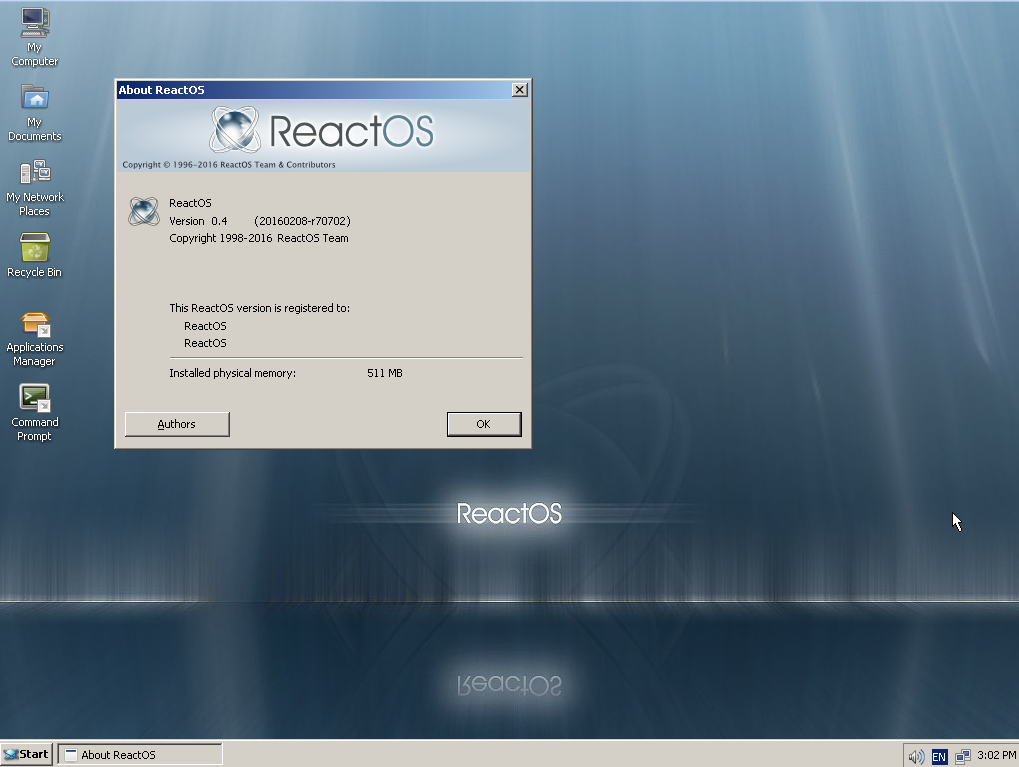
Nearly ten years ago the ReactOS Project released version 0.3.0. Today we are proud to announce the formal release of version 0.4.0. A great deal of work has gone into making this release happen and as we look back it is remarkable to consider how far the project has come since that release a decade ago. This release is both a celebration of and a testament to everything that the ReactOS team and community has achieved together. Thank you to all of you for having stood by the project for this long and we hope rewarding journey. For those of you chomping at the bit to check out the release, go to the download page to get it now.

Image

In Memoriam

It cannot be emphasized enough that ReactOS is where it is today due to the tireless efforts of the people that make up the project. Over the course of the project developers have come and gone but they have all left a mark whether it be in their code or the memories of their interactions with those still with the project. Sadly in two cases these memories are all that we shall ever receive from them. Gé van Geldorp was one of the project’s earlier developers and was heavily involved in the development of the win32 subsystem. He also helped mentor many other developers that joined afterward and is fondly remembered for his willingness to help those just getting started in the project. Brandon Mark Turner was another developer in the earlier days of the project. He worked out a variety of components and was responsible for some of the initial work to make ReactOS buildable with Microsoft’s compiler toolchain. The 0.4.0 release is dedicated to their memory and we hope that its fruition will serve to show at least some degree of our immense gratitude for the effort they put into this project.

Features

Here we document some of the highlights that separate 0.4.0 from not just the 0.3.17 release but also the cumulative achievements that the 0.3.x series achieved.
First of course the bulletpoint shortlist for those of you who don't want to wade through my giant mountain of text.

User-Centric Improvements

  • ext2 read/write and NTFS read support
  • New explorer shell and theme support
  • SerialATA support
  • Sound support
  • USB support
  • VirtualBox and VirtualPC support
  • Wireless networking

Developer-Centric Improvements

  • CMake support for GCC and MSVC compilation
  • Compilation times significantly improved
  • GDB remote debugging interface for kernel debugging
  • WinDBG support
And now onto the meat. In alphabetical order because it’s as good as any other order.

Build Modernization

Those who have been with the project since its early days will likely shudder at recollecting the means by which ReactOS was compiled back then. The first attempt to normalize the situation was in the RBuild system, a custom build specification format based on XML that was supposed to make it easy for developers to add new files and modules to the project. While impressive for its time, it suffered from structural issues that not only introduced very subtle bugs but also prevented the project from using anything but GCC to compile ReactOS.
The solution to this was a migration to the CMake platform, an effort that took many months and saw countless issues fixed. The first formal release using the CMake-based build system was 0.3.15 and since then the modernized build system has allowed developers to use not only GCC but also Microsoft’s compiler and debugging suite to build and test ReactOS, an ability that was crucial to many of the features and improvements listed here today.

Filesystems

Since its earliest days ReactOS has relied on one form or another the FAT filesystem. There was also significant interest from the community for something better, or at least something different, but a variety of technical difficulties prevented the operating system from supporting anything else. While support for ext family of filesystems progressed slowly but steadily probably the more exciting development has been preliminary support for reading NTFS volumes. While bits and pieces of the code were folded into 0.3.17, it was incomplete and 0.4.0 will be the first version to actually provide out of the box support for reading NTFS volumes.

Graphics

From 2D to 3D there were countless improvements to ReactOS’ graphics stack. Optimization work resulted in considerably faster rendering of 2D graphics, in some cases even beating performance on Windows, while support for 3D graphics has steadily advanced since work began in the 0.3.7 time period. Furthermore, architectural fixes released as part of 0.3.8 saw the ability to properly load graphics drivers, another milestone in the project’s goal of compatibility.

Memory

The memory manager, a central piece of any operating system and whose stability and correctness underpins that of the rest of the system. The memory manager that has been with the project for so many years finally saw significant parts of it retired in the 0.3.15 release. More work remains of course but a major milestone was achieved that day.

Networking

Support for networking was first formally introduced in the 0.3.0 release and since then the team has steadily improved upon the functionality and features. These range from the mundane such as simply fixing bugs to adding of wireless support in 0.3.14, affectionately known as the the PI release internally. Since the 0.3.17 release the project has also added in support for SSL, with the inclusion of the mbed TLS library.

NTVDM

A much requested feature for ReactOS was support for 16bit DOS applications. On Windows this support is provided by the NT Virtual DOS Machine (NTVDM) and the ReactOS implementation of it was first formally released in version 0.3.17. Needless to say since then the ReactOS NTVDM has seen considerable improvement to the point where many of the testers are sharing examples of old DOS games resurrected. And one of the biggest advantages to the way in which NTVDM is implemented in ReactOS is that support for it will continue on non IA-32 platforms, including AMD64 and even ARM.

Registry

Hate it or love it, the registry underpins much of the operating system’s configuration in the Windows family and like its NT-based relatives ReactOS also possesses one. The project has gone to great lengths to ensure that its implementation of the configuration manager works not only in ReactOS but is also able to correctly read and modify a registry from Windows, providing the ability for ReactOS’ own bootloader to be able to boot Windows 2003 successfully.

Shell

The explorer shell used in 0.3.0 was originally introduced all the way back in 0.2.0. When it was created ReactOS lacked the proper infrastructure to actually support a proper graphical shell, forcing the old explorer’s creator to reproduce much of the functionality, that was supposed to be provided by the operating system, in the shell itself. This worked for a time but as the OS became more complete the shell was unable to benefit from these improvements. The new explorer shell and all of its supporting infrastructure, and there was a great deal of infrastructure at that, was a cumulative effort by several people and is one of the truly new features being introduced in 0.4.0 with no previous releases possessing it.

Storage

Much as PS/2 connectors slowly fell out of use for keyboards and mice, storage devices in modern computers now use SATA instead of IDE. ReactOS added support for such devices in 0.3.10 by importing the UniATA driver and have steadily improved upon that support ever since.

Sound

What one might presume to be a rather basic piece of functionality was actually an extremely complex undertaking. Support for sound arrived in 0.3.9 and has progressively been improved upon ever since as we move towards a new normal of expecting things to work instead of being amazed that they do.

USB

In this day and age almost every peripheral comes with a USB connector. Initially the project sought to simply provide support for USB mice and keyboards, support first added in 0.3.10, but a full and proper USB stack is ultimately a necessity in this day and age. This stack was first provided in the 0.3.15 release and has seen continued work since.

Visuals

Making the shell look nicer was another oft-requested improvement and one that was a long time coming. In the course of adding that support the project encountered a few bumps of course but in the 0.3.16 release ReactOS was shipped with the Lautus theme for those that wanted to try it out.

Final Notes

More detailed technical information about the release can of course be found on the 0.4.0 wiki page with links to the changelog and other notes. Please also note that the VirtualBox image is not yet live at the time of this release.

Google Apps for Work start your free trial today

https://goo.gl/G11ts6
What is Google Apps?
 
Google Apps is a cloud-based productivity suite that helps teams communicate, collaborate and get things done from anywhere and on any device. It's simple to set up, use and manage, so your business can focus on what really matters.

Millions of organizations around the world count on Google Apps for professional email, file storage, video meetings, online calendars, document editing and more.

Watch a video or find out more here.

Here are some highlights:

Business email for your domain
 
Looking professional matters, and that means communicating as you@yourcompany.com. Gmail’s simple, powerful features help you build your brand while getting more done.

Access from any location or device
 
Check email, share files, edit documents, hold video meetings and more whether you’re at work, at home or in transit. You can pick up where you left off from a computer, tablet or phone.

Enterprise-level management tools
 
Robust admin settings give you total command over users, devices, security and more. Your data always belongs to you, and it goes with you if you switch solutions. Start your free trial