Wine Reviews has release information and reviews of Windows applications and games running on Linux macOS and ChromeOS using Wine from Winehq.org Proton Lutris Q4Wine PlayOnLinux PlayOnMac WineBottler WineSkin WineTricks and Wine-Staging.
The chains are loosening. DirectX still binds many PC games to Windows. Now, CodeWeavers expects CrossOver to support DirectX 11 by the end of the year, with Wine gaining compatibility shortly afterwards.
In other words, more Windows PC games will “just run” on Linux, and it’ll be easier for developers to package those games with compatibility code and officially support them on Linux.
CodeWeavers is bringing DirectX 11 to Linux
Wine already supports DirectX 9 very well, but many new
games no longer support DirectX 9 and rely on newer versions of
Microsoft’s graphics technology. Wine is an open-source compatibility
layer that allows Windows applications to run on top of Linux, Mac OS X,
and other non-Windows operating systems.
CodeWeavers offers a paid product, known as CrossOver, which
is built on top of the open-source Wine code. It pays developers to add
features, and those improvements inevitably end up back in the
open-source Wine project. CrossOver also provides a convenient interface
and more of a guarantee that certain applications will be officially
supported and not break.
While the DirectX 11 support will make it into CodeWeavers’
product before it makes it to the open-source Wine project, the code
will be open-source and submitted for inclusion into the Wine project.
In other words, CodeWeavers helps fund and support the development of
Wine.
During E3 2015, CodeWeavers’ James Ramey posted an update on the CodeWeavers blog:
“In the coming months, CodeWeavers will have support for DirectX 11;
better controller support; and further improvements to overall GPU
performance. While these incremental improvements for game support may
seem small (at first), the cumulative improvements for game support will
allow for many of these games to ‘just run’ when released.”
According to a post on Reddit,
this code should be done by the end of 2015, and work has already been
underway for seven months. The patches will of course be contributed to
the open-source Wine project, too.
Why this matters
Microsoft’s DirectX graphics technology is only officially
supported on Windows, Xbox, and other Microsoft platforms. The Wine
project helps bridge this gap and already supports DirectX 9 very
nicely.
Using CrossOver for Linux to play Skyrim.
The new underlying CrossOver technology will also allow
developers to port DirectX 11 games to Linux more easily. Linux gamers
tend to dislike this type of port and prefer a native game that doesn’t
use any Windows compatibility layer, but hey, it’s still better than
nothing.
In the past, John Carmack of id Software and now Oculus
has even argued that “emulation of some sort is a proper technical
direction for gaming on Linux.” The better that DirectX compatibility
gets, the easier it will be to port Windows-first games to Linux. And,
even if certain games aren’t officially supported, it’ll become easier
to just run them without any modification. Big game engines are increasingly supporting Linux, but general Windows compatibility is still helpful.
Run Microsoft Windows Applications and Games on Mac, Linux or ChromeOS save up to 20% off CodeWeavers CrossOver+ today.
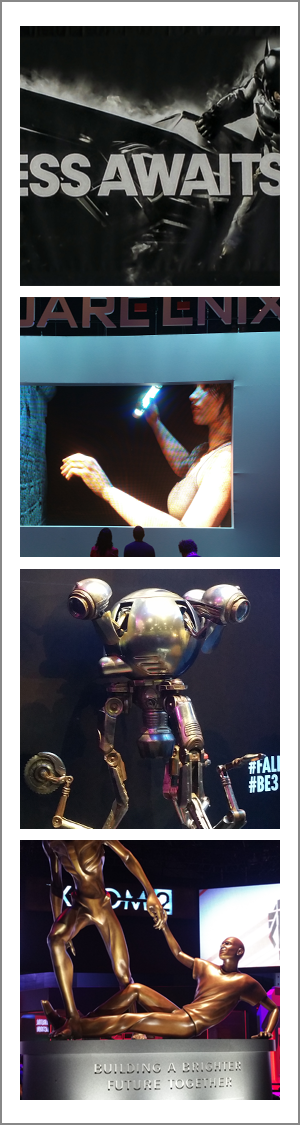
This year, I was fortunate enough to attend E3
in Los Angeles. For those that do not know, E3 is the Electronic
Entertainment Expo and spotlights the upcoming video games and other
things electronic (mostly just video games) from all the top developers
in the world. E3 is much like being at Las Vegas, if Las Vegas was on
Red Bull and hadn't slept for 48 hours or so. And while it's hard to
focus on any one thing in particular, I was able to learn quite a bit
during my two days in California.
1.) Teaming is everything.
Games are moving away from the simple premise that it's you vs. the computer game. Now, it's you and your teammates vs. people
from around the world in a variety of combat situations / simulations.
Games are more about 'team sport' and 'high performance' than about
solving riddles or achieving simple goals. And gamers are taking this
'team thing' seriously as there is now a Professional Gaming League
for most of these games. If your parents ever told you that you
couldn't make a living playing video games, THEY LIED TO YOU. The top
gamers now make six figure incomes playing games and are treated like
'rock stars' at these events.
2.) You can teach an old dog new tricks.
Just
because Star Wars is almost 40 years old doesn't mean it's going softly
into that good night. Let that sink in for a minute… Star Wars will
turn 40 on May 25, 2017. FORTY!!! Even so, this year E3 featured four
Star Wars themed games and all of them looked AWESOME! Maybe the best
of the bunch is Star Wars Battlefront
(20 vs. 20 multi-player combat game) as it provides you the opportunity
to not only fight on the ground (alongside Luke Skywalker or Darth
Vader) but also pilot various ships. I'm not sure how much cooler a
game based on a 'worn out' 40 year old premise can get!
3.) First person shooters games aren't going to be first for much longer.
Not every upcoming game is focused on killing your opponents (I'm looking at you, Nintendo). E3 featured a smackling of games like Yoshi's Wooly World, Splatoon, Rock Band 4, and Roy Mcllroy PGA Tour (albeit
there's a lot of damage you can do with a 4 iron) amongst the otherwise
violent staples. Interestingly enough, many of these 'tamer' games got
very positive reviews and were very well received which goes to show
that a well done game is a well done game and can be appreciated on its
own merits.
4.) You can't polish a turd, but you can still roll it in glitter. Batman: Arkham Knight for the PC is a beautiful but very broken game. Thousands of bad reviews won't 'patch' this game on the PC anytime soon.
5.) Sequels are good if you do them right.
If it worked once or twice or three times, you can most likely get another title out of it. Call of Duty: Black Ops 3, Assassin's Creed Syndicate, Payday 2, XCOM 2, and Uncharted 4: A Thief's End are
just a handful of the sequels coming out this fall. And if you liked
playing these games the first time, you'll appreciate the opportunity of
déjà vu all over again. Not sure we need a Street Fighter V, but I guess these franchises will live on (at least for another year).
6.) Twitch isn't just a short, sudden jerking movement. Twitch
is a real thing! I guess I'm shocked that an Internet channel
dedicated to broadcasting professional league battles of various video
games is a real thing. But at E3, it was Twitch that was broadcasting
live from almost every booth just like a major network. Twitch has
actual commentators, features professional gamers, and announces video
game battles just like announcers would do for a professional sport. It
was wild to hear commentary of in-game battles and have announcers
describe the action. I'm pretty sure that they were making most of it
up as they went along; BUT, they were making it up as they went along. I
remember doing the same thing as a child when playing my favorite Atari
2600 games. Of course back then, my parents thought it was weird and
had me quiet down. Today, I'd be a rock star with my own show.
7.) Behind every successful E3 visit is a fabulous pair of shoes.
E3
covers a lot of physical space. I averaged walking almost five miles a
day to cover all the ground in both convention halls.
Honestly, I don't even like to drive five miles. Glad I brought a good pair of shoes.
8.) A man, a tan and a plan.
Okay
well, maybe not a tan. It's hard to see everything at E3. As such, I
planned what I wanted to do and where I wanted to go beforehand. Even
with a plan in place, it was challenging to see all the exhibits and
games I wanted to see. Worse yet, most games had a one to two hour wait
in line. Heck, the wait to see the 12 minute movie for XCOM2 took nearly 50 minutes (a 50 minute line to see a movie about a game – smells of Disneyworld). But, I did get to play Witcher III, SMITE, Alekhine's Gun, Battlecry, Blood Bowl 2, and Pro Evolution Soccer 2016.
Very cool games, but they all required a bit of planning and patience
(and possibly pushing people out of the way) to experience.
9.) Every day is a fashion show and E3 is your runway.
I found it hard not to stare at people who were dressed up in elaborate costumes of their favorite video game characters. Boba Fett, check. Chun Li, check. Lara Croft,
check. I'm not sure I'd ever take my love for video games to 'this
level', but it was commendable to see others so dedicated to 'their
game' (and honestly if you're going to walk around a convention hall in a
Princess Leia bikini, you should be commended for your bravery).
10.) E3 is CodeWeavers oyster.
Not
many Mac or Linux titles on the horizon. There was obviously 'some'
titles coming to the other platforms, but it's still a predominately PC
world. To this effect, I think CodeWeavers can help in supporting some
of these titles for Mac or Linux users in CrossOver.
We'll be looking to get Beta of many of the top games from E3 to work
on support for the coming version of CrossOver. And while we might not
get every game, I'm sure that there will be one or two or more games
that will run very well in our technology.
Run Microsoft Windows Applications and Games on Mac, Linux or ChromeOS save up to 20% off CodeWeavers CrossOver+ today.
How do these games impact Mac and Linux users?
Well, they don't. That's the rub in all of this. Most of these games
are PC only.
However, you might still be able to play these titles on your Mac or
Linux computer when they are released later this year using CrossOver. In the coming months, CodeWeavers
will have support for DirectX 11; better controller support; and
further improvements to overall GPU performance. While these
incremental
improvements for game support may seem small (at first), the cumulative
improvements for game support will allow for many of these games to
'just run' when released. And when more games 'just run' in CrossOver,
it won't matter if you're battling against Thor or Apollo using a PC, a
Mac, or a Linux computer.
Run Microsoft Windows Applications and Games on Mac, Linux or ChromeOS save up to 20% off CodeWeavers CrossOver+ today.
Wine Staging is a Wine version which provides bug fixes and features that aren't yet available in regular Wine versions.
Wine Staging (formerly known as Wine Compholio) was initially created for Pipelight,
a project that brings Silverlight and other Windows-only plugins to
Linux web browsers. The project has evolved and some Linux
distributions, like Fedora, provide it in the official repositories
instead of the regular Wine version.
The latest Wine Staging provides the following extra features and bug fixes:
CSMT (Commandstream multithreading) for better graphic performance
CUDA / PhysX / NVENC Support for NVIDIA graphic cards
DXVA2 GPU video decoding (experimental)
EAX 1 support
Fixes for various upstream regressions
Job Object support
Loading of .NET CLI images without entry point
Named Pipe message mode support (Linux kernel >= 3.4 only)
Performance improvements for IO-heavy programs and memory allocation functions
S3 texture compression (DXTn) support
Threadpool API support
Various improvements to d3dx9
Various speed improvements (shared memory, RT priority)
Windows ACL support
Wine PulseAudio driver
For a complete list, see the Wine Staging GitHub page.
Some of these features are optional and they can enabled or disabled via Wine Configuration, on the Staging tab:
Install Wine Staging in Ubuntu or Linux Mint
Wine Staging is available in the
Pipelight PPA for Ubuntu, Linux Mint and derivatives. To add the PPA and
install Wine Staging, use the following commands:
If you're on 64bit and want to use the 64bit Wine version, also install 'wine-staging-amd64':
sudo apt-get install wine-staging-amd64
The Wine Staging executables aren't installed in /usr/bin (and aren't available in your PATH by default), but under /opt/wine-staging/bin/. Thanks to this, you can continue using the regular Wine version as well as Wine Staging - to run any Wine Staging executable, simply add "/opt/wine-staging/bin/" in front of the executable, like this:
However, if you don't want to type the full path each time you want to use Wine Staging, you can install a package which provides compatibility symlinks (but you won't be able to use the regular Wine version any more):
sudo apt-get install wine-staging-compat
For more information, see the Wine Staging Usage page.
The Wine Staging developers provide
binaries for Arch Linux, Debian, Gentoo, Mageia and OpenSUSE - for
installation instructions, see THIS page.
Run Microsoft Windows Applications and Games on Mac, Linux or ChromeOS save up to 20% off CodeWeavers CrossOver+ today.
You are using Mac OS X and you can’t find a way to run Terraria on
your Mac? Don’t worry, in this tutorial I’m gonna show you the easiest
way to play Terraria on Mac by using CrossOver.
Play Terraria on Mac OS X Tutorial
Download and install CrossOver at here: https://www.codeweavers.com/products/crossover-mac/download/
After installing, visit this website, and click on “Install Terraria via CrossTie” (in web browser)
Click “Install”.
Keep install various softwares requested. After done, a window pop up with two button : “Restart later” or “Restart now”, just click on Restart now.
Wait for Steam update
When Steam’s main window is shown up, shut it down and reopen it.
Log in to Steam then install Terraria and play!
Run Microsoft Windows Applications and Games on Mac, Linux or ChromeOS save up to 20% off CodeWeavers CrossOver+ today.
This week, I am at E3,
the Super Bowl of computer gaming! Right off the bat, I noticed that
game studios have fully embraced this whole team aspect thing. It's not
you vs. the bad guys. It's you and 15 or 20 of your teammates vs. 15
or 20 people on another team fighting to the death within a certain time
limit in a confined area no bigger than a phone booth. Mass carnage
with surreal graphics in mind-blowing locations at a frantic pace. And
again, it's your team vs. the world. No team? No problem! These games
are more than happy to put you on a randomly created team from a pool of
available players just waiting to get a taste of the action.
As
I step up and play on a random team, I instantly notice the lack of
cohesiveness that results in decisive victory (the kind of victory where
someone on the other team might just quit playing). And to that, I
don't know 15 or 20 people that would be willing to team up with me to
take on the world. Which, in hindsight, is probably for the best as
discearning
victory usually requires practice. PRACTICE??? Who's got time for
practice? I'm lucky with my schedule that I even get to play games at
this stage of my life (husband, father, suburbs, three dogs). So, I'll
be sticking to random teams – for now. I just wish that the time I
spent in my youth on Atari 2600 and Nintendo wasn't so largely wasted leaving me unprepared for today's gaming.
Don't
get me wrong, it's not that I don't try (even at my age – 43) to
prepare and compete in these games against vastly superior and
considerably younger gamers. I try. I bought a headset with a
microphone. I spend countless hours at work playing a variety of these
team concept video games. I even sneak away in the evenings to log in
an hour or two just to increase my rankings. HECK, I'm even spending
some of my entertainment money on upgrades and add-ons for these video
games (just to compete). My problem is that I'm not willing or able to
commit the 60 hours or so a week it would take for me to actually be
GOOD at these games. I can buy all the upgrades I want, but it doesn't
negate the fact that these 13-year-old kids are twitchy and fueled by
Red Bull.
Soooooooooooo…. E3. Team based games? Check. Games
where you can be Darth Vader, a mythical god, an elite sniper, world
class soccer player, or even vicious dwarf? Check again. From what
I've seen so far, the 'must have' games for 2015 are going to Star Wars Battlefront,
a 40 vs. 40 mass assault where you're battling as either the Rebels or
the Empireon the ground and in the air on worlds like Hoth and Endor; Smite, a seven vs. seven arena based combat where you can be an actual mythical god battling other mythical gods; Rainbow Six Siege,
a five on five strategic assault where you are either a member of an
elite military unit or part of a faction that is a threat to freedom;
and the impressive list of games from both established and indie game
studios goes on. The games all appear incredible and the action is
non-stop. You attack. You die. You restart. You improve. And you do
it again!!! It's like that Tom Cruise movie, 'Edge of Tomorrow' – LIVE.
DIE. REPEAT.
How do these games impact Mac and Linux users?
Well, they don't. That's the rub in all of this. Most of these games
are PC only.
However, you might still be able to play these titles on your Mac or
Linux computer when they are released later this year using CrossOver. In the coming months, CodeWeavers
will have support for DirectX 11; better controller support; and further improvements to overall GPU performance. While these incremental
improvements for game support may seem small (at first), the cumulative
improvements for game support will allow for many of these games to
'just run' when released. And when more games 'just run' in CrossOver,
it won't matter if you're battling against Thor or Apollo using a PC, a
Mac, or a Linux computer.
Run Microsoft Windows Applications and Games on Mac, Linux or ChromeOS save up to 20% off CodeWeavers CrossOver+ today.
Dzisiaj wpis trochę z innej dziedziny, a mianowicie o systemie Linux i
uruchamianiu aplikacji z Windows. Jako, że ja od ok. 10 lat pracuję na
systemie linux, to nie mam problemów z jego użytkowaniem. Osoby, które
dopiero zaczynają przygodę z linuxem mogą mieć problemy z pewnymi
aplikacjami. Duża część windowsowych aplikacji ma swoje „zamienniki” na
linuxa, np. MS Office/Open Office, Photoshop/Gimp, itp. Również ostatnio
za sprawą Steam coś ruszyło z grami i bez problemu uruchomimy natywnie
CS, CS:Source, CS:GO czy inne gry. Czasami jednak zachodzi potrzeba
uruchomienia jakiegoś programu/gry z Windowsa na Linuxie, lub nie znamy
odpowiednika. Co wtedy? Z pomocą przychodzi nam aplikacja
CrossOver/Wine.
Każdy użytkownik Linuxa na pewno słyszał o Wine, czyli programie
umożliwiającym uruchamianie oprogramowania napisanego na Windows pod
Linuksem. Wine jest bezpłatne, ale posiada płatny odpowiednik –
CrossOver. Na stronie producenta kosztuje 30-40 dolarów.
CrossOver Linux to bazująca na otwartym projekcie Wine aplikacja
umożliwiająca uruchamianie oprogramowania dla systemu Windows na
platformie Linux. Aplikacja zapewnia wsparcie dla długiej listy
popularnych programów. Wszystkie obsługiwane aplikacje znajdują się pod
adresem codeweavers.com. Wersja testowa pozwala na korzystanie z programu przez okres 14 dni.
Run Microsoft Windows Applications and Games on Mac, Linux or ChromeOS save up to 20% off CodeWeavers CrossOver+ today.
Many thanks to the 1508 people who took the time to complete this
survey! That’s less than the 2362 who took the survey last time, but
still over the 1000 mark which I wanted to stay above. Hopefully it will
stay around that mark and hopefully we aren’t getting repeat responses
and things which might cause issues.
Question 1 - Do you currently use Linux as your primary PC gaming platform?
Question 2 - Did you use Wine to play games last month?
Run Microsoft Windows Applications and Games on Mac, Linux or ChromeOS save up to 20% off CodeWeavers CrossOver+ today.
Running Windows applications on Linux and Mac systems has come a long
way. I remember doing virtual machines, like QEMU, and VirtualBox,
running a guest in Vista or XP, and while it does run as expected, the
overhead costs of running a whole operating system in a VM environment
can be big (I still do use these programs, particularly VBox for
development purposes).
Around 2004-2007ish, I’ve was doing some
application testings for a little program named WINE (I also have a
friend, Tom Wickline, of Wine Reviews,
who incidentally was the indirect reason why I created this blog in the
first place (we did a review of PlayOnLinux in the past together, and
it was so much fun, that I created this blog out of a whim). No, WINE is
not a alcoholic drink, but instead it is rather a program that emulates
different Windows APIs in linux and mac systems. It was also a
challenge to compile for beginners too (I do not compile in mainstream
linux OSes in the past but rather in smaller hobbyist type Linuxes like
Alinux/PeanutLinux or PCLinuxOS). Real life happened though, so I had to
give up this hobby.
The advantage of running WINE over Virtual
Machine solutions is no overhead costs and the application runs at
particularly native speeds. The disadvantage of running WINE is that not
all programs run (Windows has a lot of APIs under the hood, and WINE
doesn’t implement all of them).
In this particular article, I am
running CrossOver 14.1.3 for Mac, on an early 2011 MacBook Pro (8,1)
with 4GB of RAM and Intel HD 3000 Graphics (384MB Shared Memory
Display).
Also for this particular experiment, I am installing a
CodeWeavers supported application (Microsoft Office 2007), and two
unsupported, but community supported applications (Mass Effect, and Tomb
Raider 2013)
Before We Start
Before we start, let us see the levels of compatibility in these programs according to WINE compatibility levels:
Bronze
– programs can install and run, with fundamental functionalities
intact. However, the applications running have enough bugs that
CodeWeavers advises running them with caution (save early and often).
Silver
– programs can install and run well enough to be usable. There are
however bugs that are found to let the program run flawlessly.
Gold – programs can install and run as you would expect if you are running Windows.
A
further level of support for CodeWeavers is officially supported. That
means if your application is in the list of officially supported
applications, CodeWeavers is dedicated to bring up the level of
compatibility higher (for example, supported bronze applications is
expected to be brought up to silver level applications of CodeWeaver in
future versions of CrossOver).
Microsoft Office (Officially Supported, Bronze)
Microsoft Office is an Office Suite of Word Processor, Spreadsheet,
Presentation Software, among others. It is basically the proprietary
equivalent of LibreOffice/OpenOffice. As such, CrossOver supports
Microsoft Office officially.
I now have six licenses remaining to give to reviewers, if your interested to write a review about CodeWeavers CrossOver Mac or Linux this is your chance.
I have ten CodeWeavers CrossOver licenses available, five for CrossOver Mac and five for CrossOver Linux to give away to web sites or individuals who are interested in writing a review of CrossOver Mac or Linux. The license are valued at $59.95 each and are good for a one year subscription.
What's needed :
A website to host your review
A Linux or Mac computer
Windows Games or Applications, you can look at the compatibility center for known software that works.
What will you receive for your review :
A full copy of CrossOver Mac or Linux
Back links from this and other sites.. Think SEO
Your review posted on winehq.org Facebook and other social sites e,g Google+ , Twitter etc etc with back links to your review.
How can you contact me about doing a review :
You can leave a comment here, please include a link to your website, don't worry all comments here are moderated and won't be made public or go to Facebook and send me a message. Not the ( Contact Us ) but a Message, The Contact Us actually points to WineHQ Donate page... :)
I would like to have a Spanish, Russian, Hindi, German, French and English or other major language Chinese or Italian etc etc :) review to broaden the overall reader base. This will not only make it easier for you to write the review in your native language but for your local readers to better understand the review.
Keep in mind license and reviews will be accepted on a first come first serve basis, I'm not trying to get the greatest reviews but more importantly truly honest and unbiased reviews.
Run Microsoft Windows Applications and Games on Mac, Linux or ChromeOS save up to 20% off CodeWeavers CrossOver+ today.
I recently put up a new winehq.org Facebook page and with the help of Caron Wills from the Empire we have been posting Wine related news and links. We hope the page is a place for Wine related news, information and conversations. With that said we invite you to like and follow us on Facebook.
CodeWeavers CrossOver now has support for the Oculus Rift!
Well,
our internal testing builds do, anyway. Here at CodeWeavers, we're
excited about what virtual reality can bring to gaming and other
computing applications. The Oculus Rift
is currently the largest VR (Virtual Reality) headset available for
purchase, so we've decided to integrate support for it into CrossOver.
Once
we've released support in our public builds, playing Windows Oculus
games with CrossOver on your Rift will be just as easy as with any
native Mac OSX or Linux Oculus application. Integration between your
Windows Oculus application and your hardware should be seamless. We've
been "testing" ;) with a DK2 here in the office, and it's been an impressive experience.
Caveats? There's a couple. This is an experimental feature in CrossOver, and some games access the Rift hardware in a way that Wine doesn't yet support. We hope to have this repaired soon, but some particular applications may fail to detect the Rift hardware.
More worryingly, Oculus has decided to drop support for Linux and OSX.
While our Oculus integration works for now, it does depend on your
having a Linux or Mac OSX SDK, which is no longer supported by Oculus.
Depending on changes to future Windows Oculus SDK versions, we could
fail to support games built against those new SDKs.
But don't
lose hope! It would be difficult, but we could build support for the
Windows Oculus SDK in CrossOver. That's right: CrossOver could become
the only way to use the Oculus Rift on Mac OSX and Linux. But this is
all hypothetical. It depends on what Oculus decides to do for their
Linux and Mac users.
If you've got a Rift and are interested in trying out our support, contact our Caron at caron@codeweavers.com and ask for a nightly build. If you want more information about our solution for Oculus, contact our sales team at sales@codeweavers.com. We'd love to have your support and feedback.
We're
also interested in building support for other VR headsets. As soon as
some other headsets come on the market, like Valve and HTC's Vive headset or Microsoft's HoloLens,
we'll be thinking about adding support so you can have the freedom to
use your Windows VR games and applications on Linux and OSX.
About Andrew Eikum Andrew has been a Wine developer at CodeWeavers
since 2009. He works on all parts of Wine, but specifically supports
Wine's audio. He's also a developer on many of CodeWeavers's software ports.
About CodeWeavers Founded in 1996 as a general software consultancy,
CodeWeavers focuses on the development of
Wine – the core technology found
in all of its CrossOver products. The
company's goal is to bring expanded market opportunities for Windows software developers by making it easier, faster
and more painless to port Windows software to Mac OS and Linux. CodeWeavers is recognized as a leader in open-source
Windows porting technology, and maintains development offices in Minnesota, the United Kingdom and elsewhere around
the world. The company is privately held.
Run Microsoft Windows Applications and Games on Mac, Linux or ChromeOS save up to 20% off CodeWeavers CrossOver+ today.
tomorrow the coding period of the Summer of Code begins and I though it might be a nice idea to let the community know about the projects we've got this year. Actually, I though it would be even better if the student themselves wrote a short summary of their own project for the mailing list.
So, with no authority backing me, I'm kindly asking that. No need to write anything too fancy, just a few lines explaining what are you going to work on over the summer and maybe what are the expected benefits for Wine.
Thank you!
Aaryaman Vasishta
Hello!
Thank you for inviting
me to this opportunity! I will try my best to keep it short, though it
might be a bit long for some. There's a TL;DR at the end, though. :)
A
bit about myself. My name is Aaryaman Vasishta and I'm currently
studying in my third year of Computer Engineering in Pune Institute of
Computer Technology, India. My interests lie in game programming and
computer graphics.
My project focuses on implementing the rendering backend for the D3DRM API [1].
D3DRM
(Direct3D Retained Mode) is basically a scene graph API running on top
of Direct3D's Immediate Mode API. You can say it's more like a rendering
engine API which encapsulates Immediate Mode functionality in order to
make it easier for programmers to develop 3D scenes using it, making it a
possible competitor to OpenGL at the time.
At the moment wine's
implementation of this API is mostly full of stubs, and there's quite a
bit of work left before something can be drawn on the screen. My role
here mainly focuses on implementing object Creation/Initialization
functions for some of the main interfaces, mainly devices, textures and
viewports, all of which are COM based. If time permits, I will also work
on implementing some frequently used frames and lighting functions.
The
API is quite old (it has been removed since DX 8 SDK, and the dll
doesn't come included with vista onwards) but there are a few popular
games that used it. Namely, Lego Rock Raiders and Steel Beasts, and
applications as well, like FMS (Flying Model Simulator). So there is
some merit in working on this. Implementing these functions will help
accelerate further development of this API to get some long-awaited apps
to run on wine (I can see quite a few threads on google of people
trying to get FMS running, and a couple for LRR too, so there is some
demand for it). As an added bonus, I also get to interact with wine's
ddraw implementation for this one, which could potentially help ddraw's
implementation via possible bug detection/fixes and implementing any
ddraw functionality that d3drm requires.
TL;DR:
I'm implementing a main chunk of a graphics API called Direct3D
Retained Mode, which is based on Direct3D Immediate Mode. The API is
mostly a stub in wine and this project should help get things going.
Thank you!
Aaryaman Vasishta
Zhenbo Li
Hello!
I'm glad to working on Wine GSoC this year. My project's focus is IHMLTXMLHttpRequest. Many websites would use hacks to determine whether the browser was IE6.0 or IE 7+. As XMLHttpRequest object identifier was shipped in IE 7.0[0], the web developers would use ActiveX to access IXMLHttpRequest object. Wine IE implements some new features, so it is common that Wine IE is treated as a IE 7+ browser(like Firebug Lite[1])
Mozilla has implemented nsIXMLHttpRequest[2], and my approach is to call the wine-gecko functions from wine code. I can't tell how many applications' status on appdb will change from "garbage" to "silver/gold", but IMHO, implementing XMLHttpRequest is necessary to make wine IE more usable.
Thanks
Iván Matellanes
Hi all!
I'm looking forward to contributing to Wine.
My project consists on implementing part of the legacy Visual C++
iostream runtime, which was shipped with Visual Studio versions up to
6.0 and is currently a stub. I'll work on as many functions as time
permits, and one of the key points is to reuse code from the modern
Visual C++ runtime library that is already implemented.
Some old applications and games (like MS Reader and Tron 2.0) would
benefit from this, as they would run with the built-in library. A quick
search on Bugzilla for 'msvcirt' shows several bugs related to
unimplemented functions.
Cheers,
Iván.
YongHao Hu
Hi, all.
Sorry for the late reply. I am happy to join this discussion.
My project
focuses on implementing all the functions from tr2 namespace, which
was included in the header and being proposed for
standardization. Though there are many methods to implement the functions like
_File_size and _Equivalent etc, the hard part is finding the most
appropriate one.
New applications like
MSVC12[1] would benefit from this.
Thank you!
-----
Run Microsoft Windows Applications and Games on Mac, Linux or ChromeOS save up to 20% off CodeWeavers CrossOver+ today.
I
am delighted to announce that CodeWeavers has just released CrossOver
14.1.3 for both Mac OS X and Linux. CrossOver 14.1.3 has important bug
fixes for both Mac and Linux users.
Mac customers with
active support entitlements will be upgraded to CrossOver 14.1.3 the
next time they launch CrossOver. Linux users can download the latest
version from http://www.codeweavers.com/.
Change Log For CrossOverMac and Linux :
14.1.3 CrossOver - May 18, 2015
Mac OS X:
Fixed graphics problems with character models in the game
Banished on certain Mac hardware.
Linux:
Updated the version of the gnutls library we use for
compatibility with newer Debian and Ubuntu distributions. This
will fix connection issues in Diablo III as well as other
possible problems.
Run Microsoft Windows Applications and Games on Mac, Linux or ChromeOS save up to 20% off CodeWeavers CrossOver+ today.
Edit: apparently there are some people that do not want to play the game and decided to flood the poll. Fair enough. The poll is now closed. Please comment instead.
Hi everybody!
As some of you have heard about it, we are seriously thinking about
the future version of PlayOnLinux (a.k.a. PlayOnLinux 5. The version 4
has a long history and the code contains stuff that makes it very hard
to maintain. We really need to have a more stable version if we want to
continue to give you the best. If we continue working on PlayOnLinux v4
we are assuming that:
PlayOnLinux will no longer have new features
PlayOnLinux may become completely broken one day
In this piece of news, I'm going to explain the option we
prefer, why are we prefering it and also we are going to ask you if you
agree or not.
Pleaseread the whole article before
complaining, trolling. It is a really important topic! Once you have
read everything and you understand the problem, fell free to send
comments and to vote.
As many of you may have heard, we are seriously thinking about
switching from Python to Java. I perfectly understand some concerns and
to be honest, I was the first to criticize Java even few months ago.
However there are several reasons that let us think that Java is the right choice for us:
Portability: We want PlayOnLinux to be
accessible on Linux, FreeBSD, OpenBSD, Mac, ... and why not, being
prepared to run on ARM/Android devices later.
Maintenability
Java do a lot of things to force developers to do things great
Java is statically typed. It is a lot easier to do simple task like refactoring, code-checking, ...
I have recently discovered the tools that exists Java to measure
the code quality and the technical debt and to be honest, it is just
impressive. You may have a look at this end of this news (SonarQube)
Contributions
We've noticed that there were hardly any contribution for
PlayOnLinux v4 and we target to make some really infrastructure and
guidelines so that everyone contribute. (See "infrastructure" paragraph
at the end of this news)
PlayOnLinux is a lot more complex than just a GUI for wine. It
is mainly a set of tools allowing you to write very powerful scripts.
That is why it is a little more complicated than just a GUI for wine.
Responses to the main concerns
I don't want to install Oracle JDK or any closed program on my computer
We are going to guarantee you that PlayOnLinux v5 is compatible with OpenJDK (GPLv2)
PlayOnLinux will become very slow because Java is very slow
I can ensure you that this is wrong.
Java is a lot faster than Python in general (http://benchmarksgame.alioth.debian.org/u64q/python.html).
Moreover, the v4 branch has a lot of non optimal code. The tests we
have already done with Java is showing us than what we have developed so
fare behave a lot faster that PlayOnLinux 4. To be honest, there is only one drawback: the JVM takes a little more time to start than the python interpreter.
You should have used QT! That makes more sense.
You may be right, but I'm talking about the language here, not about
the graphical interface. So far, we've started to work with OpenJFX:
It is Open Source
It is customisable with some CSS
It supports GPU acceleration
We could support different skins for PlayOnLinux or imagine a Steam-Like interface. Everything is possible!
It is portable
Drawbacks
It may not be fully integrated with your Desktop theme
However, the design of PlayOnLinux v5 perfectly allows to
implement several user interface and let users chose the one they want.
So it is perfectly possible to implement a QT interface with QTJambi for
example: http://en.wikipedia.org/wiki/Qt_Jambi. (But it is not a priority. A command line interface is more important)
Java applications are ugly, not integrated to the system.
You may be talking about Swing. In our case, we are planning to use different interfaces that look a lot better.
Java is insecure, there are so many security patches
The reason for that is that Java also has a "sandbox" mod which is
often used to allow browser to execute some Java code without the
approval of the user. We do not want to run PlayOnLinux on your web
browser, so that's fine if you disable your browser plugin.
Proposal of a new design
A image is better to start. We plan to replace bash script with python scripts.
Python scripts will be directly run by Java (yes it is possible thanks to Jython!).
We are going to get a small part of PlayOnLinux v4 code just for backward compatibility (after some cleanup of course)
A lot of effort are going to be made to ensure the good quality of the code.
So you plan to run Wine inside Bash inside python inside Java :-O.
Of course not, that is where Jython comes. Jython is not using your
system python at all! In fact it is a library that compile your python
code into Java class on runtime. Basically, it means than it can just
run your python script directly on the Java Virtual Machine without
depending on Python. In fact, there will be less layer than there are
today because the scripts will be able to execute Java codes directly
without needing to create any sockets or other stuff like that.
Tasks that have already been done so far
Infrastructure
We have set up two tools:
Jenkins (http://www.playonlinux.org:8080). This tool will periodically run unit tests to be sure that the code stays in a stable state
SonarQube (http://www.playonlinux.org:9000).
This tool will periodically scan the whole code to measure its quality.
It is a really powerful tool that is giving us precious advice.
We have developed the following component as a proof of concept. If
you agree with us, we are going to continue on that way to be able to
propose you the best version of PlayOnLinux in the next few months.
PlayOnLinux core
Dependency injection
Unit test
PlayOnLinux core script management (all keywords are not yet implemented though)
PlayOnLinux Python script compatibility
PlayOnLinux Legacy (v4) script compatiblity
Script exemples
Install window (with remote downloading)
Other important stuff
GPG Script signature check
Complete wine registry parser (it means that you are going to be able to browse the registry with a very few line of script)
Wine management: Create a prefix with a progressbar, ...
Filesystem management (Copy with progressbar, download with progressbar)
Conclusion
So far, I'm pretty confident that this version can perform a lot better than v4.
The core we have is a lot faster
The scripts are smoother
We have a really clean code (for the moment at least)
We have a really clean infrastructure
Some external people have already shown interest in contributing to v5 code (by sending small patches)
However, I want to have your opinion about this choice. Please
send the most comment as you can and talk freely. Please provide
arguments with your commentary so that we can progress.
Now the time has come to vote!
Run Microsoft Windows Applications and Games on Mac, Linux or ChromeOS save up to 20% off CodeWeavers CrossOver+ today.
CodeWeavers recently released CrossOver 14.1.3 for Linux and Mac.
Gaming performance continues to advance with this release. The full
change log is provided below.
You Can use promo code TOM23 in CodeWeavers store and save 20% off the normal retail price.
14.1.3 CrossOver - May 18, 2015
Mac OS X:
Fixed graphics problems with character models in the game
Banished on certain Mac hardware.
Linux:
Updated the version of the gnutls library we use for
compatibility with newer Debian and Ubuntu distributions. This
will fix connection issues in Diablo III as well as other
possible problems.
Run Microsoft Windows Applications and Games on Mac, Linux or ChromeOS save up to 20% off CodeWeavers CrossOver+ today.
Oculus announced today that they will be dropping support for their Virtual Reality Oculus Rift platform on Mac and Linux due to the need to focus solely on the Windows platform for the foreseeable future. Here is the post from the Oculus site giving hardware specifications and the demise of Mac and Linux support.
Powering the Rift
About Atman Binstock:
Atman is Chief Architect at
Oculus and technical director of the Rift. Before joining, he was one of
the lead engineers and driving forces behind Valve’s VR project,
creating the ‘VR Room’ demo that garnered so much excitement at Steam
Dev Days. Prior to Valve, Atman led several projects at top companies in
the industry including RAD, DICE, and Intel.
Given the challenges around VR graphics performance, the Rift
will have a recommended specification to ensure that developers can
optimize for a known hardware configuration, which ensures a better
player experience of comfortable sustained presence. The recommended PC
specification is an NVIDIA GTX 970 or AMD 290, Intel i5-4590, and 8GB
RAM. This configuration will be held for the lifetime of the Rift and
should drop in price over time.
The Rift is specifically designed to deliver comfortable, sustained
presence – a “conversion on contact” experience that can instantly
transform the way people think about virtual reality. As a VR device,
the Rift will be capable of delivering comfortable presence for nearly
everyone. However, this requires the entire system working well.
Today, that system’s specification is largely driven by the requirements of VR graphics. To start with, VR lets you see
graphics like never before. Good stereo VR with positional tracking
directly drives your perceptual system in a way that a flat monitor
can’t. As a consequence, rendering techniques and quality matter more
than ever before, as things that are imperceivable on a traditional
monitor suddenly make all the difference when experienced in VR.
Therefore, VR increases the value of GPU performance.
At the same time, there are three key VR graphics challenges to note: raw rendering costs, real-time performance, and latency.
On the raw rendering costs: a traditional 1080p game at 60Hz requires
124 million shaded pixels per second. In contrast, the Rift runs at
2160×1200 at 90Hz split over dual displays, consuming 233 million pixels
per second. At the default eye-target scale, the Rift’s rendering
requirements go much higher: around 400 million shaded pixels per
second. This means that by raw rendering costs alone, a VR game will
require approximately 3x the GPU power of 1080p rendering.
Traditionally, PC 3D graphics has had soft real-time requirements,
where maintaining 30-60 FPS has been adequate. VR turns graphics into
more of a hard real-time problem, as each missed frame is visible.
Continuously missing framerate is a jarring, uncomfortable experience.
As a result, GPU headroom becomes critical in absorbing unexpected
system or content performance potholes.
Finally, we know that minimizing motion-to-photon latency is key to a
great VR experience. However, the last few decades of GPU advancements
have been built around systems with deep pipelining to achieve maximum
throughput at the cost of increased latency; not exactly what we want
for VR. Today, minimizing latency comes at the cost of some GPU
performance.
Taking all of this into account, our recommended hardware
specification is designed to help developers tackle these challenges and
ship great content to all Rift users. This is the hardware that we
recommend for the full Rift experience:
NVIDIA GTX 970 / AMD 290 equivalent or greater
Intel i5-4590 equivalent or greater
8GB+ RAM
The goal is for all Rift games and applications to deliver a great
experience on this configuration by default. We believe this “it just
works” experience will be fundamental to VR’s success, given that an
underperforming system will fail to deliver comfortable presence.
The recommended spec will stay constant over the lifetime of the
Rift. As the equivalent-performance hardware becomes less expensive,
more users will have systems capable of the full Rift experience.
Developers, in turn, can rely on Rift users having these modern
machines, allowing them to optimize their game for a known target,
simplifying development.
Apart from the recommended spec, the Rift will require:
Windows 7 SP1 or newer
2x USB 3.0 ports
HDMI 1.3 video output supporting a 297MHz clock via a direct output architecture
The last bullet point is tricky: many discrete GPU laptops have their
external video output connected to the integrated GPU and drive the
external output via hardware and software mechanisms that can’t support
the Rift. Since this isn’t something that can be determined by reading
the specs of a laptop, we are working on how to identify the right
systems. Note that almost no current laptops have the GPU performance
for the recommended spec, though upcoming mobile GPUs may be able to
support this level of performance.
Our development for OS X and Linux has been paused in order to focus
on delivering a high quality consumer-level VR experience at launch
across hardware, software, and content on Windows. We want to get back
to development for OS X and Linux but we don’t have a timeline.
In the future, successful consumer VR will likely drive changes in
GPUs, OSs, drivers, 3D engines, and apps, ultimately enabling much more
efficient low-latency VR performance. It’s an exciting time for VR
graphics, and I’m looking forward to seeing this evolution.
Last week I posted about CodeWeavers en-pending support for Oculus Rift on Mac and Linux see the original post here. So with this lasted announcement from Oculus it looks as tho CodeWeavers is going to be the only game in town to support Rift VR on Mac and Linux for the foreseeable future.
Run Microsoft Windows Applications and Games on Mac, Linux or ChromeOS save up to 20% off CodeWeavers CrossOver+ today.
I just seen a Tweet from CodeWeavers
that they are working hard on Supporting the upcoming Oculus Rift VR
headset in their flagship CrossOver offerings on Linux and Mac. Here is a
post from SoftPedia about the Oculus Rift pending release.
After a long wait and
plenty of speculation, Oculus has just revealed the highly anticipated
consumer version of its Rift virtual reality headset, alongside a firm
release period of the first quarter of 2016.
Oculus amazed millions of gamers with the first
version of its Rift headset, which brought virtual reality in a pretty
great package, and quickly racked up millions in terms of crowdfunding
via Kickstarter.
After having unleashed not one but two different
developer early versions of the headset, the startup was acquired by
social media giant Facebook and started hiring even more experienced
staff to help bring the long-awaited consumer version of the Rift to
life.
The final Oculus Rift VR headset is coming in early 2016
Now,
after we heard a few recent rumors, Oculus confirms on its website that
the final version of the Rift has been nailed down in terms of design
and will arrive in the first quarter of 2016.
The announcement also confirms that pre-orders for
the highly anticipated devices are going to open up later this year so
that fans can make sure they get it as soon as possible.
According to Oculus founder Palmer Luckey, the Rift
encompasses not only a device but a full virtual reality ecosystem that
allows for an optimum experience even for newcomers or less technically
skilled users.
What's more, this final version of the device builds
on the Crescent Bay prototype by improving the head tracking to allow
for seated and standing users, but also comes with a better design and a
more natural fit, as you can see in the new render images below.
"The Rift delivers on the dream of consumer VR with
compelling content, a full ecosystem, and a fully-integrated
hardware/software tech stack designed specifically for virtual reality.
The Oculus Rift builds on the presence, immersion, and comfort of the
Crescent Bay prototype with an improved tracking system that supports
both seated and standing experiences, as well as a highly refined
industrial design, and updated ergonomics for a more natural fit," he
says.
More details about the hardware, software, and games
that will be made for VR using the Rift are set to appear in the near
future. The full tech specifications are already scheduled to surface
next week.
Run Microsoft Windows Applications and Games on Mac, Linux or ChromeOS save up to 20% off CodeWeavers CrossOver+ today.
I'm coming up on my 13-year anniversary with CodeWeavers in the next couple months. And the question of the hour is: why did I decide to come to CodeWeavers, rather than staying in my previous role as an IT consultant? And was that a good call, particularly given that my livelihood is connected to an insanely difficult open-source technology like Wine?
Our fabulous parking lot. Note the shocking lack of BMWs and Porsches...
Flash back to the summer of 2002. I was working as an independent
business analyst, doing a gig at a large local real-estate firm. I was
making very good money. I was also
absolutely bored to
tears. So when Jeremy White came calling, saying he needed a right-hand
man to help him run CodeWeavers, and that he couldn't really pay me
hardly anything to start, and would I like an "opportunity" like that, I
honestly didn't hesitate much before saying "Why, yes! I would love an
opportunity to work for an obscure, struggling software company while
earning a lot less money, and a lot more aggravation!"
Fast-forward
to 2015, and here I am. Still. And CodeWeavers is still doing pretty
much the same thing: selling CrossOver. We're making more money, but not
tons more. And from a technical perspective, we're still
rolling a gargantuan rock uphill. Yeah, Wine has come a long way in
thirteen years. It runs a lot more stuff now. But it's still a colossal
pain in the butt to improve it. And not only that, but as more people
have adopted tablets and smartphones, the importance of the Windows
software marketplace has slowly diminished (sort of like my hairline),
meaning that the hard work we do is arguably less important now than it
was when I came aboard. Isn't that just awesome?
Run Microsoft Windows Applications and Games on Mac, Linux or ChromeOS save up to 20% off CodeWeavers CrossOver+ today.
Josh DuBois Sent this message to CodeWeavers Forums
I am delighted to announce that CodeWeavers has just released CrossOver 14.1.0 for both Mac OS X and Linux. CrossOver 14.1.0 has important bug fixes for both Mac and Linux users.
CrossOver 14.1.0 fixes a bug which prevented the .NET 3.5 run-time from installing. We have fixed a crash in Outlook and improved connectivity with certain Exchange servers. On OS X, we have fixed a problem with maximized windows which impacted Quicken. For users of Ubuntu Linux, we have updated our packaging so that CrossOver installs cleanly on Ubuntu 14.04.2. We have improved the start-up time of the CrossOver Software Installer on all Linux platforms.
Mac customers with active support entitlements will be upgraded to CrossOver 14.1.0 the next time they launch CrossOver. Linux users can download the latest version from http://www.codeweavers.com/.
Change Log :
14.1.1 CrossOver - April 21, 2015
Mac OS X:
We have improved joystick support for several games,
including Final Fantasy VII and Vanguard Princess (winmm
support was improved, so any game which uses this should
benefit).
Other changes:
Allow a new behavior by setting an environment variable,
CX_DIRECT_DESKTOP. Bottles created when this environment variable
is set will use the native Desktop directly instead of putting a link
to it on the Windows Desktop
Run Microsoft Windows Applications and Games on Mac, Linux or ChromeOS save up to 20% off CodeWeavers CrossOver+ today.
CodeWeavers recently released CrossOver 14.1.1 for Linux and Mac.
Gaming performance continues to advance with this release. The full
change log is provided below.
You Can use promo code TOM23 in CodeWeavers store and save 20% off the normal retail price.
14.1.1 CrossOver - April 21, 2015
Mac OS X:
We have improved joystick support for several games,
including Final Fantasy VII and Vanguard Princess (winmm
support was improved, so any game which uses this should
benefit).
Other changes:
Allow a new behavior by setting an environment variable,
CX_DIRECT_DESKTOP. Bottles created when this environment variable
is set will use the native Desktop directly instead of putting a link
to it on the Windows Desktop
Run Microsoft Windows Applications and Games on Mac, Linux or ChromeOS save up to 20% off CodeWeavers CrossOver+ today.
Hi all, we are proud to announce the 4.2.7 release of PlayOnLinux/PlayOnMac!
Among the visible changes, first a regression fix: "Install
non-listed applications" should now be visible all the
time, even while
the list of install scripts is being updated:
During installations, a small (i) information icon was already
showing up at the bottom of the wizard window for scripts that use
POL_SetupWindow_SetID; Clicking on it would lead users to the script
page on the web site. For scripts that support the embedded debugger
(scripts that use POL_Debug_Init), there will now also be a second icon
next to it to open the debugger window to show the installation log:
PlayOnLinux would display important informations at the beginning of
the first installation, but not show them again so you don't have to
click thru them with each installation. It will now display those
informations until you click "Don't remember me" (after actually reading
the messages of course!). This feature is also available for your own
install scripts, as the new statement POL_SetupWindow_notice:
The Wine versions manager display has been changed to display a small
lock (and bold text) for versions currently in use by some virtual
drives, so you can more easily remove the versions that are no longer
used:
Beside that, this version also contains its share of bugfixes and code cleanups, so here's the full changelog:
* Detect and abort scripts when trying to run 64bit programs with 32bit Wine
* POL_DetectVideoCards: list VGA compatible controllers and 3D controllers (#5012)
* Add support for several other value types than REG_SZ to registry
updating statements (#5013)
* POL_Wine_SelectPrefix: abort if no prefix name is provided
* Sort install scripts lists case insensitively (iTunes)
* Fix "hash-bang" line in shortcuts so they're actually executable
* Deprecate the usage of $REPERTOIRE in PlayOnLinux own code
* Translate remaining french comments and identifiers in Bash code
* Improve POL_Wine_PrefixDelete to remove ancillary resources (shortcuts, icons,...)
* Wine versions manager: attributes tell apart used versions instead of
unused versions; Add an extra warning when about to remove a version in use
* Avoid Python detection loops
* Display wx version found
* Fix Settings > Internet menu (#4989, thanks to rupert)
* Workaround for Wine bug #37575 (#5023)
* Improve find_binary function and make it public as POL_System_find_file
* Add support for .lnk, .bat and .cmd files to POL_Shortcut and POL_SetupWindow_shortcut_creator
* Added an icon to open the debugger from the installation wizard when
POL_Debug_Init has been called (#4948)
* Implement POL_SetupWindow_notice to display important messages, but
allow the user to acknowledge them once and for all ("Don't remind me") (#2036)
* POL_OpenShell (Configure > Misc > Open a shell) bug fixes
* Add a warning when OpenGL autotests are missing (user support)
* Make sure "Install non-listed application" link is always visible in
install window
* POL_SetupWindow_cdrom: don't suggest "*" when no CDROM has been found
* Remove use of remaining os.system() calls (less overhead, less quoting nightmare)
* Use os.kill() instead of shell command
* Use of "exec" to avoid some useless extra Bash processes
* polconfigurator interface cleanup (no risk of translation breakage)
Enjoy!
Run Microsoft Windows Applications and Games on Mac, Linux or ChromeOS save up to 20% off CodeWeavers CrossOver+ today.
CodeWeavers is planning on releasing a technology preview for CrossOver
Android sometime this summer. This will give YOU the opportunity to try
it out and make suggestions as to how we can improve the CrossOver
Android experience and what Windows games and software we should focus
our efforts in supporting. Much like CrossOver Mac and CrossOver Linux,
our users will have a voice in the direction of the product. And even
more so than CrossOver for Mac and CrossOver for Linux, we believe that
this type of technology is incredibly compelling considering that you
can't run Microsoft Windows on an Android tablet – at all.
With more focus on making Windows games portable on Android devices,
it's possible that a whole new game experience is coming in the not so
distant future. Games with depth and real AI and multiplayer
functionality that create real excitement for
gamers. I'm excited to see the next evolution of gaming. But hey if that
doesn't work, we will always be able to fling disgruntled birds.
Run Microsoft Windows Applications and Games on Mac, Linux or ChromeOS save up to 20% off CodeWeavers CrossOver+ today.
CodeWeavers recently released CrossOver 14.1.0 for Linux and mac with
a host of bug fixes and application support. Below is the full change
log for Crossover 14.1.0 that deatails all the major changes in this
release.
Keep in mind you can use deal code ( TOM23 ) in CodeWeavers online store and get a instant 20% discount off the normal retail price.
14.1.0 CrossOver - March 17, 2015
Application Support:
It is again possible to install .Net 3.5.
Fixed a hang when using ATOK, a third-party Japanese input
method.
The Equation Editor menu bar in Word 2003 and Word 97 now
works.
The Equation Editor in Word 2003 will no longer freeze after
multiple launches.
Typing a URL into an outgoing email in Outlook 2003 now
automatically generates a clickable hyperlink.
Changing fonts in Outlook 2003 is now possible.
Improved behavior of CrossOver's built-in web browser in
certain web-sites.
Fixed a crash when displaying certain characters with
Uniscribe in Outlook 2010.
Mac OS X:
Fixed a bug which caused application launchers to disappear
when a bottle was renamed.
Fixed a problem which made it difficult to change the window
size for a maximized window (Quicken was among the
impacted applications).
Linux:
Updated package dependencies to allow installation on Ubuntu
14.0.4.2.
Optimized the CrossOver Software Installer for faster
startup times in many cases.
Fixed a bug which sometimes caused CrossOver to fail to open
links in native web browsers.
Added a new option, --destdir, to various internal CrossOver
command line tools. This may make package generation for
Gentoo Linux easier.
Run Microsoft Windows Applications and Games on Mac, Linux or ChromeOS save up to 20% off CodeWeavers CrossOver+ today.
CodeWeavers recently released CrossOver 14.0.3 for Linux and Mac.
Gaming performance continues to advance with this release. The full
change log is provided below.
You Can use promo code TOM23 in CodeWeavers store and save 20% off the normal retail price.
14.1.0 CrossOver - March 16, 2015
Application Support:
It is again possible to install .Net 3.5.
Fixed a hang when using ATOK, a third-party Japanese input
method.
The Equation Editor menu bar in Word 2003 and Word 97 now
works.
The Equation Editor in Word 2003 will no longer freeze after
multiple launches.
Typing a URL into an outgoing email in Outlook 2003 now
automatically generates a clickable hyperlink.
Changing fonts in Outlook 2003 is now possible.
Improved behavior of CrossOver's built-in web browser in
certain web-sites.
Fixed a crash when displaying certain characters with
Uniscribe in Outlook 2010.
Mac OS X:
Fixed a bug which caused application launchers to disappear
when a bottle was renamed.
Fixed a problem which made it difficult to change the window
size for a maximized window (Quicken was among the
impacted applications).
Linux:
Updated package dependencies to allow installation on Ubuntu
14.0.4.2.
Optimized the CrossOver Software Installer for faster
startup times in many cases.
Fixed a bug which sometimes caused CrossOver to fail to open
links in native web browsers.
Added a new option, --destdir, to various internal CrossOver
command line tools. This may make package generation for
Gentoo Linux easier.
Run Microsoft Windows Applications and Games on Mac, Linux or ChromeOS save up to 20% off CodeWeavers CrossOver+ today.
Hello, Linux and Mac community! We are proud to announce the release of the newest version of PlayOnLinux and PlayOnMac. It can be downloaded here.
Thanks to everyone who submitted bugs and posted in the forums to help make each release better than the last.
The changelog for this 4.2.6 can be found below:
Use $ POL_TERM more Consistently, allow POL_TERM global configuration override. Beware, the carrier must terminal -T and -e options, so gnome-terminal Does not Qualify (gnome-terminal.wrapper Does though)
Add a function to compute a hash of a POL_Wine_VersionSignature Wine Package
Python version string extraction hardening (# 4895)
POL_System_PartInfo APPROBATION thru mount filesystems point INSTEAD of device (Btrfs subvolumes compatibility)
Modify bash / document_reader to pass extra arguments Unchanged ( http://www.playonlinux.com/en/topic-12519-Pass_arguments_to_PDFXChange_Viewer.html )
Remove "skipped lines" messages When The debugger gets the focus back
POL_Shortcut: do not overwrite $ binary logging to Improve
mainwindow: make boxen alert child of the main window So They can not get lost behind --other windows
We have also started an official Wiki
page that is going to be filled to the brim with Information regarding
POL/POM, Wine, scripting, and more. As of now, all current documentation has been moved to the new wiki. It is located here: http://wiki.playonlinux.com
Be sure to check back there often, as there will we new info added as often as we can.
Enjoy!
Run Microsoft Windows Applications and Games on Mac, Linux or ChromeOS save up to 20% off CodeWeavers CrossOver+ today.
There will be an update to the stable branch of WineBottler and
Wine.app, based on Wine 1.6.2 and all the new WineBottler features that appeared since WineBottler 1.6.1 came out.
That said, I will land some major changes to the unstable branch starting next week .
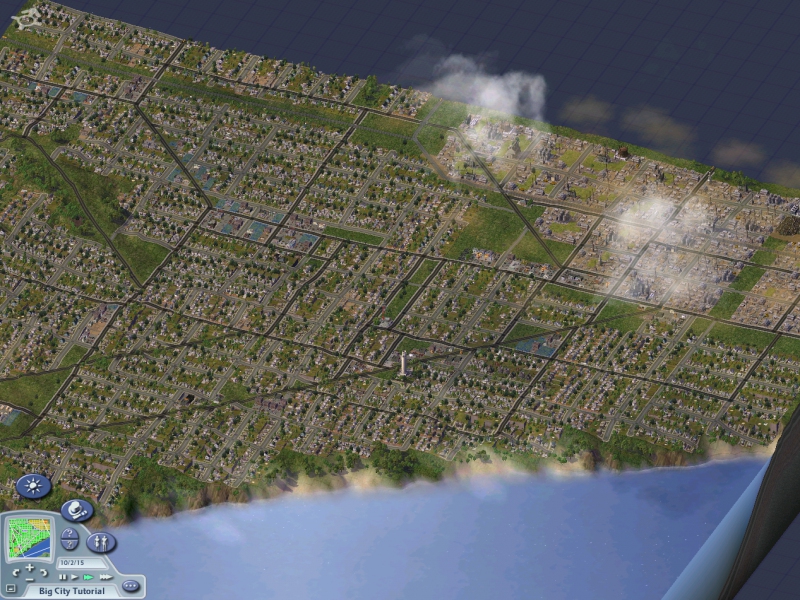
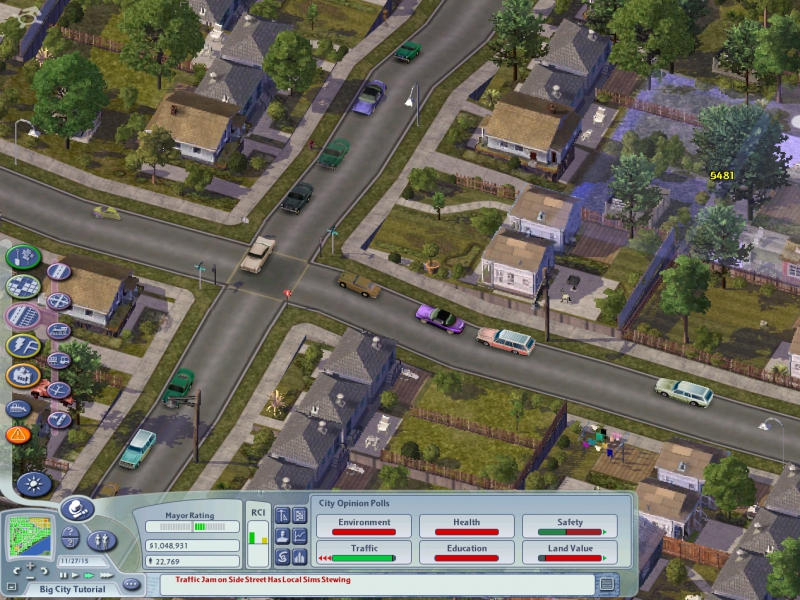
The installer for SimCity 4 Deluxe has been updated
to use the newest version of Wine, as well as having added Steam
support for newer purchasers of this fantastic, old-school game.
Improvements for Yosemite
Just a small update for WineBottler.
False positives for AV
As noted earlier, the no-op file winemenubuilder.exe triggered some anti virus checks. Starting with 1.7.34 it should pass them all.
Speaking of viruses
Please download WineBottler directly from
http://winebottler.kronenberg.org – there are some “download”-websites”
that bundle WineBottler into an installer that will install adware on your system, too.
UI Improvements
Tweaking the new look and adding it to the progress window.
Bugfixing
Fixed a bug, that prevented WineBottler from finishing custom Apps on some Yosemite Macs.
Pushing Wine.app to 1.7.34.
Wine changelog: winehq.org
If you should still have issues with AV or generating custom Apps still freezes for you, please let me know.
By the Way:
You can find news on WineBottler now on weibo and vk, too!
An update to the Adobe Photoshop CS6 installer has
just come out that fixes the missing fonts on certain systems. If you
were experiencing this issue, then you will want to delete your virtual
drive for PS, and reinstall using the official installer.
CrossOver allows you to install many popular Windows applications
and games on your Intel OS X Mac or Linux PC. CrossOver includes an easy to use,
single
click interface, which makes installing Windows software simple and
fast. Once installed, your application integrates seamlessly in OS X. or Linux.
Just click
and run your application directly from the OS X Finder or Linux Menu Bar. Clicking a
Windows file or document - including email attachments - will launch the
appropriate
Windows program, allowing you to work on the files. Best of all, you do
it all easily and affordably, without needing to purchase a Microsoft operating
system
license.
Many people still are not aware that CodeWeavers has international pricing for CrossOver, Here is a international price sheet from a older post here.
Click on the above image and it will enlarge so you can see the text in this price list.
Most sites list the American or United Kingdom price when this is the correct price for American U.K buyers the price will change depending upon where you live actually. I personally live in the Southern Philippines and at this time a full copy of CrossOver cost just $15.95 and then you can apply a promo code on top of that and get a further discount. look at the bottom of any post here and you will see that I encourage people to use ( TOM23 ) and get a instant 20% discount.
Here is a screenshot ( click to enlarge ) of the prices of CrossOver Mac in the Philippines with the ( TOM23 ) promo code applied. The price in India, China, Russia etc etc will be similar to the prices shown here.
I'm also adding in the 20% promo code discount, don't forget to apply ( TOM23 ) and get CodeWeavers CrossOver Mac or Linux for as low as $7.46 today !!!
Run Microsoft Windows Applications and Games on Mac, Linux or ChromeOS save up to 20% off CodeWeavers CrossOver+ today.
CodeWeavers recently released CrossOver 14.0.3 for Linux and Mac.
Gaming performance continues to advance with this release. The full
change log is provided below.
You Can use promo code TOM23 in CodeWeavers store and save 20% off the normal retail price.
14.0.3 CrossOver - November 17, 2014
Application Support:
A bug has been fixed which allows MetaTrader 4 to work with CrossOver.
A bug has been fixed which allows Rift to work with CrossOver.
Run Microsoft Windows Applications and Games on Mac, Linux or ChromeOS save up to 20% off CodeWeavers CrossOver+ today.
CodeWeavers recently released CrossOver 14.0.1 for Linux and Mac.
Gaming performance continues to advance with this release. The full
change log is provided below.
You Can use promo code TOM23 in CodeWeavers store and save 20% off the normal retail price.
14.0.1 CrossOver - October 30, 2014
Mac OS X:
Fixed a bug which caused Steam to sometimes fail to launch
games after the 'Play' button was pressed.
Application Support:
Fixed installation for certain version of Quicken 2015.
Mouse-look should now work in Guild Wars 2.
Run Microsoft Windows Applications and Games on Mac, Linux or ChromeOS save up to 20% off CodeWeavers CrossOver+ today.
CodeWeavers recently released CrossOver 14.0.0 for Linux and Mac.
Gaming performance continues to advance with this release. The full
change log is provided below.
You Can use promo code TOM23 in CodeWeavers store and save 20% off the normal retail price.
14.0.0 CrossOver - October 16, 2014
Mac OS X:
CrossOver's Graphical User Interface has been entirely
redone. Windows applications can now be easily launched from
within CrossOver itself, and much of the rest of the user
interface has been simplified.
The CrossOver Software Installer more prominently displays
all search results when a user searches for an application to
install, making it easier to find the desired application.
Linux:
CrossOver can now automatically detect and install missing
packages on many Linux distributions, making it easier to get
the packages you need. CrossOver will attempt to install a
minimal set of packages on first-run, and will also attempt to
install packages needed by specific Windows applications when
those Windows applications are installed.
CrossOver has fixed a bug with the way it uses threads in GTK+
(this bug fix allows CrossOver to run on Ubuntu 14.10).
CrossOver should now detect proxy settings on systems which
use GSettings.
Fixed proxy detection for certain KDE configurations.
Application Support:
New Supported Applications:
CrossOver now supports Quicken 2015 on both OS X and Linux.
CrossOver now supports Hearthstone on Linux.
CrossOver now supports Cube World on both OS X and
Linux.
CrossOver now supports Path of Exile on both OS X and
Linux.
CrossOver now supports Warcraft III on Linux.
CrossOver now supports Euro Truck Simulator 2 on both OS X
and Linux.
CrossOver now supports Terraria on both OS X and Linux.
CrossOver now supports South Park: The Stick of Truth on
both OS X and Linux.
CrossOver now supports Xenonauts both OS X and Linux.
Bug fixes:
The "Save a copy as" feature in Quicken 2014 is now
functional.
Quicken 2014 is now able to validate data files.
Quicken 2014 now displays its update notice
correctly.
Quicken 2014 will now remember when its windows are
re-sized.
Scrolling using a trackpad on an Apple laptop will now
work in Quicken 2014.
Formatting of message timestamps in Outlook 2010 has
been improved.
Many games - Deus Ex: Human Revolution - no longer
require the Legacy X Window System to run on OS X.
CrossOver's built-in web browser has improved and now
loads more sites, including the U-Haul website and the
website for the United States Copyright Office.
Steam can now be hidden reliably on OS X.
Legacy Family Tree 7 will now run under CrossOver on OS X.
Printing will now work when MathType is installed
alongside Word 2007.
Other Improvements:
CrossOver 14.0.0 is based on Wine 1.7.25 which includes over 5,000 patches
that fix bugs and add greater Windows compatibility.
Run Microsoft Windows Applications and Games on Mac, Linux or ChromeOS save up to 20% off CodeWeavers CrossOver+ today.


 people
from around the world in a variety of combat situations / simulations.
Games are more about 'team sport' and 'high performance' than about
solving riddles or achieving simple goals. And gamers are taking this
'team thing' seriously as there is now a Professional Gaming League
for most of these games. If your parents ever told you that you
couldn't make a living playing video games, THEY LIED TO YOU. The top
gamers now make six figure incomes playing games and are treated like
'rock stars' at these events.
people
from around the world in a variety of combat situations / simulations.
Games are more about 'team sport' and 'high performance' than about
solving riddles or achieving simple goals. And gamers are taking this
'team thing' seriously as there is now a Professional Gaming League
for most of these games. If your parents ever told you that you
couldn't make a living playing video games, THEY LIED TO YOU. The top
gamers now make six figure incomes playing games and are treated like
'rock stars' at these events. 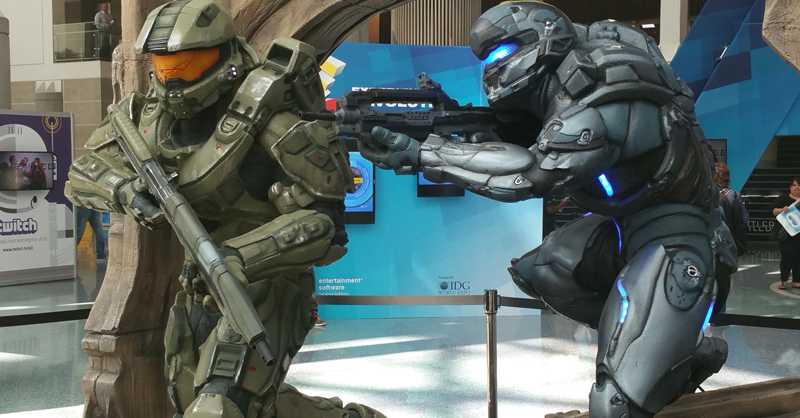 However, you might still be able to play these titles on your Mac or
Linux computer when they are released later this year using
However, you might still be able to play these titles on your Mac or
Linux computer when they are released later this year using 
 earning
victory usually requires practice. PRACTICE??? Who's got time for
practice? I'm lucky with my schedule that I even get to play games at
this stage of my life (husband, father, suburbs, three dogs). So, I'll
be sticking to random teams – for now. I just wish that the time I
spent in my youth on Atari 2600 and Nintendo wasn't so largely wasted leaving me unprepared for today's gaming.
earning
victory usually requires practice. PRACTICE??? Who's got time for
practice? I'm lucky with my schedule that I even get to play games at
this stage of my life (husband, father, suburbs, three dogs). So, I'll
be sticking to random teams – for now. I just wish that the time I
spent in my youth on Atari 2600 and Nintendo wasn't so largely wasted leaving me unprepared for today's gaming. 

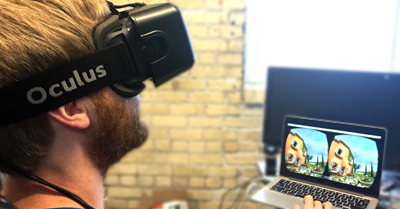
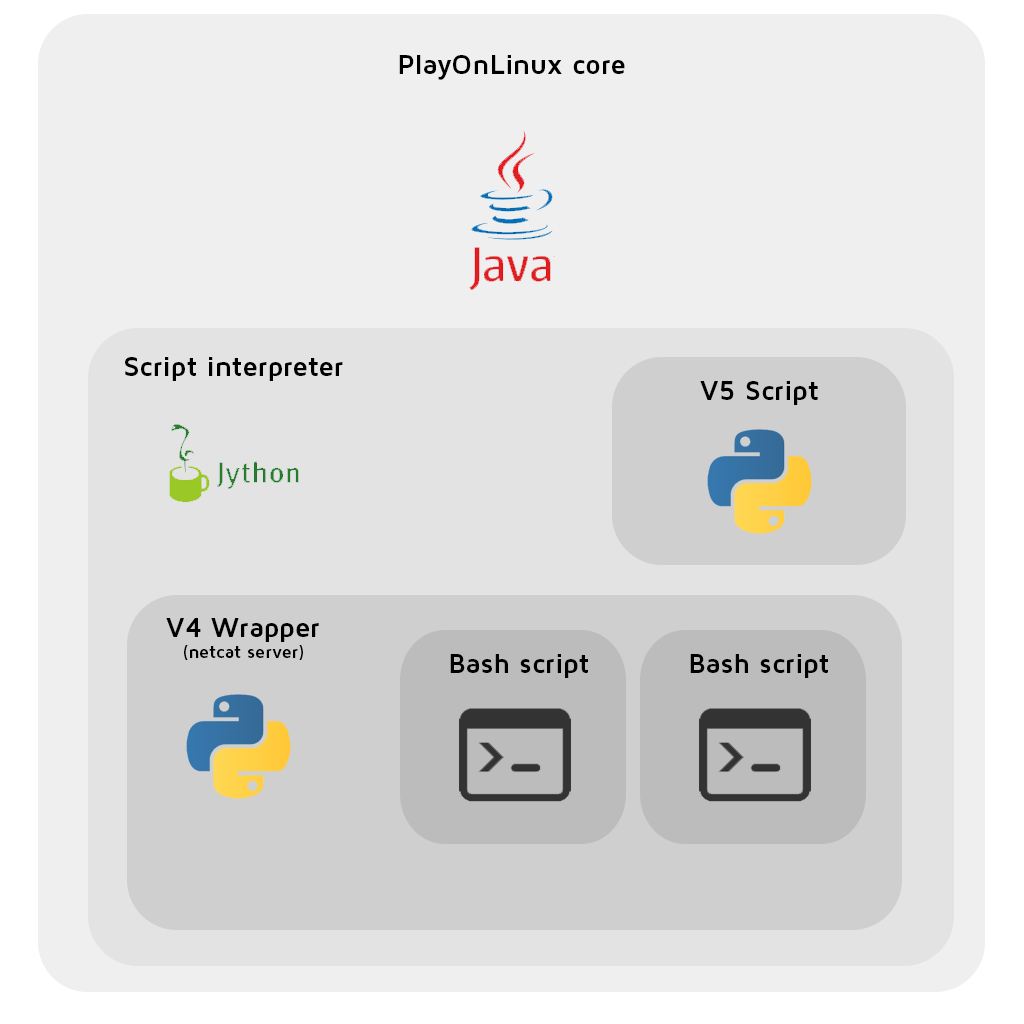


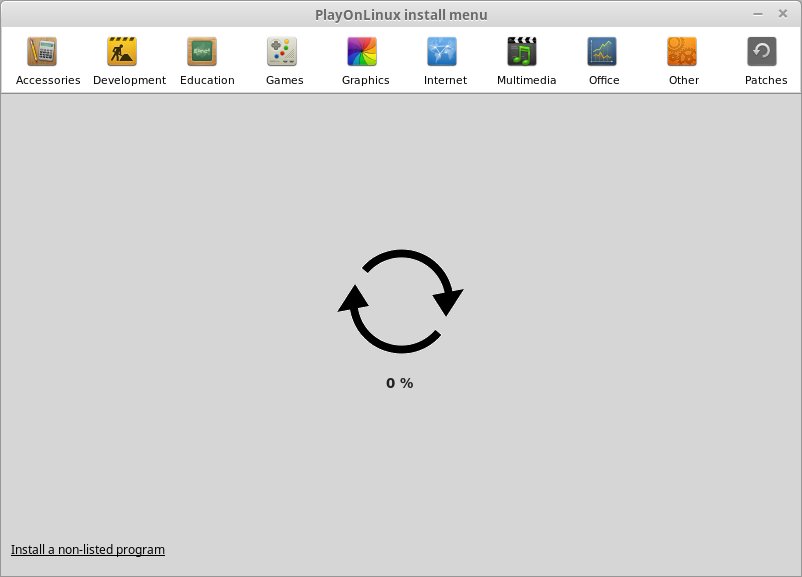
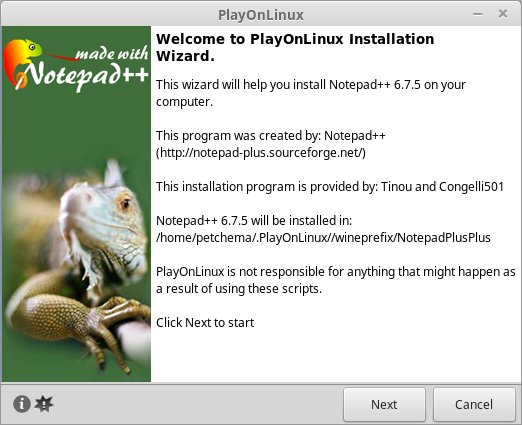
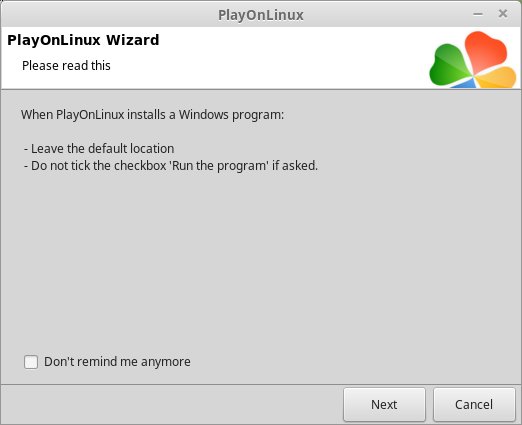
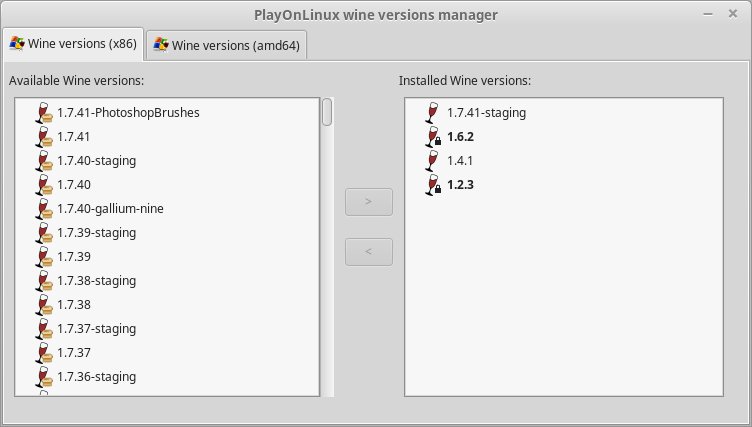
 .
.