Pages

Friday, January 11, 2019

Working on Wine Part 3 Using Wine as a Developer

Andrew Eikum a CodeWeavers employee and Wine developer is writing a series of post to introduce people to Wine usage and development.

About This Guide


This is a series of guides intended to introduce software developers to the Wine ecosystem. It will cover what Wine is, how to use Wine, how to debug Wine, how to fix Wine, and what to do with your fix once you've made it.

The guide will be published throughout January.

  • Part 1 describes what Wine is and provides a short description of various popular forks of Wine.
  • Part 2 describes Wine's build process.
  • Part 3 describes how to use Wine as a developer.
  • Part 4 describes how to debug Wine in general.
  • Part 5 describes Wine's source tree layout and how to edit the source.
  • Part 6 describes how you can send your work upstream.

Now that you have Wine built, try running it:

    $ ./wine.win64/wine winecfg
 
This should pop up a winecfg dialog. If not, something has gone wrong.
The wine executable in the 64-bit build directory is your primary interface for running Wine. Use it to install whatever software you are trying to get functional:

    $ cd ~/software/MyFavoriteApp/
    $ ~/src/wine.win64/wine Setup.exe


Wine prefixes


On first run, Wine sets up a virtual Windows filesystems containing a C: drive and a bunch of other files to mimic a real Windows installation. The virtual Windows filesystem is called a "prefix." The default Wine prefix is located at $HOME/.wine/. You can override this location with the WINEPREFIX environment variable. This can be useful to set up experimental prefixes which you can destroy later without affecting other prefixes.

A typical Wine prefix looks like this:

    ./dosdevices/
                 c: -> ../drive_c
                 com1 -> /dev/ttyS0
                 com2 -> /dev/ttyS1
                 com3 -> /dev/ttyS2
                 com4 -> /dev/ttyS3
                 d:: -> /dev/sr0
                 z: -> /
    ./drive_c/
              Program Files/
              users/
              windows/
    ./system.reg
    ./userdef.reg
    ./user.reg

The dosdevices folder contains DOS drives in the form of symlinks to folders or special devices. When an application tries to open C:\some_file.txt, the c: symlink here will cause Wine to instead open $WINEPREFIX/dosdevices/../drive_c/some_file.txt.

The drive_c folder is where the contents of a typical Windows installation live, like the Windows folder and the Program Files folders.

The .reg files contain Wine's representation of the Windows registry. These are stored in a format similar to the Windows regedit .reg format. Rather than use regedit, you can actually edit these files with a text editor directly to modify the registry (though you shouldn't do that while Wine is running).
The application you installed is probably located in Program Files. You can change into that directory and go poke around its files, just like you could on Windows. You can also run Wine from that directory:

    $ cd '~/.wine/drive_c/Program Files (x86)/Steam/'
    $ ~/src/wine.win64/wine Steam.exe

If you are running applications directly like this, be mindful of your working directory. While many applications aren't sensitive to this, some assume that you launched it from the directory specified in the shortcut file that it created. This is not always the same directory in which the executable lives.

Running Wine from a build directory


If you run Wine from a build directory, like we have been here, then Wine will look up its library files from that build directory. This is as opposed to running from a system installation, where it will look up libraries in /usr/lib/wine, for example. This means that you can make changes to one Wine component, build just that one component, and then run Wine and observe the changes. No need for a top-level make or an install round trip.

Native vs built-in components


By now, you should understand that Wine is capable of running arbitrary software that was written for Windows. This includes software and libraries that Microsoft has written. Many of the components that Windows applications depend on are distributed with the application in the form of "redistributables," which contain Microsoft-written libraries. While these weren't intended for Wine, they are Windows applications like any other, so they do work in Wine.

Typically these redistributables drop DLLs into C:\windows\system32. When Wine is asked to load some DLL from system32, it will notice that these libraries are not Wine DLLs and will determine what to do on a per-library basis. The technical details of this are beyond the scope of this guide, but you can control whether Wine will prefer the Microsoft-owned DLLs (called "native") or the Wine-created DLLs (called "built-in") by using winecfg.

Since Wine tries to reimplement Microsoft code, these native libraries are by definition "correct." And unfortunately, Wine is not yet perfect. As a result, software running against native libraries will often work better than when running against Wine DLLs. This can be useful for end-users who just want to run their software.

However, you must be very careful when using native DLLs as a developer. Wine developers must never reverse-engineer actual Microsoft-owned code, and that includes using native libraries and using Wine's debugging features to determine what they are doing. There are no exceptions to this rule, so please understand the native vs built-in state of any libraries you are working on or debugging. Any developer found to be reverse-engineering in this manner may be banned from contributing to Wine. The correct way to determine the behavior of native components is to write software like any other application developer and test the behavior of those components as a black box. This will be discussed more later in these guides.

Fake DLLs and .dll.so files


On a Windows system, system libraries are installed into C:\windows\system32 (and C:\windows\syswow64 for 32-bit DLLs on a 64-bit system). Wine also installs DLLs into this directory. Some applications actually open these files directly and expect them to be valid Windows DLLs. However, Wine does not actually use the DLL file format for most of its own libraries. Instead these "fake DLLs" simply instruct Wine to load its real libraries, in whatever format is native to the underlying operating system (e.g. ELF).

As discussed above, Wine's libraries live in the build tree if you are running Wine from the build tree. They are named with the .dll.so extension. If Wine was installed someplace, then they will live in the lib/wine directory, for example in /usr/lib/wine and /usr/lib32/wine/. If you make changes to a Wine library and want to replace a single component in an existing Wine installation, you can just copy the .dll.so file into the appropriate location. Modifying the fake DLL in the Wine prefix will do nothing useful.

Tip: Virtual Desktop


Wine can be configured to run inside of a "virtual desktop." This is a single window, inside of which all of the Windows applications run. This can be extremely useful when testing fullscreen games, as this will prevent them changing the display resolution and you can still access other windows on your desktop. See the Graphics tab in winecfg.

Full Article

Run Microsoft Windows Applications and Games on Mac, Linux or ChromeOS save up to 20% off  CodeWeavers CrossOver+ today.

Tuesday, January 8, 2019

Working on Wine Part 2 Wine Build Process

Andrew Eikum a CodeWeavers employee and Wine developer is writing a series of post to introduce people to Wine usage and development.

This is a series of guides intended to introduce software developers to the Wine ecosystem. It will cover what Wine is, how to use Wine, how to debug Wine, how to fix Wine, and what to do with your fix once you've made it.

The guide will be published throughout January.

  • Part 1 describes what Wine is and provides a short description of various popular forks of Wine.
  • Part 2 describes Wine's build process.
  • Part 3 describes how to use Wine as a developer.
  • Part 4 describes how to debug Wine in general.
  • Part 5 describes Wine's source tree layout and how to edit the source.
  • Part 6 describes how you can send your work upstream.

Wine is effectively an operating system, including all of the libraries that a Windows system provides, such as support for 3D graphics, networking, audio, and a graphical user interface, as well as dozens of support libraries that software can use like XML parsers, file format readers and writers, multimedia playback, and much more. As such, it is a very complex piece of software. Building Wine is not a trivial task.

Much of this process depends on your particular operating system, and operating system version. This guide will not get into particulars for every operating system, but instead describe the process in general. Specific guides are available at the WineHQ Wiki.

Acquiring Wine


While you can grab the Wine source from many places, the only useful place for Wine developers is to clone the Wine Git repository.

Wine uses the typical configure && make && make install process of other autoconf-based software projects.

Choosing 32-bit or 64-bit


Microsoft Windows started shipping support for 64-bit software in the mid-2000s. Wine also has support for running 64-bit Windows software. The way this works in Wine is you effectively build it twice: once for 64-bit software and again for 32-bit software. Wine will choose the correct library architecture for a given executable at runtime.

Unfortunately, building for both architectures can be complicated on Linux. Many Linux distros have poor support for installing software for multiple architectures. Since most of the software that distros support is open source, and since open source software can be built for any architecture, there is little reason to support alternate architectures. However, the Windows software that you want to run is likely to require 32-bit support. Distros that do provide multi-arch support often do it only for Wine. To be blunt, that's a fairly small usecase, and so these 32-bit libraries are often treated as second class citizens.

macOS is even worse. Apple is dropping 32-bit support entirely sometime in 2019. No one knows exactly what this will mean for users of unsupported, 32-bit-only software, including Wine users, but it doesn't look good.

In any case, 32-bit support is required to run most Windows software, so it is effectively required if you want to build Wine. It is also strongly recommended that you build 64-bit Wine as well, since more and more Windows software is being built for the 64-bit architecture. This guide will show you how to build both.

Building Wine


By default, configure will run in 32-bit-only mode. To support both 64- and 32-bit software (called "WoW64"), we want to first build 64-bit Wine and then make a build of 32-bit Wine which references the 64-bit Wine.

Wine's configure script will search your system for the libraries Wine needs to run Windows software. It takes a while to run. At the bottom of the output, it will warn you about any missing packages. Any missing packages that are critical will be marked with WARNING text. You are strongly suggested to install these missing packages before continuing, or your Wine may be missing critical features.

For example:

    $ cd src/
    $ mkdir wine.win64
    $ cd wine.win64
    $ ../wine/configure --enable-win64
    [ much truncated output ]
    configure: vkd3d 64-bit development files not found, Direct3D 12 
won't be supported.
    configure: WARNING: libjpeg 64-bit development files not found, JPEG 
won't be supported.


You can see my system is missing the 64-bit VKD3D package. This is OK, since I don't care about Direct3D 12 support for the applications that I want to run. On the other hand, if I did want to run some Direct3D 12 games, then I would need to fix this problem and re-run configure.
However, it is also missing the libjpeg package. This is bad news. Lots of applications will require JPEG support and may behave badly if it fails, so Wine gives me a big WARNING. I should install 64-bit libjpeg and re-run configure.

Continue installing packages and re-running configure until you are happy with the missing package state. Then build Wine with make. A typical Wine build for a single architecture can take between 20 and 60 minutes, depending on the speed of your CPU and hard drive. It is strongly recommended to run make with a -jN flag appropriate to your CPU count. ccache will also significantly speed up future Wine builds. You can build Wine with ccache using CC='ccache gcc' at configure-time.

Hopefully your build will complete without errors. At this point, you can run 64-bit Windows applications. However, most Windows software does require 32-bit support at some point, often for the installer or some background process and services. So let's get a 32-bit build started, using the same process:


    cd ../
    mkdir wine.win32
    cd wine.win32
    ../wine/configure --with-wine64=../wine.win64
    [ much truncated output ]
    configure: vkd3d 32-bit development files not found, 
Direct3D 12 won't be supported.
    configure: WARNING: libjpeg 32-bit development files not found, 
JPEG won't be supported.
    configure: WARNING: libpng 32-bit development files not found, 
PNG won't be supported.
    configure: WARNING: libxml2 32-bit development files not found 
(or too old), XML won't be supported.


Oh my, far more errors here. You need to install the 32-bit versions of all of the same packages. How to do this, and what packages are available in 32-bit, is going to vary widely between distros, and we won't cover this here. Refer to the Wine Wiki for your particular distro.
Again, when you are happy with the state of your packages, run make and go grab lunch. When it's done, you will now be able to run 64- and 32-bit Windows applications in Wine.

Building crosstests


The last stumbling block is cross-compiling the tests so that they can be run on Windows. This isn't technically required the Wine testbot will build a patch file and run it on Windows for you—but it will greatly speed up your development process if you can build the tests locally and run them in a Windows VM that you control.

To build the crosstests, you must have mingw-w64 installed at configure-time. Availability will vary by distro. Run make crosstest at the top-level of the Wine tree to build all of the crosstests.

Full Article

Run Microsoft Windows Applications and Games on Mac, Linux or ChromeOS save up to 20% off  CodeWeavers CrossOver+ today.

Saturday, January 5, 2019

Unofficial Wineskin Winery-1.8.2

The following Version of Winery I consider stable so I'm adding it as a release.

Functions on OSX10.8 > macOS10.14 including the EngineRepacking feature.
This was verified by downloaded and Engine and creating a Wrapper on OSX10.8.

Link to source code

Run Microsoft Windows Applications and Games on Mac, Linux or ChromeOS save up to 20% off  CodeWeavers CrossOver+ today.

Friday, January 4, 2019

Wine development release 4.0-rc5 is now available for Linux FreeBSD and macOS

Wine development release 4.0-rc5 is now available for Linux FreeBSD and macOS

What's new in this release:
  • Bug fixes only, we are in code freeze.
The source is available now. Binary packages are in the process of being built, and will appear soon at their respective download locations.


Bugs fixed in 4.0-rc5 (total 14):

  32218  LTSpice: Objects not resized when the window is resized
  32221  LTspice: component drawing issues when moving
  33719  comctl32:propsheet custom window proc test failure
  34334  MetaTester 5 never sends or receives data
  38721  Resident Evil 5 Gold Edition (Steam) fails to run
  39959  Growtopia v2.20->v2.14 fails (was v2.11 fails) to  run with unhandled exception on x86-64 (2.09 & 2.13 did run ok)
  44485  Delphi 7 debugger generates new exceptions by itself
  45719  comctl32:treeview test_right_click depends on mouse pointer position
  45917  battle.net launcher and mouse position on high DPI monitor
  45984  Skyrim Special Edition does not get past loading screen on high core count or high memory systems
  46266  tzres is constantly being loaded/unloaded when TimeZone information is queried.
  46328  Installer for Tanglet 1.5.3 crashes at target directory selection
  46352  TreePad X Enterprise 12GB (single user) v7.17.0: Generates Error on Startup
  46353  TreePad X Enterprise 12GB (single user) v7.17.0: Horizontal Ruler/Scale Is Different on Startup and Margins Are Different on Open Database

Run Microsoft Windows Applications and Games on Mac, Linux or ChromeOS save up to 20% off  CodeWeavers CrossOver+ today.

Thursday, January 3, 2019

Working on Wine Part 1 The Wine Ecosystem

Andrew Eikum a CodeWeavers employee and Wine developer is writing a series of post to introduce people to Wine usage and development.

About This Guide


This is a series of guides intended to introduce software developers to the Wine ecosystem. It will cover what Wine is, how to use Wine, how to debug Wine, how to fix Wine, and what to do with your fix once you've made it.

The guide will be published throughout January.
  • Part 1 describes what Wine is and provides a short description of various popular forks of Wine.
  • Part 2 describes Wine's build process.
  • Part 3 describes how to use Wine as a developer.
  • Part 4 describes how to debug Wine in general.
  • Part 5 describes Wine's source tree layout and how to edit the source.
  • Part 6 describes how you can send your work upstream.


What is Wine?


Wine is an open source reimplementation of Microsoft's Windows operating system on top of various Unix operating systems. It primarily targets Linux and macOS, but can also be run on other systems like FreeBSD, NetBSD, and Solaris. What this means for users is that they can run software that was made for Windows on other operating systems.

Wine does not contain any Microsoft-owned code, so there is no need for a Windows license to run Wine. Instead, the Wine developers have rewritten components of the Windows operating system such that software run in Wine will think it is running on Windows, even though it is actually running on Linux, for example.

As a simple example, consider the Windows CreateFile API. On Windows, an application could call:

    CreateFileA(
        "C:\\some_file.txt",   //lpFileName
        GENERIC_WRITE,         //dwDesiredAccess
        0,                     //dwShareMode
        NULL,                  //lpSecurityAttributes
        CREATE_ALWAYS,         //dwCreationDisposition
        FILE_ATTRIBUTE_NORMAL, //dwFlagsAndAttributes
        NULL                   //hTemplateFile
    );
 
Wine will take that CreateFileA call and turn it into a Unix open call:
    open(
        "/home/aeikum/.wine/drive_c/some_file.txt", //path
        O_WRONLY | O_CREAT,                         //oflag
        0644                                        //creation mode
    );
 
The file handle will be returned back to the application, which can then write to the file with a similar implementation mapping WriteFile to Unix's write. Of course the actual implementation of CreateFileA in Wine is far, far more complicated than this (consider the path conversion, for example), but this gives you the gist of what Wine does.

Wine Forks


Since Wine is an open source project, anyone is free to make copies of it and modify it to suit their needs or the needs of their users. There are hundreds of Wine forks, but a few of them have gained prominence and are described here.

"Upstream" Wine


Website: https://www.winehq.org/
This is the "official" version of Wine, from which all other forks are derived. When someone refers to "Upstream" Wine, they are talking about this project. Wine is primarily focused on correctness. Wine contains extensive unit tests which demonstrate the behavior of Windows, and requires that most patches provide tests. All patches must pass the existing tests to be accepted. There is also a strong focus on code quality. Wine is a very large project (it is literally an entire operating system, including a GUI), so technical debt is strongly avoided to keep the project maintainable going forward.

Wine Staging


Website: https://wiki.winehq.org/Wine-Staging
However, Wine's strict patch acceptance requirements means that lots of patches that are unproven, wrong, or dangerous, but useful for users today, would languish in private forks or on the bug tracker. The Wine Staging project (also spelled "wine-staging") is an attempt to gather and maintain these useful patches so users can easily take advantage of them. The Wine Staging community also works to upstream these patches into Wine, so their benefits become available for all Wine users and forks, while also lowering Wine Staging's own maintenance burden. It can also serve as a "testing grounds" for patches which are difficult to prove with unit tests before they are accepted upstream.

CrossOver


Website: http://www.codeweavers.com/
CrossOver is a commercial fork of Wine sold by the CodeWeavers company. It contains many patches that are application-specific hacks and not appropriate for upstreaming. CodeWeavers also maintains an application compatibility database which will pre-install some software components and otherwise modify the Wine environment so that certain applications work better. However, CodeWeavers strongly prefers to implement features correctly and send that work to upstream Wine. CodeWeavers employees perform a significant portion of the work done on Wine.

Proton


Website: https://github.com/ValveSoftware/Proton/
Proton is a fork of Wine created by the Valve software company, which is integrated with their Steam software, a major video game and software distribution platform. Proton is focused on providing a seamless experience for Steam users to run Windows titles on Linux. Like with CrossOver, most of the contributions to Proton are also sent to upstream Wine.

Other forks


There are many, many other forks of Wine. Some are packaged with commercial software and sold as macOS and Linux software. Others are one-off forks created by users for a specific application.

Developing for Wine


Wine isn't perfect, and it's likely you will run into an inadequacy or a bug in your day-to-day Wine usage. Perhaps you are interested in fixing Wine so it will run your application or game, or maybe your employer would like to use Wine and pay you to fix it. This guide will introduce you to how you can build, debug, and fix Wine, and how to send those fixes upstream.

Full Article

Run Microsoft Windows Applications and Games on Mac, Linux or ChromeOS save up to 20% off  CodeWeavers CrossOver+ today.

Wednesday, January 2, 2019

Q4Wine 1.3.11 has been released for Linux and Mac OSX

Q4Wine is a Qt GUI for Wine. It will help you manage wine prefixes and installed applications. It currently supported on Linux, FreeBSD and Mac OS X platforms.

Q4Wine was initially written by Alexey S. Malakhov aka John Brezerk. General idea comes from WineTools scripts which were initially written by Frank Hendriksen.


General features are:

  • Can export Qt color theme into wine colors settings;
  • Can easy work with different wine versions at same time;
  • Easy creating, deleting and managing prefixes (WINEPREFIX);
  • Easy controlling for wine process;
  • Autostart icons support;
  • Easy cd-image use;
  • You can extract icons from PE files (.exe .dll);
  • Easy backup and restore for managed prefixes;
  • Winetriks support;
  • And more: Explore it!;
 Changelog for 1.3.11 :

Fixed:
  • Display of Valve Proton in Processes view BUG-138;
  • Improve all dialogs of choosing files BUG-139;
  • Allow Stop Wine action to kill Valve Proton in Processes view BUG-138;
Updated:
  • Code cleanup: drop Qt4 support;

Run Microsoft Windows Applications and Games on Mac, Linux or ChromeOS save up to 20% off  CodeWeavers CrossOver+ today.

Tuesday, January 1, 2019

Phoenicis PlayOnLinux 5.0 - Alpha 2 released

Hi everyone!

We wish a happy and successful year! For this first day of 2019, we are glad to release the second alpha version of Phoenicis PlayOnLinux 5.


A new wine builder

We have rewritten from scratch our winebuild platform. To make it short, it is more reliable, more transparent, easier to setup and cross-platform compatible. Any project that needs to use wine could now potentially use it and take advantage of the 1828 different builds. (We admit that some of them are outdated, though).

The winebuild project is open source, uses containers. You can install it on your machine in no time if you want to build wine by yourself.

Support of new wine distributions

Speaking about wine builds, we now support 4 wine distributions: 

  • Upstream wine builds are vanilla and unmodified wine (1)
  • Staging wine builds are the wine builds patched by wine-staging
  • Dos support wine builds contains wine and dosbox. (See the next feature)
  • CX contains a wine version patched by codeweavers

We plan to support proton in the next weeks.

All these wine build can be compiled directly through https://github.com/PhoenicisOrg/phoenicis-winebuild/.


(1) Except the very old versions that have a specific suffix is their names, like 1.5.3-heap_allocation_v2-avoid_deadlock, but we are going to move them anyway.

DOS Support

Winebuild now provides dos_support distribution. The way these wine binaries works is very simple: Wine launch script has been modified to detect if the given .exe is Win32 or a DOS executable. If it is a DOS executable, it will set-up a dosbox configuration that will behave consistenly with wine:

  • mount drive_c as C: on dosbox
  • if a autoexec.bat file exists inside the prefix, it will run it
  • support of custom DOS configuration per prefix
  • ...

The script framework has also been modified so that you can tweak some dosbox settings directly from a script. Here is an exemple of "advanced" script

1
2
3
4
5
6
7
8
9
wine.run(wine.prefixDirectory() + "/drive_c/The Elder Scroll 1: Arena/Arena106.exe"); // Arena106.exe is a w32 fine, wine will run
 
wine.dosbox()
    .memSize(64)
    .renderAspect(true)
    .cpuCycles("max 95% limit 33000")
    .renderFrameSkip(1);
 
wine.run(wine.prefixDirectory() + "/drive_c/The Elder Scroll 1: Arena/ARENA.BAT"); // ARENA.BAT is obviously a MS-DOS file, dosbox will run


GoG support

We've added a way to add a web browser view directly inside script wizards. Thanks to this feature, scripts can now authenticate to any website.

Phoenicis can automatically download and install GoG games from your account, as POLv4 used to do during the past years.


A complete demonstration video of gog.com support: https://www.youtube.com/watch?v=Fopp-x9Fz3g&feature=youtu.be

Also, we have made a script pattern for all GoG games: it has drastically simplified them from POLv4. The script are so much easier that we believe that they will be a lot more maintained.

POLv5 script POLv4 script
1
2
3
4
5
6
7
8
9
10
11
12
13
14
15
16
17
include(["engines", "wine", "quick_script", "gog_script"]);
 
var installerImplementation = {
    run: function () {
        new GogScript()
            .name("Teenagent")
            .editor("")
            .applicationHomepage("")
            .author("Quentin PÂRIS")
            .gogSetupFileName("teenagent/en1installer0")
            .category("Games")
            .wineVersion(LATEST_DOS_SUPPORT_VERSION)
            .wineDistribution("dos_support")
            .executable("TEENAGNT.EXE")
            .go();
    }
};
1
2
3
4
5
6
7
8
9
10
11
12
13
14
15
16
17
18
19
20
21
22
23
24
25
26
27
28
29
30
31
32
33
34
35
36
37
38
39
40
41
[ -z "$PLAYONLINUX" ] && exit 0
source "$PLAYONLINUX/lib/sources"
  
GOGID="teenagent"
PREFIX="Teenagent_gog"
WORKING_WINE_VERSION="1.6.2-scummvm_support"
  
TITLE="GOG.com - Teenagent"
SHORTCUT_NAME="Teenagent"
  
POL_GetSetupImages "http://files.playonlinux.com/resources/setups/$PREFIX/top.jpg" "http://files.playonlinux.com/resources/setups/$PREFIX/left.jpg" "$TITLE"
  
POL_SetupWindow_Init
POL_SetupWindow_SetID 1214
POL_Debug_Init
  
POL_SetupWindow_presentation "$TITLE" "Metropolis Software" "http://www.gog.com/gamecard/$GOGID" "Pierre Etchemaite" "$PREFIX"
  
POL_Call POL_GoG_setup "$GOGID" "e5e3a8cd9bbbcec5a956d1f41281b4af"
  
POL_Wine_SelectPrefix "$PREFIX"
POL_Wine_PrefixCreate "$WORKING_WINE_VERSION"
  
POL_Call POL_GoG_install
  
POL_SetupWindow_VMS "1"
  
cat <<_EOFCFG_ > "$WINEPREFIX/drive_c/GOG Games/Teenagent/teenagent.polcfg"
[teenagent]
platform=pc
gameid=teenagent
description=Teen Agent (DOS/English)
language=en
guioptions=sndNoSpeech lang_English
_EOFCFG_
  
POL_Shortcut "teenagent.polcfg" "$SHORTCUT_NAME" "$SHORTCUT_NAME.png" "" "Game;AdventureGame;"
  
POL_SetupWindow_Close
  
exit 0


We are planning to add tons of GoG games in the library so stay tuned!

Installation of verbs directly inside a container

You can now install verbs directly from a wine container.

Standalone packages

  • We are now providing standalone packages that can work on any distribution without the need to install JDK runtime. These packages also remove all the feature that we don't need from the JDK. In the future, there will be probably two sorts of packages, but we want to make things easier for you for now.
  • We now provide macOS packages
  • We also support flatpak


I'd like to thank once again all the developers that helped us during the past weeks, plata, madoar, and also all those of you that contributed by reporting bugs, suggesting improvements, or tested phoenicis-winebuild.

Our next goals is to focus on prefix management (change of wine version inside a prefix, add debugging tools, etc...) and performance optimization.

If you have any suggestion or encounter any bug, we encourage you to come in our Github page: https://github.com/PhoenicisOrg/. This version is still at alpha-stage, so please be indulgent.

I also take the opportunity of this news to also announce you that PlayOnLinux and PlayOnMac 4.3.4 has been released. They have been updated to support the new winebuild system, and the different windows of the application have been made resizable. It should fix the HDPI issues some of you were encoutering. We continue to maintain these versions until you are 100% satisfied with POLv5

Download packages:


Stay tuned, the best is yet to come!

Run Microsoft Windows Applications and Games on Mac, Linux or ChromeOS save up to 20% off  CodeWeavers CrossOver+ today.

Saturday, December 29, 2018

Wine development release 4.0-rc4 is now available for Linux FreeBSD and macOS

Wine development release 4.0-rc4 is now available for Linux FreeBSD and macOS

What's new in this release:
  • Bug fixes only, we are in code freeze.
The source is available now. Binary packages are in the process of being built, and will appear soon at their respective download locations.


Bugs fixed in 4.0-rc4 (total 10):

  35603  Wine64 build produces extra warning in setupapi comparing to Wine32 build
  40884  Lord of the Rings Online crashes instantly or hangs on start with OSSv4.
  42719  Natsuiro Asagao Residence (demo): complains about timezone settings.
  45805  IoCreateDriver failed to insert driver L"\\Driver\\WineHID" in tree
  46194  Windows PowerShell Core 6.2 Preview 2 for ARM64 crashes due to decoding of instruction from incorrect PC (write watch access causes SIGSEGV)
  46244  incorrect font rendering in WinOmega splash screen
  46296  Wine 4.0-rc1 does not compile with fontconfig 2.6.0 or 2.8.0
  46329  world of tanks hangs in hangar with winsock error
  46362  Natsuiro Asagao Residence (demo) fails to start
  46364  Gecko and Mono packages doesn't save in the target folder

Run Microsoft Windows Applications and Games on Mac, Linux or ChromeOS save up to 20% off  CodeWeavers CrossOver+ today.
Sunday, December 23, 2018

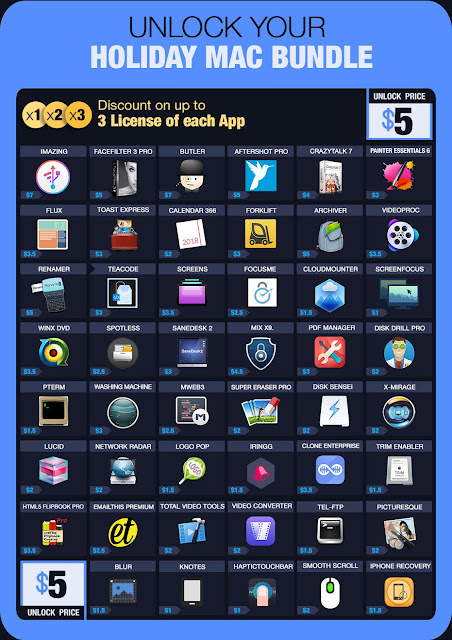
BundleHunt Holiday Mac Bundle ending soon

The BundleHunt Holiday Mac Bundle will be ending on 12/26/2018 take advantage of the savings and get this Mac Bundle while you still can.

Details about the bundle:

  • Unlock The Bundle For $5: Unlock the bundle for $5 to access a top list of best-selling apps.
  • Price/App start at $1 only
  • Build Your Dream Bundle: Create your own bundle, select and add up to 30 apps per bundle.
  • Multiple licenses per app: Add multiple license keys (max of 3 keys) for any app you like.

https://bundlehunt.com/?ap_id=twickline


Putty for Mac
Putty for Mac
$15.00

https://winereviews.onfastspring.com/putty-for-mac


Saturday, December 22, 2018

Wine development release 4.0-rc3 is now available for Linux FreeBSD and macOS

Wine development release 4.0-rc3 is now available for Linux FreeBSD and macOS

What's new in this release:
  • Bug fixes only, we are in code freeze.
The source is available now. Binary packages are in the process of being built, and will appear soon at their respective download locations.


Bugs fixed in 4.0-rc3 (total 27):

  26042  advapi32/crypt tests show two leaks under valgrind
  26070  user32/class tests show some valgrind warnings
  28766  DIB engine multiple invalid memory accesses
  29975  Ankh: fails to start with DirectDrawRenderer=opengl
  33769  Strong Bad's Cool Game for Attractive People Demo crashes without native d3dcompiler_43
  36095  valgrind errors in loader when loading a dll
  36162  valgrind shows several leaks in programs/cmd/tests/batch.c
  36283  valgrind shows an invalid read in imm32/tests/imm32.c
  36290  valgrind shows a leak in mscms/tests/profile.c
  36316  valgrind shows a possible leak in quartz/tests/avisplitter.c
  36328  valgrind shows a leak in rsaenh/tests/rsaenh.c
  36354  valgrind shows a leak in ddraw/tests/dsurface.c
  36356  valgrind shows a possible leak in dinput/tests/device.c
  36655  valgrind shows an unitialized variable in mountmgr.sys/device.c (d3d9/tests/d3d9ex.c)
  38324  Dead or Alive 5 Last Round and Ridge Racer Unbounded models/geometry problems
  39279  valgrind shows uninitialized memory in winmm/tests/mcicda.c
  42546  DSOUND_PrimaryOpen() incorrect set buf size
  43354  valgrind shows a crash in dlls/wbemprox/tests/query.c (fill_ip4routetable)
  44410  Multiple setups use wrong char widths in path edit box (UltraISO, some GOG installers)
  44443  jet40 crashes with wine-2.6 & wine-3.0 and not before
  45279  Multiple applications crash due to usage of OpenGL core context (Final Fantasy XI, Undertale, ...)
  45398  mpc-hc crash on startup.
  46215  File Open Dialog fails to set focus to Filename text box
  46285  Demo scene fr-041 debris: cut off and broken text
  46293  winegcc: stdlib.h and math.h not found when including C++'s or
  46308  SofTalk 1.56: Incorrect icon/text rendering
  46323  Rally Trophy: Controller configuration cannot be opened


Run Microsoft Windows Applications and Games on Mac, Linux or ChromeOS save up to 20% off  CodeWeavers CrossOver+ today.

Saturday, December 15, 2018

Wine development release 4.0-rc2 is now available for Linux FreeBSD and macOS

Wine development release 4.0-rc2 is now available for Linux FreeBSD and macOS

What's new in this release:
  • Bug fixes only, we are in code freeze.
The source is available now. Binary packages are in the process of being built, and will appear soon at their respective download locations.


Bugs fixed in 4.0-rc2 (total 11):

  19184  File copying fails during installation of Mordor
  23282  SpeQ: Wrong coded linefeed
  25734  Magic: The Gathering Battlegrounds trial hangs upon startup
  36430  valgrind shows a possible leak in shell32/tests/autocomplete.c
  39736  Prototype 2 crashes
  41992  total commander, copy dialog - Esc key not working
  43178  Prototype regression
  43676  Hitman(TM) requires session_set_option - option 84
  44229  Visual C++ 1.51 can't add files to project (GetOpenFileName16() doesn't support custom templates or hooks)
  46231  Button tests for ideal size fail on Arabic locale on Windows
  46270  ReactOS explorer.exe can't delete objects (use-after free caused by incorrect free in STGMEDIUM_Release())

Run Microsoft Windows Applications and Games on Mac, Linux or ChromeOS save up to 20% off  CodeWeavers CrossOver+ today.
Saturday, December 8, 2018

Wine development release 4.0-rc1 is now available for Linux FreeBSD and macOS

Wine development release 4.0-rc1 is now available for Linux FreeBSD and macOS

This is the first release candidate for the upcoming Wine 4.0. It marks the beginning of the code freeze period. There have been many last minute changes, so please give this release a good testing to help us make 4.0 as good as possible.

What's new in this release:
  • Preloader implemented on mac OS.
  • Mouse cursor support on Android.
  • Updates to the timezone database.
  • Vulkan support updated to the latest spec.
  • Stream I/O support in WebServices.
  • Better palette support in WindowsCodecs.
  • Synchronization objects support for kernel drivers.
  • Various bug fixes.

The source is available now. Binary packages are in the process of being built, and will appear soon at their respective download locations.


Bugs fixed in 4.0-rc1 (total 43):

   5402  Multiple MFC-based apps crash during non-modal child dialog control creation with active window being zero (Canon PhotoStitch 3.1.13, Flexible Renamer v8.4)
  16845  Radio buttons not being checked on focus
  23750  SpongeBob SquarePants: Diner Dash 2 - mouse has pink background
  28810  d3dx9_36/tests/mesh.ok: D3DXLoadMeshTest fails under valgrind
  29183  Heavy corruption when rendering edit control with WM_PRINTCLIENT and possibly invalid HDC
  33117  Can't load Bach41.ttf with CreateFontIndirect
  35367  Multiple applications crash due to Wine ole32 code not taking implicit MTA into account (Cyberlink Powerdirector 8, PDFXChange Editor 5.5)
  37863  Halo only works using Nvidia graphics
  38228  Wildstar game failed to download :  `winhttp:session_set_option 0` and `wine client error:41b: pipe: Too many open files`
  40031  Singularity: In Steam the game is still running after quit
  40880  Commandos 3: Destination Berlin demo has sound issues
  40971  Zombie Army Trilogy crashes before the menu
  41404  WPS Office 10.1.0.5775 unhandled exception on installation
  41488  ProfitChart RT crashes at startup
  42010  ReactOS Calc does not show dots in radio buttons.
  42255  Xenia emulator needs ntdll.dll.RtlAddGrowableFunctionTable implementation
  42474  Multiple applications crash on unimplemented function api-ms-win-core-path-l1-1-0.dll.PathCchCombineEx (Python 3.6, AutoFlashGUI, RenderDoc)
  42582  Murdered: Soul Suspect has messed up rendering
  43584  Hitman: Absolution needs dxgi_output_GetGammaControlCapabilities
  43745  Graywalkers Purgatory demo has wrong models rendering
  43889  Gradient is inverted when using gdiplus
  44015  Steam - fails to load UI since Wine 2.20 (due to dwrite commit)
  44177  Guitar Pro 5: Long freezes during draw process of dashed lines (P.M. or let ring markers)
  44588  Many kernel drivers need support for kernel synchronization objects (event, semaphore, mutex) (BattleEye's 'bedaisy.sys', Franson VSerial service 'bizvserialnt.sys')
  44897  Multiple applications using Crashpad/Chromium/CEF in Win7+ mode crash on unimplemented function ntdll.RtlGetUnloadEventTraceEx (Steam client)
  44999  Python 3.6.5 crashes due to unimplemented function api-ms-win-core-path-l1-1-0.dll.PathCchCanonicalizeEx.
  45431  Multiple D3D11 games deadlock in IDXGISwapChain::ResizeTarget while trying to resize window (Crash Bandicoot N. Sane Trilogy, Dragon Age: Inquisition)
  45453  Guild Wars 2: Launcher crashes with assertion "jobThreads && (jobThreads <= hardwareThreads)"
  45627  mdac28 fails to install (SetupDefaultQueueCallbackW copy error 32 L"C:\\users\\austin\\Temp\\IXP000.TMP\\msdaorar.dll")
  46093  GRLevel3 2.52 fails to start, hangs indefinitely
  46099  Star Citizen not loading after implementation of WaitOnAddress() in wine
  46140  .NET applications using 'WebRequest' API with MS .NET Framework crash when IPv4/6 is disabled in Linux kernel
  46142  Games launched through Windows Steam no longer launch.
  46161  Wine: Wrong GnuTLS usage?
  46168  dotnet35sp1 installer has an error under wow64
  46172  Multiple applications from Windows 7-10 crash on unimplemented function slc.dll.SLGetLicensingStatusInformation
  46173  Used e-Sword successfully a few months ago, but when I try now I get a Program Error.
  46179  Multiple Windows 10 ARM{32,64} apps need 'kernel32.dll.GetCurrentThreadStackLimits' to get stack start address
  46180  wineserver does not release atom on unregistering window classes
  46186  LoadImageA searches images in the wrong directory
  46210  explorer /desktop leaks atoms from DDE interface
  46229  server/ptrace: NetBSD debug register storage
  46235  Opening ADODB.Connection results in: Method '~' of object '~' failed

Run Microsoft Windows Applications and Games on Mac, Linux or ChromeOS save up to 20% off  CodeWeavers CrossOver+ today.

Wednesday, December 5, 2018

CodeWeavers has Released CrossOver 18.1.0 for Linux and MacOS

I am very pleased to announce that CodeWeavers has just released CrossOver 18.1.0 for both macOS and Linux.

CrossOver 18.1 now supports Visio 2016 on Linux.


For macOS users, CrossOver 18.1 contains a number of important bug fixes. We have resolved a bug which prevented game downloads and the Steam Store page from working on the latest Steam release. CrossOver 18.1 also addresses an issue some macOS users experienced running recent versions of Quicken on CrossOver 18. Those who experienced crashes or launch failures when using Quicken 2016-2018 should see full functionality on CrossOver 18.1.

Finally, CrossOver 18.1 restores controller support for Steam on both macOS and Linux.

macOS customers with active support entitlements will be upgraded to CrossOver 18.1 the next time they launch CrossOver.  Linux users can download the latest version from CodeWeavers .

Change Log For CrossOver Mac and Linux :

18.1.0 CrossOver - December 4, 2018
  • macOS:
    • Fixed a bug that prevented Quicken from launching for some users.
    • Fixed a bug that caused the latest Quicken 2016 Mondo Patch to fail during installation.
    • Fixed a bug that prevented game downloads and the Steam Store page from working on the latest Steam release.
    • Restored controller support for Steam.
  • Linux:
    • Support for Visio 2016.
    • Restored controller support for Steam.


Putty for Mac
Putty for Mac
$15.00

https://winereviews.onfastspring.com/putty-for-mac


Tuesday, December 4, 2018

WineTricks 20181203 has been released

Winetricks is an easy way to work around problems in Wine.

It has a menu of supported games/apps for which it can do all the workarounds automatically. It also allows the installation of missing DLLs and tweaking of various Wine settings.

This version can be downloaded here.


Putty for Mac
Putty for Mac
$15.00

https://winereviews.onfastspring.com/putty-for-mac


Friday, November 30, 2018

The Wine maintenance release 3.0.4 is now available for Linux macOS and FreeBSD

The Wine maintenance release 3.0.4 is now available for Linux macOS and FreeBSD

What's new in this release:
  • Added a lot of icons in Shell32
  • Various bug fixes
The source is available now. Binary packages are in the process of being built, and will appear soon at their respective download locations.


Bugs fixed in 3.0.4 (total 47):

  20961  RegEditX 2.x/3.x reports 'Internal error: could not find RegEdit window' on startup (Wine's builtin 'regedit.exe' needs to provide 'RegEdit_RegEdit' window class name)
  22255  Total Commander: Deleting the 1st or 2nd character in an edit box deletes all of them
  22333  Total Commander: Application freezes when the current directory field is editable, and you right-click a regular file and click Properties
  30185  SuperPower 2 demo crashes on launch
  30487  Add icons for 'My Network Places', 'My favorites'
  36884  Drakensang: The Dark Eye demo crashes on startup (needs d3dx9_36.dll.D3DXCreateTeapot implementation)
  37275  Chess Position Trainer 5 (.NET 4.0 app) wants gdiplus.GdipCreateAdjustableArrowCap implementation
  37834  RtlSetCurrentDirectory_U prepends "UNC\" for network paths; the resulting path is invalid
  39906  ODB++ Viewer fails to install due to improper bat file handling (quoting or delimiting problem)
  40598  Warframe 'launcher.exe' reports 'update failed' ('InternetCrackUrlW' must resize buffer when URL canonicalization fails due to insufficient buffer)
  41652  Uplay cannot connect/login to Server
  42470  Frequent critical section timeouts in winetricks dotnet46
  42577  Far manager: needs virtdisk.dll.GetStorageDependencyInformation
  42710  Wechat can not send file to friend
  42870  CurrentBuild registry value is missing
  43036  SetNamedPipeHandleState returns ERROR_ACCESS_DENIED when setting PIPE_NOWAIT
  43125  Device reports coming in too fast
  43488  Bluestacks crashes in ITextService::TxGetVScroll()
  44369  cmd's %0 path variables (e.g. %~dp0) wrong inside subroutine call
  44489  Zwei: The Arges Adventure can't detect installed Indeo 5 codec
  44490  Zwei: The Arges Adventure videos play distorted (Indeo 5 encoded)
  44981  Xenserver console and Vmware management console (client) v5.5 installer fails on 'hcmon' driver service ('EventLog\\System' needs 'Sources' registry key present for WinVer < Windows 7)
  45167  Acronis Disk Director 12 installer fails: action L"_USRCUSTACT_MsiFltSrvInstall_fltsrv_component" returned 1603 (setupapi lasterror leakage)
  45199  Many applications and games fail to start/crash after compiling wine with gcc 8.1.0 and -O2 (GOT/PIC register load code now emitted at function entry, missing hotpatch signatures)
  45372  Resident Evil 7 requires mfplat.dll.MFCreateMFByteStreamOnStream to be implemented
  45478  World of Warcraft: graphical artifacts since 8.0 (BfA)
  45495  Toontown Corporate Clash: fails to launch
  45521  64-bit Sentinel HASP hardlock.sys kernel driver crashes due ntoskrnl emulate_instruction not handling 'cli' and 'sti'
  45529  Custom color scheme applied but wine not respecting current text color of scheme on window columns and statusbar.
  45530  No$Gba crashes with pulseaudio assertion in waveOutOpen
  45535  Rekordbox 5.3.0 terminates with the message "Unexpected application error" (dwrite:dwritetextlayout_Draw out-of-bounds access on empty clustermetrics after failure to resolve layout fonts)
  45552  Kolab E14 Client installation fails
  45602  Wargaming Game Center needs msvcp140.dll._Set_last_write_time
  45603  Total War:Arena needs POWRPROF.dll.PowerEnumerate
  45617  Just Dance 2017: Unimplemented function mfplat.dll.MFCreateSample
  45622  Overwatch crashes when trying to save highlights (needs mfplat.MFTRegisterLocal implementation)
  45644  chromium 64-bit sandbox >=win10 needs UpdateProcThreadAttribute to handle  PROC_THREAD_ATTRIBUTE_CHILD_PROCESS_POLICY
  45715  Just Dance 2017: Unimplemented function mfplat.dll.MFCreateMemoryBuffer
  45722  cmd for loop doesn't work with tokens and delims
  45729  cmd's REM evaluates |
  45731  cmd for loops sensitive to whitespace
  45770  WMP9 crashes with unimplemented function pidgen.dll.PIDGenSimpW
  45784  Bethesda Launcher Updater crashes on unimplemented function msvcp110.xtime_get
  45785  Bethesda Launcher Updater crashes on unimplemented function msvcp110._Xtime_diff_to_millis2
  45786  GTA downgrader (.NET program latest.exe) crashes: "Can't find matching timezone information" ("America/Sao_Paulo")
  45821  Metasploit Console won't start due to missing registry value HKLM\System\CurrentControlSet\Services\Tcpip\Parameters\DataBasePath
  46106  Stable: ARM64 build broken with gcc

Run Microsoft Windows Applications and Games on Mac, Linux or ChromeOS save up to 20% off  CodeWeavers CrossOver+ today.

Saturday, November 24, 2018

The WineHQ Wine development release 3.21 is now available for Linux FreeBSD and macOS

The WineHQ Wine development release 3.21 is now available for Linux FreeBSD and macOS

What's new in this release:
  • Typelib marshaller rewrite using NDR functions.
  • Graphics support on recent Android versions.
  • Support for memory font resources in DirectWrite.
  • Joystick support improvements.
  • Various bug fixes.
The source is available now. Binary packages are in the process of being built, and will appear soon at their respective download locations.


Bugs fixed in 3.21 (total 62):

  14078  Rewrite typelib marshaller on top of NDR functions
  17708  Splinter cell double agent doesn't render correctly
  18759  RoughDraft 3's Word Count feature always says zero
  19016  Word Automation from .NET does not work
  20776  3DMark Vantage: your graphics card doesn't support DirectX 10 (needs support for 'D3D10_QUERY_SO_STATISTICS')
  25066  NFS Porsche: The game crashes on creation of pic16.fsh file
  26768  oleaut32 needs stubless proxies implemented on x86-64
  29700  C&C Tiberian Sun and Red Alert 2 game graphics rendering freezes when NOT moving the mouse.
  30511  Guild Wars 2 launcher crashes with "assertion m_ioCount failed"
  30522  Jupiter shows too small, unreadable fonts
  30801  need for speed underground 2 [full version] unusable because of incorrect graphics render
  33463  Alan Wake : No sound in cinematics
  33502  SnagIt writes incomplete HKLM\\System\\CurrentControlSet\\Control\\Print\\Printers entry, causing loader failures for apps that depend on winspool.drv
  34967  Microsoft .NET 2.0 (sp1) Framework (x64): hangs after install
  35663  SWAT 3: Screen Flickering
  35675  Bad textures in World of Tanks
  36763  Rogue Squadron 3D 1.3: Crashes with game resolutions above 640x480
  37850  fallout 2: problem with handling file permissions ?
  37959  Guild Wars 2 freezes on startup
  38124  Can't enable visual style in a DLL.
  38394  Eador: Genesis crashes on exit (only in fullscreen mode)
  39023  Final Fantasy XI Using a Bluetooth PS3 Controller crashes the game.
  39253  Multiple games require DXTn volume textures (From Dust, Halo Online)
  39799  Visilogic 8.0 needs 'ITypeInfo_fnInvoke' support for coclass objects (TKIND_COCLASS) in arguments
  39944  Stars! battle dialog lags
  40160  cant install mobogenie
  40206  Revit Architecture fails to install: throws Messagebox "Function failed" and aborts
  40224  Web Skype plugin for Firefox needs advapi32.CreatePrivateObjectSecurityEx implementation
  40264  Iris Online cannot connect to login server (SO_SNDBUF with value 0 is not allowed in OSX)
  40803  Hard Reset Redux fails to launch ("DirectX 10 device not found!")(DXGI_ADAPTER_DESC1 'DedicatedSystemMemory' or 'SharedSystemMemory' member must be non-null)
  42058  rFactor2 requires unimplemented function ?get@?$time_get@DV?$istreambuf_iterator@DU?$char_traits.........
  42447  Oblivion crashes on exit
  43630  Altium Designer Installer - Richedit control shows rtf code instead of text
  43683  Unigine Superposition Benchmark: missing text in launcher
  43731  GTAIV hangs when clicking Options if its resolution differs from virtual desktop resolution
  43865  LeagueOfLegends now doesn't work in Wine 2.18 (regression ?)
  44109  Simple free HAM program Opera crashes, needs unimplemented function pdh.dll.PdhVbAddCounter
  44245  Gray / black screen on Android 8+
  44409  png with indexed colors and alpha miss the alpha channel on loading
  44828  Sony Xperia Companion crashes on unimplemented function SHELL32.dll.Shell_NotifyIconGetRect
  45407  MechCommander Gold: 'Could not Initialize .PDB file' at startup
  45913  tchar.h: using the macro _sntprintf leads to an undefined reference to snwprintf; macro should resolve to _snwprintf
  45948  Can't log in to Steam (Steam crashes after the login screen)
  45949  Regression: Crash on start of Söldner Secret Wars since 3.10
  45961  KeyShot 5.3.6 crashes on unimplemented function KERNEL32.dll.GetMaximumProcessorCount
  45992  Some Unity games expect XInputSetState to succeed or ignore gamepad input
  46050  Korean Translations for winecfg are broken
  46068  Star Wars The Old Republic - slower on 3.18 & 3.19
  46089  TopoEdit tool from Windows 10 SDK (10.0.17763.x) crashes in ntdll.LdrResolveDelayLoadedAPI during resolver failure (NULL dll failure hook)
  46092  Multiple ARM64 apps want 'kernel32.GetSystemInfo' support for 'PROCESSOR_ARCHITECTURE_ARM64' ('Unknown processor architecture c')
  46101  Multiple ARM64 apps from Windows 10 SDK (10.0.17763.x) crash on unimplemented function api-ms-win-core-libraryloader-l1-2-1.dll.GetModuleHandleW
  46120  Uplay hangs while filling in fields
  46126  Provide more exception context information in ARM64 implementation of raise_exception()
  46129  'sqlwriter.exe' from Microsoft SQL Server 2012/2014 crashes on unimplemented function VSSAPI.DLL.??0CVssWriter@@QEAA@XZ
  46130  Star Citizen (RSI launcher) installer needs kernel32.dll.SetFileInformationByHandle 'FileIoPriorityHintInfo' info class semi-stub
  46135  Microsoft ODBC tool 'odbcconf.exe' (part of MDAC 2.x install) crashes during configuration (some 'advapi32.dll' API entries are not hotpatchable due to PIC/GOT code at entry)
  46143  Multiple Windows 10 ARM64 apps crash due to unimplemented function ntdll.dll.RtlAddFunctionTable (and friends)
  46144  Windows PowerShell Core 6.1 for ARM64 crashes on unimplemented function KERNEL32.dll.RtlPcToFileHeader
  46156  Multiple applications from Windows 7-10 crash on unimplemented function slc.dll.SLOpen
  46157  Doxie 2.10.3 crashes on unimplemented function msvcr120.dll._vscprintf_l
  46159  Doxie 2.10.3 hangs on startup
  46175  Crysis Warhead crashes at launch

Run Microsoft Windows Applications and Games on Mac, Linux or ChromeOS save up to 20% off  CodeWeavers CrossOver+ today.

Thursday, November 22, 2018

Wednesday, November 14, 2018

Putty for Mac 9.1.0 has been released

WinOnMacs released Putty for Mac 9.1.0 for MacOS today. Putty 9.1.0 is a major release,  we now have better font rendering and full support for macOS Mojave. Please see the full change-log below for all the changes in this release.


Putty is one of the Best Terminal Emulators available today. It Supports different types of Network Protocols such as SSH, FTP, SCP, Telnet etc. In Windows it is used as SSH Client to connect to Your Linux server or for some other purpose But what will you do if you are on Mac? You might be thinking , Is there any Software like Putty for Mac Available? The answer is Yes! With the help of some other Software’s we can Use putty on MacOS although Putty is used widely on Windows Platform. Official Versions of Putty are available on Unix like Platforms, and now it’s widely available for Mac systems running OSX 10.12.6 or higher.

SSH is available by default in Mac and Linux or Unix. Although you can use terminal for SSH connections still there are some benefits in using Putty such as Other clients don’t keep connections alive whereas Putty does. Also it is cool to use Putty as your SSH client if you are doing some Amazon AWS, VMware ESXi or CISCO Stuffs, transferring files, managing files on a server or whatever.

The cost of Putty 9.1.0 is only $15.00. A Subscription plan is also available that comes with one year of free upgrades . Putty also comes with a standard 14-day money back guarantee.

Supported Protocols:
  • Telnet
  • FTP
  • SFTP
  • SSH
  • SCP
About WinOnMacs:

There is a multitude of software developed only for the Windows operating system and even when software vendors port their applications to another platform, generally it lacks features that the Windows version contains. The only solution these developers face is to have access to both systems for testing which leads to increased infrastructure demands, and wasted project resources. Our goal is to have native ports of essential Windows tools and applications made available for MacOS users.

Version 9.1.0 New Features:
  • macOS 10.14 Mojave support
  • Improved font rendering
  • Minor bug fixes
We now use FastSpring as our preferred storefront, you can pay with Credit / Debit Cards, PayPal, Amazon payments, Wire Transfer etc. etc. This store is very secure, simple and fast.

Purchase Putty 9.1.0 now and have Telnet SSH FTP SCP on your Mac made easy!

The WineHQ Wine development release 3.20 is now available for Linux FreeBSD and macOS

The WineHQ Wine development release 3.20 is now available for Linux FreeBSD and macOS

What's new in this release:
  • Async interfaces and ACF files in the IDL compiler.
  • Support for substorage transforms in MSI.
  • RPC/COM marshalling fixes.
  • Support for Unicode requests in WinHTTP.
  • Shell Autocomplete optimizations.
  • Various bug fixes.
The source is available now. Binary packages are in the process of being built, and will appear soon at their respective download locations.


Bugs fixed in 3.20 (total 36):

   8933  Extremely slow in rendering when running Jane's USAF
  12370  AGEod's American Civil War cannot run (needs native directmusic)
  34384  Media Browser 3 Installer doesn't see .Net 4.5 as installed (wine-mono)
  35320  setlocale(Chinese_China.950) returns NULL
  38066  Memento Mori (Numen: Contest of Heroes): mouse buttons don't work (needs native dinput8)
  41269  MSI uninstaller does not clean up Registry's UpgradeCode, ProductCode
  41356  Multiple applications and games need support for szOID_NIST_sha* OIDs in crypt32 (The Crew (Uplay), Star Wars The Old Republic, PSNow v9.0.5)
  41419  Visio 2013 crashes with unimplemented function msvcp100.dll.?_GetCombinableSize@details@Concurrency@@YAIXZ
  42520  Multiple Wargaming.net games crash on startup in Win7+ mode (XAudio 2.7 'IXAudio2SourceVoice::GetState' called with 'Flags' parameter, causing register corruption) (World of {Tanks, Warships})
  42550  Photoshop CC 2017: Installation Error (needs FileAccessInformation info class)
  43358  EVE Online crashes on startup in Win7+ mode (XAudio 2.7 'IXAudio2SourceVoice::GetState' called with 'Flags' parameter, causing %ESI or %EDI register corruption)
  43464  Elite Dangerous Horizons fails to connect to server with CRC error
  43570  Bravura Easy Computer Sync 1.5 crashes on startup
  44620  `Nt{WaitFor,Release}KeyedEvent()` don't accept null handles, while Windows 7 does.
  44759  Steam show all text with italic font when dwrite is enabled
  45593  Wargaming.net Game Center: Installer deadlocks during download ('ntdll.RtlDeregisterWaitEx' must not synchronously wait when 'CompletionEvent' is NULL)
  45664  64-bit BattlEye 'BEDaisy' kernel service fails in driver entry point due to missing 'ntoskrnl.exe.PsGetProcessWow64Process'
  45665  64-bit BattlEye 'BEDaisy' kernel service fails in driver entry point due to missing 'ntoskrnl.exe.MmCopyVirtualMemory'
  45749  Multiple Node.js based applications/installers need ntdll.NtQueryInformationFile to handle 'FileModeInformation' information class (MS Visual Studio 2017 Installer, FACEIT Anti-cheat client)
  45796  Nvidia GeForce Now installer aborts due to missing 'advapi32.RegQueryReflectionKey' export
  45828  Several Microsoft games bundled with Windows 7 as part of OS install crash upon exit on unimplemented function ntdll.dll.WinSqmIncrementDWORD
  45966  Missing scrollbars in TraCFoil ribs plotting program
  45970  Add support for browseui IProgressDialog PROGDLG_AUTOTIME flag
  45997  iPed 7G 2019 (.NET 4.0 app) v13.0.10800 crashes with System.NotImplementedException at system.drawing.pen.ScaleTransform
  46004  SimSig: scroll bars in Options window do not render
  46015  Nvidia GeForce NOW crashes on unimplemented function IPHLPAPI.DLL.GetIpInterfaceTable
  46035  dotnet sdk 2.1.403 installer crashes with unimplemented Kernel32.FindStringOrdinal
  46040  Intel Extreme Tuning Utility v6.4 kernel driver 'iocbios2.sys' crashes on unimplemented function ntoskrnl.exe.KeSetTargetProcessorDpc
  46057  Multiple applications want 'ntdll.NtQueryInformationToken' to support 'TokenVirtualizationEnabled' (24) info class (Blizzard Battle.net)
  46066  GeForceNOW.exe fails to load due to missing runtime dependencies, needs 'qwave.dll' stub dll (qWAVE - Quality Windows Audio/Video Experience)
  46076  Something goes wrong when sending unicode http request
  46080  Multiple installers are missing title bar buttons
  46081  Multiple installers show readonly drives with broken size
  46084  Skype 8.33.0.50 installer crashes due to unimplemented msvcp140.dll.?_Winerror_map@std@@YAHH@Z
  46085  Multiple ARM64 apps from Windows 10 SDK (10.0.17763.x) need 'api-ms-win-core-winrt-string-l1-1-1.dll' stub dll
  46086  Multiple ARM64 apps from Windows 10 SDK (10.0.17763.x) need 'api-ms-win-core-processthreads-l1-1-3' stub dll

Run Microsoft Windows Applications and Games on Mac, Linux or ChromeOS save up to 20% off  CodeWeavers CrossOver+ today.

Wednesday, November 7, 2018

Lutris 0.4.23 has been released

Lutris helps you install and play video games from all eras and from most gaming systems. By leveraging and combining existing emulators, engine re-implementations and compatibility layers, it gives you a central interface to launch all your games.

The client can connect with existing services like Humble Bundle, GOG and Steam to make your game libraries easily available. Game downloads and installations are automated and can be modified through user made scripts.

Download this version of Lutris from here.

Changelog :

  • Prevent monitor from quitting games that open a 2nd process
  • Run on-demand scripts from game directory
  • Tell the user what executable is expected after a failed install
  • Fix a circular import causing issues on some distributions
  • Add missing dependency for openSUSE Tumbleweed

Run Microsoft Windows Applications and Games on Mac, Linux or ChromeOS save up to 20% off  CodeWeavers CrossOver+ today.