Pages

Tuesday, March 1, 2016

Why switch to Windows 10 or a Mac when you can use Linux

My buddy David Gewirtz recently wrote about the question of whether you should move from Windows 7 to Windows 10 or a Mac. I have another suggestion: Linux. Specifically Linux Mint 17.3, Rosa, with the Cinnamon desktop.

Linux Mint 17.3 is a great replacement for Windows 7. In fact, it's a great desktop operating system period.
Yes, I'm serious. I use all the above desktops -- yes I'm a Windows 7 and 10 user as well as a Linux guy -- and for people I think Mint 17.3 makes a great desktop.

I've been using Mint as my main Linux desktop for years now. Unlike some desktops I could name -- cough, Windows 8, cough -- Linux Mint has never had a flop. Every year that goes by, this operating system keeps getting better. The other desktops? Not so much.
Let's take a closer look.at Windows 7 vs. Linux Mint 17.3

UI Differences
 
There's really not much. While it's even easier for a Windows XP user to move to Mint than a Windows 7 user, any Windows user won't have any trouble picking up Linux Mint with Cinnamon. There's a Start Menu and settings are easy to find.

I regard Cinnamon 2.8 as the ultimate Window, Icon, Menu, Pointer (WIMP) interface. Is it ideal for tablets or smartphones? No. Is it perfect for long-time PC users? Yes.

Cinnamon does add some nice features. For example, if you mouse over the Window list, you'll now see a thumbnail for each application. It also has improved performance, system tray status indicators, and music and power applets.


What I like best about Cinnamon is that it doesn't get in the way. There's no learning curve. You may have never used Linux in your life but you can just sit down and start opening directories, running applications, and modify your PC's settings.

One small feature I like a lot, since I always run multiple work-spaces, is that the work-space switcher applet now shows a visual representation of what's running in each work-space.
Don't like Cinnamon? Unlike any version of Windows, Linux Mint comes with many different desktops. These include KDE, MATE and Xfce. Find one you like and enjoy,

Application Selection

It's true that Linux doesn't have as many application choice as Windows does. But, how many applications do you really need in 2016? I do most of my work these days on the cloud with software-as-a-service (SaaS) applications. These apps work just as well on Chrome, my favorite Web browser, on Mint as they do on any other desktop.

That said, there are many excellent Linux desktop programs. For example, instead of Microsoft Office I use LibreOffice 5. I don't use it because it's free, although most Linux desktop applications won't cost you a cent, but because it's an excellent office suite in its own right.

I also use Evolution instead of Outlook for e-mail and GIMP instead of Photoshop for my basic graphic editing needs. The bottom line is that are many great Linux programs that you can use in place of Windows appliations.

Are there some Windows programs that you can't live without? Well, you don't have to live without them.
There are two ways to run Windows programs on Linux. One is to use CodeWeaver's CrossOver Linux. This program enables you to run many popular Windows applications on Linux. Supported Windows applications include Microsoft Office (from Office 97 to Office 2010), Quicken, and some versions of Adobe Photoshop.

The application you absolutely must have won't work with CrossOver? Then run it on a virtual machine (VM) program such as Oracle's Virtual-box.

I use both methods and they work well.

Run Microsoft Windows Applications and Games on Mac, Linux or ChromeOS save up to 20% off  CodeWeavers CrossOver+ today.

Sunday, February 28, 2016

Установка и настройка Wine программы для запуска приложений Windows

Wine (WINE Is Not an Emulator)  специальная программа, слой совместимости, для запуска Win32 приложений в UNIX-подобных системах. Проще говоря, эта штука позволяет запускать виндовые проги и игры в вашем уютном Линуксе.

Программа активно развивается, но пока, к сожалению, не все приложения корректно в ней работают (а некоторые не работают вовсе). С играми пока тоже печально – полной поддержки DirectX 10 и 11 нету, только 9 и младше. (поддержка DirectX 10 активно улучшается в последних тестовых сборках). Но тем не менее, и на DirectX 9 очень много игр. В этой статье мы установим и сконфигурируем Wine, а также установим приложение PlayOnLinux, которое очень пригодится для игр. Установка будет зависеть от вашего дистрибутива, но сама настройка программы абсолютно одинакова в подавляющем большинстве дистрибутивов. Существует две ветки Wine – стабильная и тестовая. В большинсве случаев рекомендуется использовать именно тестовую, так как программа активно развивается и улучшается. Пока рассмотрим установку стабильной версии (примеры для командной строки, однако вы можете пользоваться графическими утилитами, типа Ubuntu Software Center или Yast2 в OpenSUSE):

Для Debian/Ubuntu/Mint:

sudo apt-get install wine winetricks

Для OpenSUSE:

sudo zypper ar -r http://download.opensuse.org/repositories/Emulators:/Wine/openSUSE_13.1/Emulators:Wine.repo
sudo zypper in wine

Для Fedora:

sudo yum install wine
cd /tmp
wget http://www.kegel.com/wine/winetricks
chmod +x winetricks

Обратите внимание. Если у вас 64 битная система, то для корректной работы 32-х битных программ (а игры в большинстве именно такие), необходимо сконфигурировать Wine на 32-х битный префикс. Для этого водим:

WINEARCH=win32 WINEPREFIX=~/.wine winecfg

Откроется окно настроек. Можете оставить всё как есть.


Теперь нам необходимо установить комплект системных библиотек для работы наших виндовых приложений. В меню программ найдите и запустите Winetricks (или из терминала командой winetricks). В первом окне выбираем---Select the default wineprefix--- наживаем ОК. Во втором---install a Windows DLL or component---ОК


Запомните:
Нужно будет отмечать точками, как в списке. Лучше устанавливать не все сразу, а по несколько штук. Я их разделю для удобства. Далеко не уходите при установке, нужно соглашаться с лицензионными соглашениями и прочим. Будут выскакивать окошки с ошибками, жмите ОК. Начнём.

directx9, d3dx9, d3dx9_26, d3dx9_28, d3dx9_31, d3dx9_35, d3dx9_36, d3dx9_42, d3dx9_43, d3dx10, d3dx11_42, d3dx11_43, d3dxof, devenum, dinput8, dirac, directmusic, directplay, dmsynth

dotnet20

dotnet30 (посыпятся ошибки и откроется окно в файловом менеджере и в браузере, скачиваем по второй ссылке и перемещаем в это окно файлового менеджера. Набираем в консоли winetricks и снова выбираем dontnet30. Перед этим нужно проверить Настройку Wine, чтобы стояла версия Windows XP или Vista.


dxdiagn, gecko120, gfw, mfc40, mfc42, msasn1, msxml6, gdiplus , physx, quartz

vb5run, vb6run, vcrun2003, vcrun2005, vcrun2008, vcrun6, vcrun6sp6

wmp10, wsh56vb, wsh57, xact, xact_jun2010, xinput

Установим шрифты. Выбираем Instal a Font и указываем

corefonts , fontfix

Настройка реестра

Открываем Change Settings и отмечаем
1. DirectDrawRender(ddr) -- opengl
2. Multisampling Direct3D -- enabled
3. OffscreenRenderingMode(orm) -- fbo
4. PixelShaderMode(psm) -- enabled
5. Render TargetLockMode(rtlm) -- auto
6. UseGLSL(glsl) -- enabled (default)(Для видеокарт Nvidia рекомендуется оставить disabled. Это может существенно поднять производительность некоторых игр).
7. VertexShaders(vsm) -- hardware
8. VideoMemorySize 1024 (выбирете значение ОЗУ вашей видеокарты)
9. MouseWarpOverride(mwo) -- enabled (force)
Подтверждаем наши изменения – OK.

Вот собственно и всё. Теперь небольшие примечания по установке софта и игр. Во первых, ни в коем случае не устанавливайте дополнительное ПО, которое предлагает программа (всякие директиксы, visual c++ и так далее). Внимательно проверяйте и в случае чего – снимайте галочки. Во-вторых, в конце установки снимайте галочку "Запустить программу".

Теперь что касается тестовой версии. Для Ubuntu/Mint существует специальный репозиторий. Чтобы его подключить и поставить тестовую версию Wine, вводим в терминале:

sudo add-apt-reposytory ppa:ubuntu-wine/ppa
sudo apt-get update
sudo apt install wine 1.7 winetricks

В некоторых дистрибутивах (например Debian), для установки тестовой версии, её нужно собирать из исходного кода. Но это уже выходит за рамки этой статьи. Или вы можете установить wine-staging, который также является тестовым, но имеет несколько дополнительных возможностей.

Run Microsoft Windows Applications and Games on Mac, Linux or ChromeOS save up to 20% off  CodeWeavers CrossOver+ today.

Выпуск Wine 1.9.4

Доступен очередной экспериментальный выпуск открытой реализации Win32 API - Wine 1.9.4. С момента выпуска версии 1.9.3 было закрыто 27 отчётов об ошибках.
Наиболее важные изменения:
  • В DirectWrite добавлена поддержка цветных глифов и запасных шрифтов (font fallback);
  • Внесены улучшения в WebServices Reader;
  • Добавлены дополнительные форматы в Direct3D 11
  • Упрощён синтаксис и проведена чистка тестов, в которых используется вызов todo_wine_if();
Закрыты отчёты об ошибках, связанные с работой игр и приложений: Ultima IX, Pendulumania, Dolphin Wii/GCN emulator, BitComet, UltraISO, No Limits 2, Jagged Alliance 2, PCB Design Toolkit 6.86, IE 7, XIIZeal, Three Kingdoms 13, 3DMarkVantage, SimCity 4 Deluxe.

Run Microsoft Windows Applications and Games on Mac, Linux or ChromeOS save up to 20% off  CodeWeavers CrossOver+ today.

The WineHQ Wine development release 1.9.4 is now available for Linux and Mac

The #WineHQ #Wine development release 1.9.4 is now available for #Linux and #Mac.

What's new in this release:
  • Support for color glyphs and font fallbacks in DirectWrite.
  • Improvements to the WebServices reader.
  • Support for more formats in Direct3D 11.
  • Simplified syntax and clean up of tests marked todo.
  • Various bug fixes.
The source is available now. Binary packages are in the process of being built, and will appear soon at their respective download locations.

Bugs fixed in 1.9.4 (total 27):

   9823  Mentioning "wine eject" in SGML
  11657  Problems with MessageBox API
  12217  Documentation should be in XML and not SGML format
  13683  Ultima IX: Mouse pointer missing when reading books, under inventory
  19733  Pendulumania crashes
  21454  Dolphin Wii/GCN emulator crashes on rom load
  27680  Multiple 64-bit applications crash on startup (violation of the Windows 64-bit ABI, stack pointer (RSP) must be 16-byte aligned when making a call to Win64 API)
  29862  BitComet version<1 .37="" br="" fails="" start="" to="">  33581  Wine does not quit gracefully
  34174  MinGW installer 0.5-beta-20120426-1 fails to process log files (sharing violation on temp file used for piped output)
  35824  UltraISO 'ISODrive.sys' crashes in entry point (SCM doesn't start SERVICE_FILE_SYSTEM_DRIVER type services with winedevice hosting process)
  36013  bleem! 1.4 (PlayStation emulator) fails on startup, complaining with 'Not enough memory to load program!'
  37288  Not implemented feature System.Drawing.Pen.ResetTransform()
  37373  No Limits 2: Help files fails to show text. Needs Times New Roman, or dwrite ability to use font replacements
  37556  CompareStringW should abort on the first nonmatching character to avoid invalid memory access.
  38314  Mouse Wheel doesn't work for Jagged Alliance 2 version 1.13 (it uses MOUSEHOOKSTRUCTEX)
  39433  mshtml:xmlhttprequest fails on IE 7
  39792  Saturn PCB Design Toolkit 6.86 fails to load, reporting missing 'SHCore.dll' dependency (import descriptors with empty thunk list must be ignored)
  39866  XIIZeal (steam) immediately exits on start
  40034  Linksys usb wireless adapter installer needs wlanapi.dll.WlanEnumInterfaces
  40053  Romance of the Three Kingdoms 13 (三國志13) fails to start
  40075  3DMarkVantage needs SM4 dcl_output_siv support
  40094  SimCity 4 Deluxe fails to start when set to use hardware rendering
  40108  kernel32:process regression
  40114  mshtml:style regression (crash)
  40129  MSI Reading and Writing Behaves differently than Windows
  40166  drcom.exe client needs rasapi32.RasGetLinkStatistics

Run Microsoft Windows Applications and Games on Mac, Linux or ChromeOS save up to 20% off  CodeWeavers CrossOver+ today.

Wednesday, February 17, 2016

MacGourmet Deluxe 4.2.5 has been released


MacGourmet Deluxe is a recipe-management application that allows users to create, edit, and scale new recipes, or import recipes from their favorite websites, then share them via email, Facebook, and Twitter.

Unlike MacGourmet, MacGourmet Deluxe users can also plan meals, analyze nutritional information, and generate shopping lists.
Features
  • Chef's view for distraction-free cooking
  • Add images to your recipes and to the steps, as well as to your Beer, Wine, and Cheese notes
  • Use the Ingredient search or let MacGourmet suggest a recipe for you
  • Free cloud account for storing and syncing on Mariner Cloud


What's New Version 4.2.5


Note: Now requires a 64-bit Intel processor.
  • Fixed "unsupported url error on Mariner Cloud sign in.


Requirements

  • Intel, 64-bit processor
  • OS X 10.7 or later

You can use any of these 4 coupons in the Mariners online store and save between 5% and 25% off the retail price of new purchases or one of the 5 pack bundles.

Run Microsoft Windows Applications and Games on Mac, Linux or ChromeOS save up to 20% off  CodeWeavers CrossOver+ today.

Tuesday, February 16, 2016

How to run Windows programs on Linux with CodeWeavers CrossOver

Want to move to Linux, but there's this one application that's keeping you stuck on Windows? CodeWeaver's CrossOver Linux may be exactly what you need.

Just because there's a Windows application you must use doesn't mean you must run Windows. CodeWeavers CrossOver Linux enables you to run many popular Windows applications on Linux. Supported Windows applications include Microsoft Office (from Office 97 to Office 2010), Intuit Quicken, and some versions of Adobe Photoshop and Photoshop CS. CrossOver also runs games. For example, you can play such popular online games as World of Warcraft and Guild Wars.

Need Microsoft Office on your Linux PC? Thanks to CodeWeavers CrossOver that's not a problem.
Sure, with powerful enough hardware you could run your Windows applications on Linux inside a virtual machine (VM) such as Oracle's VirtualBox. The problem with these is that they don't run well on systems with limited resources. If CrossOver supports the applications you need you won't need to worry with fitting a VM.

CrossOver runs many but not all Windows programs. For example, you can run Visio 2010 on CrossOver Linux. AutoCAD? Not so much.

Will your program run on Linux, or for that matter CrossOver Mac? CrossOver keeps a complete listing of what runs, and what doesn't. You can also try CrossOver with a 15-day free trial to make sure the software you need works well on a Linux system.

CrossOver is based on the open-source project Wine, an implementation of the Windows application programming interface (API) on top of the Unix/Linux operating system family. Wine is a mature project with 20 plus years of work behind it.

Technically, you don't need CrossOver Linux to run Windows applications on Linux. You can do it with Wine alone -- if you know what you're doing. CrossOver gives you automated installation of Windows applications and technical support. In short, CrossOver makes it much easier to install and manage Windows applications on Linux.

CrossOver 15, the latest version, is available as a 15-day free trial. If you like it will cost $59.95. It comes with 12 months of upgrades and technical support. CrossOver is supported on Debian, Fedora, Mint, Red Hat Enterprise Linux (RHEL) and Ubuntu. It should work on any Linux, but these are the officially supported distributions. CrossOver requires almost nothing from your PC except that it be capable of running Linux. Any PC from the last five years will have no trouble running it.

There's also a good free program, PlaysOnLinux, which duplicates some of CrossOver's functionality but doesn't have much support. If you're new to Linux, CrossOver is the best way to go. Since you can try it for free, you'll know before you buy whether it supports your favorite Windows applications.

Run Microsoft Windows Applications and Games on Mac, Linux or ChromeOS save up to 20% off  CodeWeavers CrossOver+ today.

The #WineHQ #Wine development release 1.9.3 is now available for #Linux and #Mac

The Wine development release 1.9.3 is now available.

What's new in this release:
  • New version of the Gecko engine based on Firefox 44.
  • JSON support in JavaScript.
  • Improved line breaking in DirectWrite.
  • Some more write support in WebServices.
  • Still more Shader Model 4 instructions.
  • Various bug fixes.
The source is available now. Binary packages are in the process of being built, and will appear soon at their respective download locations.

Bugs fixed in 1.9.3 (total 24):

  12652  Tom Clancy's Rainbow Six: Vegas 2 fails to launch (number of quality levels for D3DMULTISAMPLE_NONMASKABLE multiple-sample type must not exceed 8)
  14617  Multiple Visual Basic 5/6 applications using ActiveX components depend on Standard OLE Types Typelib which is missing from 'olepro32.dll'
  28488  Arcanum: Mouseclicks in character generation screen doubled with pause
  32695  Yahoo Messenger login crashes on unimplemented function nspr4.dll.PR_SetCurrentThreadName (messenger provided 'nspr4.dll' ABI incompatible with Wine Gecko)
  32852  BioEdit: changing the install directory doesn't show the change in the GUI
  33140  Photos opened in Nikon Capture NX 2.4 have inverted red and blue channel for displaying.
  33988  Star Wars: The Force Unleashed II - Crashes with a page fault
  34504  __unDName doesn't support function pointer with type "P8"
  34507  __unDName doesn't support data type "$$B"
  37632  farcry 3 display strange colors
  37911  LINE program, black window
  39092  Regression introduced with xaudio2_8
  39181  "When Monster Strikes", "The Vanishing of Ethan Carter Redux" require msvcr120.dll._set_FMA3_enable
  39615  Multiple applications want msdrm.dll (Dassault Systemes CATIA v5, FoxitReader 5.1)
  39686  IE frame freezes after calling the print dialog
  39865  Poker Night: changing to non-fullscreen mode crashes X.
  39875  Starcraft can't see Direct Cable Connection games hosted on another computer
  39904  Spurious "You must use msvcrt" error even when __MSVCRT__ is defined (-mno-cygwin)
  39928  Star Wars: The Old Republic corruptions in dialogues when Conversation Depth of Field is enabled
  39933  iNode 3.6 client needs ndis.sys.NdisAllocateSpinLock
  39965  Lego Mindstorms EV3 Software does not find EV3 brick using Bluetooth: needs irprops.cpl
  40021  IDEA v1.7 fails to start
  40035  VMware shared folders network provider fails loading in MPR
  40052  Opening an RTF file with "A Wine application" fails with "File not found"

Run Microsoft Windows Applications and Games on Mac, Linux or ChromeOS save up to 20% off  CodeWeavers CrossOver+ today.

The #WineHQ #Wine stable release 1.8.1 is now available for #Linux and #Mac

The Wine maintenance release 1.8.1 is now available.
What's new in this release:
  • Various bug fixes.
  • Small translation updates.
The source is available now. Binary packages are in the process of being built, and will appear soon at their respective download locations.

 Bugs fixed in 1.8.1 (total 24):

   7938  Gyldendal dictionary needs ole2disp.dll.SAFEARRAYALLOCDATA
  11023  Lack of ole2disp.dll.SAFEARRAYDESTROYDESCRIPTOR causes Nota Bene to refuse to launch
  22581  Internet Explorer 3.01 crashes on some web pages (unimplemented function ole2disp.dll16.VARIANTINIT)
  24658  Unimplemented function ole2.dll16.READCLASSSTM
  28113  winverbs doesn't work, needs ole2disp.dll16.SAFEARRAYALLOCDESCRIPTOR
  32852  BioEdit: changing the install directory doesn't show the change in the GUI
  34185  Castlevania: Lords of Shadow demo doesn't work after intro movies
  38076  GameRanger: unimplemented function dnsapi.dll.DnsFlushResolverCacheEntry_A
  38818  Umax Astra 4100 USB scanner driver installer needs setupx.dll16.DiBuildDriverIndex in Win9X mode
  39454  64-bit StarCraft II v3.0 client crashes immediately on startup (SetThreadContext on self with only DRx registers/CONTEXT_DEBUG_REGISTERS provided)
  39611  Any Video Converter (AVC) crashes after converting a video, needs msvcr100.dll._wtmpnam_s
  39660  some *-config scripts in configure.ac are not crosscompiling friendly
  39678  Zararadio can not read folder/file name path with Latin characters
  39739  Cobra 11 - Burning Wheels demo: crashes when starting the tutorial
  39752  The elder scrolls IV: Oblivion issues
  39805  GTAIV rendering is broken
  39811  GetLongPathName not working on case insensitive filesystems when short path is passed
  39904  Spurious "You must use msvcrt" error even when __MSVCRT__ is defined (-mno-cygwin)
  39943  Worms Armageddon opens wine explorer instead of running
  39952  trackbar thumb always at zero on dialog load.
  39953  StarCraft II: 64bit client crashing regularly due to access violation (0xC0000005)
  39954  StarCraft II: 64bit client only runs with lowest shader settings
  39974  Thumb slider doesn't respond to key events
  40052  Opening an RTF file with "A Wine application" fails with "File not found"

Run Microsoft Windows Applications and Games on Mac, Linux or ChromeOS save up to 20% off  CodeWeavers CrossOver+ today.

The #WineHQ #Wine development release 1.9.2 is now available for #Linux and #Mac

The Wine development release 1.9.2 is now available.
What's new in this release:
  • GStreamer 1.0 support.
  • Support for SHA hashes in BCrypt.
  • Synthesizing bold glyphs also for bitmap fonts.
  • Underlines support in DirectWrite.
  • Still more Shader Model 4 instructions.
  • Various bug fixes.
The source is available now. Binary packages are in the process of being built, and will appear soon at their respective download locations.

 Bugs fixed in 1.9.2 (total 41):

   7938  Gyldendal dictionary needs ole2disp.dll.SAFEARRAYALLOCDATA
   8490  SHBrowseForFolder: BIF_NEWSTYLEDIALOG not implemented - title gets cropped in uTorrent
  11023  Lack of ole2disp.dll.SAFEARRAYDESTROYDESCRIPTOR causes Nota Bene to refuse to launch
  18932  Installshield installer text not being bolded (appinstall)
  20896  Use-after-free in DdeClientTransaction in user32 dde tests
  24658  Unimplemented function ole2.dll16.READCLASSSTM
  28113  winverbs doesn't work, needs ole2disp.dll16.SAFEARRAYALLOCDESCRIPTOR
  30557  winegstreamer broken with >=glib-2.32.0
  31496  Render-to-fbo with WINED3D_SWAP_EFFECT_FLIP continually spammed in console
  31836  Add support for GStreamer 1.0 API/ABI
  31913  EasyPal version August 6 2012 crashes on unimplemented function msvcp60.dll.??Dstd@@YA?AV?$complex@N@0@ABNABV10@@Z
  34185  Castlevania: Lords of Shadow demo doesn't work after intro movies
  35774  MSVC 2012 needs msvcp110.dll.?_Equivalent@sys@tr2@std@@YAHPBD0@Z
  36299  valgrind shows a few possible leaks in msxml3/tests/httpreq.c
  36303  valgrind shows several leaks in msxml3/tests/schema.c
  37536  Native MSVCP120.dll override requires implementation of msvcr120.dll._W_Gettnames (Desura client)
  37908  GLFont crashes saving a .glf file (needs msvcp70.dll.?open@?$basic_ofstream@DU?$char_traits@D@std@@@std@@QAEXPBDH@Z)
  38451  valgrind shows uninitialized variable in dlls/shlwapi/tests/ordinal.c
  38722  AVG installer wants ntdll.dll.RtlCreateUserProcess
  38781  Dungeon Keeper FX runs too quickly (differences in clock() function)
  39186  Steam client: links missing underline when DirectWrite method enabled
  39558  Unused variables xoffset, yoffset in SCROLL_TrackScrollBar
  39609  Dirt 3 requires WINED3DFMT_R8G8_UNORM
  39677  Zararadio crashes when it has to change from a playlist to another.
  39739  Cobra 11 - Burning Wheels demo: crashes when starting the tutorial
  39803  When closing a maximized microsoft word 2007 window, the program is closed but the desktop screen is not refreshed
  39805  GTAIV rendering is broken
  39818  J-Link 1.3.0 does not start at all, needs winspool.drv.EnumPrinterKeyW
  39820  Warhammer 40k: Kill Team needs BC1_UNORM
  39838  Wreckfest Server: Crashes at startup, unimplemented function KERNEL32.dll.GetConsoleScreenBufferInfoEx & SetConsoleScreenBufferInfoEx
  39874  Alien Shooter crashes often with access violation
  39901  LeapPadExplorer needs rasapi32.dll.RasSetCustomAuthDataW
  39943  Worms Armageddon opens wine explorer instead of running
  39950  Cabal II can't be opened, needs msvcp100.dll.?lowest@?$numeric_limits@M@std@@SAMXZ
  39951  KeePassX 2.0 wants KERNEL32.dll.SetSearchPathMode
  39952  trackbar thumb always at zero on dialog load.
  39953  StarCraft II: 64bit client crashing regularly due to access violation (0xC0000005)
  39954  StarCraft II: 64bit client only runs with lowest shader settings
  39958  Regression in dmime caused by change in flag handling for DSBCAPS_CTRLPAN in dsound
  39974  Thumb slider doesn't respond to key events
  39984  EveOnline launcher crashes when started, needs msvcr120.dll._dpcomp

Run Microsoft Windows Applications and Games on Mac, Linux or ChromeOS save up to 20% off  CodeWeavers CrossOver+ today.

The #WineHQ #Wine development release 1.9.1 is now available for #Linux and #Mac

The Wine development release 1.9.1 is now available.
What's new in this release:
  • A few more deferred fixes.
  • Support for debug registers on x86-64.
  • More Shader Model 4 instructions.
  • Support for the Mingw ARM toolchain.
  • Various bug fixes.
The source is available now. Binary packages are in the process of being built, and will appear soon at their respective download locations.

 Bugs fixed in 1.9.1 (total 38):

  10919  GetLargestConsoleWindowSize() should not return hard coded constants
  11372  Geoplan / Geospace popups cannot be accepted or dismissed
  22581  Internet Explorer 3.01 crashes on some web pages (unimplemented function ole2disp.dll16.VARIANTINIT)
  23298  Windows utility 'relog.exe' crashes on unimplemented function 'pdh.dll.PdhGetLogFileTypeW'
  23642  Before You Know It crashes
  24061  Drag & Drop doesn't redraw on Stars! 2.60b
  28082  OCCT Perestroïka needs hal.dll.READ_PORT_ULONG
  28696  ieframe/tests/intshcut.c: Uninitialised value in test_ReadAndWriteProperties
  28698  ieframe/tests/intshcut.ok: uninitialized value in PersistFile_Load, found during test_ReadAndWriteProperties
  30260  Office 2010 SP1 & SP2 installers report failure
  32088  KODAK Share button app wants SETUPAPI.dll.SetupDiSelectBestCompatDrv
  32692  Clones (game) crashes when starting a single-player game (without native d3dx9 libraries)
  33121  wineconsole: Ignores height/width window size specified in program's external configuration file
  33937  [EA Origin]Pictures don't display correctly with Wine set to win7
  34405  AkelPad 4.8.4 crashes in Options->Plugins menu
  36298  valgrind shows several leaks in msxml3/tests/domdoc.c
  36302  valgrind shows several leaks in msxml3/tests/saxreader.c
  37030  Visual Basic 6 - Listbox shows scrollbar when there isn't any
  38230  3D Ultra Pinball Thrillride: Intro movie fails to play; causes hang
  38736  Volume Shadow Copy Service (VSS) Backup/Restore Test Tool from Windows SDK 8.1 needs api-ms-win-security-lsalookup-l1-1-0.dll
  38737  'makeappx' tool from Windows SDK 8.1 crashes on unimplemented function ntdll.dll.RtlInitializeGenericTableAvl
  38738  VSS Agent from Windows SDK 8.1 needs api-ms-win-security-lsalookup-l1-1-1.dll
  39034  SuperTux 0.3.5a crashes on startup
  39035  The Forest: Game fallbacks to 64 MB VRAM
  39074  IXMLDOMDocument::cloneNode crash
  39195  msvcr120.dll.nextafter is needed by Sonkwo
  39295  Saints Row 2 crashes on unimplemented function x3daudio1_4.dll.X3DAudioInitialize
  39454  64-bit StarCraft II v3.0 client crashes immediately on startup (SetThreadContext on self with only DRx registers/CONTEXT_DEBUG_REGISTERS provided)
  39475  PhysX 9.15.0428 installer does not run ('advapi32.RegOpenCurrentUser' must return a real handle instead of 'HKEY_CURRENT_USER' for user root key)
  39486  Unused value in CFn_WMCommand (Coverity #1225886)
  39563  Oddworld: Stranger's Wrath HD crashes when starting a new game
  39579  iNode 3.6 client needs ndis.sys.NdisAllocateMemoryWithTag
  39660  some *-config scripts in configure.ac are not crosscompiling friendly
  39750  Sonic Generations: Crash due to stack overflow
  39752  The elder scrolls IV: Oblivion issues
  39823  "fixme:nls:CompareStringEx semi-stub behavor for flag(s) 0x10000000" appears thousands of times in terminal when running the Lego Mindstorms EV3 software
  39861  Windows utility 'relog.exe' crashes on unimplemented function 'pdh.dll.PdhBindInputDataSourceW'
  39892  UFile crashes with runtime error when rendering certain pages

Run Microsoft Windows Applications and Games on Mac, Linux or ChromeOS save up to 20% off  CodeWeavers CrossOver+ today.

Sunday, February 14, 2016

Codeweavers CrossOver 15.0.1 has been released

I am delighted to announce that CodeWeavers has just released CrossOver 15.0.1 for both Mac OSX and Linux.  CrossOver 15.0.1 has important bug fixes for both Mac and Linux users.

Mac customers with active support entitlements will be upgraded to CrossOver 15.0.1 the next time they launch CrossOver Mac.  Linux users can download the latest version from https://www.codeweavers.com/.

Change Log For CrossOver Mac and Linux :

 15.0.1 CrossOver - January 13, 2016
  • Mac OS X:
    • Fixes for various user interface bugs on OS X 10.8
  • General Improvements
    • The final, release version of Wine 1.8 has been merged into this release.
    • We now have better support for display of Chinese characters in situations where not all Chinese fonts are available.
    • Various non-English translations have been improved.
  • Application Support:
    • The backup feature in Quicken has been fixed.
    • Quicken versions 2004 and earlier are again able to open database files.
    • Fixed a bug which prevented StarCraft from running on OS X.
    • Fixed a bug which prevented South Park: Stick of Truth from running.
  • Linux:
    • CrossOver will install successfully on CentOS 6.7.
    • CrossOver will install successfully when D-Bus fails.

Run Microsoft Windows Applications and Games on Mac, Linux or ChromeOS save up to 20% off  CodeWeavers CrossOver+ today.

Friday, February 12, 2016

Enter for your chance to win a GPX Wireless Drone from Uneeqco

Dare to fly fast and fare with the GPX Wireless Drone. Plus, record sharp images with the 0.3 megapixel camera. The 3-axis gyroscope, 4-channel direction control and 160 ft. to 260 ft. range put you in the pilot’s seat.

No purchase necessary to enter.

Promotion Period: The Uneeq Company Drone giveaway sweepstakes begins at 9AM Central on Monday, January 18, 2016 and ends at 12 Midnight Central on February 15, 2016.
https://uneeqco.com/giveaways/?ap_id=twickline
Enter to Win Today

Wednesday, January 6, 2016

Mariner Software StoryMill Review

When I was researching scientific information for my novel, I found that my typical journal technique simply became a mess as I scratched out ideas that won't work and kept jotting ideas around the margins. I like neat notes and I like physically writing my ideas, but writing them quickly became a bigger mess than ever before.

That's what happens when you write a complicated, detail-necessary work! How do I get organized? How do I make it easy to find my ideas without a ton of Word files in my research folder? I'm still trying to find a good solution that works for me, and during this process, I've come across quite a few writing tools that sound interesting. The first one on the list:
StoryMill.


https://winereviews.onfastspring.com/marinersoftware/

StoryMill is one of a few software packages by Mariner Software that work to help writers. While StoryMill is dedicated to various aspects of overall novel writing, Persona (character management) and Contour (story outline) are two other options that focus on specific areas of novel development. I'll be honest: Contour is not something I'll try because I am not the type of writer who outlines in any detail whatsoever. I have a general idea, pit stops along the way, and an endgame; however, my characters direct me better than any outline I've ever done. In other words, you won't see a review of it here because it won't be unbiased. With that being said, Persona is on my list because it has what I wished StoryMill did for characters: detail, detail, detail!

Character Screen
This is one of my problems with StoryMill. The most you have under the info block is what you see above: role, height, hair, race, weight, and eyes. You can add photos, tags, links, and blah blah blah, but the majority of your information is going to be typed in a blank word-like document. It's not very organized other than being under the name of the character. This is why I'll be testing out Persona for my characters; however, if I'm going to drop money on software ($40 a pop!), I don't want to have to buy something else I would think should be included.

It does have some simple planning features that make Contour unnecessary for many writers. The main screen for "Scenes" gives you a list of your scenes and the ability to pull up a timeline of your novel's scenes:

Scene Main Screen
In each scene's page, you can write the scene, make notes, add photos, select the chapter, choose the characters in the scene, pick the location, and choose the date and time it starts and ends.

Individual Scenes

When going back and adding the information for my novel, the most helpful parts for me were the chapter, date, and time. I was able to get a timeline going and really think about the amount of time that was passing in each scene and how plausible certain things were in the scheme of that time frame. On the other hand, the timeline feature is only so helpful. Rather than stacking scenes chronologically for each date, everything falls in a line to scroll horizontally no matter how short of a time frame you select.

Timeline
Notice above that the first time shows "The Ex....Dealing". This is because there are multiple scenes in that time period. It would be much more helpful if it was more of a calendar format where each day's scenes stacked in a straight line and then you could scroll right for the following days.

Locations
The locations option is helpful but still basic. You can add pictures, take notes, create tags, save links for files or websites, and see which scenes are related to the location. This is helpful for keeping together information for each location, but there's nothing special about it. The research tabs are similar. The only difference is that the "scenes" tab is missing. You can also create a list of tasks that you want to complete and use tags for them.

There are a lot of small features having to do with formatting, exporting, etc., but they are what you would expect from writing software. A few mop-up features of interest:
  • Word Frequency - See how many times you use certain words in each chapter or the novel overall.
  • Progress Meter - Set a word count goal and you'll see a meter at the top of the screen that shows your progress to the selected goal. It can be progress for the current session or the whole novel's completion.
  • Highlight Cliches - Find possible cliches in your writing.
  • Snapshot - Take a snapshot of your work before you make big edits or changes. 

You can use any of these 4 coupons in Mariners online store and save between 5% and 25% off the retail price of new purchases or one of the 5 pack bundles.

Run Microsoft Windows Applications and Games on Mac, Linux or ChromeOS save up to 20% off  CodeWeavers CrossOver+ today.

Monday, January 4, 2016

WineHQ Wine Mac OS X binary downlad packages now available

We here at wine-staging are happy to announce an initial version of our Mac OS X >= 10.8 Wine builds. So far the packages have not yet received that much testing, so please give them a try, and report any issues you encounter.

The packages are available at: https://dl.winehq.org/wine-builds/macosx (Some mirrors don't show all files yet, just append random arguments to the url like ?whereismypackage to trick the cache)

For inexperienced users, it is recommended to install Wine using the *.pkg files. Just double-click on the package, and the usual Mac OS X installer wizard should open. As pointed out by Austin, I am not a registered Apple Developer and therefore the packages aren't signed. This will result in an error if you configured gate keeper to block unsigned packages. The installation itself should be self-explaining, so I will not go into too much detail here. It is possible to install the package either for all users (needs administrator privileges), or just for your current user. If you haven't installed XQuartz >= 2.7.7 yet (our package supports the x11drv as well as the macdrv), the installer will complain. Just install the missing dependency, and restart the installation, if this is the case.

After the installation is finished, you should find an entry "Wine Staging" or "Wine Devel" in your Launchpad. By clicking on it, a new Terminal window opens with a short introduction into some important wine commands. You can now directly start wine/winecfg/... from the Terminal, as the PATH variable is set correctly. For user convenience, the package also associates itself with all *.exe files, which means you can run windows executable s just by double-clicking on them. This might not work for all executable s though, since OS X doesn't seem to pass the current working directory to the "Open With" handler.

Some experienced users on the other hand might prefer a raw wine version without those gimmicks, so we also provide tarball archives. They basically contain the same files (except packaging related stuff), and can be unpacked in any directory. There is no need to set DYLD_* environment variables, all paths are relative, so it should work as long as the directory structure is preserved (you can skip the /usr prefix though using --strip-components 1). Also make sure to install XQuartz >= 2.7.7 in this case.

For those who are wondering, here a couple more technical aspects:

-------- Dependencies --------

The following dependencies are shipped as precompiled *.dylib-libraries directly with Wine:

    * libjpeg-turbo
    * liblcms2
    * liblzma
    * libopenal-soft
    * libtiff
    * libxml2
    * libxslt
    * [libtxc-dxtn-s2tc]
      This is the patent free implementation of dxtn as used by many
      linux distros. Only included in Wine Staging.

-------- Scripts --------

You can find all scripts and build files at https://github.com/wine-compholio/wine-packaging/tree/master/macosx Those files allow you to build the packages on Debian Jessie as host system, starting from a patched clang compiler (to support ms_hook_prologue), tools necessary to create OS X packages, cross compilation of the Wine build dependencies and finally cross compiles Wine itself. You only have to provide MacOSX10.8.sdk.tar.xz and xquartz-2.7.7.tar.xz, everything else is built from source. However, the generated scripts are meant to be run inside our build VMs, so realistically speaking it requires some effort to setup such a system and is not suitable for an average user.

------------------------

There are also some features I am planning to implement in the future (depending on how much time I have):

-------- Auto updater --------

There is no common system to provide automatic updates for packages besides the Store, so I think it would be good to come up with some solution for this problem. Especially if the user installed the package into his home directory, he could easily update it without entering a password. I don't have much knowledge about objective-c or cocoa, so if someone else wants to implement this, I am more then glad to add it as an optional feature to the installer.

-------- Desktop integration --------

So far Wine does not create desktop entries that are shown in Launchpad, but instead creates useless entries at ~/.local/share/applications/. I think it shouldn't be too hard to dynamically create a proper entry at ~/Applications/ using a wrapper like I did for the main wine executable.

-------- Package signing? --------

This is basically something I could fix in 5 minutes, but I don't feel like paying 99$/year if I basically don't use Mac OS X myself.

------------------------

The Wine Devel and Wine Staging packages can be installed in parallel. When started correctly (using Launchpad or the Dock), they will work no matter which other Wine versions are on the same system. Technically this is implemented by prepending the $PATH environment variable with the installation directory of our Wine version.

Please note that it is very important here that users use the Launcher, typing "wine" in a regular terminal will either not work, or run a Wine version installed via other sources like Macports/Fink/Homebrew. At least Homebrew installs to /usr/local, which means that "wine" typed in a regular terminal has a different meaning than "wine" typed in a terminal spawned by clicking on "Wine Devel" or "Wine Staging". Only in the second case, the WineHQ packages will be used.

In order to start WineHQ from a terminal without going through our Launcher, the user either has to:

* Prepend $PATH himself with the installation directory. For an installation into the home directory, the following command should work:

export PATH="$HOME/Applications/Wine Devel.app/Contents/Resources/wine/bin:$PATH"

export PATH="$HOME/Applications/Wine Staging.app/Contents/Resources/wine/bin:$PATH"

* Use the Mac OS X specific "open" command, which will search for the executable by program name.

open -a "Wine Devel" program.exe
open -a "Wine Devel" --args winecfg
open -a "Wine Staging" program.exe
[...]

The only (non-critical) "conflict" is that the Devel and Staging packages (and also Play On Mac) register themselves for .exe files. The first installed application is then the default application to open .exe files. But like on all other systems, you can do a right click on such a file and use the "Open With" menu entry to select the application you want to use. The user can also change the default application for the .exe extension, if they want to always use Wine Devel or Wine Staging.

Regards,
Michael

Run Microsoft Windows Applications and Games on Mac, Linux or ChromeOS save up to 20% off  CodeWeavers CrossOver+ today.


PlayOnLinux and PlayOnMac 4.2.10 have been released


PlayOnLinux and PlayOnMac 4.2.10 are now released. Here is the changelog:
  • Wine 1.8 staging is now the default wine version on OSX. The build process has been improved thanks to wine-staging team so that the compiler supports ms_hook_prologue, allowing function hotpatching. This should improve the compatibility of some applications like Steam.
  • Some wine staging instructions have been added so that they are fully supported by the scripts.
  • The wineprefix tab in the configuration panel has been improved.
Enjoy!

Run Microsoft Windows Applications and Games on Mac, Linux or ChromeOS save up to 20% off  CodeWeavers CrossOver+ today.

Monday, December 28, 2015

MacGourmet Deluxe 4.2.3 has been released

Introducing MacGourmet Deluxe 4, the most powerful food and drink management experience for the Mac! And El Capitan compatible.

Import recipes from your favorite websites. Create, edit, and scale your recipes. Share them via email and Facebook. Break down and illustrate the steps for your recipes with images, as well as written directions. Use the Chef’s View for distraction free cooking. In addition to cooking notes, you can now build up a library of notes about beer, cheese, as well as wine. There’s a place for tasting notes, brewery, pricing - even pairings. Enhance your recipes and your notes with images. Make shopping lists from your recipes - even combine multiple lists. Plan out meals for your family or a formal dinner.

Concerned about nutrition and how many calories you consume?

https://marinersoftware.com/?ap_id=twickline

MacGourmet Deluxe will calculate the calories and nutrition of your recipes. If you have a collection of great family recipes, creating a cookbook of them would make a great gift. Use the Cookbook Builder to do it and have a PDF of it that’s suitable for printing.

Not sure what to have for dinner? Use the Ingredient search or let MacGourmet Deluxe suggest a recipe for you.

Share with other MacGourmet Deluxe users - via a Mac or iOS device - when you sign up for an included, free Mariner Cloud account where you can store and sync all your information.

================

New in MacGourmet Deluxe 4

• Full, two way, incremental syncing for Mac and iOS
• 64 bit architecture
• More intuitive user interface
• Added new Icon View
• Added Beer Notes
• Added Cheese Notes
• Moved and improved Chef Reference
• Fixed date comparisons in Smart Lists
• Added Chef View to default toolbar
• Added new recipes
• Added new wines, beers, & cheeses
• Added share with email, Facebook
• Added prices in shopping list printouts
• And much more!

================

• "As an Executive Chef and business owner, I need to be organized and able to view and use a recipe at any moment. MacGourmet Deluxe does all this for me - and more. One of my favorite features is the ability to send attractive looking pdf recipe files to guests and magazines. Love the product and love the folks at Mariner." -- Kent Rathbun, Iron Chef America Winner

• "With so many ways to sort, organize, and search for recipes, MacGourmet Deluxe is invaluable for anyone who loves cooking and collecting recipes." -- MacNN

• "It all boils down to this: if you need a database to manage your recipes, there are several available, though none has been more pleasant for me to use than MacGourmet Deluxe." -- ATPM

What's New in Version 4.2.3


Updated the Food&Wine.com importer to support the new site format.
Updated the NYTimes.com importer to support the new site format.
Updated the Epicurious.com importer to support the new site format.
Updated the FoodNetwork.com importer to support the new site format.
Added (more) missing Retina display images and icons.
Fixed a crash when using web clippings.
Added new security for El Capitan.
Updated Help menu.

You can use any of these 4 coupons in Mariners online store and save between 5% and 25% off the retail price of new purchases or one of the 5 pack bundles.

Run Microsoft Windows Applications and Games on Mac, Linux or ChromeOS save up to 20% off  CodeWeavers CrossOver+ today.
Sunday, December 27, 2015

WineHQ has released Wine 1.9.0 for Linux and Mac

The Wine development release 1.9.0 is now available.
What's new in this release:
  • A number of fixes that were deferred during code freeze.
  • WSAPoll implementation.
  • Standard font dialog fixes.
  • X11 drag&drop improvements.
  • Various bug fixes.
The source is available now. Binary packages are in the process of being built, and will appear soon at their respective download locations.

 Bugs fixed in 1.9.0 (total 43):

   3611  CorelDRAW 9: copy/paste of graphics elements between multiple instances of the program doesn't work
   8097  Pazuru Alfabet picture display flicker
  14290  winhelp: temporary 100% CPU use when loading some help files
  15253  VB6 application doesn't fully render text using custom bitmap font (only one character shown)
  15951  Origin Pro 6.1 / 7.5 / 8.0 / 8.5: Matrix menu commands don't work (dialog for auto-spacing of levels, colors or linestyles in contour-plots not shown)
  17310  Window looses its top returning from fullscreen and is undragable from normal means
  18347  Multiple applications crash on unimplemented function gdiplus.dll.GdipImageSetAbort (Cooliris, IPLA 0.9)
  20208  Liquid Story Binder - 'z' location broken and window management issues
  22871  MinGW gdb 5.2.1 crashes when trying to enter commands
  22966  Restricted Area: incorrect rendering of character animations
  25104  ChooseFont dialog does not support non standard font sizes
  26769  Unable to play mms in Windows Media Player [9|10] with builtin wininet
  28915  Eclipse Indigo SR1 (3.7.1) C++ IDE complains "'Periodic workspace save.' has encountered a problem." (java expects NtWriteFile to support FILE_WRITE_TO_END_OF_FILE)
  29455  Call of Duty 4: persons are not visible
  30621  Web Forum Reader 3.0 shows empty/white page when adding website resource (embedded browser)
  30678  Phantasy Star Online: Ambition of The Illuminus (PSU: AOTI): resolution dropdown box empty
  30811  Music in Alpha Centauri stutters
  32650  LibreOffice 4 beta UI quite slow
  32926  PPTV 3.2.1 crashes after installation
  33101  FlashDevelop 4.3.0 (.NET 2.0 app) crashes on startup with 'Initialization failed. Please, run FlashDevelop again.'
  33641  MS Comptes Bancaires 9.0 crashes on startup
  33651  HeeksCAD & HeeksCNC fails
  33737  PowerPoint Viewer 2010 cannot start when Windows version is Vista or later ('IFileDialogCustomize::MakeProminent' and 'IFileDialogCustomize::SetControlItemState' are stubs)
  34312  3d chat client for there.com crashes
  35187  Jade Empire Special Edition configuration tool always resetting video settings
  35605  3Dmark 2000: Choosing "Run Default Benchmark" says "Benchmark Aborted!"
  35693  Kaspersky Internet Security 2010 service installation fails due to missing TDI wrapper library 'tdi.sys'
  37457  Musedit crashes when trying to transcribe from a midi file
  37580  Spotify "Browse" GUI not present.
  37646  valgrind shows an invalid free in advpack/tests/install.c
  38076  GameRanger: unimplemented function dnsapi.dll.DnsFlushResolverCacheEntry_A
  38321  Game Heroes 3.5 In The Wake Of Gods (Heroes III of Might And Magic mod): Mouse pointer disappears after click
  38580  Secret Files 1-2, UFO:Extraterrestrials Gold: hardware mouse pointer missing/corrupted
  38601  Planetary Annihilation needs WS2_32.dll.WSAPoll
  38734  Application Impact Telemetry Static Analyzer from Windows SDK 8.1 App Certification Kit needs api-ms-win-core-path-l1-1-0.dll
  38818  Umax Astra 4100 USB scanner driver installer needs setupx.dll16.DiBuildDriverIndex in Win9X mode
  39611  Any Video Converter (AVC) crashes after converting a video, needs msvcr100.dll._wtmpnam_s
  39678  Zararadio can not read folder/file name path with Latin characters
  39764  An attempt to do automatic authentication unexpectedly drops the payload from server response
  39769  Caffeine Demo fails to start with NVIDIA: Extension GL_VERSION_3_3 required for glVertexAttribDivisor not supported
  39770  "Enter/Exit Full Screen" menu isn't localized
  39789  Reusing xmlhttprequest doesn't clear previous headers
  39811  GetLongPathName not working on case insensitive filesystems when short path is passed

Run Microsoft Windows Applications and Games on Mac, Linux or ChromeOS save up to 20% off  CodeWeavers CrossOver+ today.

WineBottler 1.8-rc4 has been released for OSX El Capitan

Yep… Wine is turning final to a new stable! … and so is WineBottler.
After the dust of the major changes in WineBottler 1.7.52 have settled, this one comes only with minor fixes and improvements.

The most important might be the rebinding of the CMD-key. As 80% have voted on having the CMD-key doing the work of the CTRL-key, this feature is on by default, now.
A big thank you flies out to Tobias B. on directing my head to it.

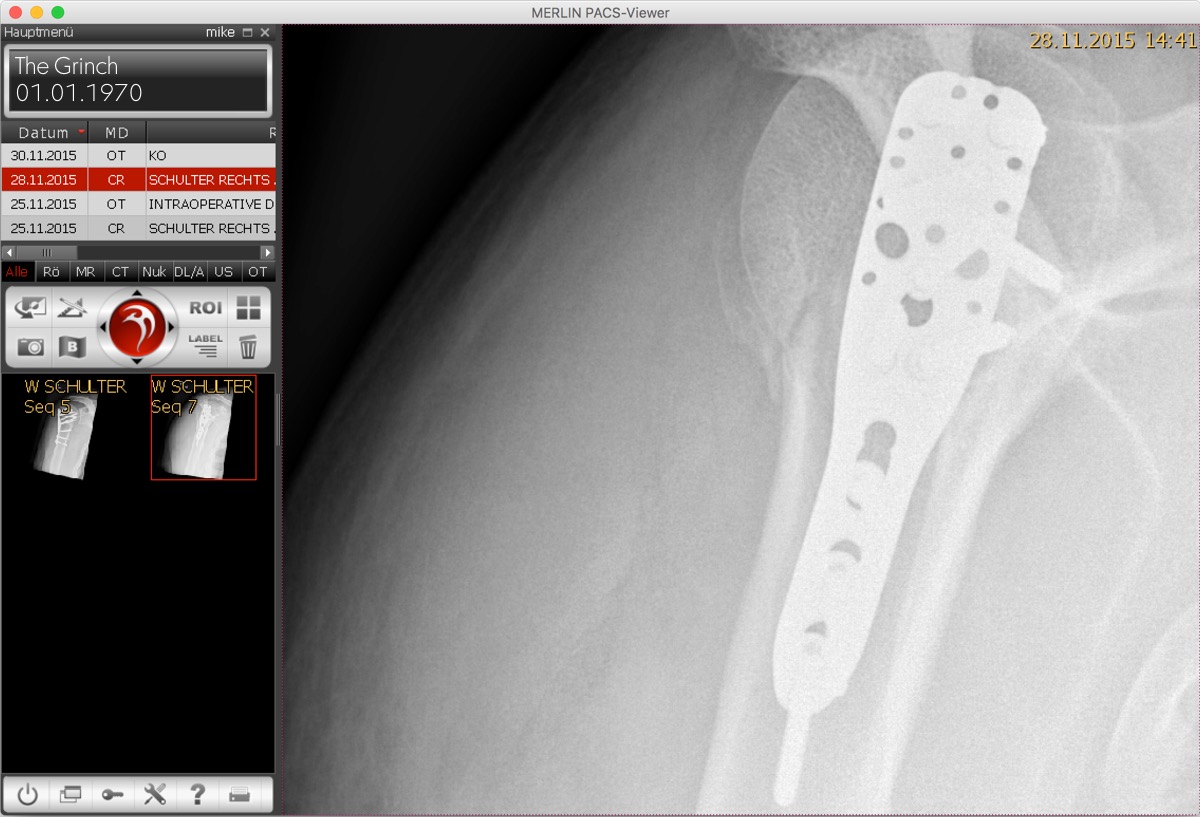
WineBottler MERLIN PACS Viewer
Looking at a fracture in MERLIN PACS Viewer on WineBottler on OS X El Capitan.

As usual: head over to winebottler.kronenberg.org and grab your copy :) .

Enjoy!
Mike

PS
… no, it’s not my shoulder. Txs for asking.

Run Microsoft Windows Applications and Games on Mac, Linux or ChromeOS save up to 20% off  CodeWeavers CrossOver+ today.

Выпуск Wine Staging 1.8 экспериментального варианта Wine


Следом за Wine 1.8 увидел свет релиз ответвления Wine Staging 1.8, в рамках которого формируются расширенные сборки Wine, включающие не полностью готовые или рискованные патчи, пока не пригодные для принятия в основную ветку Wine. Wine-staging позиционируется как площадка для предварительного тестирования экспериментальных патчей, перед их включением в основное дерево исходных текстов Wine.

По сравнению с Wine 1.8 в Wine-staging добавлено более 730 патчей и 260 исправлений ошибок. В том числе добавлена реализация многопоточного режима (Commandstream multithreading), поддержка Windows ACL, возможность использования тем GTK3+, декодировние DXVA2 на стороне GPU, поддержка CUDA/PhysX/NVENC для видеокарт NVIDIA, поддержка EAX 1, улучшенная реализация d3dx9, различные оптимизации производительности и т.д.

В качестве особого рождественского подарка пользователям разработчики Wine Staging также представили реализацию технологии Windows Update для Wine. Реализация основана на установщике wusa.exe (Windows Update Stand-Alone Installer), который используется для установки обновлений пакетов в Vista и более новых выпусках Windows. В текущем состоянии система поддерживает установку 32- и 64-разрядных пакетов, но пока охватывает не все типы MSU-пакетов. Например, не поддерживается проприетарный формат упаковки msdelta, используемый в пакетах с IE, но вполне корректно работает установка .NET Framework 4.5.

Run Microsoft Windows Applications and Games on Mac, Linux or ChromeOS save up to 20% off  CodeWeavers CrossOver+ today.

Стабильный релиз Wine 1.8

После полутора лет разработки и выпуска 56 экспериментальных версий представлен релиз открытой реализации Win32 API - Wine 1.8. С момента прошлой стабильной версии было внесено около 13 тысяч изменений. Выпуск примечателен реализацией DirectWrite, Direct2D и Direct3D 10/11, новым звуковым драйвером для PulseAudio и поддержкой множества новых игр и приложений. В настоящее время подтверждена полноценная работа в Wine 4088 программ для Windows, еще 3571 программ прекрасно работают при дополнительных настройках и внешних DLL, у 3134 программ наблюдаются небольшие проблемы в работе, которые не мешают использованию основных функций приложений.
Из изменений, добавленных в процессе подготовки Wine 1.8, можно отметить:
  • Графическая подсистема:
    • Поддержка программного интерфейса Direct2D. Реализация включает в себя средства отрисовки в поверхности DXGI (DirectX Graphics Infrastructure) и битмапы WIC, добавлены геометрические объекты на основе прямых линий и кубических кривых Безье, реализованы вывод текста, битмапы и кисти (сплошные, на основе битмапов и непрозрачные).
    • Возможность кодирования файлов PNG в чересстрочном режиме;
    • Возможность чтения информации о цвете из PNG-файлов;
    • В GdiPlus реализована поддержка анимированных GIF;
  • Текст и шрифты
    • Реализован программный интерфейс DirectWrite. Обеспечена поддержка загрузки файлов со шрифтами, рендеринга, генерации битмапов, работы с формами (shaping), сборки семейств шрифтов через комбинирование похожих шрифтовых начертаний, раскладки текста, сопоставления шрифтов, обработки разрывов строк и двунаправленного текста.
    • Возможность синтеза жирных глифов для контурных шрифтов;
    • Поддержка определения нескольких замен для одного шрифта через добавление многострочных записей в "HKCU\Software\Wine\Fonts\Replacements";
    • Более точная обработка диапазонов символов в вертикальном тексте за счёт использования таблиц Unicode;
    • Таблицы символов на базе стандарта Unicode 8.0.0;
    • Во встроенных шрифт Wingdings добавлены дополнительные глифы;
    • В API Uniscribe добавлена поддержка сопряжения открывающихся и закрывающихся скобок для Unicode;
    • Для более точной отрисовки теста в программе RichEdit задействован API Uniscribe;
  • Direct3D
    • Возможность выполнения простых графических приложений, использующих API Direct3D 10. На текущем этапе разработки пока остаётся много нереализованных функций, но уже доступны операции обновления ресурсов, распознаются объектные коды (opcode) моделей шейдеров, можно работать с буферами констант, реализованы различные представления ресурсов, объекты и блоки состояния (state objects, state blocks). Для работы Direct3D 10 требуется наличие системы с поддержкой как минимум OpenGL 3.2 и GLSL 1.50;
    • Поддержка API Direct3D 11, уровень реализации которого примерно соответствует поддержке Direct3D 10;
    • Реализована часть интерфейса DXGI 1.1 (DirectX Graphics Infrastructure);
    • Обеспечено корректное сворачивание приложений и восстановление режима экрана после потери фокуса;
    • Реализованы функции смешивания вершин (vertex blending);
    • Возможность задания размеров точке в привязке к вершинам;
    • Расширена база данных графических карт wined3d, упрощён код определения графических карт и обеспечено задействование адекватных типовых режимов для нераспознанных карт;
    • Реализован режим адресации текстур "mirror once", который может работать через задействование расширения GL_ARB_texture_mirror_clamp_to_edge или GL_EXT_texture_mirror_clamp
    • Через расширение GL_ARB_blend_func_extended реализован фактор смешивания D3DBLEND_SRCALPHASAT;
    • Для различных операций с текстурами задействованы расширения GL_ARB_sampler_objects и GL_EXT_texture_snorm;
    • Введены более жесткие ограничения для формата текстур, что позволяет приложению переключиться на другой формат вместо некорректной обработки текущего;
    • Улучшена поддержка Direct3D 9, добавлена возможность использования расширения GL_ARB_timer_query и константы D3DTSS_CONSTANT;
    • Поддержка поверхностей NV12, которые могут применяться для вывода видео;
    • Поддержка текстур и поверхностей ATI1N, которая реализована через обращение к расширению GL_ARB_texture_compression_rgtc;
    • Поддержка интерфейса IDirect3DSwapChain9Ex;
    • Добавлены базовые контексты OpenGL и OpenGL ES, а также возможность передачи многопоточных команд OpenGL ("CSMT");
  • DirectDraw
    • Улучшена реализация вызова SetCooperativeLevel(), что положительно сказалось на качестве работы эксклюзивного режима DirectDraw;
    • Обеспечена более корректная работа механизма переключения поверхностей DirectDraw, что затронуло приложения, использующие более одного буфера предварительной отрисовки;
    • Улучшены средства обработки палитр в DirectDraw, что улучшило работу приложений, манипулирующих режимами с 8-разрядной глубиной цвета;
    • Улучшена поддержка поверхностей "Client memory", которые используются при сжатии текстур;
  • Звук и видео
    • Реализован звуковой драйвер, работающий через звуковой сервер PulseAudio. Драйвер подключается автоматически при наличии в системе запущенного сервера PulseAudio;
    • В реализации DirectSound добавлена поддержка 5.1 surround, которую можно настроить через Winecfg;
    • Реализован API XAudio2, который основан на использовании библиотеки OpenAL;
    • Реализована седьмая версия API Video Mixing Renderer;
    • Добавлена поддержка кодирования и сжатия файлов AVI;
  • Ядро
    • Wine может быть настроен для вывода номера версии Windows, например,'Windows 8.1' или 'Windows 10';
    • Реализованы объекты синхронизации событий (Keyed Events) и механизм синхронизации "init once";
    • Реализованы условные переменные;
    • Реализованы Slim-блокировки на запись и чтение;
    • Для загрузки DLL, библиотек типов и COM-классов задействован механизм активации контекста;
    • Поддержка чтения и записи в Windows-устройства и их привязка к существующим Unix-устройствам;
    • Поддержка TLS (Thread local storage) для динамически загружаемых библиотек;
    • Поддержка обработки заданий;
    • Добавлен сервис с планировщиком задач;
    • Поддержка кодировки UTF-7;
    • Возможность привязки процессов и потоков к определённым процессорным ядрам (affinity);
    • Поддержка динамического перехода на зимнее/летнее время (DST, Daylight Saving Time);
    • Добавлена эмуляции доступа к USER_SHARED_DATA на платформах x86-64;
    • Представлен новый API для управления пулом потоков (thread pool);
    • Реализована поддержка OpenMP;
    • Предварительная поддержка HID-устройств ввода (Human Interface Device);
  • Интерфейс пользователя
    • Реализовано опциональное меню Start, для включения которого в настройках рабочего стола (HKCU\Software\Wine\Explorer\Desktops\*) нужно указать "EnableShell" = "Y";
    • В штатном диалоге открытия файла добавлено выпадающее меню со списком операций с файлом;
    • Обеспечено связывание папки 'My Documents' с директорией 'Documents', при её наличии;
    • Поддержка задания тем оформления для полос прокрутки;
    • Возможность сохранения и восстановления состояния типовых элементов панели инструментов;
  • Сетевые возможности
    • Браузерный движок Gecko обновлён до версии, используемой в Firefox 40. В MSHTML реализовано большое число новых объектов и свойств;
    • Поддержка автоматической настройки параметров прокси-сервера;
    • При работе RPC поверх HTTP реализованы схемы аутентификации NTLM и Negotiate;
    • Частично реализован Web Services API;
    • Возможность отмены загрузки дополнений к Gecko и Mono из диалога с прогрессом выполняемой операции;
    • Поддержка условной компиляции в JavaScript;
    • В VBScript реализованы массивы, математические функуции и раскрутки исключений (exception unwinding);
    • Возможность использования Samba NetAPI для настройки подключения к удалённым сетевым хранилищам (network shares);
    • Добавлена DLL с функциями для захвата пакетов (Packet Capture DLL);
    • Поддержка вывода уведомлений об изменении состояния сетевого интерфейса;
    • В Wininet добавлена поддержка сжатия контента методом Deflate;
    • В Windows Sockets добавлен TransmitFile API;
    • Улучшена поддержка сервиса передачи файлов BITS;
  • Вывод на печать
    • Поддержка вертикального текста при печати через драйвер PostScript;
    • В драйвере PostScript обеспечена поддержка генерации стандартных имён глифов;
    • Улучшена поддержка монохромных принтеров при выводе на печать цветных изображений;
  • Встроенные приложения:
    • В программе 'taskmgr' обеспечен показ признака выполнения процессов под WoW64;
    • В 'regedit' улучшены средства импорта и экспорта файлов с реестром;
    • В 'wineconsole' добавлена поддержка настройки вставки и переопределения режима в диалоге настройки;
  • Разное
    • В драйвере X11 появилась поддержка пятой версии протокола X Drag & Drop;
    • В WMI (Windows Management Instrumentation) реализованы дополнительные системные классы WBEM;
    • В MSI улучшены средства применения патчей;
    • Поддержка свежих версий C/C++ runtime, в том числе новой библиотеки UCRTBASE.
    • Многочисленные улучшения, связанные с поддержкой работы на платформе OS X: поддержка 64-разрядной архитектуры, поддержка джойстиков и всех событий мыши, возможность использования полноэкранного режима в стиле Cocoa, поддержка раскрытия окон на весь экран, возможность переключения раскладок клавиатуры, реализация TL (Active Template Library) версий 9, 10 и 11;
    • В OLE-хранилище добавлена поддержка блокировки и файлов размером более 4 Гб;
    • Возможность загрузки 32-разрядных библиотек из 64-разрядных программ;
    • Для платформы ARM64 реализована поддержка режима WoW64;
    • На платформе Android реализована поддержка 64-разрядной архитектуры;
    • Возможность сборки разных версий DLL на основе одного набора исходных текстов;
    • В число зависимостей включены liblcms2, libnetapi (network shares), libpcap (Packet Capture DLL), libpulse (Pulse Audio driver), OpenAL (XAudio2).

Run Microsoft Windows Applications and Games on Mac, Linux or ChromeOS save up to 20% off  CodeWeavers CrossOver+ today.

WineHQ has released Wine 1.8 for Linux and Mac

The WineHQ team is proud to announce that the stable release Wine 1.8 is now available.
This release represents 17 months of development effort and around 13,000 individual changes. The main highlights are the implementation of DirectWrite and Direct2D , and the new Pulse Audio driver. It also contains a lot of improvements across the board, as well as support for many new applications and games. See the release notes below for a summary of the major changes.

The source is available now. Binary packages are in the process of being built, and will appear soon at their respective download locations.

What's new in Wine 1.8
======================

*** Text and fonts

- DirectWrite is implemented, and works for a number of
  applications. The implemented functionality includes:
  - Font file loading from system or custom font collections.
  - Building font families by combining similar font faces.
  - Font matching algorithm using weight/width/slope model.
  - Basic text layout support.
  - Bi-directional level resolution and line breaks resolution.
  - GDI interoperability API, including rendering to DIB section base target.
  - Rendering to arbitrary target with generic rendering interface.
  - Generating black&white and grayscale alpha bitmaps.

- Bold glyphs can be synthesized for outline fonts.

- Multiple replacements can be specified for a single font by using a
  multi-string entry under HKCU\Software\Wine\Fonts\Replacements.

- Vertical text uses the Unicode data tables for more accurate
  character ranges support.

- Character tables are based on version 8.0.0 of the Unicode Standard.

- The built-in Wingdings font contains more glyphs.

- Unicode bracketing pairs are supported in Uniscribe.

- The RichEdit control uses Uniscribe for more accurate text rendering.

- Hebrew and Arabic Mac OS code pages are supported. This improves
  support for loading translated font names from Mac OS font files.

*** Graphics

- Direct2D is supported. Among the implemented features are:
  - DXGI surface and WIC bitmap render targets.
  - Geometries defined by straight lines and cubic Bézier curves.
  - Drawing text.
  - Bitmaps.
  - Solid color brushes and bitmap brushes.
  - Opacity brushes.

- PNG files can be encoded in interlaced mode.

- Gamma information can be loaded from PNG files.

- Animated GIFs are correctly supported in GdiPlus.

*** Direct3D

- Direct3D 11 is supported, to about the same level as Direct3D 10.

- Simple applications using Direct3D 10 are supported. There are still
  many unimplemented features.  Direct3D 10 requires support for at
  least OpenGL 3.2 and GLSL 1.50. Some of the changes and supported
  features include:
  - Several resource update operations are implemented.
  - Many more shader model 4 opcode are recognized.
  - Constant buffers are supported.
  - The various resource views are implemented.
  - The various state objects are implemented.
  - Stateblocks are implemented.

- A number of new DXGI 1.1 interfaces are implemented. This benefits Direct3D
  10 and 11 applications.

- Direct3D applications correctly minimize and restore the display
  mode on focus loss.

- Fixed function vertex blending is implemented. This requires GLSL support.

- Per-vertex point sizes are supported. This requires GLSL support.

- The wined3d graphics card database recognizes more graphics
  cards. The graphics card detection code is simplified and
  improved. More reasonable fallbacks are picked for unrecognized
  graphics cards.

- On drivers that support it, GL_ARB_texture_mirror_clamp_to_edge or
  GL_EXT_texture_mirror_clamp are used to implement the "mirror once"
  texture addressing mode. Previously this required
  GL_ATI_texture_mirror_once.

- GL_ARB_depth_clamp is no longer required to correctly draw pre-transformed
  vertices with disabled z-buffering. This helps older graphics cards that
  can't correctly implement GL_ARB_depth_clamp.

- On drivers that support it, GL_ARB_blend_func_extended is used to
  implement the D3DBLEND_SRCALPHASAT blend factor.

- On drivers that support it, GL_ARB_sampler_objects is used to apply
  sampler states independently of the texture object they apply
  to. This helps applications that bind the same texture to multiple
  texture stages, but with different sampler states.

- On drivers that support it, GL_EXT_texture_snorm is used to support
  signed (normalized) texture formats. These are typically used for
  bump mapping. Previously these formats required either
  GL_NV_texture_shader, or fixups when loading and using them.

- On drivers that support is, GL_ARB_timer_query is used to support
  Direct3D 9 timestamp queries.

- Texture format restrictions are more strictly enforced. This allows
  applications to fall back to a different format instead of continuing with
  broken rendering.

- Direct3D 9 D3DTSS_CONSTANT texture stage constants are supported.

- Color keyed blits can be done by the graphics card. Previously these
  needed to be done by the CPU.

- NV12 surfaces are supported. This is used by some applications for
  playing back video.

- ATI1N textures and surfaces are supported, in addition to ATI2N
  textures and surfaces. This requires support for
  GL_ARB_texture_compression_rgtc from the OpenGL driver.

- When GLSL is supported, lighting for Direct3D 1-3 is more
  correct. However, for most application the difference will only be
  very slight.

- The IDirect3DSwapChain9Ex interface is supported.

- OpenGL core contexts, OpenGL ES contexts, and multi-threaded OpenGL
  command submission (known as "CSMT") have been added, however that
  work is not finished yet.

*** DirectDraw

- SetCooperativeLevel() works better, affecting DirectDraw exclusive
  mode in particular.

- DirectDraw surface flipping is more correct. This affects applications that
  use more than 1 back buffer in particular.

- DirectDraw palette handling is better supported. This mostly affects
  older applications using 8-bpp display modes (but not exclusively.)

- "Client memory" surfaces are better supported, in particular related
  to the handling of pitch and texture compression.

*** Audio and video

- A Pulse Audio driver is implemented. It is selected automatically
  when Pulse Audio is running.

- 5.1 surround sound is supported in DirectSound. Stereo is the
  default, but other speaker configurations can be set through the
  Audio tab in Winecfg.

- XAudio2 is implemented, based on the OpenAL Soft library.

- The OpenAL library defaults to the native version.

- The Video Mixing Renderer version 7 is implemented.

- AVI file encoding and compression is implemented.

*** Kernel

- Wine can be configured to report the Windows version as 'Windows
  8.1' and 'Windows 10'.

- Keyed event synchronization objects are implemented.

- The "init once" synchronization mechanism is supported.

- Condition variables are implemented.

- Slim Reader/Writer locks are implemented.

- Activation contexts are used for loading DLLs, type libraries, and
  COM classes, avoiding the need for explicit registration.

- Windows devices support read and write operations in addition to I/O
  controls. They can be remapped directly to existing Unix devices.

- Thread local storage is supported in dynamically loaded libraries.

- Process jobs are implemented.

- The Task Scheduler service is implemented.

- The UTF-7 encoding is supported.

- ATL thunk emulation supports a wider range of possible instructions.

- Process and thread affinity is supported even with a large number of
  processors.

- Dynamic DST (Daylight Saving Time) is supported through the
  registry. Timezone data is updated for a number of timezones.

- USER_SHARED_DATA access is emulated on x86-64 platforms.

- The new thread pool API is supported.

- OpenMP (parallel programming API) is implemented.

- Preliminary support for HID devices is implemented, but it's not
  enabled yet.

*** User interface

- There is an optional Start Menu in desktop mode, that can be enabled
  on a per-desktop basis by setting "EnableShell" to "Y" under
  HKCU\Software\Wine\Explorer\Desktops\.

- The standard Open File dialog supports a drop-down menu for file
  manipulations.

- The 'My Documents' folder links to the XDG or Mac OS X 'Documents'
  folder if it exists.

- Many more shell Known Folders are supported.

- Scrollbar theming is implemented. Theming of other controls also
  works better.

- The Toolbar common control can save and restore its state.

*** Mac OS X support

- The 64-bit architecture is supported on Mac OS X; however, it's not
  100% compatible with Win64, because of the OS X non-standard 64-bit
  ABI.

- Memory size is reported accurately on Mac OS X.

- Joysticks are supported at the WinMM level on Mac OS X.

- Debugging information and stack unwinding are improved on Mac OS X.

- Trash folder enumeration is supported on Mac OS X.

- All mouse events are supported in the system tray with the Mac driver.

- Window maximization is supported in the Mac driver.

- The Cocoa-style full-screen mode is supported in the Mac driver.

- Multiple keyboard layouts are supported in the Mac driver.

*** X11 driver

- X Drag & Drop protocol version 5 is supported.

- Flashing a window caption is implemented in the X11 driver using the
  NET_WM_STATE_DEMANDS_ATTENTION style.

*** OLE / COM

- OLE Storage files support file locking, and sizes larger than 4 GB.

- Type libraries are registered correctly on 64-bit setups.

- 32-bit type libraries can be loaded from 64-bit programs.

- The OLE data cache supports DIB images.

- The RPC interface to control Windows services is compatible with the
  native version.

- OLE Accessible Objects are implemented for better accessibility support.

*** Internet and networking

- The Gecko engine is updated to the version from Firefox 40. Many
  more objects and properties are implemented in MSHTML.

- Internet proxies can be configured automatically.

- RPC over HTTP supports the NTLM and Negotiate authentication
  schemes.

- The Web Services API is partially implemented.

- Download of Gecko and Mono add-ons can be canceled from the
  progress dialog.

- Conditional compilation is supported in JavaScript.

- Arrays, math functions, and exception unwinding are implemented in
  VBScript.

- Remote network shares can be configured using Samba's NetAPI library.

- The Packet Capture DLL is implemented.

- Network interface change notifications are implemented.

- IPv6 DNS addresses are supported in IphlpAPI.

- The Deflate content encoding is supported in Wininet.

- The TransmitFile API is implemented in Windows Sockets.

- The BITS file transfer service is better supported.

*** Printing

- Vertical text is supported when printing through the PostScript driver.

- The PostScript driver generates standard glyph names when possible.

- Monochrome printers are better supported, in particular when
  printing color images.

- Collation is supported in the PostScript driver.

*** Miscellaneous

- Windows Management Instrumentation (WMI) implements several more
  WBEM system classes.

- Applying installation patches is better supported in MSI.

- Hyperlink controls are supported in installers.

- More recent versions of the C/C++ runtimes are supported, including
  the new UCRTBASE library. The old MSVCIRT C++ runtime is also
  partially implemented.

- Version 9, 10, and 11 of ATL (Active Template Library) are
  implemented.

- The Windows Scripting Runtime supports many more classes, including
  file and folder collections and dictionaries.

- Writing XML files is implemented.

- The Invariant locale is supported.

*** Built-in applications

- The 'taskmgr' application displays whether processes are running
  under WoW64.

- The 'regedit' tool better supports import/export of registry files.

- The 'wineconsole' tool supports configuring the insert/overwrite
  mode in the settings dialog.

*** Platform-specific changes

- System and hardware information is properly reported on ARM
  platforms.

- WoW64 mode is supported for the ARM64 platform.

- The 64-bit architecture is supported on Android.

- Binaries are built as PIE on Android, for compatibility with Android
  version 5.

*** Build environment

- Source files can be shared across DLLs, to allow building multiple
  versions of a DLL from the same source. This is more compatible than
  forwarding calls to a single master DLL. It's used mainly for the
  C/C++ runtime libraries.

- #pragma directives are supported in various source files to specify
  dependencies, for more accurate makefile generation.

- The IDL compiler supports WinRT namespaces.

- The message compiler uses mo files instead of po files for faster
  processing.

- Architecture-specific compile flags like -march= are supported in
  Winegcc and passed along to the assembler.

*** New external dependencies

- liblcms2 is used instead of liblcms version 1.

- libnetapi from Samba is used for configuring remote network shares.

- libpcap is used to implement the Packet Capture DLL.

- libpulse is used by the Pulse Audio driver.

- The OpenAL Soft library is used to implement XAudio2.

- The prelink tool is no longer necessary as long as the linker
  supports the -Ttext-segment option.

*** Known issues

- Since the support for OpenGL core contexts in WineD3D is not
  complete enough yet, Direct3D 10 and 11 need to be supported in a
  legacy context / the compatibility profile, which means that they
  currently don't work on Mesa.

- Setting the PULSE_LATENCY_MSEC variable was sometimes necessary with
  the Alsa audio driver, but it can cause trouble with the Pulse
  driver. It is recommended to unset the variable.

--
Alexandre Julliard


Run Microsoft Windows Applications and Games on Mac, Linux or ChromeOS save up to 20% off  CodeWeavers CrossOver+ today.