Pages

Wednesday, November 4, 2009

RealPlayer SP 1.0.2 on Linux with Wine

RealPlayer has always enabled you to play RealAudio (*.ra) and RealMedia (*.ram) files.
Now, with RealPlayer, you can:
  • Download videos from thousands of Web sites with just one click
  • Build your own video library and playlists
  • Play all major audio and video formats
RealPlayer for personal use includes audio CD burning capabilities, DVR-style playback buffering, multimedia search, Internet radio, a jukebox-style file library, an embedded web browser (using Microsoft Internet Explorer), and the ability to transfer media to a number of portable devices, including Apple's iPod, MP3 players, and Windows Media devices.
Since version 11, RealPlayer also includes Flash Video support, DVD, SVCD, VCD burning and video recording.

Wine configuration
Linux Distribution: Ubuntu 8.04
Wine Version: 1.1.32
Windows version emulated: XP

Installing RealPlayer SP 1.0.2

Download RealPlayer SP 1.0.2 from here.

RealPlayer should install without any problems, just open your favorite terminal and run :

$ wine RealPlayerSPGold.exe

After the install you will want to install some native windows dlls and the flash plugin. The easiest way to do this is with winetricks, if you don't already have a current release of winetricks just go to the archive section of this site and select winetricks.

Select the following software in winetricks to install : Microsoft core fonts, tomaha font, richedit 20 and 32, flash plugin & ie6
After all the above software is installed cd to the install directory and run realplay.exe

$ cd /home/tom/.wine/drive_c/Program\ Files/Real/RealPlayer
now run realplay.exe
$ wine realplay.exe
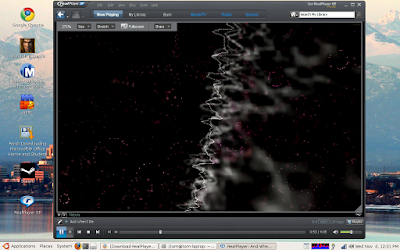
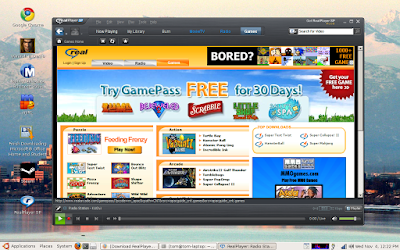
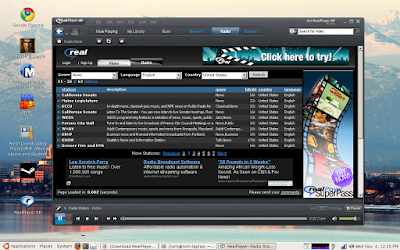
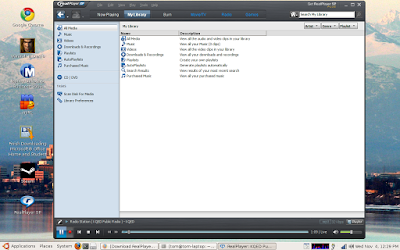
RealPlayer SP playing a mp3 file


RealPlayer SP Radio
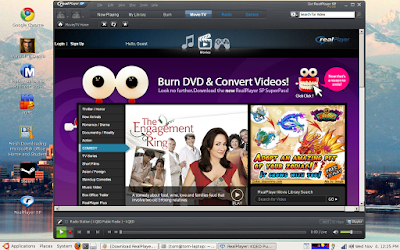
RealPlayer Movies/TV
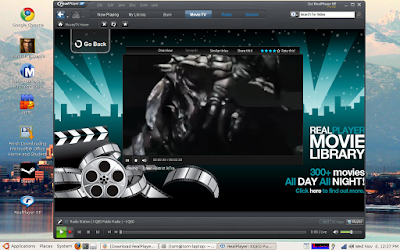
District 9 movie trailer


What works :
  • Audio : All of the audio files I tried played without any problems.
  • Radio : works reasonably good, each time you select a station select open in the dialog box.
  • Movies/TV : about 75% of the movie trailers I tested worked with any problem.
What doesn't :
  • Selecting Station, Genre etc... caused the player to lock up on me, narrowing the available selections works fine with the search option.
  • Some of the movie trailers wouldn't play, the player screen remained black but the audio played just fine..Maybe this can be worked around with a codec change or video setting change.
  • I didn't test DVD, VCD or burning so im not sure how well these features work at this time.
Run Microsoft Windows Applications and Games on Mac, Linux or ChromeOS save up to 20% off  CodeWeavers CrossOver+ today.

Tuesday, November 3, 2009

Codeweavers Profile in High Definition from G4TV

Video Description: Codeweavers is bridging the gap between Windows and Mac. Their sofware allows you to run most major games and software that are Windows only to run on your Mac OS without even having a windows license.

Codeweavers Profile


Putty for Mac
Putty for Mac
$15.00

https://winereviews.onfastspring.com/putty-for-mac


Monday, November 2, 2009

Wine Cedega Crossover and PlayonLinux

As the title says I'm going to talk about some of the differences between all of the above.
WINE is basically a windows emulator for Linux operating systems. WINE allows you to run some applications on Linux that does not have Linux support or installers ie: Office 2007, World of Warcraft and many others. This is not a how-to but more a idea of what is going around and what its all about. WINE is the underlying technology for all the above applications. But lets face it, this was made so we could run the nice M$ games on our Linux distros. I for one love to game and I really would like to have more games written for M$ and Linux. I can't figure out what the big deal is as most games are written in C++ and could be compiled for any OS type.

Games is a major stumbling block when it comes to people moving from M$ to Linux and most don't have the knowledge or time to sit and try figure out how to play there favorite games on Linux. Here comes the solutions. Some are free and others not but lets take a look at them a little more.

WINE
WINE is easy to setup but hard to configure. Most of the time you need to install things like flash, msfonts and direct X to make things work. So far I found that if you don't want to physically install something from a CD or download it, the best option is to use WINE on its own and check out WINE AppDb for some useful tips on how to run some of the applications. WINE has some add-on tools to make life a little easier like winetricks and others.

Cedega also known as WINEX
Cedega is a commercial application that will cost you around $5 a month if you want to play games on Linux but it does support some really nice games. It's a frontend that was built on top of WINE which runs basic scripts to install the needed applications to run specific games. Now, as South Africans in a recession this is not a viable option as we already have to pay monthly subs for some games and then also just to run it on our system.

Crossover
Crossover has two versions: Crossover Linux Professional and Crossover games for Linux. And as you can guess it is WINE with some scripts and uses WINEPREFIX to run its applications. I must say if I had to pay for applications this would be the one. Its a once-off charge of $39.95 and no monthly subs.

PlayOnLinux
This is exactly the same as all of the above its uses WINE with scripts to make installations easy. The big difference here is that its absolutely free and according to their site will remain free. But with all free things there comes a price. Their application support is not as big as WINE and they are still working out what all is needed to run what applications.

Now for my 2 cents worth on the entire subject is that if you have all the install CDs and your looking for less fuss and more play time then get either Crossover or PlayOnLinux as they are reasonable and less hard to work with. If you have all your games on a external hdd like me from Windows past then WINE with winetricks is about the best option. This is a work around for playing games on Linux and until supplies start recognizing that the Linux gaming community is growing rapidly and start selling games for all OS's this will have to be the workaround.

Oh, the one thing that all the others do is use WINEPREFIX with different names. Crossover calls it bottles and PlayOnLinux something else. But what it basically does is install your game on its own little windows framework so that if you install something that might help one application but break another then they don't affect each other. CodeWeavers Crossover also gives you a 30-day trial on CrossOver Games Linux if you want to check it out before you buy it.


Putty for Mac
Putty for Mac
$15.00

https://winereviews.onfastspring.com/putty-for-mac


CodeWeavers Announces Lame Duck Support Insurance Policy

On Anniversary of Huge Software Giveaway, CodeWeavers Announces "It’s NOT Free" Special for Wednesday, October 28

 
In 2008 CodeWeavers Gave Away 650,000 Free Licenses in 24 Hours; This Year’s Special Includes "Lame Duck Insurance Policy" Offering 2-for-1 Support
 
SAINT PAUL, Minn. (October 27, 2009) – On the one-year anniversary of the software industry’s largest-ever one day giveaway—a publicity stunt that nearly crippled his company—Jeremy White, the deeply embittered CEO of CodeWeavers, announced ALL of his software will NOT be free tomorrow in celebration. "Not even CLOSE to free," White proclaimed in announcing his non-giveaway. "Still, we’ll have some pretty good deals."

Last Year: A Mushroom Cloud of New Users
The time was July, 2008. The plan: as part of CodeWeavers' "Great American Lame Duck Challenge," if President Bush could accomplish one of five goals by his term’s end – including reducing the price of gas to below $3 / gallon – CodeWeavers would give away its CrossOver software to anyone who wanted it. CrossOver is a highly-celebrated open source software that enables individuals to run Windows applications without purchasing a Windows license from Microsoft. And then, in mid-October 2008, as the global financial meltdown unfolded and the Great Recession kicked into fifth gear, gas hit $2.79 in the Twin Cities, and CodeWeavers announced that the giveaway was on.

The result was an internet phenomenon. On October 28, 2008, nearly 650,000 people downloaded CrossOver. "Our servers melted, my sales director was sobbing uncontrollably and we basically burned to the waterline," White said. "We were suddenly the hottest commodity on the Web after porn." One year later, though, White says he’s seen the light. "My socialist phase has passed; I’m back to being a greedy capitalist. It’s time for somebody to bail me out!"

This Year: CodeWeavers Actually Asks People to BUY Their Software
Wednesday, October 28, 2009, in a shocking, one-time-only shift away from its previous marketing stance, CodeWeavers has decided to try making money instead. For a 24-hour period commencing at midnight, October 28, CodeWeavers will offer ALL of its software for NOT free. "Half off, to be precise," intoned White. "But that’s still pretty darned good. No, we probably won't be moving as many licenses, but our servers won't be puddles of slag in the morning, either."

Users buying during the NOT free promotional period will automatically later receive CodeWeavers forthcoming "Zombie Mallard" and "Snow Mallard" releases, named in honor of the twisted Lame Duck that spawned them.

"Zombie Mallard" will allow CodeWeavers users CrossOver Games product to play Valve's fervently anticipated forthcoming Left 4 Dead 2 release, available in mid-November. "Snow Mallard," CodeWeavers next-generation productivity app, will allow users to install Windows applications directly from CodeWeavers huge online database of known software installation recipes.

"We think the Mallard releases will offer significant improvements to the way our current (non-paying) customers enjoy using CrossOver," White chuckled, then gagged from his stress-induced acid reflux. "A pity the Mallards won't QUITE be ready until after the Lame Ducker's 1-year support period has expired. That's just pure coincidence, though."

CodeWeavers Offering Assuring Insurance With Sale
White is also offering customers two further perks during this year’s "giveaway." First, they will receive the Lame Duck Insurance Policy.

"Starting Oct. 28th, for every day the customer waits for Snow Mallard to be released, we'll tack TwoWO days onto their support entitlements," White said from his desk, as he bent over and picked up a penny. "How’s that for a public option?

"It’s a pretty sweet deal: The later we ship, the more value the customer receives for their money. Not only that, but we're giving away 25 free lifetime licenses of CrossOver as well. That oughta pump up some interest; at least, that's what Marketing better hope," White muttered, in reference to his disgraced Marketing department, now chained to their desks until the company sells 650,000 PAID licenses. "Marketing got us into this mess in the first place; they ain't getting out of it until I say they’re out," White sneered. "Back to work, you!"

About CodeWeavers

Founded in 1996 as a general software consultancy, CodeWeavers today focuses on the development of Wine, the core technology found in all of its CrossOver products. The company's goal is to bring expanded market opportunities for Windows software developers by making it easier, faster and more painless to port Windows software to Mac OS X and Linux. CodeWeavers is recognized as a leader in open-source Windows porting technology, and maintains development offices in Minnesota, the UK and elsewhere around the world. The company is privately held. For more information about CodeWeavers, log on to www.codeweavers.com.


Putty for Mac
Putty for Mac
$15.00

https://winereviews.onfastspring.com/putty-for-mac


Wednesday, October 28, 2009

Codeweavers honors the great Lame Duck giveaway

From Jeremy White's blog,

Wednesday the 28th is the one year anniversary of our Lame Duck giveaway special, in which we gave away 650,000 copies of CrossOver, melted down our servers, and destroyed the US economy.
We're choosing to celebrate the anniversary in a variety of ways. First, we're going to launch a 'CrossOver is NOT Free' promotion starting on Wednesday.

Next, in honor of the Lame Duck, we have given our next two upcoming releases code names. 'Snow Mallard' is the upcoming version of regular CrossOver and 'Zombie Mallard' is the upcoming version of CrossOver Games.


Snow Mallard represents a radical departure for us. For the first time, we're going to embrace the reality that CrossOver runs many applications, rather than just a limited number. Instead of a fixed number of applications supported by CrossOver, CrossOver will be able to use 'Application Installer Profiles', which can come from us, or from the broader community. This should make it easier for our Advocates to bake tips and tricks right into an installation recipe.

Snow Mallard also includes a complete rewrite of the client engine, so everyone, particularly Linux users, should see a dramatic improvement in behavior.

Zombie Mallard will continue to build on the great games we support now, and add support for Left 4 Dead 2, once it's available.

The marketing guys also tell me we'll have a new video out tomorrow, something to do about the Lame Duck as well. But they won't tell me what it is; some kind of surprise...

Cheers,
Jeremy

Wednesday, October 14, 2009

CodeWeavers CrossOver Mac Pro 8

Sometimes, what is possible it not always practical. Some users, such as those who absolutely must run a legacy Windows application, have found it's possible to load Windows on a Mac. Not for the faint of heart, the process involves booting into Windows--you'll need software such as Apple's Boot Camp (free)--or running Windows within a virtual machine application such as Parallels ( Macworld rated 3.5 out of 5 mice ) or VMware Fusion ( Macworld rated 4.5 out of 5 mice ).

A slicker option is CodeWeaver's CrossOver Mac Pro 8.0, an application that runs a virtual environment so you can run Windows applications on your Mac. (We tested the Pro version, which supports both apps and games.) With CrossOver 8 installed on your Mac, you can insert a Windows installer disc such as the one for Microsoft Office 2007 or Quicken 2009 for Windows, install the program, and run it without actually running Windows. This saves time, because you never have to boot the Windows OS. And, theoretically, it should make Windows apps run faster on your Mac.

CrossOver Mac Pro 8 is a smart application; it relies on the open-source Wine application for running Windows apps and streamlines the install process. However, since the CrossOver 7 ( Macworld rated 3 out of 5 mice ) release last year, the new version only adds support for one major, new Windows application (Quicken 2009) and tweaks Office 2007 compatibility. CodeWeavers has not addressed my chief complaint, which is that the application does not provide any guidance as to whether an application will work at the time of install, and relies instead on an online user forum. So, CrossOver 8 is smarter, but still not smart enough.

Application testing

Of course, the real strength of CrossOver 8 is whether it will work for the applications and games you want to run, not any interface issues. For example, I know of a design agency that still uses Adobe FrameMaker 7 to access an extensive archive of page layout documents. In some other cases, you might need to run a Windows program such as Microsoft Word 2007 because that's the version dictated by your company. Fortunately, CrossOver 8 has tweaked support for Office 2007 and now runs more reliably and faster, and adds support for features such as inserting clip art. That said, on my MacBook with 2GB of RAM and a 2.4GHz Core 2 Duo processor, Office 2007 still crashed to the Desktop at least once per hour.

CrossOver 8 supports some of the more popular--but still not the very latest--PC games, such as Left4Dead. That game in particular is important because it ranks up there with World of Warcraft ( Macworld rated 5 out of 5 mice ) as a popular multiplayer game without a Mac version (yet). Left4Dead actually ran quite smoothly and even worked for a multiplayer co-op match.

I also tested Internet Explorer 7. After a few "dry runs" the app finally installed. Sites rich with ActiveX components, such as Live.com, ran quite well. Quicken 2009 never crashed, although parts of the program (such as the start-up screen) have noticeable graphical glitches. Accessing these apps is easy: CrossOver puts icons for Windows apps in a folder, a nice touch, and you can even drag them to the dock for easy access.


Putty for Mac
Putty for Mac
$15.00

https://winereviews.onfastspring.com/putty-for-mac


VMare Fusion 3 Allows Even More Windows 3D Games To Run on Macs

Today VMware announced the latest release of its virtualization application for the Mac VMware Fusion 3. VMware Fusion allows Windows and Windows apps to be installed and run on Macs. While the release of the third official version of Fusion--with its "more than 50 new features"--might seemingly be meaningful to only a small group of Mac owners who need access to a handful of specific Windows applications, there is an aspect to this release that might have a much larger appeal to gamers: VMware Fusion 3 now includes DirectX 9.0c Shader Model 3 and OpenGL 2.1 support.

One of the reasons why the Mac hasn't had anywhere near the same market share as Windows systems is that the Mac has never really been considered a gaming system--at least not for games with high-level 3D graphics. (This is neither the primary nor the only reason--Mac OS licensing availability, or lack of it, has more to do with this than just about all other factors.) There are still far more 3D game options for Windows systems than there are for Macs; but ever since the Mac platform switched over to using Intel processors, a slowly-growing momentum has been building of Windows games being ported to the Mac--or Mac versions of Windows games being released around the same timeframe as their Windows counterparts.

Windows OS and Mac OS running at the same
time with VMware Fusion 3


It is the switch to Intel processors that opened the door for another possibility for the Mac: to actually run the Windows OS on a Mac--either natively or via virtualization. If you run Windows natively on a Mac (via Apple's Boot Camp tool), then you get the full benefit of all the features the OS has to offer--such as DirectX 10 Shader Model 4 with Windows Vista, or DirectX 11 Shader Model 5 with Windows 7.

Another option the Intel processor brought to the table for the Mac is support for the Intel processor's integrated virtualization features. By using a virtual machine, the Windows OS can run on top of the Mac OS--giving you access to both operating systems at the same time. This is not a native solution, however, so the Windows OS will not behave precisely as it would if it was installed and run natively from its own partition--performance won't be quite as good and some features, such as full DirectX or OpenGL support, might not be enabled. That said, other than full 3D gaming support and a slight performance hit, the Windows OS experience via virtualization with the current application offerings should be almost identical to running the OS natively. Fusion even adds a number of features that help foster moving data back and forth between the Mac OS and Windows, as well as migrating a physical Windows system over to a virtual Windows Machine on a Mac.

VMware Fusion 3 supports Aero and Flip 3D


The previous version of VMware Fusion, as well as its primary competitor, Parallels Desktop 4.0 for Mac, include support for DirectX 9.0 Shader Model 2. Parallels also includes support for OpenGL 2, while VMware Fusion 2 didn't have OpenGL support. VMWare Fusion 3 ups the ante, however, by now including DirectX 9.0c Shader Model 3 and OpenGL 2.1 support. This won't be earth-shattering news to longtime Windows users, who are long-used to DirectX 10 and now DirectX 11; but it does at least update the Windows graphics capabilities of VMware Fusion from circa 2002 up to 2004. And it is important to note, that despite the existence of DirectX 10 and DirectX 11 (as well as OpenGL 3.2), the vast majority of 3D games out there are still DirectX 9 and 9.0c and OpenGL 2.0 and 2.1 titles--or at least Direct X 9 and 9.0c compatible (meaning that some graphics features are turned off when a DirectX 10 title is running in DirectX 9 or 9.0c mode). This means is that more Windows games will run on VMware Fusion, and many games will now have more quality settings supported by VMware Fusion.

Intel Macs owners actually have a number of other options for running Windows apps on their Macs. One is the free, open-source Wine project, and another is a commercial-implementation of Wine: CodeWeavers' CrossOver Mac. CodeWeavers also has a special version of CrossOver, made exclusively for running Windows games on the Mac: CrossOver Games. CrossOver Games currently supports DirectX 9 Shader Model 3 and OpenGL 3.x. Unfortunately, the Mac OS presently supports only up to OpenGL 2.1, so you won't be able to run any games that demand OpenGL 3.x. A CodeWeavers representative tells us that DirectX 10 Shader Model 4 support is currently in development and "will likely be ready next year."

There is a big caveat here that bears mentioning. Despite all this software support for DirectX and OpenGL, there is limited hardware support for these features on many of the Macs that are presently in owners' hands. Many iMacs and MacBooks have GPUs that simply lack the necessary support and horsepower for games that use DirectX 9 and above and OpenGL 2.1 and above. For instance, Apple has a matrix on its Developer site that shows the OpenGL support for the different GPUs found in its systems--some of the GPUs support only up to OpenGL 2.0, and one supports only up to OpenGL 1.4. As Apple embraces gaming more and more for the Mac platform, however, some higher-end GPU options have been slowly becoming available.

In addition to updating its 3D graphics support capabilities, VMware Fusion 3 also adds compatibility for Snow Leopard (Mac OS X 10.6) and officially supports Windows 7, including Windows Aero and Flip 3D. (VMware Fusion 2 identifies Windows 7 as Windows Vista, while Parallels 4's Windows 7 support is considered "experimental.") Starting today, VMware Fusion 3 is available for pre-orders from the VMware site, the Apple Online Store, and Amazon, for $79.99. VMware Fusion 3 will start shipping on October 27. On this date, users of previous versions of VMware Fusion can also upgrade to the new version for $39.99 via the VMware site.


Putty for Mac
Putty for Mac
$15.00

https://winereviews.onfastspring.com/putty-for-mac


A year later CodeWeavers urges free CrossOver users to pay up

Once upon a time, about a year ago, a company called CodeWeavers ran a promotion allowing customers to download and install their software fore free. CodeWeavers suite of Crossover apps basically lets users run a number of Windows games and utilities including PhotoShop, Office, and World of Warcraft on Mac or Linux machines. The programs usually run about $40 to $70, but thanks to a heck of a lot of publicity, CodeWeavers wound up giving away an estimated $45 million dollars worth of software in one day.

On the one hand, the promotion wound up boosting CodeWeaver's customer base by 400% (although I'm certain some people downloaded the application without ever getting around to installing it). On the other hand, a huge number of people who might otherwise have paid for the software over the last 10 months might have decided there wasn't much reason to do so.

Now that the 1 year anniversary of the big promotion is coming up, CodeWeavers is sending out emails to the roughly 650,000 people who downloaded the free software asking them to consider paying for ongoing support. The company is also planning on releasing a new version of the software in December, meaning anyone who pays for support will get the update, while those who let their 1 year subscription expire will have to pay full price for the new version.

Do you need support in order to keep using the software. No. But even if you don't need the updates or customer support, you might want to think about taking pity on a company that wound up giving away a ridiculous amount of software in one day last year at the risk of dramatically decreasing revenue for the next year. Last December, the company explained that sales were down 25% since the October 2008 promotion, but I'm not sure what the impact has been since then.


Putty for Mac
Putty for Mac
$15.00

https://winereviews.onfastspring.com/putty-for-mac


Monday, October 12, 2009

Windows 8 to be 128 bit operating system

Microsoft is planning to make Windows 8 an 128-bit operating system, according to details leaked from the software giant's Research department. The discovery came to light after Microsoft Research employee, Robert Morgan, carelessly left details of his work on the social-networking site, LinkedIn.
"Research & Development projects including 128-bit architecture compatibility with the Windows 8 kernel and Windows 9 project plan"

The senior researcher's profile said he was: "Working in high security department for research and development involving strategic planning for medium and longterm projects. Research & Development projects including 128-bit architecture compatibility with the Windows 8 kernel and Windows 9 project plan. Forming relationships with major partners: Intel, AMD, HP and IBM."
Morgan's LinkedIn profile has now been pulled down, but a version remains in the Google search cache.

A move to 128-bit support would be a bold move for Microsoft. Many outsiders were urging Microsoft to make Windows 7 64-bit only, but the company continues to offer a 32-bit version of the forthcoming OS.

Microsoft has said very little publicly about Windows 8, although on a visit to the UK earlier this week, CEO Steve Ballmer denied rumours that Windows 7 would be the last major client OS the company produced. Ballmer admitted that planning was underway on Windows 8, although it's highly unlikely that the OS will arrive until 2012 at the earliest.
Morgan's talk of planning for Windows 9 supports Ballmer's claim that the company thinks there is plenty of life left in Windows yet.

This Slashdot comment raises some interesting points:
"Most 64-bit processors provide 40 or 48 bits of address space; they ignore the other two or three bytes of the address (often they support a larger virtual address space than physical, but even then it's usually less than 64-bit). I've yet to see a consumer-grade machine with more RAM than PAE (36-bit addressing) could address. That said, memory is not the only place where the number of bits is important. Hard drives are typically addressed by 512-byte blocks, so 32 bits gives you 2TB, which is a single disk these days. 64 bits gives you 8ZB, which is quite a lot, but it's not a completely unreasonable amount; some people , are going to find that constraining in the next few years, which is why ZFS uses 128 bits. It's not that 128 bits are necessary, so much that 65 bits are and 128 is the most computationally-convenient size after 128. Making sure everything in the kernel supports 128-bit filesystem offsets is an important for long-term project."

Seems to me the future of Wine is going to also have be 128 bit to remain relevant and run the future 128 bit Games and Office tools that are geared for the future Windows OS. Possibly by the time of Windows 8 this will be when they finally kill off 32 bit support and release 64 bit and 128 bit versions of Windows. Looks as if the ground work for 128 bit computing is being set now and therefor a future 128 bit release of our favorite Windows re implementation Wine.

Putty for Mac
Putty for Mac
$15.00

https://winereviews.onfastspring.com/putty-for-mac


Tuesday, October 6, 2009

q4wine 0.113 has been released

Finally, after many months of development, testing and bugfixing a new version of q4wine has been released. q4wine is a wine configuration and management utility written in QT.
General features are:
  • Can export QT color theme into wine colors settings.
  • Can easy work with different wine versions at same time;
  • Easy creating, deleting and managing prefixes (WINEPREFIX);
  • Easy controlling for wine process;
  • Easy installer wizard for wine applications; (Not yet. Wait for v. 0.120)
  • Autostart icons support;
  • Easy cd-image use;
  • You can extract icons from PE files (.exe .dll);
  • Easy backup and restore for managed prefixes.
  • Winetricks support.
  • And more..
New features avalible in the 0.113 release are:
Added:
  • Added q4wine-cli console utility for wine applications and prefixes management.
  • Added libq4wine implementation;
  • Added embeded q4wine-mount (This is a copy of fuseiso + RH path);
    Note: use this if you too lazy to compile fuseiso from SF and apply pathes;
  • q4wine now remembers 8 recent mounted images;
  • q4wine now remembers 8 recent runned binaryes via Run dialog;
  • QtSingleApp integration. Now you can run only one instance of q4wine-gui;
  • Online documentation;
  • Now q4wine save last user selected prefix and dir;
  • Added "open directory" menu items via xdg-utils;
  • Added "open directory" menu items via winefile;
  • Added xdg-utils support (note: now it is in the depends list)
  • Added translation file for Portuguese (Brazil) by Marcio Moraes;
  • Added *.xpm filter to icon import patten;
  • Added http proxy support for winetricks;
  • Improved icon display widget;
  • Added Drag & Drop support;
  • Added Drag support q4wine icons export;
  • Added Drop support for wine .exe and .com files;
  • Added Drop support for wine .bat files (Now autoadd wineconsole binary args);
  • Added splitter for programs and icons lists;
  • Added command line option for q4wine (See q4wine --help for details);
Fixed:
  • Linux: Improved wine process list build (thanks to Sergey Kishchenko (tilarids));
  • Cleanup q4wine tmp directory on exit;
  • Some fixes for q4wine.desktop (thanks to Eugene Pivnev);
  • Fixed GUI bug: Text fields size, on some desktop configurations, are too small to edit;
  • Fixed a lot of English spelling errors (thanks to Sergey Kishchenko (tilarids));
  • First steps for source code documentation via Doxygen....;
  • Total code reorganize;
  • Database engine rewrite;
  • Many fixes for q4wine.desktop file (thanks to Kyrill Detinov);
  • Fixed compilation with Qt-4.4.X (thanks to Kyrill Detinov);


Tuesday, September 22, 2009

Bordeaux 1.8.6 for Linux Released

The Bordeaux Technology Group released Bordeaux 1.8.6 for Linux today. Bordeaux 1.8.6 fixes a critical bug in the rpcrt4.dll. If you have had problems with Bordeaux 1.8.x not installing a application we recommend you update to 1.8.6 and the problem should now be resolved. Bordeaux allows Linux users to run many of today's popular windows based applications and games on Linux. There has also been a couple other small bug fixes and tweaks in this release.
Bordeaux 1.8.6 was tested against Wine 1.1.26

The cost of Bordeaux 1.8.6 is $20.00. Anyone who has purchased Bordeaux in the past six months is entitled to a free upgrade. Bordeaux comes with six months of upgrades and support and of course a 30-day money back guarantee.

Supported Applications/Games:

  • Microsoft Office 2007
  • Microsoft Office 2003
  • Microsoft Office 2000
  • Microsoft Office 97
  • Microsoft Office Visio 2003
  • Microsoft Office Project 2003
  • Adobe Photoshop 6
  • Adobe Image Ready 3
  • Adobe Photoshop 7
  • Adobe Image Ready 7
  • Adobe Photoshop CS
  • Adobe Photoshop CS2
  • Microsoft Internet Explorer 6
  • Steam and Steam based Games
  • Apple QuickTime 6.5.2 Player
  • IrfaView 4.25 (Image files only)
  • Winetricks support

About Bordeaux:

The Bordeaux Technology Group is a software services and development company specializing in Windows compatibility software. Users of Linux, BSD, Solaris and Mac systems from time to time find themselves in the need to run specialized Windows software. The Bordeaux suite enables access to these programs and data in a seamless and low cost manner without requiring licensing of Microsoft Technology. The Bordeaux Group also provides migration services and support for alternative operating systems specializing in Windows compatibility.

There is a multitude of software developed only for the Windows operating system and even when software vendors port their applications to another platform, generally it lacks features that the Windows version contains. The only solution these developers face is to have access to both systems for testing which leads to increased infrastructure demands, and wasted project resources. If you are vendor interested in supporting your application on Linux, BSD, Solaris or Mac OS X or a software user that needs to run a Windows application on Linux, BSD, Solaris or Mac OS X we can help.

Version 1.8.6 New Features:

  • Fixed a critical bug in rpcrt4

Friday, September 11, 2009

CrossOver Games 8.0.0 Supports New Games and Snow Leopard

CodeWeavers has announced CrossOver Games 8.0.0, the first version of the piece of software to fully support Mac OS X 10.6, Snow Leopard (CrossOver Mac is already friends with Mac OS X 10.6). This piece of software enables Mac users to play the most popular Windows PC titles on their Macs, without using costly virtualization software.

“I am happy to announce that we have now released version 8.0.0 of CrossOver Games, for both the Mac and for Linux,” Jeremy of the CodeWeavers team says. “Version 8 now supports Left4Dead, Tales of Monkey Island (via Steam), and a range of other new games,” his email reads. “It also sports a lot of 'under the hood' improvements that should lead to better visuals, better frame rates and more enjoyable game play all around,” Jeremy adds.

“Version 8 also supports Snow Leopard, so everyone, even the most up to date folks, can exterminate the Zombie plague,” the message reads. A complete list of changes is also provided by the people at CodeWeavers, who claim to have fixed several problems with memory management. The company has set Shader Model 2.0 and 3.0 to be enabled by default and fixed various regressions in HL2; TF2; Spore; Guild Wars; Civilization IV; LOTRO (unsupported); EVE (unsupported); Pharaoh (unsupported); City of Heroes (unsupported); Lego Starwars (unsupported); Bejeweled.

We’ve saved the best for last – CrossOver Games also includes support for new games. Those are: Dragon Sky; Last Chaos; Jade Empire; Ether Saga; Perfect World; Left4Dead; Tales of Monkey Island (via Steam); Shaiya (“though only in non-English versions, for DRM reasons,” the team at CodeWeavers says).

Overall, CrossOver Games is probably the best solution for hardcore gamers due to the super-fast Wine platform and it's greater reliability/convenience for gaming over Parallels and Boot Camp.


Putty for Mac
Putty for Mac
$15.00

https://winereviews.onfastspring.com/putty-for-mac


Wednesday, September 9, 2009

Interview Tom Wickline of the Bordeaux Group

Juraj Šípoš Who maintains http://www.freebsd.nfo.sk/ did a interview with me about Bordeaux, About what Bordeaux is and the future plans of the project. I'm posting the English version of the interview if you want to read the original interview in Slovak it's posted here: www.linuxexpres.cz with screenshots.

I found Bordeaux looking for some Wine enhancements and I came across the bordeauxgroup.com website.

Bordeaux is a commercial front-end or User Interface for Wine, which shows users the way to a comfort zone, as Wine is sometimes difficult to use. The Bordeaux Technology Group distributes Bordeaux and Tom Wickline is in charge of sales and support. I interviewed him to get some answers and details about this project. Here they are.

1) Bordeaux is the name for any Wine produced in the Bordeaux region of France. Why did you choose this name when there are also other famous brands of wine?

Steven Edwards chose the name for the project because the highest quality red Wine come from the Bordeaux regain of France.

2) Bordeaux is a Wine dependency. What does it mean in particular? Does it run with Wine a bit better than Wine alone, or is it only a front-end (a users' comfort zone)?

Up to version 1.8.2 Bordeaux is mostly just a simple front-end with three custom dlls to get around some install problems. We also have install scripts and templates for each of the applications we support. When Bordeaux 2.0 is released this will all change.

3) What is Bordeaux's history?

Bordeaux was first written to be a front end to winetricks. The first release was in January 2008 and provided the front end to winetricks, but after awhile Dan Kegel devised a front-end for winetricks and we had the choice to drop the project or take it in another direction. So after some thought we decided to extend the winetricks script and support some popular productivity applications and Steam for gaming.

4) Do you plan to distribute Bordeaux in the same way as CrossOver Office with its own version of Wine? On your website at http://www.wine-reviews.net/ you inform readers about your plans to bundle Wine with Bordeaux. Will it be a modified version of Wine?

Yes, we are currently working on our next release and it will come with a bundled version of Wine with some enhancements (hacks) so we can support more applications and games. The biggest downside to any Wine front-end is Wine is released every two weeks and comes with absolutely no guarantee that a regression will occur to your favorite application or game. So what happens is we release Bordeaux and test against the most current version of Wine at the time of our release. And a couple days later a new release of Wine comes out and things don't perform as they should. So we have to ask our users to use a known version of Wine that works. And this causes major problems as different people use different versions of Wine. And when a stable Wine release is released only ever couple years, you really cant expect people to use two year old software.

5) There are a few free front-ends for Wine like WineXS, q4wine, or Wine-doors. What is special about Bordeaux if compared to the above-mentioned Wine enhancements?

Bordeaux runs on all systems, we will bundle Wine, cabextract, unzip, wget and freetype, so the user doesn't have to go out looking for any dependencies. With a Wine bundle we can add in enhancements like the unsupported "DIB Engine" and set a registry key to turn it on or off. We can also add in other (hacks) as needed for installer bugs and the many holes that are still present in Wine.

6) Bordeaux is available for Solaris, Linux, and FreeBSD. You also have Bordeaux beta version for Mac. Will Bordeaux be available for other platforms too (OpenBSD, NetBSD…)?

Bordeaux will run on any system that Wine runs on, we have builds for FreeBSD and PC-BSD at this time and if their is demand we would try our best to support OpenBSD, DragonFly BSD or any other BSD derivative.

7) How well does Bordeaux work with Windows games?

When Bordeaux 2.0 ships you will be able to play any game that currently works in Wine. And with the inclusion of the DIB Engine and some other enhancements playability and performance should improve on a number of these games.

8) On the back of Wine, Bordeaux runs many Windows applications very well - MS Office 2003, MS Office 2007, or Adobe Photoshop CS2. What other Windows applications would you particularly like to see working with Bordeaux?

Microsoft Outlook is at the top of the list and its one of the reasons why were bundling Wine with Bordeaux 2.0

9) When do you plan to release Bordeaux 2.0 and what major changes can we expect?

The biggest change will be the Wine bundle, the release is still a couple months away, I have everything building and running on Linux, FreeBSD and OpenSolaris now. But we have to rewrite all the scripts and make changes to the wine menu builder for example, so it links to our version of Wine if the application was installed via Bordeaux.

10) If users buy Bordeaux (version 1.8.2, for example), will you allow them to use future versions for the price they already paid?

Yes! All purchases come with six months of FREE upgrades so anyone who purchases Bordeaux today will defiantly get a free upgrade to 2.0

11) You are behind the Wine Reviews website. What is your connection to bordeauxgroup.com?

I do a little of everything at bordeauxgroup... Sales, PR, Support, testing, hacking, site updates, scheduling... You name it, I do it to some extent.

12) There is no demo version of Bordeaux. Do you plan to make one?

Yes, with a demo we can let people try the software before they buy it. and with a demo we can for example get into the BSD ports system and builds for PC-BSD will be automatically built. Our demo wont be the old style time restricted nag screen demo, it will be a limited version demo. for example the demo might only support IE, Irfanview and Apple's QuickTime Player. These applications are also free downloads so everyone would have the chance to try Bordeaux. Then if they need support, or Microsoft Office or Photoshop they could buy the full version. But for people who only need the free apps we include in the demo the software would be free.. They could however still buy a copy to show their support. :)

13) Some people in the Open Source community recommend "good" (free) or "bad" (non-free) software. Richard Stallman does not recommend OpenBSD because of a few makefiles in its ports system and the Stallman vs Raadt controversy started a very huge thread - http://www.osnews.com/comments/19057. Do you experience a similar denial of Bordeaux by some guys in the Open Source community? If yes, is the resistance strong?

No, we haven't had any resistance up to this point but then again we provide all the required source to go it alone if you wish.
see: http://bordeauxgroup.com/free-software when Bordeaux 2.0 ships it will also come with all relevant source code, bundled with the actual release in a SRC directory. The build scripts wont be included but if you know what your doing you can easily write your own.

14) What particular contributions to the Wine community are on your records?

OSX :

http://www.winehq.org/pipermail/wine-patches/2009-July/076251.html comes to mind, from what I get AJ had agreed to accept the code then changed his mind at the last minute. :) So Steven is still working on those patches.

OSX :

http://www.winehq.org/pipermail/wine-patches/2009-June/074035.html
http://www.winehq.org/pipermail/wine-patches/2009-June/074040.html
and others......

FreeBSD and PC-BSD :

http://www.winehq.org/pipermail/wine-patches/2009-June/074919.html

Once we start releasing Bordeaux with a Wine bundle we will of course have more contributions to the Wine project. Most front-end changes don't effect the actual underlying Wine code, So with user support in the way of purchases we can devote more hacking hours toward Wine and give back more to the Wine project.

I thank you very much for taking the time to answer the above questions.

Thank you very much for allowing me the opportunity to explain a little about Bordeaux and the Bordeaux Group.

Tom Wickline

Monday, September 7, 2009

Bordeaux 1.8.4 for Linux Released

The Bordeaux Technology Group released Bordeaux 1.8.4 for Linux today. Bordeaux 1.8.4 fixes a critical bug in our wget implementation. If you have had problems with Bordeaux 1.8.2 not installing a application we recommend you update to 1.8.4 and the problem should now be resolved. There has also been a couple other small bug fixes and tweaks.
Bordeaux 1.8.4 was tested against Wine 1.1.26

The cost of Bordeaux 1.8.4 is $20.00. Anyone who has purchased Bordeaux in the past six months is entitled to a free upgrade. Bordeaux comes with six months of upgrades and support and of course a 30-day money back guarantee.

Supported Applications/Games:

  • Microsoft Office 2007
  • Microsoft Office 2003
  • Microsoft Office 2000
  • Microsoft Office 97
  • Microsoft Office Visio 2003
  • Microsoft Office Project 2003
  • Adobe Photoshop 6
  • Adobe Image Ready 3
  • Adobe Photoshop 7
  • Adobe Image Ready 7
  • Adobe Photoshop CS
  • Adobe Photoshop CS2
  • Microsoft Internet Explorer 6
  • Steam and Steam based Games
  • Apple QuickTime 6.5.2 Player
  • IrfaView 4.25 (Image files only)
  • Winetricks support

About Bordeaux:

The Bordeaux Technology Group is a software services and development company specializing in Windows compatibility software. Users of Linux, BSD, Solaris and Mac systems from time to time find themselves in the need to run specialized Windows software. The Bordeaux suite enables access to these programs and data in a seamless and low cost manner without requiring licensing of Microsoft Technology. The Bordeaux Group also provides migration services and support for alternative operating systems specializing in Windows compatibility.

There is a multitude of software developed only for the Windows operating system and even when software vendors port their applications to another platform, generally it lacks features that the Windows version contains. The only solution these developers face is to have access to both systems for testing which leads to increased infrastructure demands, and wasted project resources. If you are vendor interested in supporting your application on Linux, BSD, Solaris or Mac OS X or a software user that needs to run a Windows application on Linux, BSD, Solaris or Mac OS X we can help.

Version 1.8.4 New Features:

  • Fixed a critical bug in wget

Wednesday, September 2, 2009

CodeWeavers Releases Crossover Games 8.0 for MAC and Linux

Latest Release Features Support for Left4Dead, Tales of Monkey Island
"Zombies need to die," CEO proclaims.
SAINT PAUL, Minn. (September 2, 2009) – CodeWeavers, Inc., a leading developer of software products that turn Mac OS X and Linux into Windows-compatible operating systems, today announced the release of CrossOver Games 8.0 for both Mac and Linux, available immediately. CrossOver Games allows Windows games to be played on Mac and Linux PCs without the need for a Windows operating system license.

CrossOver Games 8.0 adds support for Left4Dead and Tales of Monkey Island (Steam version only). Other titles include Perfect World International's games Perfect World, Jade Empire, and Ether Saga, as well as Aeria Games' Dragon Sky, Shaiya (English versions only), and unofficial support for their Last Chaos title on Linux. In addition, numerous fixes and enhancements for Half-Life 2, Team Fortress 2, Spore, Guild Wars, Civilization IV, Bejeweled and unsupported titles such as EVE Online, Lord of the Rings Online, Pharaoh, City of Heroes and Lego Starwars have been added.

"Perhaps the biggest news in this release is support for Left4Dead, the incredibly popular first-person shooter," said Jeremy White, president and CEO of CodeWeavers. "And, before all you zombie-rights people start getting on my case, I'd just like to state for the record that CodeWeavers is an equal-opportunity employer, and we're certainly in favor of equal rights for zombies everywhere. But having said that, and speaking personally, I'm quite pleased the game runs as well as it does under CrossOver. Because zombies need to die. Especially hunters."

CrossOver Games is available for purchase directly from CodeWeavers and its authorized resellers. It is a download-only product. The cost for the product is $39.95, which includes 12 months of free product support and software updates.

About CodeWeavers
Founded in 1996 as a general software consultancy, CodeWeavers today focuses on the development of Wine, the core technology found in all of its CrossOver products. The company's goal is to bring expanded market opportunities for Windows software developers by making it easier, faster and more painless to port Windows software to Mac OS X and Linux. CodeWeavers is recognized as a leader in open-source Windows porting technology, and maintains development offices in Minnesota, the UK and elsewhere around the world. The company is privately held. For more information about CodeWeavers, log on to www.codeweavers.com.

Change Log For CrossOver Games

8.0.0 CrossOver Games - September 2, 2009
  • Improved behavior of the Steam game store
  • Fixed several problems with memory management -- this should fix TF2 crashes, among others.
  • Enabled Shader Model 2.0 and 3.0 by default
  • New supported games:
    • Dragon Sky
    • Last Chaos
    • Jade Empire
    • Ether Saga
    • Perfect World
    • Left 4 Dead
    • Tales of Monkey Island
    • Shaiya (Though only in non-English versions, for DRM reasons)
  • Fixed various regressions in:
    • Half-Life 2
    • Team Fortress 2
    • Spore
    • Guild Wars
    • Civilization IV
    • LOTRO (unsupported)
    • EVE (unsupported)
    • Pharaoh (unsupported)
    • City of Heroes (unsupported)
    • Lego Star Wars (unsupported)
    • Bejeweled


Putty for Mac
Putty for Mac
$15.00

https://winereviews.onfastspring.com/putty-for-mac


Saturday, August 22, 2009

Bordeaux 2009 year end roadmap

I thought this would be a good time for us to share our next six months outlook for Bordeaux. Maybe I should start with whats taken place over the past few months then go over our future goals.

Over the past six months it's has been extremely exciting times around here, we shipped Bordeaux for Solaris and now its allot easier for Solaris and OpenSolaris users to use Wine to run Office 2003, Adobe Photoshop and other applications on their systems.

We also have a Bordeaux beta for MAC users and this is where allot of energy has been going lately. Once Bordeaux 2.0 for MAC ships it will be easy and inexpensive for MAC users to run IE 7 and Microsoft Office on their beloved Mac's.

We also refreshed Bordeaux for BSD and Linux twice thus far this year and added QuickTime Player and IrfanView support. fixed a number of bugs and tweaked the install scripts for cleaner installs.

In the next few months, we plan to ship Bordeaux 2.0 and this is where 95% of our work has been focused. We started off by re-writing our build and install scripts so they were portable across all platforms. Then we bundled in Cabextract, unnzip and wget to get a feel of the bundling process. And with bundling in these tools it makes life allot easier for the end user as they don't have to go out ad install each tool on their system. It's just there and it just works.

In the past Bordeaux was a run of the mill "Wine frontend" and while their is nothing wrong with being just a frontend to Wine this approach causes massive head aches. Wine is released every two weeks and over just a couple months their are numerous versions that need to be supported. Some people stick with the stable Wine 1.0.1 version that came with their distribution while others install the latest version just after each release. And if you have used Wine for more then a month you know that what worked in one release isn't guaranteed to work in the next release.

So it has comes the point to where we need to also Bundle Wine with Bordeaux. This way we can focus on one version and test all of our supported applications against it. and not have to worry about the next Wine release breaking a application or feature. It's also opens up the availability for us to add in hacks and tweaks so certain applications and games run, or in some circumstances run allot better then with just plain stock Wine.

We have a number of hacks and fixes in the works, a hack depends on how you look at the situation in our 2.0 build and one of these new features will be the unsupported DIB Engine. We know it's not perfect but it will allow our customers to use it if needed. We will be able to support IE 7 and Microsoft Outlook in the near future with our own Wine bundle.

After the Wine bundle is complete and all of our current applications and a few new applications have been tested and gone through QA test we plan to re-write the frontend and make it extremely simple to install any application or game through the new UI.

After the new frontend is complete we plan to have our own application and game database and then tie it into the UI so you can instantly see what other peoples success was with any given application.

Here is two recent screen shots of Office 2007 running on OpenSolaris 200.06


Sound now works on Solaris


IE 7 running on Linux (Gentoo).


If Bordeaux is something your interested in we would ask that you purchase the current 1.8.2 version to help fund the next release. All of the above changes take one of two things time or money. And with your support we can invest in more hacking hours and have Bordeaux 2.0 ready for release in just a couple short months.

Keep in mind if you make the purchase now you get six months of upgrades, so you will also get version 2.0 and any service releases.

Thursday, August 20, 2009

Bordeaux now available at Payloadz

We have had some recent request for ways to purchase Bordeaux other then through PayPal. So as of today we have Bordeaux listed at Payloadz.com and can be purchased without the need of a PayPal account.

Payloadz will let you use your credit or debit card to make a direct payment and access to five downloads through their servers.

If you do prefer to use PayPal just go to our store and make your purchase there.


Wednesday, August 19, 2009

Bordeaux 1.8.2 for Linux Released

The Bordeaux Technology Group released Bordeaux 1.8.2 for Linux today. Bordeaux 1.8.2 adds support for Apple's QuickTime 6.5.2 Player, IrfanView 4.25 the extreamly popular image viewer and editor. This release aslo bundles in Cabextract, Wget and Unzip to remove external dependencies. Our winetricks script has been synced to the latest official release, Steam should now install and run once again, There has also been many small bug fixes and tweaks.
Bordeaux 1.8.2 has been tested against Wine 1.1.26

The cost of Bordeaux 1.8.2 is $20.00. Anyone who has purchased Bordeaux in the past six months is entitled to a free upgrade. Bordeaux comes with six months of upgrades and support and of course a 30-day money back guarantee.

Supported Applications/Games:

  • Microsoft Office 2007
  • Microsoft Office 2003
  • Microsoft Office 2000
  • Microsoft Office 97
  • Microsoft Office Visio 2003
  • Microsoft Office Project 2003
  • Adobe Photoshop 6
  • Adobe Image Ready 3
  • Adobe Photoshop 7
  • Adobe Image Ready 7
  • Adobe Photoshop CS
  • Adobe Photoshop CS2
  • Microsoft Internet Explorer 6
  • Steam and Steam based Games
  • Apple QuickTime 6.5.2 Player
  • IrfaView 4.25 (Image files only)
  • Winetricks support

About Bordeaux:

The Bordeaux Technology Group is a software services and development company specializing in Windows compatibility software. Users of Linux, BSD, Solaris and Mac systems from time to time find themselves in the need to run specialized Windows software. The Bordeaux suite enables access to these programs and data in a seamless and low cost manner without requiring licensing of Microsoft Technology. The Bordeaux Group also provides migration services and support for alternative operating systems specializing in Windows compatibility.

There is a multitude of software developed only for the Windows operating system and even when software vendors port their applications to another platform, generally it lacks features that the Windows version contains. The only solution these developers face is to have access to both systems for testing which leads to increased infrastructure demands, and wasted project resources. If you are vendor interested in supporting your application on Linux, BSD, Solaris or Mac OS X or a software user that needs to run a Windows application on Linux, BSD, Solaris or Mac OS X we can help.

Version 1.8.2 New Features:

  • Added QuickTime 6.5.2 Player support
  • Added IrfanView 4.25 support
  • Bundle cabextract, wget and unzip support
--

Special thanks to Bar Chiu for building the 32 bit installers for us... :)

Tuesday, August 11, 2009

Bordeaux The frontend for Wine

Juraj Šípoš Who maintains http://www.freebsd.nfo.sk/ wrote a nice review about Bordeaux on FreeBSD. The original review is at www.linuxexpres.cz and can be translated with google translate. Just choose Slovak to English or your language of choice, Here is a link to the English translation.

Here is a small snip of the review, Juraj also talks about WineTricks and CodeWeavers CrossOver Ofiice.

Bordeaux is a port area in the southwest of France on the river Garonne. Produces are high-quality wine. Recently it its name in English (wine) of each application and environment, which programs you run Windows on Unix without that you must have installed the Windows operating system.

Bordeaux - interesting extension for Wine

Wine is something totally different, what emulators as VMware or qemu in which the user must install the entire Windows environment. In practice, this represents money for the license and the unnecessary costs. Wine is not a emulator, which is confirmed by the abbreviation of the name in English - Wine Is Not an Emulator. Wine is a working environment without emulating the processor.

When the application interface Wine saw the first light of the world (even with Win32 supporting around 1995), had many shortcomings and remember the veterans, showed that, although with some difficulties to run 16-bit Windows programs, with 32-bit environment are still problems. In those times it was difficult to configure Wine and then of course to use it.

Wednesday, August 5, 2009

Bordeaux for Mac OSX 1.8 status update

First I'd like to apologize to those of you following this list and waiting on a new Mac build. We plan on having the new build out in just a few more days. I'd like to go ahead and give you a rundown of the new features in what we hope will be the final release.

1. IE7 Support
2. Application Bundle support for all Win32 Applications
3. Much improved and responsive Bordeaux Setup and Cellar Manager applications

There are still some glitches such as the Application bundles don't yet have the proper icons but we are working on that and hope to have it addressed in the 2.0 build. Part of the holdup is that our patches to Winehq to support Application Bundle generation have been going through very strict review to get in the winehq tree.

You will find attached two screenshots, the first is showing the old Bordeaux Setup on the left and the New Bordeaux Setup on the right. As you can see we've got nice new Aqua styles as well as have gotten rid of that annoying double Dock icon bug.

Also you will find attached a screenshot showing the new bundles, I am still not happy as they are just all dumped in your Users Applications folder. We've not quite decided if we should create a new group called "Bordeaux Windows Applications" under the applications folder or pick another spot. Also I'm not happy with the lack of nesting and true Start Menu emulation as well as the lack of nice icons but I am afraid those things may have to wait until 2.0.


When we ship the final stable build the cost will be $25.00 per licence. At this time we will process pre sales for Bordeaux 1.8 for Mac and when the final build ships you will still receive your full six months of upgrades and support.
Benefits of pre-odering Bordeaux for Mac OS X
  • The pre-oder price will only be $20.00 so you will save $5.00
  • You will have access to all beta builds.
  • You can join our beta testing group and give feedback.
  • Users who give useful beta reports will get a extra six months of free upgrades.

Thanks,

The Bordeaux Development Team


Putty for Mac
Putty for Mac
$15.00

https://winereviews.onfastspring.com/putty-for-mac


Tuesday, August 4, 2009

Bordeaux 1.8.2 for FreeBSD Released

The Bordeaux Technology Group released Bordeaux 1.8 for FreeBSD today. Bordeaux 1.8.2 adds support for Apple's QuickTime 6.5.2 Player, IrfanView 4.25 the extreamly popular image viewer and editor. This release aslo bundles in Cabextract, Wget and Unzip to remove external dependencies. Our winetricks script has been synced to the latest official release, Steam should now install and run once again, There has also been many small bug fixes and tweaks.
Bordeaux 1.8.2 has been tested against Wine 1.1.26

The cost of Bordeaux 1.8.2 is $20.00. Anyone who has purchased Bordeaux in the past six months is entitled to a free upgrade. Bordeaux comes with six months of upgrades and support and of course a 30-day money back guarantee.

Supported Applications/Games:

  • Microsoft Office 2007
  • Microsoft Office 2003
  • Microsoft Office 2000
  • Microsoft Office 97
  • Microsoft Office Visio 2003
  • Microsoft Office Project 2003
  • Adobe Photoshop 6
  • Adobe Image Ready 3
  • Adobe Photoshop 7
  • Adobe Image Ready 7
  • Adobe Photoshop CS
  • Adobe Photoshop CS2
  • Microsoft Internet Explorer 6
  • Steam and Steam based Games
  • Apple QuickTime 6.5.2 Player
  • IrfaView 4.25 (Image files only)
  • Winetricks support

About Bordeaux:

The Bordeaux Technology Group is a software services and development company specializing in Windows compatibility software. Users of Linux, BSD, Solaris and Mac systems from time to time find themselves in the need to run specialized Windows software. The Bordeaux suite enables access to these programs and data in a seamless and low cost manner without requiring licensing of Microsoft Technology. The Bordeaux Group also provides migration services and support for alternative operating systems specializing in Windows compatibility.

There is a multitude of software developed only for the Windows operating system and even when software vendors port their applications to another platform, generally it lacks features that the Windows version contains. The only solution these developers face is to have access to both systems for testing which leads to increased infrastructure demands, and wasted project resources. If you are vendor interested in supporting your application on Linux, BSD, Solaris or Mac OS X or a software user that needs to run a Windows application on Linux, BSD, Solaris or Mac OS X we can help.

Version 1.8.2 New Features:

  • Added QuickTime 6.5.2 Player support
  • Added IrfanView 4.25 support
  • Bundle cabextract, wget and unzip support

Running Windows Apps on Solaris with Bordeaux 1.8.2 and Wine

For what seems like forever using Wine (The Windows compatability layer) on Solaris was an absolute pain. There was once a time when you had to compile it by hand, then Vit Hrachovy & Apostolos Syropoulos and Albert Lee started producing SVR4 packages that made installing as easy as “pkgadd -d winepackage”.

Since then Brandon Barker has pushed the latest stable release of Wine into the contrib IPS repository which integrates well with the new software management architecture for OpenSolaris.

By itself Wine is very usable but you need a fair amount of expertise or lots of time to get your favourite Windows application running correctly. This is why we have companies like Bordeaux Group and CodeWeavers who sell commercially supported Wine version or management tools that make our lives a little easier.

To give you an idea of how easy it is I am just going to focus on how easy Bordeaux 1.8.2 makes it to get MS Office 2003 up and running.

Installing Bordeaux:

Once you have added the “contrib” repository to your OpenSolaris sytem by typing:
pfexec pkg set-authority -O http://pkg.opensolaris.org/contrib/ contrib
You can install Wine by simply typing
pfexec pkg install wine
This will pull in Wine and all the other packages that support it.
After doing this you can run the Bordeaux installer by typing:
./bordeaux-solaris.x86.sh
You should then be able to see the new Bordeaux sub-menu in your Applications Menu:

Installing MS Office

In the Bordeaux menu when you select “Install Windows Applications” you are presented with a list of supported Windows Applications, from here I selected Microsoft Office 2003. Bordeaux then goes and fetches all of the necessary supporting components (MSXML etc…) and installs them all for you, following that you are asked to point the installer at the installer exe for Microsoft Office which you may have on a DVD disk or stored on your drive. Once you select the installer you simply go through the normal installation process, entering your product key and so on.

Full Article

Thursday, July 30, 2009

Bordeaux for OpenSolaris 1.8.2 Released

Bordeaux for OpenSolaris 1.8.2 was released with support for Microsoft Office 97, 2000, 2003, Visio 2003, Project 2003, Internet Explorer 6, Adobe Image Ready 3, Adobe Photoshop 7, Adobe Image Ready 3, QuickTime Player 6.5.2 and IrfanView 4.25 (Image support only at this time). There has also been many small bug fixes and tweaks on the backend to improve the speed and reliablity of all the supported applications.

Supported Applications/Games:
  • Microsoft Office 2003
  • Microsoft Office 2000
  • Microsoft Office 97
  • Microsoft Office Visio 2003
  • Microsoft Office Project 2003
  • Adobe Photoshop 6
  • Adobe Image Ready 3
  • Adobe Photoshop 7
  • Adobe Image Ready 7
  • Microsoft Internet Explorer 6
  • Apple's QuickTime 6.5.2 Player
  • IrfanView 4.25 (Image files only)
  • Winetricks support
Version 1.8.2 New Features:
  • Added QuickTime 6.5.2 Player support
  • Added IrfanView 4.25 support
  • Bundle cabextract, wget and unzip support
We use PayPal as our preferred payment provider, with PayPal you do not need an account to make a transaction simply select to pay via credit card, its very simple and fast.
  • All purchases include 6 months of email support and the product is backed by a 30 day refund.
  • Simply click on the Buy Now button below and order with your PayPal account or Major Credit Card
  • Follow the instructions on the page and when you order is complete be sure to click "Return to Merchant"

Apple QuickTime 6.5.2 Player with Bordeaux

IrfanView 4.25 with Bordeaux


Steam on OpenSolaris with Bordeaux