Pages

Tuesday, March 25, 2008

An introduction to CrossOver Games

What exactly is CrossOver Games

CrossOver Games is a commercial variant of Wine released by CodeWeavers with support for many of today's most popular games. CrossOver Games is tested for performance and stability with many games such as Guild Wars, Eve Online, and Steam games like Half-Life 2 and Portal.
Minimum system requirements

Linux:
  • An x86 based Linux distribution based on glibc 2.3 or greater
  • Perl 5 or greater
  • IJG JPEG library (libjpeg)
  • It is also recommended that you have a web browser installed.
  • 40MB of available disk space (plus space for the Windows applications)
  • 64MB of RAM
Mac:
  • Intel-based Macintosh system running Mac OS X
  • 120 MB of free disk space
  • Systems with integrated Intel GPUs will suffer some performance degradation on graphically intense games.
The Demo version of CrossOver

The demo version of CrossOver has all the functions and features of the full version. Any Windows software that works on a full version will also run in the demo version, and vice versa. The important limitation of the demo version is that bottles can only be used for 7 days. This means that any Windows packages that you install using the demo version will cease to work 7 days after their installation. When a demo installation is unlocked, all existing bottles and applications are unlocked as well. To unlock a demo, you must have a support account with CodeWeavers. You can purchase CrossOver licenses and support contracts from the vendor that provided you with your demo or directly from the CodeWeavers store. During purchase you will be asked to provide an email address and password. This address and password will be used to unlock your demo install.

Supported Games

World of Warcraft
Guild Wars
EVE Online
Half-Life (via CD or Steam)
Half-Life 2 and variants such as Counter-Strike (via Steam)
Team Fortress 2
Portal
Call of Duty (via Steam)
Call of Duty 2 (via Steam)
Prey (via Steam)
Day of Defeat (via Steam)


Many games that are not on the Supported list will still work just fine. For a list of such applications, visit the CodeWeavers CrossOver Compatibility Center. At the compatibility center you can search for games, read about other users' experiences, and post tips and hints for other users.

Cost and Support of CrossOver Games

If your a current owner of CrossOver Office you will receive a complimentary copy of CrossOver Games. If by chance you don't currently own a copy of CrossOver Office you can purchase the stand alone Games product for only $39.95 with your purchase you will receive six months of professional support through their support ticket system, you can join in the discussions that take place at the C4 compatibility center, join a mailing list, vote for your favorite game, and much more.

A purchase also goes toward helping support a full time Wine hacker! the folks at CodeWeavers have over the years given back well over 98% of all the code modifications that went into CrossOver to the Wine project.

CrossOver Games Screenshots

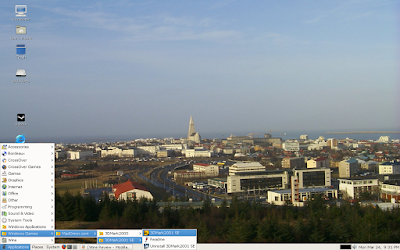
CrossOver Games Gnome menu entries
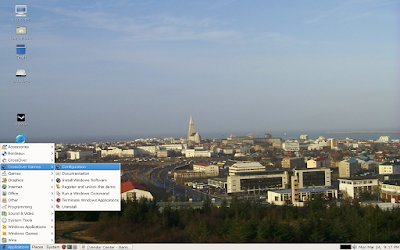


When you select "Configuration" from the menu "CrossOver Games Setup" the setup tool will start.
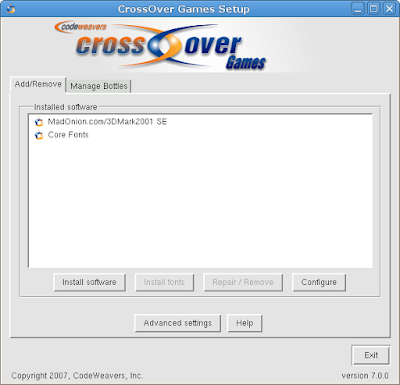


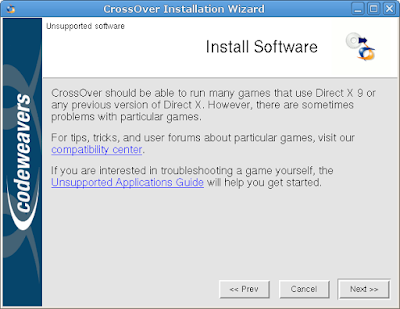
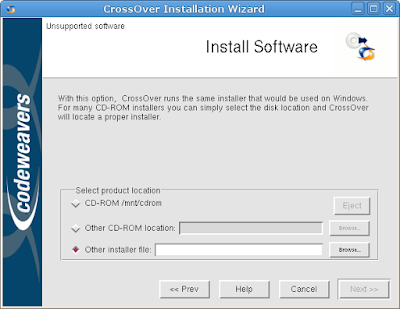
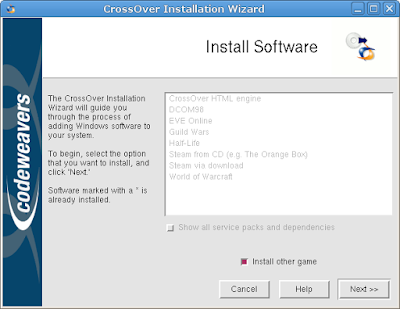
If you select install software the installation process will begin.


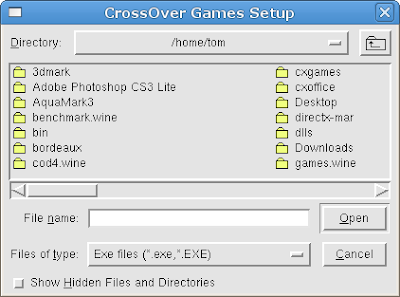
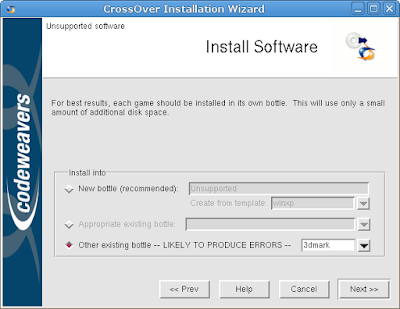
After you select the bottle you want to install your application or game into the install process will start.


After the install has finished your application or game will be placed in the Add/Remove software window.
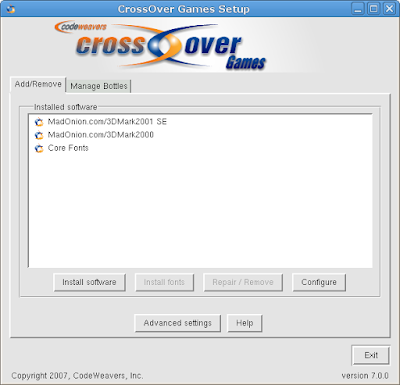


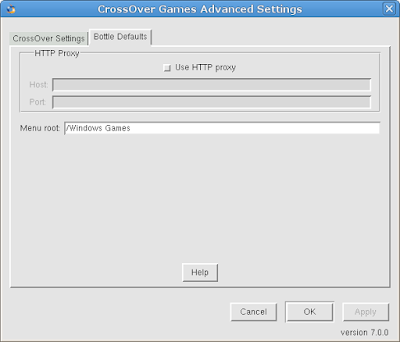
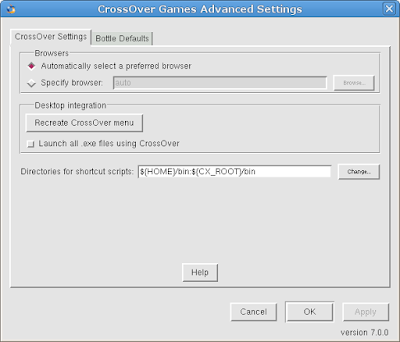
In the Add/Remove tab you will see "Advanced Settings"


If you want to manage a bottle select the "Manage Bottles" tab and proceed.
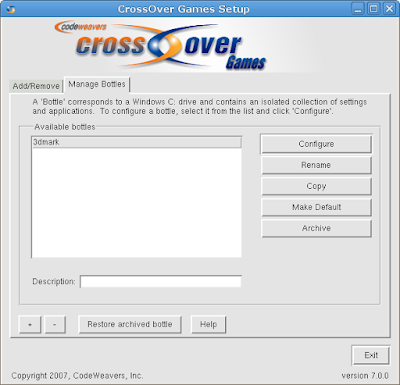


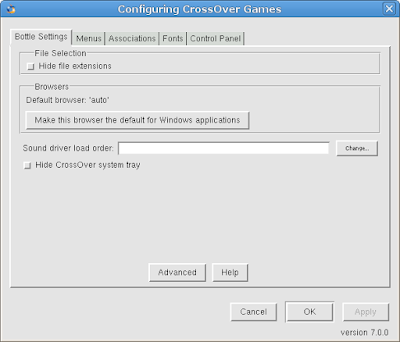
Here is some screenshots of the "Manage Bottles" tab, this is where you configure CrossOver Games to your desired liking.
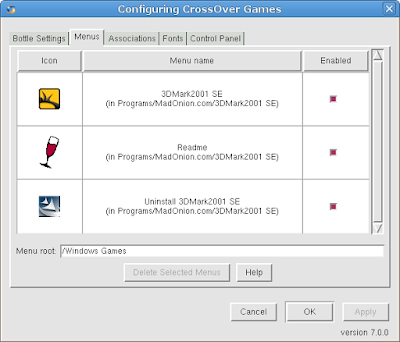
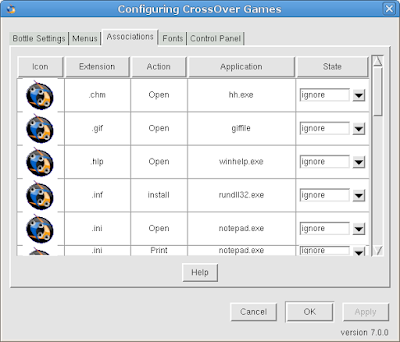
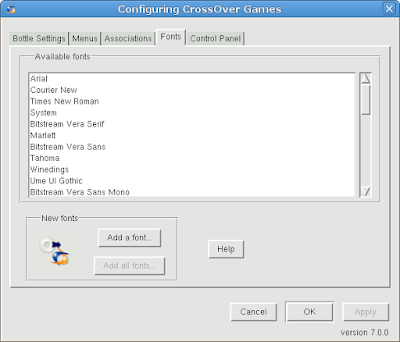
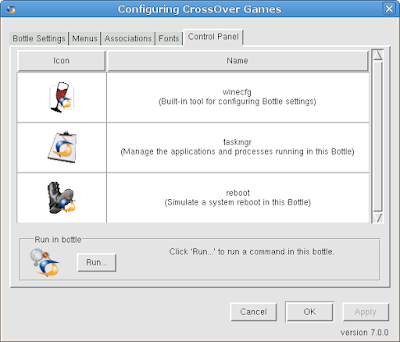


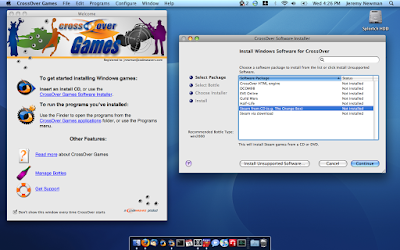
From the system menu if you select "Install Windows Software" you will see this window, and shortly afterwards the "Install Windows Software" window will start.


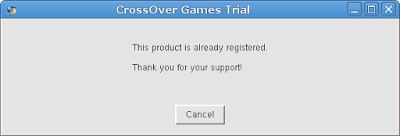
To register your copy of CrossOver Games select the "Register and unlock this demo" from the system menu. You will need to enter your email address and password and the register tool will conect to the CrossOver store and proceed with the registration.


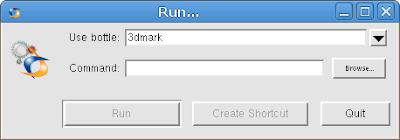
To run a Windows command select "Run a Windows Command" from the system menu. Select a bottle and then run a Windows command from that bottle.


To terminate a Windows application select "Terminate Windows Application" from the system menu.
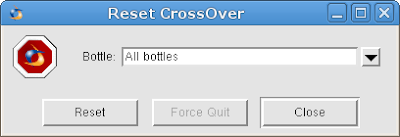


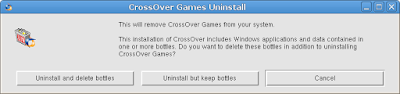
To uninstall CrossOver Games select "Uninstall" from the system menu. You can choose to leave all of your previously configured bottles intact if you wish to do so.


To run a Windows game from the system menu select "Windows Games" and simply navigate to the menu entry and choose the installed game.


CrossOver Games Mac GUI


In our next post we will be doing a review of Steam, Half-Life and Half-Life 2 via the Steam install in CrossOver Games.


DirectX 10 for XP in Wine

This Page Has Been Moved: Please Note the New Location Below

We restructured the whole site and this page no longer exists on this location. The page that your looking for has been moved to a different Web address on the new and improved Wine-Reviews.net Site:


Click on the link above to go to the new location. (To maintain accessibility, we have not set up automatic redirection to the new page.) If you have a bookmark to the old page, please change it to the new address above. If you followed a link from another Web site to this page, please let the people responsible for that Web site know the new location above. If you are having trouble finding the information you want, do a search on this article at our new site.

Thanks for your understanding and Sorry for the inconvenience.

The Editors at Wine-Reviews


Putty for Mac
Putty for Mac
$15.00

https://winereviews.onfastspring.com/putty-for-mac


Monday, March 24, 2008

Safari on Linux with Wine

This Page Has Been Moved: Please Note the New Location Below

We restructured the whole site and this page no longer exists on this location. The page that your looking for has been moved to a different Web address on the new and improved Wine-Reviews.net Site:


Click on the link above to go to the new location. (To maintain accessibility, we have not set up automatic redirection to the new page.) If you have a bookmark to the old page, please change it to the new address above. If you followed a link from another Web site to this page, please let the people responsible for that Web site know the new location above. If you are having trouble finding the information you want, do a search on this article at our new site.

Thanks for your understanding and Sorry for the inconvenience.

The Editors at Wine-Reviews


Putty for Mac
Putty for Mac
$15.00

https://winereviews.onfastspring.com/putty-for-mac


NVIDIA Demos with WINE

About NVIDIA Demos

In order to showcase the prowess of GeForce chipsets, Nvidia creates technology demos that render in real-time on the chipsets in question (while videos are usually also made available).
There are many ways to prove our graphics cards with games, the famous 3dmark or benchmarks. Depending on the model of our graphics card (Nvidia or Ati), we can prove to various demos that demonstrate the full power of our gpus. This demos are modes of presentation for future models. A few days I wanted to test all the technology demos for my gpu, on this website are available all the demos: http://www.nzone.com/object/nzone_downloads_nvidia.html.

As my gpu is not in the serie 8xxx I tested with all the demos from "Box of Smoke", I tested the demos most important that have not seen in Wine AppDB

Wine configuration

This is with a clean configuration directory and running in a 1024x768 virtual desktop (with demo Mad Mod Mike 1280x1024 virtual desktop).

Windows version emulated: XP
Wine version tested: 0.9.58

The installation of all these demos is not very complicated, I recommend execute by terminal.
Demos can be found in / .wine / drive_c / Program Files / NVIDIA Corporation / NVIDIA Demos / "name of the demo".

Gallery of photos
I made a few pictures of demos that work, you can click on the pictures to see them in real size:

The quality and performance of Luna and Mad Mod Mike require pixelshaders 3.0, Transluce and Depth of Field, the fluidity that show is amazing, these demos were not working a month ago . Seeing these advances in applications 3d, I am not surprised that version 1.0 of wine will be launched in June.

https://www.codeweavers.com/store/?dealcode=unity


Wine 1.0 in the press

This Page Has Been Moved: Please Note the New Location Below

We restructured the whole site and this page no longer exists on this location. The page that your looking for has been moved to a different Web address on the new and improved Wine-Reviews.net Site:

Click on the link above to go to the new location. (To maintain accessibility, we have not set up automatic redirection to the new page.) If you have a bookmark to the old page, please change it to the new address above. If you followed a link from another Web site to this page, please let the people responsible for that Web site know the new location above. If you are having trouble finding the information you want, do a search on this article at our new site.

Thanks for your understanding and Sorry for the inconvenience.

The Editors at Wine-Reviews


Putty for Mac
Putty for Mac
$15.00

https://winereviews.onfastspring.com/putty-for-mac


Photoshop CS3 on Linux with Wine

About Adobe Photoshop CS3


Industry-standard editing toolset

Perfect your images with industry-leading image-editing capabilities, which include enhanced color-correction and cloning and healing tools.

Nondestructive editing

Take advantage of nondestructive editing capabilities, including new Smart Filters, which let you visualize different image effects, and Smart Objects, which let you scale, rotate, and warp raster and vector graphics — all without altering pixel data.

Rich painting and drawing toolset

Create or modify images with a wide assortment of professional, fully customizable paint settings, artistic brushes, and drawing tools.

Advanced compositing

Create more accurate composites by automatically aligning multiple Adobe® Photoshop® layers or images based on similar content. The Auto-align Layers command quickly analyzes details and moves, rotates, or warps layers to align them perfectly, and the Auto-blend Layers command blends the color and shading to create a smooth, editable result.

Quick Selection and Refine Edge tools

Make selections in a snap. Loosely draw on an image area, and the Quick Selection tool automatically completes the selection for you. Then fine-tune your selections with the Refine Edge tool.

Built-in efficiency

Take advantage of customized workflows and a streamlined work environment with enhanced palette management so you can focus on your images, not your software.

Improved printing experience

Experience better control over print quality with color management, a larger print preview window, and more controls in one place so you can print in fewer steps. Improved printing controls, co-developed by Adobe and HP, make printing easier and more predictable and streamline setup options via integration with select printers from HP, Epson, and Canon.

Faster, more flexible asset management with Adobe Bridge CS3

Organize and manage images more efficiently with Adobe Bridge CS3, which now delivers improved performance, a Filter panel for easier searching, the ability to group multiple images under a single thumbnail, the Loupe tool, offline image browsing, and more.

Wide range of supported formats

Import and export a wide range of file formats, including PSD, BMP, Cineon, JPEG, JPEG2000, OpenEXR, PNG, Targa, and TIFF.

Wine configuration

This is with a clean configuration directory and running in a 1024x768 virtual desktop.

Wine Version tested: 0.9.58
PhotoShop version: CS3

$ winecfg

Once the .wine directory is built the configuration tool will start and you can set a virtual desktop in the graphics tab if you wish.

Installing photoshop cs3

You will need to install a native gdiplus.dll from a Windows install in your /system32 directory and set it to "native then builtin" in winecfg under (Libraries) You might also need to mount your installation CD with the option -o unhide. This will avoid having problems with hidden files during installation.

mount -t iso9660 -o unhide /dev/cdrom /media/cdrom0

tom@tom:~$ cd /media/cdrom0
tom@tom:/media/cdrom0$ wine setup
fixme:midi:OSS_MidiInit Synthesizer supports MIDI in. Not yet supported.

The setup should now run without any errors and complete as successful.

Interface Changes
There are significant interface changes to Photoshop (and the rest of the apps in the Design editions of the Creative Suite) that you'll see as soon as you open the program. Photoshop's palettes are now contained in special docks, so you can easily expand and collapse entire groups to better manage screen real estate.


And this is where Wine runs into some major problems, the new interface doesn't properly work as of Wine 0.9.58 other then the interface glitches CS3 runs remarkably well.


Putty for Mac
Putty for Mac
$15.00

https://winereviews.onfastspring.com/putty-for-mac


Sunday, March 23, 2008

DirectX 9.0c March 2008 redistributable on Linux with Wine

This Page Has Been Moved: Please Note the New Location Below

We restructured the whole site and this page no longer exists on this location. The page that your looking for has been moved to a different Web address on the new and improved Wine-Reviews.net Site:


Click on the link above to go to the new location. (To maintain accessibility, we have not set up automatic redirection to the new page.) If you have a bookmark to the old page, please change it to the new address above. If you followed a link from another Web site to this page, please let the people responsible for that Web site know the new location above. If you are having trouble finding the information you want, do a search on this article at our new site.

Thanks for your understanding and Sorry for the inconvenience.

The Editors at Wine-Reviews


Putty for Mac
Putty for Mac
$15.00

https://winereviews.onfastspring.com/putty-for-mac


Saturday, March 22, 2008

Wine 0.9.58 Released

This Page Has Been Moved: Please Note the New Location Below

We restructured the whole site and this page no longer exists on this location. The page that your looking for has been moved to a different Web address on the new and improved Wine-Reviews.net Site:


Click on the link above to go to the new location. (To maintain accessibility, we have not set up automatic redirection to the new page.) If you have a bookmark to the old page, please change it to the new address above. If you followed a link from another Web site to this page, please let the people responsible for that Web site know the new location above. If you are having trouble finding the information you want, do a search on this article at our new site.

Thanks for your understanding and Sorry for the inconvenience.

The Editors at Wine-Reviews


Putty for Mac
Putty for Mac
$15.00

https://winereviews.onfastspring.com/putty-for-mac


Wednesday, March 19, 2008

WWN Issue 343 was released today

This Page Has Been Moved: Please Note the New Location Below

We restructured the whole site and this page no longer exists on this location. The page that your looking for has been moved to a different Web address on the new and improved Wine-Reviews.net Site:


Click on the link above to go to the new location. (To maintain accessibility, we have not set up automatic redirection to the new page.) If you have a bookmark to the old page, please change it to the new address above. If you followed a link from another Web site to this page, please let the people responsible for that Web site know the new location above. If you are having trouble finding the information you want, do a search on this article at our new site.

Thanks for your understanding and Sorry for the inconvenience.

The Editors at Wine-Reviews


Putty for Mac
Putty for Mac
$15.00

https://winereviews.onfastspring.com/putty-for-mac


Tuesday, March 18, 2008

CodeWeavers to release CrossOver Games

Today while browsing around the CodeWeavers site I came across the 2008 CrossOver roadmap that was posted by Jeremy White the CEO of CodeWeavers. About three paragraphs into the roadmap Jeremy reveals that they plan to release a gaming product in the next couple weeks, called CrossOver Games.
In the next few weeks we are going to launch a new product called 'CrossOver Games'. CrossOver Games is an entry level product that lets you play a broad range of games, particularly games with a lot of replayability such as MMOs like World of Warcraft and the range of games from Valve (e.g. Team Fortress 2, CSS, and so on). CrossOver Games will be available for free to any of our CrossOver Mac or Linux Professional customers. The idea is that we will rev CrossOver Games more quickly than regular CrossOver, so as to better take advantage of all of the great work being done on Wine with respect to games. The regular CrossOver will continue on a more stable and reliable pace. We're doing this in part to try to generate some buzz and interest; we feel like Rodney Dangerfield when it comes to games - we'd like to earn some respect. We feel strongly that CrossOver will be the finest way to run games on a Linux or Mac system, and we want to shout that from the rooftops!
WoW! it looks as if the folks at TransGaming are in for a little competition for Linux and Mac gamers. And the best thing is if your a current CrossOVer customer you get a free copy of CrossOver Games!

Jeremy also talks about the upcoming release of CrossOver 7 and what changes are in store for it's release.
Beyond the Games launch, we also have a lot of major improvements in store. We plan to launch CrossOver 7 for both Mac and Linux some time in April. The highlights of CrossOver 7 include support for Office 2007, as well as support for Photoshop CS/CS2 (and hopefully CS3) along with all versions of Dreamweaver, and a few other Adobe applications (thanks, Dan!). Of course, we have a lot of fixes our customers have requested. Office 2003, notably Outlook, should be much improved. Quicken 2007/8 should be able to connect properly with banks. There will be fixes across the board in other applications, notably Internet Explorer 6.
Later on into the year we can expect to see .NET applications working in Wine and the implementation a DIB Engine! Whoo Hoo....
After CrossOver 7, we will turn our focus to several major areas where Wine is lacking. First and foremost is going to be better support for .NET based applications. We are hoping that will allow us to properly support modern versions of Quickbooks. We also hope to support modern versions of iTunes, and we're going to keep fighting to add support for things like the NetFlix player (if only so I can run them on my MythTV system). We'll also be implementing a DIB Engine - a tool we need to use to eliminate some performance bottlenecks in certain applications. This should help performance in Quicken, Visio, and Powerpoint for sure, and a range of other applications as well.

Essentially, our goal is to finish all of the basic building blocks that Wine needs. We hope to mark that event by releasing Wine 1.0. Of course, there will still be a lot of work to be done from there, but our hope is that increasingly applications will 'just work'.
I for one can't wait until Wine has a working DIB engine.

Monday, March 17, 2008

Wine 1.0 Release Criteria updated

We restructured the whole site and this page no longer exists on this location. The page that your looking for has been moved to a different Web address on the new and improved Wine-Reviews.net Site:


Click on the link above to go to the new location. (To maintain accessibility, we have not set up automatic redirection to the new page.) If you have a bookmark to the old page, please change it to the new address above. If you followed a link from another Web site to this page, please let the people responsible for that Web site know the new location above. If you are having trouble finding the information you want, do a search on this article at our new site.

Thanks for your understanding and Sorry for the inconvenience.

The Editors at Wine-Reviews


Putty for Mac
Putty for Mac
$15.00

https://winereviews.onfastspring.com/putty-for-mac


Saturday, March 15, 2008

Play Windows games on Linux with PlayOnLinux

This Page Has Been Moved: Please Note the New Location Below

We restructured the whole site and this page no longer exists on this location. The page that your looking for has been moved to a different Web address on the new and improved Wine-Reviews.net Site:


Click on the link above to go to the new location. (To maintain accessibility, we have not set up automatic redirection to the new page.) If you have a bookmark to the old page, please change it to the new address above. If you followed a link from another Web site to this page, please let the people responsible for that Web site know the new location above. If you are having trouble finding the information you want, do a search on this article at our new site.

Thanks for your understanding and Sorry for the inconvenience.

The Editors at Wine-Reviews


Putty for Mac
Putty for Mac
$15.00

https://winereviews.onfastspring.com/putty-for-mac


Flash CS3 and Photoshop CS3 running in Wine

It looks as if Wine might be supporting Adobe's Flash CS3 as well as Photoshop CS3 on Linux in the near future. With the recent help from Google to get Photoshop CS and CS2 working properly in Wine a huge chunk of the underlying architecture work was put in place for CS3 application support. There are still a number of bugs that need to be triangled and fixed before CS3 is properly supported but this is great news none the less.

Photoshop CS3 in Wine

Louis Lenders posted on bug 8945 that he has got Photoshop CS3 running in Wine, here is his post.
Photoshop CS3 in current git

Right, got Photoshop CS3 running now in current git. Looks like interface suffers from quite some bugs though, see screenshot.

http://bugs.winehq.org/attachment.cgi?id=11323

So when Wine 0.9.58 is released if your not a current git user you can try CS3 and keep track of its progress.

Flash CS3 in Wine

Here's Louis' recipe for installing Flash CS3:

1. copy mshtml, shdocvw, urlmon, shlwapi, mlang and jscript.dll from my XP
partition to ~/.wine/drive_c/windows/system32
2. Do 'regsvr32 jscript.dll'
3. Do winetricks msxml3
4. Set mshtml, shdocvw, urlmon, shlwapi, mlang to native in winecfg
All this is only needed to make the installer happy and finish fine. The actual
Flash.exe doesn't need any native dlls set here, only you need gdiplus.
5. Do winetricks gdiplus

Now start Flash.exe, and it comes up fine here (Note: "fine" is maybe not a good word, the toolbars are quite messed up, if i use native comctl32 it all looks better)


Putty for Mac
Putty for Mac
$15.00

https://winereviews.onfastspring.com/putty-for-mac


winetricks 20080314 released

This Page Has Been Moved: Please Note the New Location Below

We restructured the whole site and this page no longer exists on this location. The page that your looking for has been moved to a different Web address on the new and improved Wine-Reviews.net Site:


Click on the link above to go to the new location. (To maintain accessibility, we have not set up automatic redirection to the new page.) If you have a bookmark to the old page, please change it to the new address above. If you followed a link from another Web site to this page, please let the people responsible for that Web site know the new location above. If you are having trouble finding the information you want, do a search on this article at our new site.

Thanks for your understanding and Sorry for the inconvenience.

The Editors at Wine-Reviews


Putty for Mac
Putty for Mac
$15.00

https://winereviews.onfastspring.com/putty-for-mac