Pages

Tuesday, March 9, 2010

Bordeaux 2.0.0 Beta 2 for Mac Released

The Bordeaux Technology Group released Bordeaux 2.0.0 Beta 2 for Mac today. Bordeaux 2.0.0 Beta 2 marks major progress over the older Beta 1 release. With this release we now support Leopard and Snow Leopard. We have improved support for Microsoft Office 2007 (Word, Excel and PowerPoint) and preliminary support for Internet Explorer 7 in this release, there has also been many small bug fixes and tweaks on the back-end.

The cost of Bordeaux 2.0.0 Beta 2 is $20.00. Mac customers who pre order this Beta will save $5.00 once the final release ships the cost will be $25.00 pre order customers can also join our Beta testing group. Anyone who has purchased Bordeaux in the past six months is entitled to a free upgrade. Bordeaux comes with six months of upgrades and support and of course a 30-day money back guarantee.

Please read our Mac Beta 2 readme file before you use Bordeaux.
SYSTEM REQUIREMENTS
  • Intel Apple Mac (Mac Pro, Mac Mini, iMac, Macbook, Macbook Pro and Macbook Air)
  • Mac OS X Leopard OS-X 10.5.7 or later is required to install this package.
  • Updated X11.app from http://xquartz.macosforge.org (At least version 2.3.3.2)
  • Gtk-Framework-2.14 2.14 Download For more information see : http://www.gtk-osx.org/
Benefits of pre-odering Bordeaux for Mac OS X
  • The pre-oder price will only be $20.00 so you will save $5.00
  • You will have access to all beta builds.
  • You can join our beta testing group and give feedback.
  • Users who give useful beta reports will get a extra six months of free upgrades.
Beta 2 application support :
  • Microsoft Office 2007 Applications (Word, Excel, Powerpnt)
  • Microsoft Office 2003 Applications (Word, Excel, Powerpnt)
  • Microsoft Visio 2003
  • Microsoft Project 2003
  • Microsoft Internet Explorer 7
  • Microsoft Internet Explorer 6
  • Microsoft Office 2000 Applications (Word, Excel, Powerpnt)
  • IrfanView 4.25
Final Release todo :
  • Sane scanners support
  • Steam support depending on customer demand
  • Fix the known Icon Bugs
  • Bug fixes and performance tweaks
Beta 2 New Features :
  • Bordeaux now runs on Snow Leopard
  • Updated to Wine version 1.1.36
  • Added support for IE 7
  • Added support for Irfanview 4.25
  • Many fixes to .app Bundle support
  • Fixes to Icon support
  • libpng and libjpg fixes
  • Fixed a couple bugs in the Bordeaux UI
  • Fixed a couple bugs in the Cellar Manager
  • Synced to newest winetricks release
  • Many other small bug fixes
Beta 2 Screenshots :
Bordeaux User Interface on OS-X Snow Leopard.


Bordeax Starting the Internet Explorer 7 Install.


Internet Explorer 7 running on OS-X Snow Leopard.


Microsoft Office 2003 Install.


Microsoft Office 2003 Install has Completed.


Microsoft Word 2003 on OS-X Snow Leopard.


Microsoft Excel 2003 on OS-X Snow Leopard.


Putty for Mac
Putty for Mac
$15.00

https://winereviews.onfastspring.com/putty-for-mac


Howto Install CrossOver Linux Standard 9.0 on Ubuntu

Currently CrossOver Linux standard already reached version 9.0. Many improvements including a brand new user interface was applied to this release. Based on the official change log, this CrossOver 9.0 Linux is more applicable to Microsoft Internet Explorer, Microsoft Office. This version is based on Wine version 1.1.34.
In order to install the CrossOver Linux Standard 9.0, please follow these guide:

1. Download the trial version of CrossOver Linux Standard 9.0.0, or you can buy this software if you want.

2. On the download section, choose the installer type. You can download the installer in .deb, .rpm or .sh extension. In this tutorial I am using the .sh installer file. This installer is more applicable to many Linux distribution.

3. Now its time to install.
Open terminal and move to your downloaded directory. And then type this command to install
sh install-crossover-standard-demo-9.0.0.download

4. Then the graphical installation wizard will be opened.


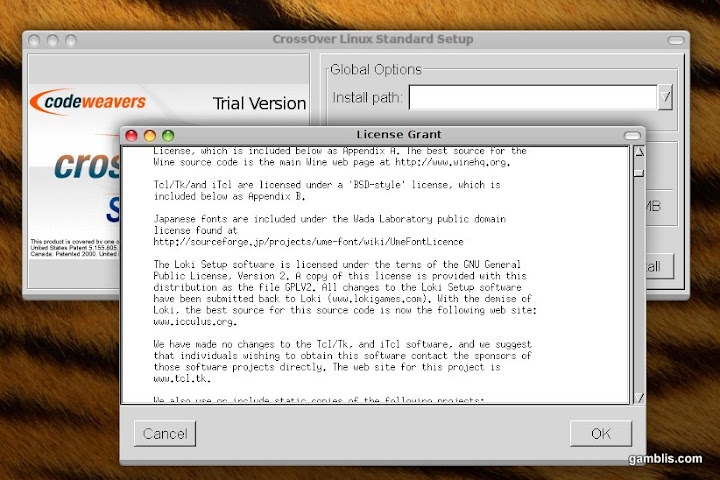
Press OK to accept the license agreement.

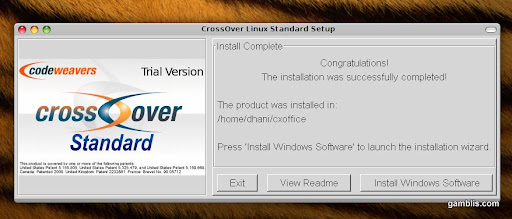
To start install the CrossOver Linux Standard, click Begin Install. Then system will install this software. When finished you will be notified.

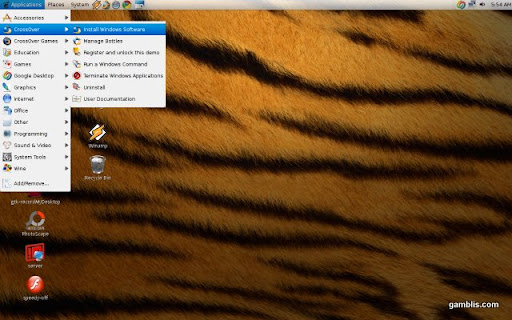
The installation is now finished. You can start using this program via Applications | CrossOver | Install Windows Software.


Softpedia released comment:
CodeWeavers’ CEO, Jeremy White, announced a few minutes ago the availability of the CrossOver 9.0 application for both Linux and Macintosh operating systems. Dubbed Snow Mallard, the new CrossOver 9.0.0 release has a brand-new user interface for Linux users! This new GTK2-compatible graphical user interface is a dream come true, expected by all CrossOver Linux users (take a look at the image for details).

Moreover, CrossOver 9.0.0 brings various improvements to Microsoft applications, such as Internet Explorer 7 or the Microsoft Office suite. CodeWeavers distributes the CrossOver 9.0.0 binaries for the Ubuntu, Debian, Red Hat, Fedora, Mandriva and openSUSE operating systems, as well as an universal installer for other Linux flavors.

Thursday, March 4, 2010

CodeWeavers 9.0 For Mac and Linux Released With New Interface

CodeWeavers, the popular commercial version of Wine, sees a new update this week with the release of version 9.0 for CrossOver Mac and CrossOver Linux. Users are treated to an overhauled user interface for Mac and a completely redesigned interface for Linux, which developers say makes both apps run more quickly and intuitively.

The release also includes more than 7,500 patches and a bunch of fixes and improvements to the overall application. CrossOver 9.0 now supports macros in Excel, improved Outlook stability, and limited support for Quicken 2010.

CrossOver now also has the ability to download installation files -- or "recipes" -- directly from the project's online database "If another CrossOver user has figured out how to use CrossOver to install a Windows application, they can upload that installation recipe to our database," explains company CEO Jeremy White on the CodeWeavers Web site.

"As we go forward, and build this online storehouse," says White, "CrossOver will begin to automatically install that same application for other users. This enables us to move closer to a world where CrossOver will begin to run the majority of Windows apps, and not just an officially supported subset. In other words, our diabolical plot for world domination is going exactly as planned."


Putty for Mac
Putty for Mac
$15.00

https://winereviews.onfastspring.com/putty-for-mac


Wednesday, March 3, 2010

CrossOver 9 revamped reinvented and a must have

Yesterday, we received word that a new version of the popular CrossOver product by CodeWeavers had been released. Version 9 is out and it promises a new look, more versatile interface and increased compatibility with a broader line of products.

For those unfamiliar, CrossOver is a proprietary version of Wine that is used for running Windows applications on Mac OS X and Linux. While there are other products that offer similar functionality such as Transgamings’ Cedega, CodeWeavers is the only one that immediately sends patches they create back to the Wine project to further enhance it’s functionality, making it.. in our opinion, the better choice of the two.

One sore spot for a number of Linux users of late was the adjustment by Apple to make it more difficult to view it’s Quicktime movies and trailers with anything other than Quicktime itself. There are a number of ways to get around this but none are particularly easy. For this reason, we decided to test out CrossOver 9 and see if it could allow us to watch trailers from Apple.com in our native Firefox browser on Linux without any effort other than installing Quicktime through their tool.
Here are the results of this test:

First off, installing CrossOver is as simple as downloading the trial (or purchasing the product for as low as $39.95) from their website here: http://www.codeweavers.com/products/cxlinux/
Once installed, simply launch the product and you’ll be greeted with an installer such as this:

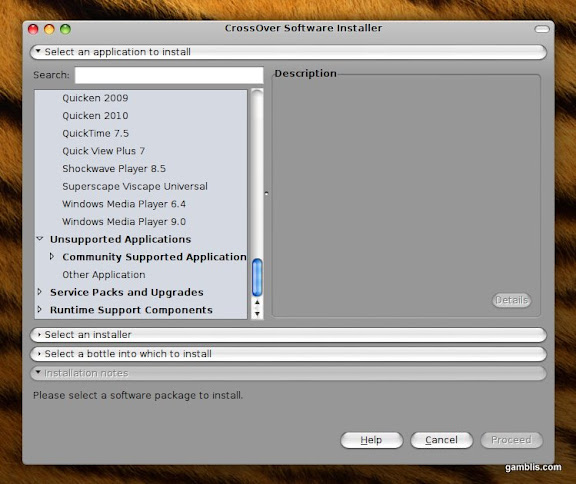
This is definitely a more streamlined look from CodeWeavers and we like it, nice and simple and gets to the point. Also, they have added a number of new options to the software installer as you can see below:

It’s nice to see the inclusion of Community Supported products as well and it also gives credence to the statement that CrossOver can run quite a few applications without issue..
As we mentioned earlier, we’re going to test it out by installing Quicktime 7.5 and seeing if the browser (Firefox) picks it up as a plugin and allows us to play trailers on http://www.apple.com/trailers (a favourite site of ours).
Let’s get installing shall we? Simply select Quicktime from the list and hit next and the installer gets to work straight away:

Once the installer completes, it’s time to check and see if Firefox picked it up as a plugin.

As you can see from the screenshot above, the latest version of Firefox (3.6) picked it up without any issue at all.
Now for the moment of truth, will it play our beloved trailers? Let’s see.

As you can see, it worked like a charm. Quicktime loaded quickly and started playing right away without any issues at all. The video was seamless just as if we were running it through a windows machine.

Tuesday, March 2, 2010

CodeWeavers Releases Crossover Office 9.0 for MAC and Linux

Latest Release Boasts New User Interface, Lets User Build Their Own Installation 'Recipes'
SAINT PAUL, Minn. (March 2, 2010) -- CodeWeavers, Inc., a leading developer of software products that turn Mac OS X and Linux into Windows-compatible operating systems, today announced the release of CrossOver 9.0 for both Mac and Linux. CrossOver allows Windows software to be used on Mac and Linux PCs without the need for a Windows operating system license.
Available immediately, CrossOver 9.0 features a new user interface that focuses on making installation of Windows software quicker and easier than previous versions.

"We've modified our installer so that in many cases users can install an application from a single screen, using a single click," said Jeremy White, CodeWeavers chief executive officer. "We want to make the whole process as intuitive and painless as possible."

Another new feature is CrossOver's ability to download installation "recipes" directly from CodeWeavers online Compatibility Database. "If another CrossOver user has figured out how to use CrossOver to install a Windows application, they can upload that installation recipe to our database," said White. "As we go forward, and build this online storehouse, CrossOver will begin to automatically install that same application for other users. This enables us to move closer to a world where CrossOver will begin to run the majority of Windows apps, and not just an officially supported subset.

"In other words, our diabolical plot for world domination is going exactly as planned," he added.
"This new compatibility feature is an important advance," said John Rizzo, Editor in Chief of MacWindows. "It means that CodeWeavers is taking their core technology an extra step and adding user convenience. It makes switching to a Mac or Linux machine a lot less scary for some users. It also means that software manufacturers can post their own recipes to help extend their existing Windows software into new markets." White confirmed that CodeWeavers offers porting services to Windows software developers as well.

CrossOver 9.0 is available immediately at www.codeweavers.com. The Standard version of the product costs $39.95; the Pro version costs $69.95.

About CodeWeavers
Founded in 1996 as a general software consultancy, CodeWeavers focuses on the development of Wine –the core technology found in all of its CrossOver products. The company's goal is to bring expanded market opportunities for Windows software developers by making it easier, faster and more painless to port Windows software to Linux. CodeWeavers is recognized as a leader in open-source Windows porting technology, and maintains development offices in Minnesota, the United Kingdom and elsewhere around the world. The company is privately held. For more information about CodeWeavers, log on to www.codeweavers.com.

The new CrossOver 9.0 User Interface.

Monday, March 1, 2010

VLC on OpenSolaris 2010.2 build 131

A couple weeks back we released Bordeaux 2.0.0 for Solaris and OpenSolaris and I posted the news about the release in the OpenSolaris forums. Ian ask if I could check and see if VLC ran in Bordeaux, the Windows client. And sure enough it runs extremely well with just a couple dll overrides. The screenshot below is VLC 1.0.3 running on OpenSolaris 2010.2 build 131 via Bordeaux 2.0.0 for OpenSolaris. The video is the live 200 kbs feed of CNBC in RealVideo format.

The system load is kind of high because I have OpenSolaris running in Virtual Box. If you have OpenSolaris installed as your primary operating system or on a partition the load is much lower.


UPDATE 03/01/10

I have also had some request for additional media players and FireFox via Wine. Bordeaux and the Wine build we provide should run most of the app's that's in the Wine appdb. So if your wondering if your application will run on OpenSolaris just check the Wine application database and see how the app is ranked.

To install a unsupported application or game you will need to put our Wine Build in your path. To do this open your favorite terminal and add these lines to your .profile file in your home directory.

# Add Bordeaux Wine to path
export PATH=$PATH:/opt/bordeaux
export PATH=$PATH:/opt/bordeaux/bin
export PATH=$PATH:/opt/bordeaux/doc
export PATH=$PATH:/opt/bordeaux/etc
export PATH=$PATH:/opt/bordeaux/lib
export PATH=$PATH:/opt/bordeaux/share
export PATH=$PATH:/opt/bordeaux/support

Now when you enter wine in your terminal it will be found.

$ wine
Usage: wine PROGRAM [ARGUMENTS...] Run the specified program
wine --help Display this help and exit
wine --version Output version information and exit

All un-supported apps will now be installed in .wine in your home directory. You can run :

$ winecfg

to edit the configuration, you can also copy /opt/bordeaux/bin/bordeaux-winetricks.sh to your home directory and run it just like running winetricks

$ ./bordeaux-winetricks.sh

And add Microsoft redistributable's, dlls, registry changes, and further config Wine.

Here is more screenshots of just some of the apps Ive got running as unsupported apps with Bordeaux.

QuickTime Player 7.1.6 on Opensolaris via Bordeaux.


Windows Media Player 9 on Opensolaris via Bordeaux.


FooBar2000 version 1.0 on Opensolaris via Bordeaux.


Emule version 0.49c on Opensolaris via Bordeaux.


FireFox Windows version 3.5.5 on Opensolaris via Bordeaux.


Many Applications and Games will run that we don't currently support in Bordeaux, the best way to know if your Applications or Game runs is to try it... You might be pleasantly surprised. :)

UPDATE 01/31/10

As per a request in the OpenSolaris forums I also tested SeaMonkey 2.0.2 on OpenSolaris with Bordeaux 2.0.0

Here is some screenshots, keep in mind this is in Virtual Box, and on my old crappy laptop and thats why the load is so high. :)


Look how crappy the fonts look in these two screenshots...


Now look what they look like with a little tweaking... :)


Click on a image for full view.


Putty for Mac
Putty for Mac
$15.00

https://winereviews.onfastspring.com/putty-for-mac


Friday, February 26, 2010

Bordeaux 2.0.2 for Solaris and OpenSolaris Released

The Bordeaux Technology Group released Bordeaux 2.0.2 for Solaris today. Bordeaux 2.0.2 is a maintenance release that fixes a critical bug with sound support. Customers who need sound support are advised to upgrade to this newer release. This release has been tested on OpenSolaris 2009.06 as well as the upcoming OpenSolaris 2010.03 release build 133, there has also been a couple small bug fixes and tweaks on the back-end.
With version 2.0.0 and onward we bundle our own Wine build and many tools and libraries that Wine depends upon. With this release we bundle Wine 1.1.36, Cabextract, Mozilla Gecko, Unzip, Wget and other support libraries and tools. We have also added preliminary support for Microsoft Office 2007 (Word, Excel and PowerPoint) and Internet Explorer 7.
The cost of Bordeaux 2.0.2 is $25.00. Anyone who has purchased Bordeaux in the past six months is entitled to a free upgrade. Bordeaux comes with six months of upgrades and support and of course a 30-day money back guarantee.

Supported Applications/Games:

  • Microsoft Office 2007
  • Microsoft Office 2003
  • Microsoft Office 2000
  • Microsoft Office 97
  • Microsoft Office Visio 2003
  • Microsoft Office Project 2003
  • Adobe Photoshop 6
  • Adobe Image Ready 3
  • Adobe Photoshop 7
  • Adobe Image Ready 7
  • Adobe Photoshop CS
  • Adobe Photoshop CS2
  • Microsoft Internet Explorer 7
  • Microsoft Internet Explorer 6
  • Steam and Steam based Games
  • Apple QuickTime 6.5.2 Player
  • IrfaView 4.25 (Image files only)
  • Winetricks support

About Bordeaux:

The Bordeaux Technology Group is a software services and development company specializing in Windows compatibility software. Users of Linux, BSD, Solaris and Mac systems from time to time find themselves in the need to run specialized Windows software. The Bordeaux suite enables access to these programs and data in a seamless and low cost manner without requiring licensing of Microsoft Technology. The Bordeaux Group also provides migration services and support for alternative operating systems specializing in Windows compatibility.

There is a multitude of software developed only for the Windows operating system and even when software vendors port their applications to another platform, generally it lacks features that the Windows version contains. The only solution these developers face is to have access to both systems for testing which leads to increased infrastructure demands, and wasted project resources. If you are vendor interested in supporting your application on Linux, BSD, Solaris or Mac OS X or a software user that needs to run a Windows application on Linux, BSD, Solaris or Mac OS X we can help.

Version 2.0.2 New Features:

  • Fixed a critical bug with sound support.
Here is a couple screen shots of Bordeaux on OpenSolaris 2010.03 build 133


For more screen shots see the Bordeaux 2.0.0 release post.


Putty for Mac
Putty for Mac
$15.00

https://winereviews.onfastspring.com/putty-for-mac


Bordeaux Group Announces License Agreement With StormOS to Develop Bordeaux 2.2 User Interface

The Bordeaux Technology Group announces it has signed an exclusive worldwide licensing agreement with StormOS to develop and further commercialize Bordeaux for Unix operating systems.

Under the terms of the agreement, the developers at StormOS will develop the future Bordeaux (UI) User Interface and StormOS will receive an exclusive license to distribute all related intellectual property.

Users of StormOS will have the ability to run many of their favorite Microsoft Windows Programs on top of StormOS at no charge. With this agreement, every future StormOS user will be eligible for a free Bordeaux license.

Bordeaux 2.2 is currently in active development. With this partnership, The Bordeaux Technology Group is further strengthening its promising portfolio of products on Unix operating systems. The Bordeaux Technology Group will receive and own all development achievements, and will release the new User Interface in the upcoming 2.2 release of their Windows on Unix technology.

By entering into this research and development collaboration with StormOS, we are able to improve the end user experience with Wine technology's and bring a new and exciting User Interface to the Bordeaux product.

The agreement also provides StormOS with the ability to develop additional Windows on Unix technology's for distribution in the StormOS operating system.

About The Bordeaux Technology Group :

The Bordeaux Technology Group is a software services and development company specializing in Windows compatibility software. Users of Linux, BSD, Solaris and Mac systems from time to time find themselves in the need to run specialized Windows software. The Bordeaux suite enables access to these programs and data in a seamless and low cost manner without requiring licensing of Microsoft Technology. The Bordeaux Group also provides migration services and support for alternative operating systems specializing in Windows compatibility.

About StormOS :

StormOS is the first desktop distribution based on the Nexenta Core Platform which combines the power of the Solaris kernel with the Ubuntu user-land and package management system. The project aims to create a lightweight OS that can scale from netbook to workstation including all the essentials out of the box.


Putty for Mac
Putty for Mac
$15.00

https://winereviews.onfastspring.com/putty-for-mac


Wednesday, February 24, 2010

Codeweavers Crossover Games Rules

Review of CrossOver Games Mac by Kendrick Lo

After being a computer game fiend for almost all of my childhood up until early college, since moving exclusively to using a Macbook, I have been absent from the gaming world for quite some time. A combination of not having enough time (not that I have enough time now…) and just lack of interest had me disregarding computer gaming in favor of console games when I lived with a roommate who decked our apartment out with a huge flat screen TV and an XBOX 360 and.. Call of Duty 4 and Soul Calibur 4.

Anyway, recently I stumbled across the wonder that is Wine, an open source software application that allows Windows applications to run on your Unix-based operating system (such as Mac OS X and Linux) by implementing the Windows API and running the applications natively.

Being the lazy nerd that I am, I got frustrated while attempting to get some games running through Wine binaries and eventually stumbled on the wonder that is Crossover from the talented crew at Codeweavers. Crossover is a third-party application that strives to make your Mac-Windows experience super easy.


Putty for Mac
Putty for Mac
$15.00

https://winereviews.onfastspring.com/putty-for-mac


Thursday, February 18, 2010

Bordeaux 2.0.0 for FreeBSD and PC-BSD Released

The Bordeaux Technology Group released Bordeaux 2.0.0 for FreeBSD and PC-BSD today. Bordeaux 2.0.0 marks major progress over older releases. With version 2.0.0 and onward we bundle our own Wine build and many tools and libraries that Wine depends upon. With this release we bundle Wine 1.1.36, Cabextract, Mozilla Gecko, Unzip, Wget and other support libraries and tools. We have improved support for Microsoft Office 2007 (Word, Excel and PowerPoint) and preliminary support for Internet Explorer 7 in this release, there has also been many small bug fixes and tweaks on the back-end.
The cost of Bordeaux 2.0.0 is $20.00. Anyone who has purchased Bordeaux in the past six months is entitled to a free upgrade. Bordeaux comes with six months of upgrades and support and of course a 30-day money back guarantee.

Supported Applications/Games:

  • Microsoft Office 2007
  • Microsoft Office 2003
  • Microsoft Office 2000
  • Microsoft Office 97
  • Microsoft Office Visio 2003
  • Microsoft Office Project 2003
  • Adobe Photoshop 6
  • Adobe Image Ready 3
  • Adobe Photoshop 7
  • Adobe Image Ready 7
  • Adobe Photoshop CS
  • Adobe Photoshop CS2
  • Microsoft Internet Explorer 7
  • Microsoft Internet Explorer 6
  • Steam and Steam based Games
  • Apple QuickTime 6.5.2 Player
  • IrfaView 4.25 (Image files only)
  • Winetricks support

About Bordeaux:

The Bordeaux Technology Group is a software services and development company specializing in Windows compatibility software. Users of Linux, BSD, Solaris and Mac systems from time to time find themselves in the need to run specialized Windows software. The Bordeaux suite enables access to these programs and data in a seamless and low cost manner without requiring licensing of Microsoft Technology. The Bordeaux Group also provides migration services and support for alternative operating systems specializing in Windows compatibility.
There is a multitude of software developed only for the Windows operating system and even when software vendors port their applications to another platform, generally it lacks features that the Windows version contains. The only solution these developers face is to have access to both systems for testing which leads to increased infrastructure demands, and wasted project resources. If you are vendor interested in supporting your application on Linux, BSD, Solaris or Mac OS X or a software user that needs to run a Windows application on Linux, BSD, Solaris or Mac OS X we can help.

Version 2.0.0 New Features:

  • Bundle Wine 1.1.36
  • Added Internet Explorer 7 support
  • Improved Microsoft Office 2007 support
  • Bundle Mozilla Gecko
  • New shell based installer
  • New Progress Bar
  • Updated to the latest Winetricks


Putty for Mac
Putty for Mac
$15.00

https://winereviews.onfastspring.com/putty-for-mac


Wednesday, February 17, 2010

The Real Mac Genius Interview James Ramey VP of Sales at Codeweavers

At MacWorld, we were lucky enough to interview James Ramey, VP of Sales at Codeweavers. Codeweavers is a Minneapolis based software company that enables Mac OS X and Linux users to run Windows applications. Through the usage of open source software called Wine, Codeweavers is able to allow Windows based applications to run as if they were native applications. When you first switched from a Windows PC to a Mac, you might have been gloomy because you could not play Counter-Strike or had to buy a new license of Microsoft Office (Which is not cheap!).
Codeweavers has two different flavors of software, CrossOver Mac/Linux and CrossOver Games. The price CrossOver Mac are two different prices, $39.99 Standard, and $69.95 Professional. The reason for the difference in price is because of the time of support. CrossOver Mac Standard gives you 6 month of Level 3 Support, so you are able to get the important updates. In CrossOver Mac Professional, you receive 1 year of Level 2 Support. In addition, you also have a copy of CrossOver Games ($39.95). The difference between CrossOver Mac and CrossOver Games is with CrossOver Mac you are able to run enterprise applications (I.E. Microsoft Word, PowerPoint, etc.) and Windows only games. CrossOver Games is geared more for gamers, so it only gives you the ability to run Windows games.


Monday, February 15, 2010

The Bordeaux Group announces new affiliate program

We are proud to officially announce the launch of our Affiliate program.

Effective IMMEDIATELY, any individual or organization may contact The Bordeaux Group about participation in our brand new Affiliate Program.

The Affiliate Program will allow anyone who participates to place a Bordeaux Group banner or text link on their website and automatically receive a commission from every item purchased by visitors to http://bordeauxgroup.com/ through the banner or text link visit.

That's it... there's nothing more you have to do! Just put up a banner or text link on your website and immediately begin earning commissions for yourself or your organisation!

How to apply :

If you don't already have a Bordeaux Group account, create a new account and then log into the account, and go into the my accounts section..

http://www.bordeauxgroup.com/user/

click on apply for role. Or if you wish you can request to participate by sending a message through our "Contact" page.

Once your new affiliate account is approved. You should be able to see a section called "Affiliate Center", you should be then be able to generate the links you'll need to put on your website and track the click throughs and commissions.

You can use any or all of the banners provided below to link back to The Bordeaux Group. Or if you wish you can create your own custom banner and use it on your blog or website.


Thanks to http://thelinuxbox.org/ for the animated banner at the bottom of this site. :)

Affiliate Links :

You can append a destination page to the end of the affiliate links to redirect to a specific page, as well as track clicks to it, i.e. http://bordeauxgroup.com/affiliate/twickline/store/bordeaux-software

Commission rates :

The current commission rate is 25% of all sales that come from your links or banners.

Qualifications :

All affiliate payouts will be done through Paypal, so to qualify for the Affiliate program you will need a Paypal account.


Putty for Mac
Putty for Mac
$15.00

https://winereviews.onfastspring.com/putty-for-mac


Spill the Wine install IrfanView in Debian

Sure I've tried Wine before. But never successfully. I took the plunge recently, forking over $20 for the Bordeaux GUI front-end for Wine, the non-emulator that allows users of Linux (and Solaris and FreeBSD) to run Windows applications on their Unix-like computers.

I decided to use Bordeaux because its developers (or developer singular ... I'm not sure) promised that IrfanView 4.25 would run with it.

And I saw plenty of Wine users have trouble with Irfanview. Codeweavers, who I'd rather deal with than Bordeaux, doesn't make any promises in regard to Irfanview. Bordeaux does.
Why Irfanview? It's the best photo editor on any platform for my particular workflow at the L.A. Daily News. It's quick, batches well and lets me get to every part of the IPTC metadata I need to edit.
So getting it in Linux — in my case Debian Lenny — is a huge win.
I had problems but by sheer luck (Bordeaux's lack of documentation is astounding for something I paid actual money for) I was easily able to install Bordeaux and then use it to install IrfanView. It's almost too easy.

Getting the IrfanView plugins installed was another matter.
After the Bordeaux install, none of the Wine tools worked — either from the Bordeaux GUI or on the Linux command line.

I don't know how I thought of this (it's a bit above my FOSS geek-level pay grade), but I came up with the idea that I should install Debian's Wine packages over those installed by Bordeaux.
That did it. I could now use Bordeaux's tools to "run" Wine and all of its utilities. I was then able to install the IrfanView plugins from the .exe file I had previously downloaded from the IrfanView site.
I even found a PNG logo for IrfanView with which I added the app to my upper GNOME panel. (And yes, I'll be sending some cash along to IrfanView developer Irfan Skiljan very soon.)
What's the takeaway?

If you're running Debian Lenny, first install Bordeaux, then use Synaptic (or your favorite package-managing tool) to install Debian's own Wine package and dependencies.
I have a feeling that the Wine included in Bordeaux 2.0.0, which is Wine 1.1.36, doesn't work perfectly (or all that well) in Debian Lenny because it's too "new."
Lenny installs Wine 1.0.1-1. Thus far, I can say that with the Lenny Wine, everything works like it's supposed to.

I don't really have any other Windows apps I'm dying to run. Bordeaux offers easy GUI installs of the IE 6 and 7 browsers, a bunch of MS Office programs as well as a few versions of Photoshop up to CS2, I think (I imagine you need either a bona fide Photoshop disc or a product code) as well as the Steam gaming engine (barely know what that is, to tell you the truth). I really don't need any of that stuff.

But having IrfanView in Debian is a huge, huge win for my personal workflow.


Putty for Mac
Putty for Mac
$15.00

https://winereviews.onfastspring.com/putty-for-mac


CrossOver Windows apps without Windows

VirtualBox may be free, but you still have to own a copy of Windows. If you’re not willing to shell out a few hundred dollars to Microsoft but still want to run Windows on your Intel-based Mac, there is one more alternative: CrossOver from CodeWeavers costs $40 and runs Windows applications on Mac OS X — without Windows.

CrossOver is not virtualization, as evidenced by the whimsically named technology behind it: the open source Wine (Wine Is Not an Emulator) project. With CrossOver, Windows applications run directly in Mac OS X, and not in a virtual machine. Wine is an implementation of the Win32 API on Mac OS X. The Windows applications don’t know they’re not running on Windows. There’s also a CrossOver for Linux.

The result is that a Windows application running with CrossOver uses fewer system resources, including memory, disk space, and CPU utilization, than the same app running in Parallels Desktop or VMware Fusion. Performance of Windows applications is very good.


Putty for Mac
Putty for Mac
$15.00

https://winereviews.onfastspring.com/putty-for-mac