Pages

Wednesday, February 2, 2011

CodeWeavers CrossOver ComeToTheLight sale has been extended

Codeweavers offers downloads of its Crossover Games for $39.95 and Crossover Professional for $69.95 but if you apply coupon code "ComeToTheLight" this will drop CrossOver Games to $29.96 And Crossover Professional to $52.46 That's 25% off the normal retail selling price.

Update 04/06/2023 : The ComeToTheLight dealcode has expired, you can now use "TOM23" as your dealcode and save 20% off CrossOver for Mac and Linux.

CrossOver enables you to install Windows applications and games on Intel-based Macs and Linux. CodeWeavers also has unsupported builds for FreeBSD and Solaris. To get the FreeBSD or Solaris build you will need to buy a Linux licence and then go to your downloads and select the unsupported tab.

The new and improved CodeWeavers CrossOver version 10.0.0 was recently released, So if you need a Windows Application or Games to run on Linux, Mac OS X, FreeBSD or Solaris this is your chance to get it at 20% off the normal selling price.

CrossOver 10.0.0 contains many fixes to existing applications, and just generally makes the product better. As of this writing CrossOver has been merged with Wine 1.3.9 and contains many improvements for Internet Explorer, Microsoft Office, Quicken, PhotoShop and many other supported and none supported applications. See below for the full changelog of changes in CrossOver 10.0.0 for Linux and Mac.

Second, and perhaps most important, the CrossOver installer will now be directly linked to their online Compatibility database and allow people to install unsupported software via (recipes) contained on the Compatibility Center. The recipes are now called CrossTie and have the .tie file extention.

Technically speaking, a CrossTie file is a formatted XML file. When you click on a CrossTie link in our Compatibility Database, you'll be prompted to download the the CrossTie file to your machine. After downloading the CrossTie file, on Mac you can drag and drop the CrossTie file onto the CrossOver icon, or double click on the CrossTie file to have CrossOver load the file.

On Linux you can double-click on the CrossTie file, right-click and choose "Open With-->Crossover", or if you're a command-line junky, you can open the file with :

$ ~/cxoffice/bin/cxinstaller installerfile.tie

CrossOver reads the XML 'recipe' and begins the installation process for the target application. The CrossTie file tells CrossOver everything it needs to know about how to install the target software package, how to detect if it is installed, and even how to determine what software package a given CD is for. CrossOver will also automatically understand all the dependencies, tweaks and settings that would be needed to make that application install and function to the best of its ability.

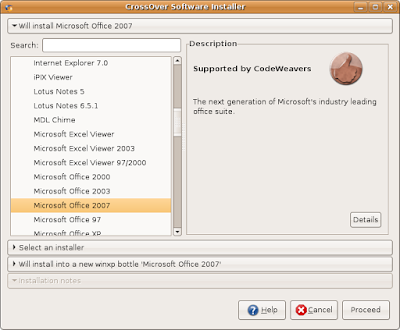
Here is a couple screenshots of the Crossover Professional 10.0 (UI) user interface.


Change Log For CrossOver Mac

10.0.1 CrossOver Mac - January 28, 2011
  • Fix the Mac Programs menu for non-English locales.
10.0.0 CrossOver Mac - January 28, 2011
  • Platform support:
    • CrossOver Mac and CrossOver Games Mac no longer run on OS X 10.4 Tiger.
    • The Mac product now uses modern (Leopard-era) GUI tools, which should improve the look and feel of quite a few things.
    • Added localizations: German, Czech, Chinese (PRC), Brazilian Portuguese.
  • CrossTie integration:
    • .c4p files are renamed to .tie files (aka 'CrossTies').
    • The complete set of supported .tie profiles can now be automatically refreshed in the product.
    • A disambiguation tool (cxtie on Linux and the 'CrossOver CrossTie Launcher' on the Mac) has been added to properly direct .tie files to an appropriate product (CrossOver or CrossOver Games).
    • Secure signing of .tie files is now supported.
    • Active rejection of malicious .tie files is now supported.
    • Many differences between the web-based .tie files and the .tie files that ship with CrossOver have been resolved.
    • Installation profiles are now smarter about locating appropriate install media.
    • The behavior of the installer assistant should generally be smoother, smarter, and more straightforward.
    • CrossOver now supports 'required patches' which are applied to an application automatically after installation.
    • The mac product now responds to a custom URI that should greatly improve autoplay of CrossTie files from the website.
    • CrossTie profiles respect bottle groups.
  • GUI and System integration:
    • The installer no longer accidentally grabs files from $HOME.
    • Trace flags are functioning properly.
    • Long CrossTie errors are cleaned up.
    • Mac Menu Items are removed after uninstall of applications.
    • Restored the 'Use Native Browser' option that was present in CrossOver 8.x.
    • Made several changes to the layout and graphical design.
    • The 'Force Quit' button in the bottle manager should work better.
    • Fixed quite a few minor behavioral bugs.
  • Application Support (MS Office):
    • Extensive changes to the installation process for Office 2003 and 2007. This should allow more editions to install properly.
    • Office 2003 & 2007 Spanish Accents enter correctly.
    • Office 2003 applications print images.
    • Office 2007 Pressing Alt + F4 now closes applications.
    • Enterprise Office 2007 additional versions install.
    • PowerPoint 2003 does not take a long time to load large documents.
    • PowerPoint 2003 is better at rendering images & slides.
    • PowerPoint 2003 redraws images faster.
    • PowerPoint 2003 displays slide backgrounds.
    • Excel 2007 Copy/Paste from one workbook to another now works.
    • Large Excel 2007 & 2003 documents take less time to load.
    • Excel 2007 document links work.
    • Excel 2003 & 2007 macro improvements.
    • Outlook 2007 does not become disconnected after several hours of use.
    • Outlook 2007 attachments to Calendar and Task items work.
    • Outlook 2007 Additional Exchange mailboxes can be added to an Exchange account.
    • Outlook 2007 now connects with Gmail via IMAP.
    • Outlook 2007 New Appointment, Scheduling tab no longer jumps.
    • Outlook 2007 PDF documents now attach.
    • Outlook 2007 accepts more add-ons like Proofing Tools.
    • Outlook 2007 Web Toolbar now works.
    • Outlook 2007 send/receive no longer moves windows.
    • Outlook 2007 autocompletes the ‘to’ field.
    • Outlook 2003 now updates the preview pane on Mac.
    • Outlook 2003 ‘find’ works.
    • Outlook 2003 welcome message generates properly.
    • Outlook 2003 Items attached to Calendar Events can be opened.
    • Outlook 2003 page setup works.
    • Word 2007 (Enterprise versions) no longer flag an error on launch.
    • Word 2007 can now open documents with images pasted into them on the Mac.
    • Word 2007 no longer enters a loop when MathType 6.x is installed.
    • Word 2003 no longer freezes on printing. (Mac only)
    • Word 2003 handles embedded images better.
    • On the Mac, PowerPoint or Excel 2003 double clicking to open a document no longer causes a launch failure.
  • Application Support (Others):
    • Printing works in win98 bottles.
    • Enterprise Architect 8 is installing again.
    • FrameMaker 7.2 now respects specified locales.
    • Internet Explorer 6 now defaults to a win2000 bottle. This should resolve the long-standing printing bugs with Internet Explorer 6.
    • Internet Explorer 6 can now access OWA (Outlook Web Access) pages.
    • Internet Explorer 6 and 7 follow DNS names provided by the server.
    • Internet Explorer 7 Paragon MLS site now logs in, buttons & menu items render.
    • Internet Explorer 6 security settings can be adjusted.
    • Internet Explorer 7 Printing is improved.
    • Quicken 2002 is now able to print checks and reports. (Mac only)
    • Added support for Quicken 2011.
    • Quicken 2009 now prints checks and reports.
    • ChemSketch regressions fixed (versions 5.x and up), ChemSketch can be launched more than once.
    • Visio 2007 can now open files in the .svg format.
    • CrossOver is now merged with Wine 1.3.9. This includes countless improvements and will no doubt also produce countless regressions.

Change Log For CrossOver Linux

10.0.0 CrossOver Linux - January 28, 2010
  • Platform support:
    • The Linux shell installer now uses a more modern GTK-based installation tool, MojoSetup. This should resolve many installation issues present in the old installer, and also changes the look and feel considerably.
    • Added localizations: German, Czech, Chinese (PRC), Brazilian Portuguese.
  • CrossTie integration:
    • .c4p files are renamed to .tie files (aka 'CrossTies').
    • The complete set of supported .tie profiles can now be automatically refreshed in the product.
    • A disambiguation tool (cxtie on Linux and the 'CrossOver CrossTie Launcher' on the Mac) has been added to properly direct .tie files to an appropriate product (CrossOver or CrossOver Games).
    • Secure signing of .tie files is now supported.
    • Active rejection of malicious .tie files is now supported.
    • Many differences between the web-based .tie files and the .tie files that ship with CrossOver have been resolved.
    • Installation profiles are now smarter about locating appropriate install media.
    • The behavior of the installer assistant should generally be smoother, smarter, and more straightforward.
    • CrossOver now supports 'required patches' which are applied to an application automatically after installation.
    • CrossTie profiles respect bottle groups.
  • GUI and System integration:
    • Linux system tray behavior is improved in several ways.
    • The installer no longer accidentally grabs files from $HOME.
    • Trace flags are functioning properly.
    • Long CrossTie errors are cleaned up.
    • Menu behavior has been improved on several Linux platforms.
    • Restored the 'Use Native Browser' option that was present in CrossOver 8.x.
    • Made several changes to the layout and graphical design.
    • The 'Force Quit' button in the bottle manager should work better.
    • Fixed quite a few minor behavioral bugs.
    • Sound does not get out of sync on Linux systems.
  • Application Support (MS Office):
    • Extensive changes to the installation process for Office 2003 and 2007. This should allow more editions to install properly.
    • Office 2007 balloon tooltips now display on Linux.
    • Office 2003 & 2007 Spanish Accents enter correctly.
    • Office 2003 applications print images.
    • Office 2007 Pressing Alt + F4 now closes applications.
    • Enterprise Office 2007 additional versions install.
    • PowerPoint 2003 does not take a long time to load large documents.
    • PowerPoint 2003 is better at rendering images & slides.
    • PowerPoint 2003 redraws images faster.
    • PowerPoint 2003 copy from a Linux native application to a PowerPoint slide works.
    • PowerPoint 2003 displays slide backgrounds.
    • Excel 2007 Copy/Paste from one workbook to another now works.
    • Large Excel 2007 & 2003 documents take less time to load.
    • Excel 2007 document links work.
    • Excel 2003 & 2007 macro improvements.
    • Outlook 2007 does not become disconnected after several hours of use.
    • Outlook 2007 attachments to Calendar and Task items work.
    • Outlook 2007 Additional Exchange mailboxes can be added to an Exchange account.
    • Outlook 2007 now connects with Gmail via IMAP.
    • Outlook 2007 New Appointment, Scheduling tab no longer jumps.
    • Outlook 2007 PDF documents now attach.
    • Outlook 2007 accepts more add-ons like Proofing Tools.
    • Outlook 2007 Web Toolbar now works.
    • Outlook 2007 send/receive no longer moves windows.
    • Outlook 2007 autocompletes the ‘to’ field.
    • Outlook 2003 ‘find’ works.
    • Outlook 2003 welcome message generates properly.
    • Outlook 2003 Items attached to Calendar Events can be opened.
    • Outlook 2003 page setup works.
    • Word 2007 (Enterprise versions) no longer flag an error on launch.
    • Word 2007 no longer enters a loop when MathType 6.x is installed.
    • Word 2003 handles embedded images better.
  • Application Support (Others):
    • Printing works in win98 bottles.
    • Enterprise Architect 8 is installing again.
    • FrameMaker 7.2 now respects specified locales.
    • Internet Explorer 6 now defaults to a win2000 bottle. This should resolve the long-standing printing bugs with Internet Explorer 6.
    • Internet Explorer 6 can now access OWA (Outlook Web Access) pages.
    • Internet Explorer 6 and 7 follow DNS names provided by the server.
    • Internet Explorer 7 Paragon MLS site now logs in, buttons & menu items render.
    • Internet Explorer 6 security settings can be adjusted.
    • Internet Explorer 7 Printing is improved.
    • Added support for Quicken 2011.
    • Quicken 2009 now prints checks and reports.
    • ChemSketch regressions fixed (versions 5.x and up), ChemSketch can be launched more than once.
    • Visio 2007 can now open files in the .svg format.
    • CrossOver is now merged with Wine 1.3.9. This includes countless improvements and will no doubt also produce countless regressions.
Run Microsoft Windows Applications and Games on Mac, Linux or ChromeOS save up to 20% off  CodeWeavers CrossOver+ today.

Tuesday, February 1, 2011

Wineskin 2.0 RC2 has been released WS6 engines updates and Multiple Monitors support coming

Wineskin wrapper 2.0 RC2 along with WS6 engines are now up and available in Wineskin Winery 1.0 RC1. The Manual should have all current info correctly.

RC1 wrappers will not work right with WS6 engines... I also suggest not using WS5 engines in RC2
RC1 wrappers should be able to update, and change engines fine using Wineskin.app once you have downloaded them in Wineskin Winery.

Biggest changes...
True fullscreen support for gaming using Display Capturing, with a toggle to get in and out (Cmd+Opt+A)
Fixes for file associations, so you can open files with wrappers from Finder correctly even if the wrapper was already running.

Winetricks was updated to the Winetricks-alpha builds. Do not use the Update Winetricks button for now, or it will break Winetricks and you’ll need to replace Wineskin.app from a fresh wrapper to fix it.
WS6, Multiple Monitors...
I’ve had multiple inquiries about multi-monitor problems with WS6 engine bases.
I have this problem fixed in WineskinX11 (Xquartz for Wineskin) and am working on a few different related things... This will bump the current engine base up to WS7, where.. unless there is another major problem found, should be the last update to the engine base for a long while... which will help all the RCs get to release status faster!

I do not know when I will have WS7 stuff up, just depends how the changes and testing goes.
When WS7 is out, fullscreen gaming and handling multiple monitors should work great! Think of WS6 as a WS7beta :-)

I do not plan on having quick replacement changes like this once Wineskin 2.0 is at a release version.
Wineskin 2.0 RC2 download


Putty for Mac
Putty for Mac
$15.00

https://winereviews.onfastspring.com/putty-for-mac


Thursday, January 27, 2011

CodeWeavers Releases CrossOver 10 for Linux and Mac aka the Impersonator

WEARING SEQUINS AND STILETTO HEELS, CODEWEAVERS DELIVERS DEATH BLOW TO MICROSOFT’S FASHION HEGEMONY
New CrossOver “Impersonator” Release Dramatically Increases Ease of Impersonating Windows on Mac and Linux

 
SAINT PAUL, Minn. (January 27, 2011) It’s Mac in the back; Windows in the front. Gadfly software company, CodeWeavers, Inc., today releases CrossOver Impersonator Edition. This latest edition greatly increases the ease of running Windows software on Macs and Linux PCs without the need for a Windows operating system license.
Impersonator Edition also includes CodeWeavers new “CrossTie” installer, which lets users install hundreds of Windows applications with just a click of a button. CrossTie communicates directly with CodeWeavers massive compatibility database (c4.codeweavers.com), which lists thousands of software applications including basic office packages, educational software and highly popular games that Windows-less individuals can now operate through Impersonator.
“One click on CrossTie and bam! users are set to run applications on their Mac or Linux machine,” said CodeWeavers CEO Jeremy White, fetchingly attired as the incomparable Lucille Ball, complete with stunning red wig. “Whether it’s the latest Steam game, some random knitting program or Microsoft Office, we put Windows’ lipstick on your Mac, quickly and guiltlessly.”
Both COO Jon Parshall and White dressed in drag as a shameless stunt to draw attention to themselves and their Impersonator software. David Pogue of the New York Times called it “hilarious,” and one of the most creative pitches he’d seen all year.
“CrossOver Impersonator is the diamond edition of our CrossOver software, and because of the improved functionality, anyone from an open source novice to a hard core gamer can easily use our software, all without paying a dime to Microsoft,” Parshall added. CodeWeavers COO, complete with Cher wig and towering black heels, will be unveiling the new software at Macworld 2011 in San Francisco. “Impersonator delivers the death blow to Microsoft’s fashion dominance. So be there, or be Cher!”
CrossOver Impersonator Edition replaces all previous versions of CrossOver. The software is immediately available at www.CodeWeavers.com.

About CodeWeavers
Founded in 1996 as a general software consultancy, CodeWeavers focuses on the development of Wine the core technology found in all of its CrossOver products. The company's goal is to bring expanded market opportunities for Windows software developers by making it easier, faster and more painless to port Windows software to Linux. CodeWeavers is recognized as a leader in open-source Windows porting technology, and maintains development offices in Minnesota, the United Kingdom and elsewhere around the world. The company is privately held. For more information about CodeWeavers, log on to www.CodeWeavers.com.
 
 
Run Microsoft Windows Applications and Games on Mac, Linux or ChromeOS save up to 20% off  CodeWeavers CrossOver+ today.

Tuesday, January 25, 2011

All dressed up and MacWorld to go

From Jeremy Whites blog :
These days, the combination of CrossOver and all the hard work of our Advocates is amazing. Within 5 minutes, or less, you can easily download and install CrossOver and your favorite Windows application. But you don't have to buy, install, or hassle with Windows. It's like playing a game like Call of Duty without having to actually be in a real combat zone. Or like a man putting on a dress instead of getting a sex change operation. Feels a little funny, but strangely nice, and you still get to be a man afterwards.


So in 8 days, at MacWorld in San Francisco, we are launching CrossOver 10 'The Impersonator'. This new version of CrossOver will feature our new CrossTie technology that will make it drop dead easy to install a Windows application and only that Windows application - on your Mac or Linux computer. And since we're so excited about this, we're telling everyone we know, including our buddies David Pogue and Walt Mossberg, who ignore us every single freaking year (not that we're hurt or anything, mind you).

Click on the picture above to see what I mean about a dress. And if you're in San Francisco next week, come on down to booth 442 at MacWorld; we'll have real Impersonators on hand, and you can check out the new Impersonator version of CrossOver. Or check this space next week for our launch.

Cheers,

Jeremy

Wednesday, January 12, 2011

Wine-Reviews Acquires The Bordeaux Technology Group

Washington, DC - January 12, 2011 - Wine-Reviews Inc. today announced it acquired The Bordeaux Technology Group., a Greenville, SC-based Wine services company.
Financial terms of the deal were not disclosed.

Bordeaux entered the Wine services market in early 2008 and gained a foothold through its strength in marketing, branding and the technology expertise of a limited partnership with Wine-Reviews Inc.
With the acquisition of Bordeaux, Wine-Reviews has transformed from a stand alone news portal service to a full service Wine information and Technology company. With the acquisition of The Bordeaux Technology Group, Wine-Reviews will provide the current Bordeaux customer base with better support and upgrade options. Future Bordeaux releases will have an auto upgrade option built in, this feature will allow the end user to upgrade to the newest version with a single mouse click.
Wine-Reviews plans to re-write all of the current code used in Bordeaux and provide a vastly improved graphical user interface to make the process of installing Windows applications and games on Linux, FreeBSD, Mac OS X, and OpenIndiana as easy and strait forward as possible. The current GUI is written in GTK and is extremely limited in it's functionality and options.

The upcoming Bordeaux 3.0 GUI will be written in Gambas and will run on any system that supports the Gambas 2.15.2 or higher runtime libraries. The next major release of Bordeaux is planned for late February to early March 2011. Testing is now underway to insure all applications and games that are currently supported install and run as stable as possible.

Product pricing and availability is slated to remain the same at this time, $20.00 for Linux and BSD and $25.00 for Mac and OpenIndiana downloadable versions of Bordeaux.
Below is a screenshot of the upcoming Bordeaux 3.0 GUI that shows some of the planned options to install unsupported applications and games with Bordeaux. More details will soon be released in a upcoming news article describing all the new features and enhancements that are planned for Bordeaux.
About Wine-Reviews, Inc.
Wine-Reviews, LLC was formed in 2008 and is a privately held Wine news and reviews portal. Wine-Reviews provides news and review services for Wine, CodeWeavers CrossOver, PlayOnLinux, WineTricks, Q4Wine, Bordeaux, and other Wine related technologies. For more information on Wine-Reviews, please visit www.wine-reviews.net


Putty for Mac
Putty for Mac
$15.00

https://winereviews.onfastspring.com/putty-for-mac


Friday, January 7, 2011

winetricks 20110105 and 20110105 alpha has been released with 35 games added

New winetricks 20110105: improved download error recovery, added first-run optin dialog. New winetricks 20110105-alpha: menu divided into categories, added 35 games.
Another month, another Winetricks - or, rather, two new Winetricks.

Dan Kegel released winetricks 20110105 today. New version 20110105 has only two notable changes:
1. it will retry a corrupt download for you (this should get rid of most cryptic warnings about needing to rename a file and retry),

2. a first run dialog now asks whether you would like to help winetricks development by reporting usage stats. You should only see this dialog once (and only if you're using the gui, and only if you're using zenity). This has been very helpful already, as people have been running it from svn. Please let me know what you think of it.
Experimental new version 20110105-alpha has a few further changes:
3. The menu is now broken up by category; there is now a top-level menu which gives you a choice of category (dll, font, app, or setting). This ought to make the menu a little less overwhelming. Let me know what you think of the new menu navigation.
4. There's now a progress dialog during downloads in gui mode.
5. It should work better when the user has removed the Z: drive.
6. Its been refactored to make adding new verbs much easier (you no longer have to edit the script in multiple places to add a verb, and you can even put verbs in external files).
7. Added 35 games. (A bunch more remain to be ported from wisotool.)
8. Removed (or, rather, haven't ported yet) a number of less-common verbs. The statistics gathered by the new version will tell us which of the remaining verbs to port first.
Changes in version 20110105:

Dan Kegel:
  • remove old synonym dotnet2 for dotnet20
  • mpc: remove broken call to append_path
  • handle 'winetricks win31 vista' properly
  • make dotnet20sp2 warn that it's broken. Don't list in menu.
  • w_download: don't redownload if no expected checksum given. Also remove == typo from r2207.
  • don't declare checksum error unless, you know, there was a checsum error as favor for etersoft, avoid referring directly to zenity/kdialo /xmssage to avoid pulling them all in as dependencies when building a package
  • automatically retry download once if cached file has wrong checksum
  • ie8: avoid writing to / (just like ie7 fix). Don't bother running ie8 when finished; point user to workaround instead. Also move a verb that got sandwiched between ie6 and ie7.
  • ie7: when / is writable as on macosx, move z: out of the way during ie7 install to avoid scribbling temporary files in /. Had to run with WINEDEBUG=warn+heap to avoid memory bugs in setupapi? when reporting usage, also report version.
  • in zenity gui case, ask user on first run whether to opt in to usage reporting.
  • on MacOS X, put cache in /home/dank/Library/Caches
  • delete msxml6.dll before running installer. Fixes bug 211.
  • tahoma: don't download to top of cache
  • finish renaming WINETRICKS_UNIXQUIET to W_UNATTENDED_DASH_Q
  • make cabextract quiet
Austin English:
  • add win31 verb (needed internally by ole2)
Online as always at :
http://kegel.com/wine/winetricks
The experimental version is only at :
http://kegel.com/wine/winetricks-alpha
SVN and bug tracker are online at
http://winezeug.googlecode.com

Run Microsoft Windows Applications and Games on Mac, Linux or ChromeOS save up to 20% off  CodeWeavers CrossOver+ today.

Wednesday, January 5, 2011

CodeWeavers And Linsoft Announce Linsofts 10 Year Anniversary Sale

CODEWEAVERS AND LINSOFT ANNOUNCE LINSOFT’S 10-YEAR ANNIVERSARY SALE
To Celebrate LinSoft’s 10th year in business, CrossOver Linux will be provided FREE on all LinSoft PCs until January 31st, 2011

SAINT PAUL, Minn. (December 24, 2010) — CodeWeavers, Inc. and LinSoft GmbH (www.linsoft.de), leading providers of open-source systems and tools, announced today their joint participation in LinSoft’s 10th Anniversary Sale. Effective today until January 31st, 2011, LinSoft will be providing a free license of CrossOver Linux Standard on every LinSoft Linux PC. CrossOver Linux provides the ability for users to run Windows software applications on their Linux PC without needing to purchase a Windows operating system license.

Said Jon Parshall, CodeWeavers COO, “We’re excited to be providing a great Windows compatibility solution to LinSoft’s customers—a solution that saves them time and money, and having to purchase a Windows license to run their needed applications.” Oliver Poths, LinSoft’s founder, echoed this sentiment, noting that “Linux on the desktop has always been highly cost-effective. But now it’s becoming increasing user-friendly as well. Tools like CrossOver provide Linux desktop users with a great user experience.”

Conveniently timed around the Christmas holiday, Poths noted further, “This offer makes a great Christmas present, or even an after-Christmas present, if Santa hasn’t brought you a Linux PC down the chimney.”

About CodeWeavers
Founded in 1996 as a general software consultancy, CodeWeavers focuses on the development of Wine – the core technology found in all of its CrossOver products. The company's goal is to bring expanded market opportunities for Windows software developers by making it easier, faster and more painless to port Windows software to Linux. CodeWeavers is recognized as a leader in open-source Windows porting technology, and maintains development offices in Minnesota, the United Kingdom and elsewhere around the world. The company is privately held. For more information about CodeWeavers, log on to www.CodeWeavers.com.

Tuesday, January 4, 2011

CodeWeavers CrossOver Multi-User Pricing Discounts save up to 43% off full retail

With the recent announcement that the Russian government will mandate A shift from Microsoft to Linux by 2015. I started thinking about what the Russians will do if they have some Windows Applications that don't have Linux equivalents at this time.

One option would be to keep some Microsoft Windows boxes around to run a small number of critical applications. Another option would be for the government to fund the development or porting of the needed applications to Linux. A third option would be they could run the applications on CodeWeavers CrossOver Pro on Linux and save the Windows licences and any development or porting cost.

This isn't just for Russia, this is also true for many other countries around the world that's making the shift away from Microsoft Windows to Linux.

Then their is smaller state and local governments that are also making the shift to Linux. And for smaller governments the cost to develop or to port a custom application to Linux might be prohibitive. But with the purchase of volume CrossOver licences the cost would remain within budget. As the local government would save the cost of the Windows licence that's allot more expensive then the cost of CrossOver.

Next is educational institutions, have you ever thought how much the worlds educational institutions would save by making the move away from Windows to Linux? And how the savings could be used for actually educating our children and young adults.

Then their is the power user who has two or more computers that run Linux or Mac and who wants the option to run certain windows applications or games on their operating system of choice. With a volume purchase of two or more licences you can receive a discount off the full retail price.

Lastly I would suggest LUG users or people who have friends who also use Linux or Mac to setup a home brew Groupon. And one person take every ones order and then make the volume purchase for the discounted price. This way everyone in the group gets a higher discount as more licences can be purchased at a single time.

So how does volume licensing work?

For example if you purchase 2 to 9 licenses you will receive a 5.6% discount off the normal retail selling price of $69.95 and as you can see in the table below the more licenses you purchase in a single block the higher the discount received. The maximum discount goes up to 43% off retail for 1000 or more licenses purchased at a single time. While a $40,000 purchase might seem like allot to a single user, this is well within range of normal software purchases for large business, educational intuitions, and government of all sizes.

For more information on CodeWeavers volume licencing click this link.

SKU pricing Table

Prices for Currency: ($) US Dollar
Name SKU Qty Range List Price Each Vendor Price Each Vendor Support Extension Price Each
CrossOver Mac Professional cxmac


1 - 1 $69.95 $69.95 $35.00


2 - 9 $66.00 $66.00 $32.00


10 - 24 $63.00 $63.00 $29.00


25 - 49 $60.00 $60.00 $26.00


50 - 99 $56.00 $56.00 $24.00


100 - 499 $52.00 $52.00 $21.00


500 - 999 $45.00 $45.00 $18.00


1000+ $40.00 $40.00 $15.00
CrossOver Mac Standard cxmacstd


1+ $39.95 $39.95 $39.95
CrossOver Linux Professional cxpro


1 - 1 $69.95 $69.95 $35.00


2 - 9 $66.00 $66.00 $32.00


10 - 24 $63.00 $63.00 $29.00


25 - 49 $60.00 $60.00 $26.00


50 - 99 $56.00 $56.00 $24.00


100 - 499 $52.00 $52.00 $21.00


500 - 999 $45.00 $45.00 $18.00


1000+ $40.00 $40.00 $15.00


Educational Discounts

CodeWeavers strongly believes in the power of open-source solutions to help deliver critically needed software at reasonable prices to educational institutions worldwide.

Wednesday, December 29, 2010

CodeWeavers Crossover Come To The Light Sale

Codeweavers offers downloads of its Crossover Games for $39.95 and Crossover Professional for $69.95 If you apply coupon code "ComeToTheLight" this will drop CrossOver Games to $29.96 And Crossover Professional to $52.46 That's 20% off and the lowest total price we've seen since a 1-day sale in October 2009. CrossOver enables you to install Windows applications and games on Intel-based Macs and Linux.

Update 04/06/2023 : The ComeToTheLight dealcode has expired, you can now use "TOM23" as your dealcode and save 20% off CrossOver for Mac and Linux.

The new and improved CodeWeavers CrossOver version 9.2.1 was recently released, So if you need a Windows Application or Games to run on Linux or Mac OS X this is your chance to get it at 25% off the normal selling price.

CrossOver 9.2.1 contains many fixes to existing applications, and just generally makes the product better. As of this writing CrossOver has been merged with Wine 1.2.1 and contains many improvements for Internet Explorer, Microsoft Office, Quicken, PhotoShop and many other supported and none supported applications.

Second, the folks at CodeWeavers have re-written the entire user interface from scratch, and have created what they feel is a more intuitive installation process and user experience. The new user interface is written in GTK and the look and feel is much more intuitive then the older Tcl/TK UI that was used before this upcoming release.

Third, and perhaps most important, the CrossOver installer will now be directly linked to their online Compatibility database and allow people to install unsupported software via (recipes) contained on the Compatibility Center.

Here is a screenshot of the Crossover Professional 9.0 (UI) user interface.


Keep in mind this sale is for a limited time only, and may be discontinued at any time.

A Guide to Wine on Ubuntu for Beginners

This guide is divided in four parts, so that you can jump to whichever you want using the links below:

What Is Wine?
Installing Wine in Ubuntu (Two Methods)
Starting Up and Configuring Wine
Customizing Wine
What Is Wine?
Wine is a compatibility layer which allows Windows applications to run on Linux by translating Windows system calls into native Linux calls. Wine runs successfully a variety of Windows applications and games on Linux - the official website offers an application database which organizes those depending on how well they perform under Wine, known issues and solutions, screenshots and helpful comments.

You should give Wine a try if you have some Windows-only game or application that you really need and want to be able to use Linux for it.

Installing Wine in Ubuntu (Two Methods)
I will approach two different ways of installing the latest Wine release in Ubuntu: using the Wine PPA and compiling from source.
Using the Wine PPA

This method is pretty straightforward. First, we need to make sure that we uninstall any older version of Wine:
sudo apt-get remove --purge wine
Now, let's add the Wine PPA repository to our sources.list file:
sudo add-apt-repository ppa:ubuntu-wine/ppa
Finally, update the package lists and install Wine:
sudo apt-get update sudo apt-get install wine
This should be all.
Compiling Wine from source

This is usually not needed considering there is an updated repository available, but sometimes the PPA repository may have a delay until the packages are built and uploaded. Usually this happens immediately after a new version of Wine is released and there are no updated packages in the PPA. This is where compiling Wine from source could come in handy. Also, Ubuntu 10.10 Maverick Meerkat comes with the latest stable release of Wine, which is 1.2, so if you want the latest development release you will need to install it from the PPA or compile it from source.

First, make sure you have the sources repositories enabled, meaning a line that starts with deb-src is in your /etc/apt/sources.list file, like the following:
deb-src http://ro.archive.ubuntu.com/ubuntu/ maverick universe multiverse
If not, add it and save the file. Also, make sure to replace maverick with your actual Ubuntu version. Sources are enabled by default in Ubuntu, so you will probably need to do nothing at this step, unless you commented or deleted this line yourself.
Next, let's install the compilation tools, the needed development libraries and additional Wine dependencies:

sudo apt-get build-dep wine
sudo apt-get install libgsm1-dev libmpg123-dev
The first command will fetch the needed development libraries needed by Wine, together with the compilation tools like gcc. The second one will install two additional development libraries. Now, download the source tarball from the official website (direct link here), and then uncompress it by typing in a terminal (don't forget to make sure the current working directory is the one where you saved the tarball):
tar -xjf wine-1.3.9.tar.bz2
I used the latest version available at the time of writing, but replace the version number accordingly if it differs.

Next, enter in wine-1.3.9 directory and issue the following commands to compile and install it:
./configure
make
sudo make install
This will take a while, but in the end Wine should be properly installed. Alternately, you can specify a different installation prefix from the default, e.g.:
./configure --prefix=/home/USER/usr
In this case Wine will use /home/USER/usr (replace USER with your actual username) as the installation prefix, and you can issue make install as normal user, without the need of sudo. Notice that in this example Wine would install inside /home/USER/usr/bin/wine, so if you specify a different prefix don't forget to include the path to the Wine binary in your $PATH. Also notice that for older versions of Wine the commands needed to compile it should be ./configure; make depend && make; sudo make install.

If you need to uninstall Wine, issue the following command from within the wine-1.3.9 directory:
sudo make uninstall


Configuring Wine :

Winecfg

winecfg is used to configure Wine and change settings like sound, graphics, Windows version and so on. Wine uses the winecfg utility for configuration, which you can start either by typing winecfg in a terminal or pressing Alt+F2 and typing it there, followed by Enter. Note that the default settings usually will do, so it's not necessary to change the configuration options after installing Wine. When it starts for the first time, winecfg will prompt you to install Gecko, a web rendering engine used to embed HTML in applications (the same engine which is used by Firefox). It is recommended that you install it.

gecko

If you don't install Gecko now, you'll be prompted later when it is needed by some application or you will be able to install it manually using the winetricks script (which is explained below this section). After installing Gecko, let's have a look at the Wine configuration window:

wine_configuration

I'll briefly explain each tab:
  • Applications tab: this is used to set different Windows versions for different applications. The default (Windows XP) should be fine for most of them.
  • Libraries tab: here you can add dynamic link libraries (DLLs) and specify whether they should be a Wine builtin or a native Windows binary; this will be used to copy various libraries needed by certain games or applications to run properly.
  • Graphics tab: in this tab you can specify graphics settings, emulate a virtual desktop and choose its resolution, change Direct3D vertex shader options and set fonts dots per inch (DPI).
  • Desktop Integration tab: in this tab you will be able to change the look of Windows applications that run through Wine, and also to change the theme which it uses (this is explained below in the section Customizing Wine).
  • Drives tab: this tab allows you to set drive mappings, which will give Wine access to certain devices and drives on your system. Default is usually fine, but you may need to add an optical drive here for applications which require the CD or DVD.
  • Audio tab: the first time you click on this tab a message window will appear notifying you that a recommended driver has been selected. Click OK, then in the Audio tab click Apply. You can also test the sound using the Test Sound button. Default settings should be fine.
  • About tab: optionally you can fill in the Owner and Organization text fields (anything will do).
wine configuration

Winetricks

Winetricks is a powerful script which automates installation of various useful packages, offering a friendly interface to do so. Before downloading and using winetricks, first let's install the cabextract package, which is a native Linux application that extracts Microsoft Cabinet files (CAB), and is available in the repositories.

Friday, December 17, 2010

CodeWeavers 30% off Winter Solstice Sales on CrossOver Mac and Linux

While the big box stores and shopping malls run black Friday sales, and in recent years many of the online retailers have began to have black Monday sales. Leave it up to the wacky folks at Codeweavers to have a 30% off Winter Solstice Sales on CrossOver Mac and Linux.

Why a Winter Solstice sale you might ask, well you see CodeWeavers has their headquarters in Minneapolis St. Paul Minnesota and in Minnesota in the winter you measure snow by the feet and temperatures to the negative. So when the Solstice comes on December 21st, the beginning's of longer days and warmth are surly on the way. And this is a time of mass celebration on the magnitude of world cup winners, or your favorite team winning the super bowl. And in all this mass hysteria a thirty percent off sale was devised so everyone around the world can join in this festive time of the year.

This sale runs from now until December 20th 2010 and to take advantage of it just use "TOM23" as your dealcode in CodeWeavers store at checkout.

This is a good time to purchase CrossOver not only because you will save 30 percent off the normal retail selling price. And as a bonus to this discount in the next month or so CrossOver 10.0 will be released with many new and exciting features. And if you purchase now you can upgrade to CrossOver Pro or Games 10.0 when it's released.

This sale is open to anyone who needs to run Windows Applications and Games on Mac, Linux and FreeBSD. So please help spread the word and post about the "Solstice2010" sale on Facebook, your web site, and don't forget to send a tweet to all your friends and family.

Run Microsoft Windows Applications and Games on Mac, Linux or ChromeOS save up to 20% off  CodeWeavers CrossOver+ today.

Wednesday, December 15, 2010

Help spread the word about CrossOver for Linux and Mac

The folks over at CodeWeavers are having a get the word out campaign. If your a proud customer of theirs and would like to help them spread the word about the great products that they have, this would be a good time to do it. Ive personally used their products ever since CrossOver Plugin 1.0 first shipped and have always been satisfied with the product and support that I've received over the many years.

Spreading the word about CrossOver

Friends of CodeWeavers, unite! First of all, thank you very much for your support. We greatly appreciate everyone who has purchased a copy of CrossOver, or has worked hard as an Advocate to ensure that CrossOver continues to improve and run the apps that you need. Beyond that, though, we also really value those of you who help spread the word about CrossOver. Your favorable comments, both in person and on the Web, are absolutely some of the most powerful things you can do for us.

Link to CodeWeavers From Your Page

If you have a web page, blog, MySpace page, Facebook page, or whatever, we'd love to have a link from you. Here's are some graphics for your Mac or Linux PC that can show that you're a CodeWeavers customer. Simply copy the image and link to your site. You can link from the image hosted here or right click and save the image to your PC then upload it to your site and use the link provided here.

Also, please add a link to this page from your blog, facebook page, twitter, buzz account etc. etc... and help spread the word about spreading the word. :)

Thanks for your support!

Tuesday, December 14, 2010

Transgaming Cider Game users can now save 25% off CodeWeavers CrossOver Games for Mac

About Transgaming Cider

"TransGaming's Cider Portability Engine is a proprietary technology that allows PC games to be enabled on Apple's Intel Macs without the traditionally expensive and arduous need to redevelop a game from the ground-up. Cider acts as a "wrapper" around the PC game dynamically translating PC API calls to the Mac OS X operating system. As such, games can be enabled with Cider in a matter of days to weeks as opposed to the typical man years that traditional development takes.

Cider is an extremely powerful technology that allows games to be released day and date with their PC counter-parts giving publishers significant upside revenue potential and leveraging marketing and branding initiatives. Cider also allows publishers to release either dedicated Mac versions of their games or PC/Mac hybrid versions (i.e. both versions of the game in a single box)."

In reality how well do games really run with Transgaming's Cider on Mac? Well with the the help of my friend Google I did some searches for Cider Games and this is what I found. Below is a quote and link to the original article.

GTA2 [Intel][Cider] (Mac Games) :
"Notes: The resolution can't be changed in game - you will have to leave it at the preset value.
Known Issues: If you click on Options in the main menu the game will crash, so don't do it. Controls and other settings have already been configured for you." Full Link

'Cider' could see PC/Linux/Mac game releases :
"Cool, but also a bit frightening, many publishers will rush games and release fairly buggy products as is, I can only imagine the horror unleashed adding all that" Full Link

Sins of a Solar Empire :
"Personally, I would really really hope that if a port ever happened (which it doesn't seem like Stardock has ever had any inclination to do for any of its games - which is a shame) it wouldn't use Cider as Cider games are often very buggy due to not being Mac native. Hell, EVE Online uses Cider and there are still dialogs to pic a DirectX version in the options..." Full Link

Dark messiah with Cider and font issue :
"the fact that the cutscene videos won't show up and had to be deactivated because they use a DirectX 90c shader which Cider can't handle I can hear the sound but the screen is just black with a white quare - too bad since the videos contain major story elements..."

"I am currently fiddling with Vampire The Masquerade Bloodlines, but the game is extremely buggy and crashes every time I try to load a new game." Full Link

COD5 Cider Port Released :
"I hate cider. Everything about it is just annoying. I would rather have it then no port, but really, for big game companies? Its slow, buggy, and resource intensive. The valve apps that are programmed in OpenGL should run much better." Full Link

Settlers Community Technical Support :
"Cider C Runtime Error Runtime Error!!!!! Program: C:\The Settlers 7\Data\Base\_Dbg\Bin\Release\Settlers7R.exe abnormal program termination" Full Link

And this is just a small sample of the search results regarding Transgaming Cider ported games for the Mac. All I can say is, Wow... it sure seems that Cider is a extremely buggy piece of technology at this time, and therefore you can most likely expect crashes and errors with a Cider ported game on your Mac.

Most people choose a Mac because it is a quality premium product with a elegant OS to go on that hardware. So the last thing your going to want is a buggy Cider based game on your Mac right? Keep in mind extremely buggy software like this also taxes your CPU and GPU and can cause premature hardware failures do to overheating and constant 100% system loads. Not to mention system lock ups and system crashes. I personally would not put my Mac through this torture, because their are alternatives at this time to Ciderized Games.

What are the alternatives to Cider ported games?

At this time there are more and more native Mac ported games coming on the market all the time. With the recent market share increases the Mac has seen more and more game developers are porting to the Mac.

You could also duel boot using bootcamp, but your going to have to pay for the Microsoft Windows licence. And you cant run any of your Mac software while your booted into Windows. You will also loose a large chunk of hard drive space for that Windows install.

You can install vanilla Wine from WineHQ on your Mac and play games, this is a good option for technical minded people. And for people who have hours to spend tweaking Wine and the Game for the best playing experience. But if your not familiar with compiling software and then further configuring Wine once you have Wine installed this option might not be for you.

And then their is CodeWeavers CrossOver Games for Mac. CrossOver Games can run hundreds of Windows Applications and Games on Intel based Mac PCs.

About CodeWeavers CrossOver Games for Mac :

"Now gamers can play the games they want, on whatever platform they want! With CrossOver Games, you can run many popular Windows games on your Intel OS X Mac or Linux PC. Whatever your tastes first-person shooters, fantasy, strategy, MMORPGs CrossOver Games lets you run many popular game titles. CrossOver comes with an easy to use, single click interface, which makes installing your games simple and fast. Once installed, your game integrates seamlessly with your Desktop. Just click and run! It's like running Windows on your Mac or Linux machine, but without Windows. No rebooting, no switching to a virtual machine, and no Windows Operating System license required!."

To see if your favorite game currently runs on CrossOver Games just visit CodeWeavers CrossOver Compatibility Center (C4) and browse through the over 8,000 applications and games in the C4 database.

About CodeWeavers CrossOver Compatibility Center (C4) :

"CodeWeavers goal is to make Linux and Mac OS X fully Windows-compatible operating systems. All Windows applications should be able to be run: cleanly, harmoniously, within the native environment, and without using an emulator. To that end, we maintain this Compatibility Center."

If your favorite games currently runs via CrossOver Games Mac you can join the C4 forums and share your experience with other CrossOver Gamers. You can also become a advocate for your favorite games and vote on your games support level, give feedback, and much more. If by chance your game doesn't currently run with CrossOver Games you can vote for your game and let the people at CodeWeavers know the game is important to you and you would like to see it supported in a future CrossOver Games release. Their is also a tips and tricks section in the C4 forums where you can use or add to known tips for getting a unsupported game up and running.

If by some chance your game isn't currently listed in the database you can still install the game as a unsupported application and see for yourself if it runs. And then submit the game for inclusion in the database and once its accepted submit your ranking. You will also want to keep in mind that just because a game isn't officially supported by CodeWeavers doesn't mean it isn't playable. As of today their is currently well over 1,000 Gold ranked applications and games in the C4 database.

So how do you save 20% off CrossOver Games for Mac? Just use "TOM23" in the CodeWeavers store at checkout time as your coupon / dealcode and you will get a instant 20% discount off the full retail selling price. Anyone who has ever had any problems running a Cider based Game can use this dealcode and give CrossOver Games a try.

Run Microsoft Windows Applications and Games on Mac, Linux or ChromeOS save up to 20% off  CodeWeavers CrossOver+ today.

Wednesday, December 8, 2010

CodeWeavers Releases CrossOver Games 9.2.1

CODEWEAVERS SUPPORTS WORLD OF WARCRAFT CATACLYSM:
CodeWeavers Releases CrossOver Games 9.2.1; Vows Extensive Personal Testing for Quality Assurance Purposes

 
SAINT PAUL, Minn. (December 7, 2010) Twelve million addicts, err, players cant be wrong. Theres no doubting the draw of World of Warcraft. And today, as Blizzard rolls out its third, much-anticipated expansion to the game Cataclysm, CodeWeavers ensures that Linux gamers can play right along with their PC and Mac brethren. CodeWeavers Linux customers will be able to run Cataclysm as if they were running on Windows with today’s immediate shipment of CrossOver Games 9.2.1.
CodeWeavers Chief Operating Officer Jon Parshall vowed that testing of the new CrossOver build would be ongoing. All day at his office. All night at his home. Probably until I hit level 85, Parshall stated. Well, to be honest, probably for a while past that. I actually have six level 80s to get to 85, and Im thinking about leveling up a worgen, too, he continued, referring to the new Alliance race of fearsome werewolves. That’s gonna take quite a while, but its all in the name quality assurance.
With the release of Cataclysm, the dreaded dragon Deathwing has returned to Azeroth, ripping asunder and utterly transforming the game world that players have lived in for the past six years, and leaving chaos and destruction in his infernal wake.

Im thinking chaos and destruction is what my wife may visit on me as well for sequestering myself in my mancave for hours at a time, but that’s a price I’m going to have to pay, Parshall added as he grabbed three cans of Red Bull and a bag of All Nighter Cheeseburger Doritos® before disappearing into his basement.

For footage of World of Warcraft: Cataclysm running under Linux


CrossOver Games 9.2 replaces all previous versions of CrossOver. The software is immediately available at www.CodeWeavers.com.

About CodeWeavers
Founded in 1996 as a general software consultancy, CodeWeavers focuses on the development of Wine the core technology found in all of its CrossOver products. The companys goal is to bring expanded market opportunities for Windows software developers by making it easier, faster and more painless to port Windows software to Linux. CodeWeavers is recognized as a leader in open-source Windows porting technology, and maintains development offices in Minnesota, the United Kingdom and elsewhere around the world. The company is privately held. For more information about CodeWeavers, log on to www.CodeWeavers.com.
 
Run Microsoft Windows Applications and Games on Mac, Linux or ChromeOS save up to 20% off  CodeWeavers CrossOver+ today.

Tuesday, November 30, 2010

Bordeaux 50% off recession busting sale

The Bordeaux Technology Group is proud to announce a 50% off recession busting sale on Bordeaux for Linux, Mac, FreeBSD, PCBSD and OpenIndiana. With the current US unemployment rate hovering near 10% and rumors of the possibility of a double dip recession. We want to do our part to help save individuals and small business as much money as we can on their Wine related software needs. With Bordeaux you can run many of todays most popular Windows based office applications and games on your operating system of choice.

Over the past two years their has been a large multitude of changes that have taken place in Wine. And with Wine 1.2.1 being recently released users can run more of their favorite Applications and Games on their unix operating system of choice.

Bordeaux for Linux and BSD will be marked down to only $10.00 and Bordeaux for Mac and OpenIndiana will cost only $12.50 during this sale.

This sale will last until the US unemployment rate falls below 7% or as long as we can feasibly run this half off sale. So, If you have ever wanted to try Wine or Bordeaux and have put off your purchase in the past this is the perfect time to try Bordeaux and save 50% off the normal selling price.

Supported Applications/Games:
  • Microsoft Office 2007
  • Microsoft Office 2003
  • Microsoft Office 2000
  • Microsoft Office 97
  • Microsoft Office Visio 2003
  • Microsoft Office Project 2003
  • Adobe Photoshop 6
  • Adobe Image Ready 3
  • Adobe Photoshop 7
  • Adobe Image Ready 7
  • Adobe Photoshop CS
  • Adobe Photoshop CS2
  • Microsoft Internet Explorer 7
  • Microsoft Internet Explorer 6
  • FireFox 3.6.8 and multimedia plug ins
  • Apple Safari 5.0 Web Browser
  • Steam and Steam based Games
  • Google SketchUp 7.1
  • VLC 1.1.0
  • Apple QuickTime 6.5.2 Player
  • IrfanView 4.27 (Image files only)
  • Winetricks support

Bordeaux 2.2.0 will be our next release and will have a large number of new features and bug fixes over our previous release. Anyone who purchases Bordeaux during this sale can freely upgrade to our next release and any further updates for the next six months.

New Features Planned for Bordeaux 2.2.0:
  • Sync to Wine 1.2.1
  • Sync to the latest WineTricks Release
  • More fixes to the Bordeaux UI and Cellar Manager
  • The 2.2.0 release will have a new GTK based backend

New Features Planned for Bordeaux 3.0.0:
  • Sync to Wine 1.2.x or 1.3.x if all supported programs run stable.
  • Sync to the latest WineTricks Release
  • More fixes to the Bordeaux UI and Cellar Manager
  • The 3.0.0 release will have a new and improved UI
  • A new Bordeaux Application Database

About BordeauxGroup, Inc.:
Founded in 2008, The Bordeaux Group focuses on the development of Free Software solutions enabling legacy Windows applications to run on Unix systems and other non-Windows operating systems. Bordeaux is designed to aide in the transition and migration to non-Windows platforms by bringing Windows software to Linux, Mac, FreeBSD, PCBSD and OpenSolaris. The company is privately held. For more information about the Bordeaux Group please visit http://www.bordeauxgroup.com

Bordeaux for Linux is a trademark of the Bordeaux Group, Incorporated. Linux is a registered trademark of Linus Torvalds. Windows is a registered trademark, and Office is a trademark, of Microsoft Corporation in the United States and other countries. Photoshop is a trademark of Adobe in the United States and/or other countries. All other trademarks and registered trademarks are owned by their respective companies.


Putty for Mac
Putty for Mac
$15.00

https://winereviews.onfastspring.com/putty-for-mac


Mac OSX running Counter Strike 1.6 and Call of Duty 4 Natively

Thanks to Cider, Mac users can run windows applications/games WITHOUT running a virtual OS. Now that I think about it… I'm not sure if this COD4 was actually made for mac or if it was a port running through cider. This works for many other things as well. The Codeweavers CrossOver also does the same type of thing using wine instead of cider. Somewhere on their site they have a compatibility list. I successfully use CrossOver to run Steam games like DOD:S and other stuff. With virtualization through Parallels or VMWare Fusion, you still need a copy of the windows OS. With cider/wine, you dont. Long Live Mac! The ONLY reason I ever used windows was because I wanted to play games.


Putty for Mac
Putty for Mac
$15.00

https://winereviews.onfastspring.com/putty-for-mac


Tuesday, November 23, 2010

CrossOver Linux Review

by Mike Mansell

For about four months now, I have been using the Ubuntu Linux operating system full-time on both my desktop and notebook computer. A few weeks into this experience, I wrote an article sharing some of my findings about the Windows to Linux migration process. One of the main concepts that I addressed in this article was the concept of finding Linux-based alternatives to one’s current Windows software. However, I also covered the fact that there are some software applications that simply do not have worthy alternatives, and for this reason suggested that Linux newcomers look into the WINE package to run Windows software on Linux. However, there is no denying that WINE is “at best a bit sketchy” (as said by a commentator).

When I first started using Linux, I had heard about the CodeWeavers CrossOver software package that worked to run Windows applications in a Linux environment. However, I could not justify purchasing it (retail pricing starting at $40) because in my eyes, it did not offer any value. After all, it was based on the WINE project, and I saw it pointless to purchase something that was simply a re-branded version of something that was freely available. More recently, though, a few people have been telling me about the wonders of CrossOver and how it was so much more than the branded WINE package that I thought it was. For this reason, I decided to take the plunge and purchase CrossOver Linux Standard in order to run a few Windows applications in Linux.

Upon installing the pre-compiled package, I was intrigued by the “bottle” concept that was employed in CrossOver. You see, in order to maximize comparability and isolate instabilities, CrossOver allows you to create separate ”bottles” that have individualized WINE settings. For example, I currently have a “bottle” that contains the mIRC IRC client. When I install additional software packages down the road, I will install them in separate bottles. Then, if any Windows-based software opts to go haywire down the road, any errors or damage will be isolated to that bottle and will not effect other software. Simply put, this leads to optimum stability. Additionally, by allowing individual applications to reside within their own bottles, CrossOver allows for the best possible comparability by eliminating any software conflicts and allowing for optimal operating system environments to be used.

More importantly, however, is the level of control that the end-user has over the bottles. I say this because the bottle manager allows for bottles to be forced to shut-down in the event of error, and allows for applications and runtime to be installed and uninstalled. Moreover, the implementation of a task manager extends the end-users level of control.

In retrospect to installing software in WINE, installing Windows-based applications in CrossOver is amazingly simple. The easy-to-use installation wizard allows you to create a new bottle with the recommended settings for your applications and to go about the installation process. These pre-configured settings for supported (and non-officially community-supported) software reduces the need for “trial and error” when installing software.

One of the best things about CrossOver is the fact that it instantaneously updates the “Applications” menu under Gnome, giving the end-user easy access to their applications. While this seems somewhat basic of a feature, it is definitely something that I have yet to see implemented in WINE.

Run Microsoft Windows Applications and Games on Mac, Linux or ChromeOS save up to 20% off  CodeWeavers CrossOver+ today.

Wednesday, November 17, 2010

Test-driving Bordeaux 2.0.8

We, as computer users, run applications -- all sorts of them. We browse the web with an program, send e-mail via another, write up reports, crunch numbers, listen to music, transfer files and store contacts using a long list of different applications. There are thousands upon thousands of programs floating around the digital world and there's one problem: they don't all run on your operating system. Almost all of us, at one time or another, will come to a point where we have an operating system and matching programs that do almost everything we want and, on the other hand, a program which doesn't run natively on our OS of choice. Fortunately there are ways of dealing with this. Some people dual-boot their systems and deal with the awkward transition between platforms. Others use virtual machines and work with the overhead involved with running two systems at the same time. A third option is to build compatibility into one OS so that it can run programs designed for a different OS and that's where Bordeaux comes in.

The Bordeaux Technology Group is a company specializing in compatibility software. Specifically, they work at making it as easy as possible to run Windows programs on the UNIX family of operating systems. Their Bordeaux tool is built to run on Linux, FreeBSD, Solaris, OpenIndiana and Mac OS X. Bordeaux is, at its heart, a customized build of Wine. They take a recent version of Wine, add some special tools and test their build for compatibility against a group of popular Windows software. They then sell this bundle (along with support) for about US$20 - 25, much less than the typical cost of a Windows license. A few weeks ago I had a chance to chat with Tom, a member of the Bordeaux Technology Group, and he was kind enough to give me a copy of Bordeaux (PC-BSD edition) to test-drive.

The provided PBI package was about 44 MB and it installed without any problems. With the install completed, two icons were added to my desktop and application menu. These new icons were labelled "Bordeaux" and "Cellar Manager". I launched Bordeaux first and was presented with a new window featuring three tabs along the top. These three tabs are called "Install Applications", "Manage Wine" and "Unsupported Packages". At the bottom of the window, regardless of which tab is selected, are two buttons called "Help" and "Install". Clicking the Help button always opens a browser window to the Bordeaux documentation website. The Install button actually performs different functions depending on which tab is selected.

Let's start with the Manage Wine tab. It provides us with a list of basic Windows software, such as Notepad, Minesweeper and the Registry Editor. Clicking on one of these items and clicking the Install button launches the program. It's pretty straightforward and I didn't have any problem using these built-in items.

The Install Applications tab is a bit more interesting. This tab provides us with a list of Windows software which is supported by Bordeaux. Highlighting one of the items and clicking the Install button will perform one of two actions. In cases where the highlighted software is freely available online, Bordeaux will download and install the application. I tried this with Internet Explorer 7, Safari, QuickTime Player and Google's SketchUp. Each of them downloaded and installed without and problems and the first three ran smoothly. The SketchUp program installed on my machine, but I ran into problems running it and experienced frequent crashes. I haven't used SketchUp before, so I'm uncertain as to how much of this is a problem with the application itself, with Bordeaux, or with my hardware. There are several other programs available in the support list, many of them Microsoft Office products. Picking one of these options and clicking the Install button would kick off work in the background and install some components. Bordeaux didn't provide much information as to what was going on, but I suspect it was configuring my environment to work with the highlighted software.


Putty for Mac
Putty for Mac
$15.00

https://winereviews.onfastspring.com/putty-for-mac


Wednesday, October 20, 2010

CodeWeavers Releases CrossOver and CrossOver Games 9.2

CodeWeavers Releases CrossOver 9.2
to Support Civilization 5 on Linux and Mac

 
SAINT PAUL, Minn. (October 19, 2010) Less than a month after Firaxis released its highly anticipated and acclaimed Civilization 5, CodeWeavers, Inc. today announced the release of CrossOver Games 9.2, enabling gamers to play the game on Linux and Mac operating systems.
Based in Saint Paul, Minn., CodeWeavers is a leading developer of software products that turn Mac OS X and Linux into Windows-compatible operating systems. Its CrossOver software allows Windows software to be used on Mac and Linux PCs without the need for a Windows operating system license.

“Civilization 5 is pure turn-based pleasure, and I personally couldnt wait for it to arrive,” said Jon Parshall, chief operating officer at CodeWeavers. “As soon as we opened it up, we unleashed our programming ninjas to upgrade CrossOver so Linux loyalists and Mac lovers can join in on the good times.

“Current CrossOver subscribers can hit our site for a free 9.2 upgrade. New customers? Welcome aboard!” Parshall added. “Now, if youll excuse me, King Bernie Smedley is busily leading the virtuous Smedleyites to a glorious victory over the hated Carthaginians. Its all part of our ongoing commitment to testing and quality assurance…
CrossOver Games 9.2 replaces all previous versions of CrossOver. The software is immediately available at www.CodeWeavers.com.

About CodeWeavers
Founded in 1996 as a general software consultancy, CodeWeavers focuses on the development of Wine – the core technology found in all of its CrossOver products. The company's goal is to bring expanded market opportunities for Windows software developers by making it easier, faster and more painless to port Windows software to Linux. CodeWeavers is recognized as a leader in open-source Windows porting technology, and maintains development offices in Minnesota, the United Kingdom and elsewhere around the world. The company is privately held. For more information about CodeWeavers, log on to www.CodeWeavers.com.

Change Log For CrossOver Games


9.2.0 CrossOver Games - October 19, 2010
  • Merged with Wine release 1.2.1. This includes bug fixes for several unsupported games, as well as fixing a crash in the launcher for Street Fighter IV and a lag in Team Fortress 2.
  • Fixed a bug that causes DRM problems on Ubuntu 10.10.
  • Fixed patching of StarCraft II (via an updated Gecko engine).
  • Fixed a problem that prevented StarCraft II from launching properly during the first run.
  • Fixed the sending of text in Worms Armageddon WormNET.
  • Improved behavior with built-in msvcr71. Should simplify the installation of several unsupported games, including Lord of the Rings Online.
  • Fixed a double mouse-pointer bug that appeared in Call of Duty: Modern Warfare II on some Linux distributions.
  • Improved font rendering for Trainz 2004 and others.
  • Got Tomb Raider: Chronicles working again.
  • Fixed a serious rendering problem for Civilization V.

Change Log For CrossOver Linux

9.2.0 CrossOver Linux - October 19, 2010
  • Merged with Wine release 1.2.1 which includes bug fixes for many applications. It also includes adjustments to cope with a change of security policy on Ubuntu 10.10.

Change Log For CrossOver Mac

9.2.0 CrossOver Mac - October 19, 2010
  • Merged with Wine release 1.2.1 which includes bug fixes for many applications.
Run Microsoft Windows Applications and Games on Mac, Linux or ChromeOS save up to 20% off  CodeWeavers CrossOver+ today.

Tuesday, October 19, 2010

Bordeaux 2.0.10 for OpenIndiana Released

The Bordeaux Technology Group released Bordeaux 2.0.10 for OpenIndiana today. Bordeaux 2.0.10 is a maintenance release that fixes a number of small bugs. With this release we have bundled Wine 1.2.1, updated firefox to 3.6.8, Added support for Apples Safari 5.0 Web Browser, Updated to the latest winetricks release and fixed desktop shortcuts.

Bordeaux 2.0.10 was built on OpenIndiana build 147, you will need to have OpenIndiana build 147 or higher installed before Bordeaux will work properly. This build will most likely not work properly on the now defunct OpenSolaris. If you still have OpenSolaris installed you should look into upgrading to OpenIndiana ASAP.

For screenshots and more information please take a look at this previous post.
We bundle our own Wine build and many tools and libraries that Wine depends upon. With this release we bundle Wine 1.2.1, Cabextract, DIB Engine, Mozilla Gecko, Unzip, Wget and other support libraries and tools.

The cost of Bordeaux 2.0.10 is $25.00. Anyone who has purchased Bordeaux in the past six months is entitled to a free upgrade. Bordeaux comes with six months of upgrades and support and of course a 30-day money back guarantee.

Supported Applications/Games:

  • Microsoft Office 2007
  • Microsoft Office 2003
  • Microsoft Office 2000
  • Microsoft Office 97
  • Microsoft Office Visio 2003
  • Microsoft Office Project 2003
  • Adobe Photoshop 6
  • Adobe Image Ready 3
  • Adobe Photoshop 7
  • Adobe Image Ready 7
  • Adobe Photoshop CS
  • Adobe Photoshop CS2
  • Microsoft Internet Explorer 7
  • Microsoft Internet Explorer 6
  • FireFox 3.6.8 and multimedia plug ins
  • Apple Safari 5.0 Web Browser
  • Steam and Steam based Games
  • Google SketchUp 7.1
  • VLC 1.1.0
  • Apple QuickTime 6.5.2 Player
  • IrfanView 4.27 (Image files only)
  • Winetricks support

About Bordeaux:

The Bordeaux Technology Group is a software services and development company specializing in Windows compatibility software. Users of Linux, BSD, OpenIndiana and Mac systems from time to time find themselves in the need to run specialized Windows software. The Bordeaux suite enables access to these programs and data in a seamless and low cost manner without requiring licensing of Microsoft Technology. The Bordeaux Group also provides migration services and support for alternative operating systems specializing in Windows compatibility.
There is a multitude of software developed only for the Windows operating system and even when software vendors port their applications to another platform, generally it lacks features that the Windows version contains. The only solution these developers face is to have access to both systems for testing which leads to increased infrastructure demands, and wasted project resources. If you are vendor interested in supporting your application on Linux, BSD, OpenIndiana or Mac OS X or a software user that needs to run a Windows application on Linux, BSD, OpenIndiana or Mac OS X we can help.

Version 2.0.10 New Features:

  • First build on OpenIndiana
  • Bundle Wine 1.2.1
  • Updated FireFox to 3.6.8
  • Fixed Desktop shortcuts
  • Added support for Safari 5.0
  • Updated to the latest winetricks release


Putty for Mac
Putty for Mac
$15.00

https://winereviews.onfastspring.com/putty-for-mac


Monday, October 11, 2010

Wine 1.2.1 Released

The Wine maintenance release 1.2.1 is now available.
Whats new in this release:
  • Translation updates.
  • Various bug fixes.
The source is available now. Binary packages are in the process of being built, and will appear soon at their respective download locations.
Bugs fixed in 1.2.1:

3975 FILE: printing does not work as expected
13344 DPP 3.4.1.1 - Images with "Fit to window" corrupted
16047 Garena client crashes in WSASendTo
16998 WISO Sparbuch crashes at startup
18864 IW2: Edge of Chaos launcher pagefaults on startup
19070 hh.exe should exit immediately if not given a file to open (appinstall)
19560 Street Fighter IV : launcher crashes
21295 Painkiller and Painkiller Black Edition cannot accept CD Key submission preventing installation
22021 Switching pages in ElsterFormular 2009/2010 needs much time
22536 Office 2010 installation crashed
22881 Custom-decorated windows not movable with Openbox (affects steam, wow...)
22994 Far Cry installer quits
23085 Printing in notepad displays "Page &p" instead of actual page number.
23340 Winscard : test program : unimplemented function winscard.dll.SCardIsValidContext and winscard.dll.SCardReleaseContext
23453 Worms Armageddon cannot send text in WormNET
23477 WoW Cataclysm Beta needs KERNEL32.SetFileValidData
23578 Team Fortress 2: Significant lag disrupts gameplay...
23678 Crystal Cubes: fonts not drawn correctly
23704 winhelp failed to load any help file
23707 stack overflow when destroying a window whose owner is itself
23762 wineboot aborts if "Terminate Process" is clicked
23772 The bug in NtQueryInformationProcess with ProcessInformationClass = ProcessDebugObjectHandle
23810 16-bit setup program can't find its files
23907 Winecfg should not allow resolutions lower than 640x480 amount
23936 pressing enter in passpack's search box has no effect
23940 SetWindowPos does not work for other process windows
23953 qemu.exe exhausts file descriptors
24046 Keypressing in listview can result in infinite hang
24068 Crash in dbghelp (WoW)
24072 winepath: Add -0 option
24161 Anzio version 16.2 fails with ntdll exception
24180 crash in dnsbench.exe
24193 ptrace protection in Ubuntu 10.10 breaks debuggers (affects winedbg, wow, ...)
24226 Broken Sword II gives fatal error on startup
24425 err:module:find_forwarded_export function not found for forward 'krnl386.exe16.GetProcessDword'
24441 Fix the detection of the number of CPUs for OpenBSD.

Run Microsoft Windows Applications and Games on Mac, Linux or ChromeOS save up to 20% off  CodeWeavers CrossOver+ today.